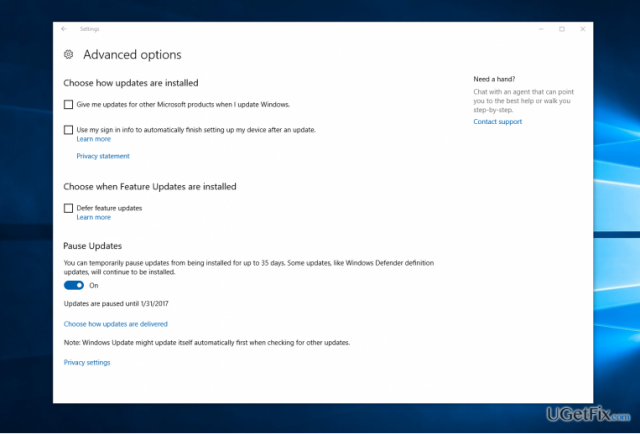
Microsoft and other IT-related forums are full of users’ complaints related to the forced Windows 10 Updates. Some people reported about a lost data after automatic update, which is a big deal to fuss about. The others say that after initiating a research on some of Windows 10 updates they did not intend to install them at all due to various bugs and faulty configurations. While Windows OS updates, in general, are vital for a proper system’s maintenance, they often fail to stand out the purpose. While they should fix the current system bugs, sadly, the fixed issues are replaced by the others. You must have heard about Windows 10 cumulative updates, which broke the webcam, caused Internet connection issues, initiated software and hardware incompatibilities, ended up with BSOD, and many other issues. Luckily, Microsoft has some good news for Windows 10 users who were having problems due to automatic Windows 10 Updates! The upcoming Creators Update, which is scheduled for release in January 2017, will add a “Pause Update” feature. This option will allow users to block newly released updates from being installed on the system automatically. This way, people will be able to wait until the update is deployed properly, thus causing zero issues.
Up till now, home users did not have the option to delay Windows 10 updates directly. Even though computer owners applied various methods, such as automatic update blockers, there was no direct update defer on the OS settings. The new “Pause Update” option will allow postponing installation of the available updates, except security updates for Windows Defender, for up to 35 days.
Windows Insiders will be able to test this new feature in the January 2017. However, it’s not clear yet when Home and Pro users will get the chance to postpone updates. That’s because the build 14997, which appeared to be supplemented with a “Pause Updates” feature and that has been recently leaked, is deemed at Windows 10 Enterprise build and has to be confirmed first. As soon as the direct update block feature will be released, you will have to configure “Pause Updates”, which can be done by performing these steps:
- Click Win key + I, go to Update & Security.
- Select Windows Update and click on Advanced Options.
- Find a new “Pause Update” option (should be at the bottom of the page).
- Slide the toggle to enable or disable “Pause Updates”.

Report an issue
What's wrong with this guide? We review every report and update or remove content.
Report received — thank you. We'll review and fix it.
You need a free account to submit a report.
Be the first to comment