How to recover
What is a Hard Drive Crash
from Windows
Discover the causes of hard drive crashes on Windows 10 and 11 and how to recover lost files and settings quickly. Expert-tested solutions await!

What leads to What is a Hard Drive Crash?
- Logical failure of the operating system
- Physical failure of the hard drive
- Weird noises such as grinding, clicking, or whirring
- Overheating due to clogged ventilation
- Corrupted files or human errors
- Malware infections or encryption processes
Repairs Windows system files, removes malware, and restores a clean OS state — without reinstalling.
Hello. I can't load my computer any longer and I don't know what is the problem. Is there a way to figure out is there something wrong with my Windows OS or my hardware?
An operating system crash and hard drive crash is not the same thing. The crash of your OS is the result of a logical failure, whereas the crash of the hard drive is a physical failure. Even though your information may not be instantly accessible, it is still possible to retrieve it. In order to avoid data loss, you should always backup your files.[ref en-1] However, if you have not done it this time and you suspect that your hard drive is crashing, there is still one more solution to try.
So first of all, you need to know whether the crash results from a physical or logical failure. If the failure is logical, the computer will fail to boot the operating system. However, physical failure may also result in a computer's inability to boot the OS. Also, if you hear weird noises coming from your computer, this may signify that the failure is of physical nature. You may hear grinding, clicking or whirring noise. If you do, stop trying to reboot your system.
The heat coming from the excessive work of the hard drive may also cause crashes. Overheating hard drive cannot cool due to the clogged ventilation area. If you overlook this overheating issue smoke or even fire can damage your machine. As well as corrupted files or human errors. When someone tampers with system files or deletes important data hard disk malfunctions can easily be caused.
We have already covered another issue with data restoring from a hard disk that got corrupted or damaged. This is one of many results after a Hard Drive Crash or even malware infections or encryption processes.[ref en-2] Nevertheless, there is a need to determine the type of Hard Drive failure.
Physical hard drive failure
The noise is the best indication that failure is physical. If that's definitely not the sound emitted by the cooling fan, you are dealing with the physical failure. Your information is still intact and the hard drive is still functioning, you may still try to get an image of the drive or copy it to a new drive, even though it is quite risky.
You may not know what will be the last straw that will make your hard drive crash irreparably. The best thing for you to do is to put it into another system and recover the data from the drive using [rev id="Data Recovery Pro"].
If the retrieval has been successful, you may now buy a new hard drive, reinstall the OS as well as other programs. As much as computers have advanced, the hard drive is still one of the most vulnerable parts of the hardware.[ref en-3]
Logical Hard Drive Failure
A logical failure happens when the hard drive is OK, but it is still impossible for you to load the system. This might be caused by various reasons. It may be a virus, a system drive conflict, human error or simply a system malfunction.
In this case, if you want to recover your data, you should refrain from reinstalling Windows or using amateur system tools. Take advantage of a reliable data recovery solution like [rev id="Data Recovery Pro"] and think of using a backup the next time.
See if your hard drive is dead by running S.M.A.R.T check
Self-Monitoring, Analysis, and Reporting Technology can help view if your hard drive may develop severe problems soon.
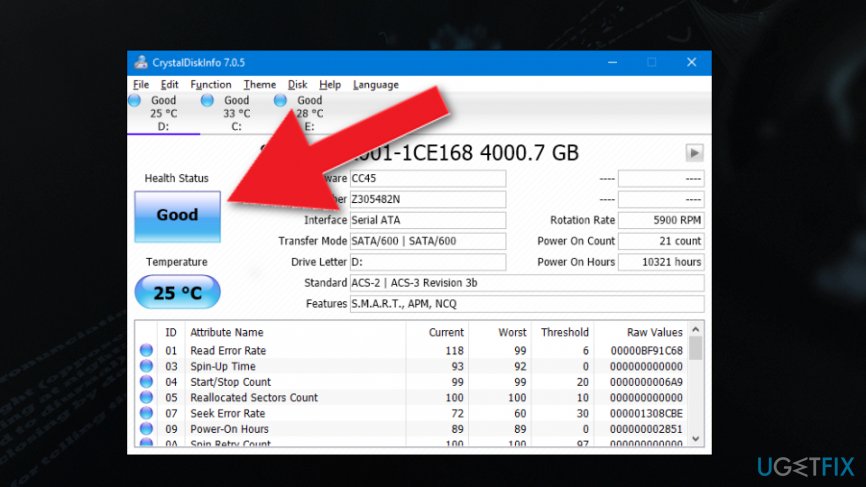
An open-source program that is free and easy-to-use - CrystalDiskInfo shows details about your hard drive. The application shows S.M.A.R.T status information of your hard drives. You can see Good displayed on your screen if everything is working properly and there are no issues. Other results may be Caution or Bad, Unknown. In any other cases, you may need to check your hard drive and backup your data in case of a crash.
Check drive status via Command Prompt
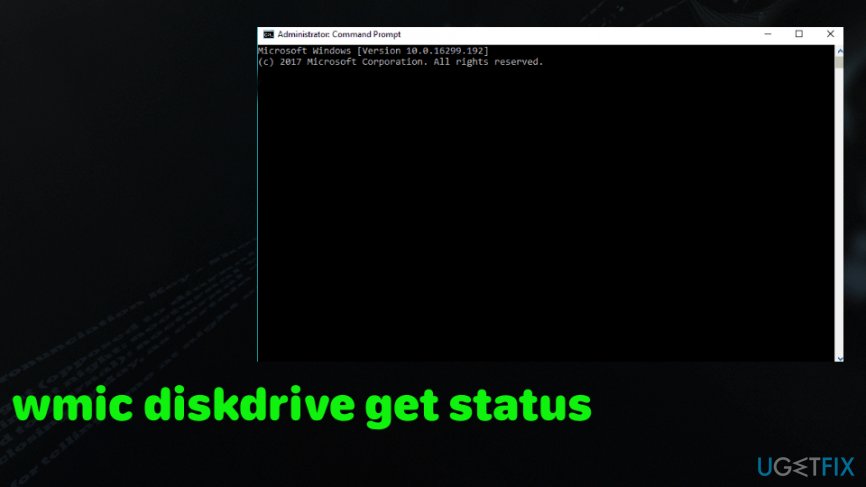
- Go to Command Prompt and type:
wmic diskdrive get status - OK determines that everything is working as supposed to.
- Other results indicate problems that need to be fixed.
What is a hard drive crash smart command prompt
Bottom line
To determine the type of hard drive failure, listen for unusual noises that may indicate a physical failure. If the computer fails to boot, check for overheating issues and ensure proper ventilation. If none of these solutions work, consider backing up your data and seeking professional help.
Frequently asked questions
Common signs include frequent system crashes, unusual noises from the hard drive, slow performance, and files becoming inaccessible or corrupted.
You can use built-in tools like File History or third-party recovery software to attempt recovery of lost files after a hard drive crash.
Yes, if you have a backup created with Windows Backup or a system restore point, you can restore your system settings after a hard drive crash.




Report an issue
What's wrong with this guide? We review every report and update or remove content.
Report received — thank you. We'll review and fix it.
You need a free account to submit a report.
Be the first to comment