
chrome_elf.dll is missing or fails to load: what the file is and how to fix it
chrome_elf.dll is the Chrome Early Loading Framework, the library chrome.exe loads before anything else when the browser starts. Google Chrome keeps it in its own version folder, and browsers built on Chromium, as well as programs that embed a Chromium browser, ship their own copy. When the file is missing, an update was cut short, a security scan removed it or a cleanup went too far, and the browser's own installer puts it back.

Prefer to fix it yourself? The manual steps follow.
How to fix chrome_elf.dll errors
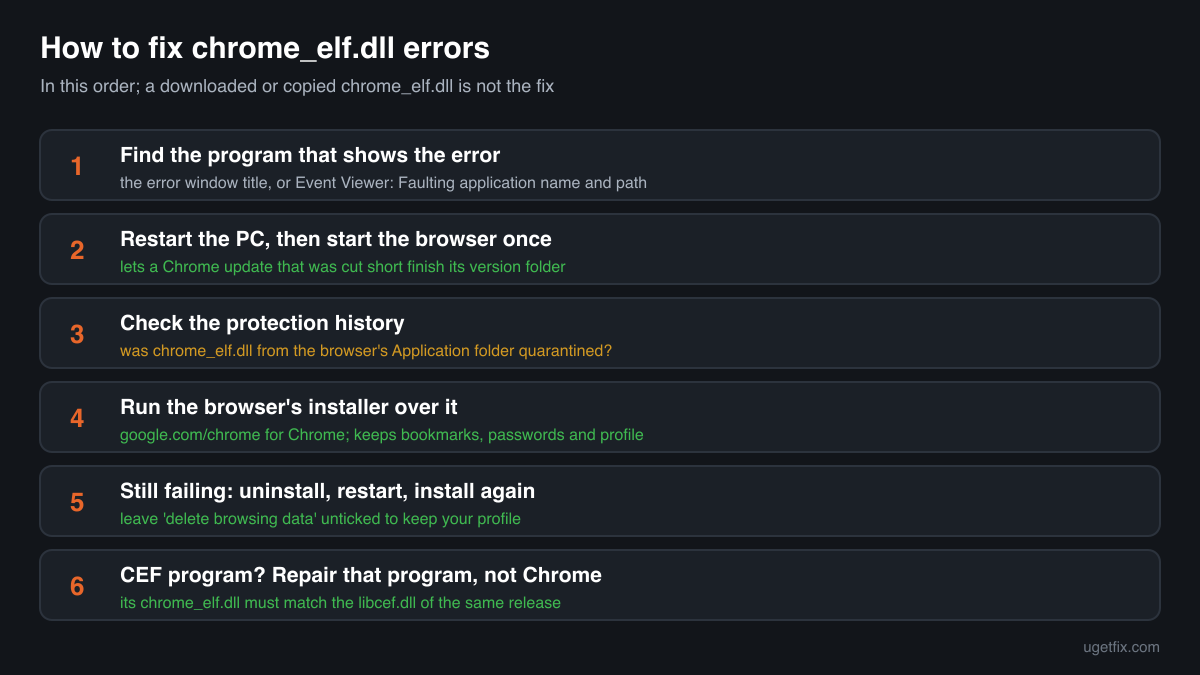
The file belongs to the browser or program that shows the error, not to Windows. First restart the PC: Chrome finishes an update when it is closed, and a restart completes one that was left halfway. If the error stays, download the Chrome installer from google.com/chrome and run it over the existing installation. It writes a complete version folder with chrome_elf.dll in the build that matches chrome.exe, and keeps your bookmarks, passwords and profile. For another Chromium-based browser, use that browser's own installer; for a program built on a Chromium web view, repair or reinstall that program.
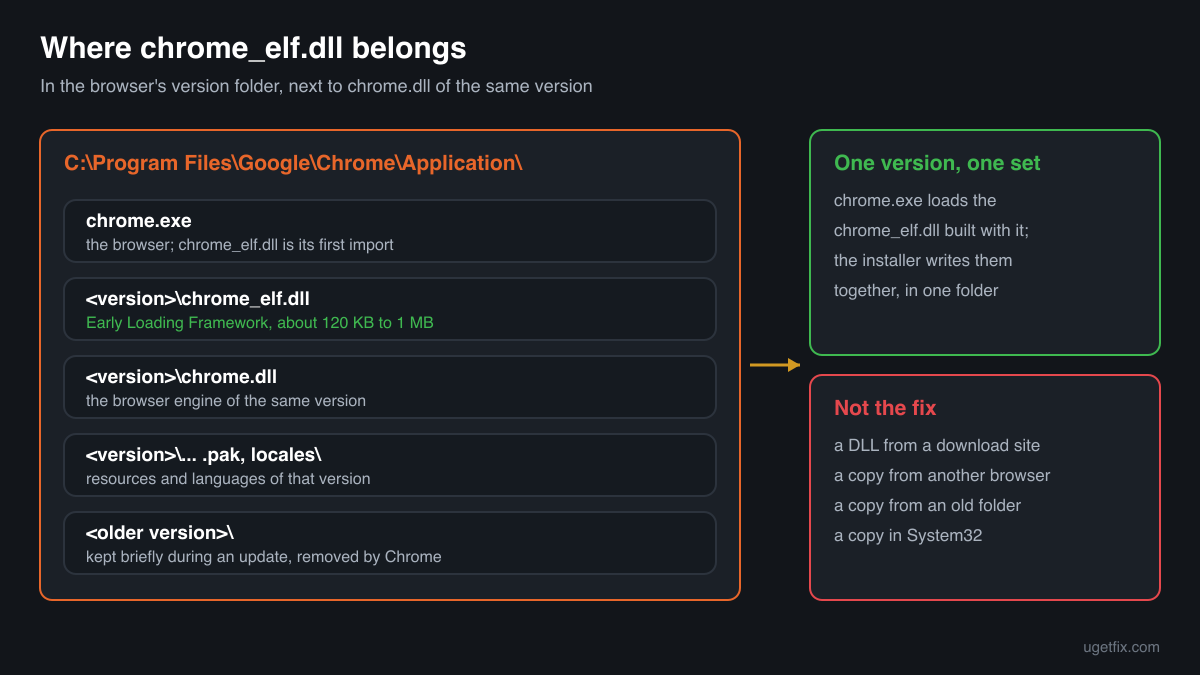
A chrome_elf.dll from a DLL download site or from another browser is not the fix. chrome.exe loads it as its very first import and expects the build that came with it, so a copy from elsewhere fails with an entry point or bad image error, or loads and makes the browser crash at start.
Which browsers and programs ship chrome_elf.dll
The file comes from the Chromium source code, so every product built from that code can carry it, each in its own folder and its own build. The public DLL catalogue shows copies from Google Chrome, from plain Chromium builds and from several other browsers based on Chromium. These are the cases you will meet.
| Program | Made by | What to know |
|---|---|---|
| Google Chrome | Google LLC (Google Inc. in older builds) | The usual case. The file sits in the version folder of Chrome's Application folder, under Program Files for an install for all users or under your AppData\Local folder for a per-user install. Restarting after an update or running Google's installer again restores it. |
| Chromium builds | The Chromium Authors | The open-source browser Chrome is built from. Builds are made by many people and packagers, often without an updater. Download the build again from the place you got it, or switch to a browser that updates itself. |
| Other Chromium-based browsers | Their own makers | The catalogue holds copies from Coc Coc, CryptoTab Browser, 360 Secure Browser and 2345 Accelerated Browser, each reporting its own company. The file belongs to that browser's folder, and only that browser's installer brings back the right copy. |
| Programs built on CEF | The program's maker, using the open-source Chromium Embedded Framework | Programs that draw part of their window as a web page with CEF ship chrome_elf.dll next to libcef.dll, where it handles crash reporting. Repair or reinstall the program; installing Chrome does not fix it. |
| A chrome_elf.dll with no browser around it | Unknown | A copy alone in Downloads, Temp or a random AppData folder, without chrome.exe or another browser's .exe and chrome.dll next to it, belongs to no installed program. Do not try to make it work: read the security note below. |
Step by step
- Find out which program shows the error. The title of the error window names the .exe. If it is not shown, open Event Viewer, Windows Logs, Application, and read Faulting application name and its path in the error event. chrome.exe under Google\Chrome means Chrome; any other folder means another browser or a program built on Chromium, and the fix goes through that one.
- Restart the PC, then start the browser once. Chrome installs an update next to the running version and switches to it when the browser is closed. If the PC was shut down in the middle, or Chrome was killed while the switch ran, the version folder can be incomplete. A full restart lets the update finish. Close all Chrome windows, including the icon in the notification area, before you restart.
- Look at your security software's protection history. In Windows Security open Virus and threat protection, Protection history; other security programs have a quarantine of their own. If chrome_elf.dll from Chrome's Application folder is listed, that is why it is gone. Do not restore it yet: the reinstall in the next step brings a clean copy straight from Google.
- Run the Chrome installer over the existing installation. Download the installer from google.com/chrome and run it while Chrome is closed. It writes the current version folder in full, chrome_elf.dll included, and leaves your profile alone. For another Chromium-based browser, download that browser's installer from its maker instead.
- If that fails, uninstall and install again. Open Settings, Apps, Installed apps, uninstall Google Chrome and leave the option to delete browsing data unticked if you want to keep your profile. Restart, then check that the Application folder is gone or empty and install Chrome again. Sign in afterwards so sync brings back anything stored in your Google Account.
- If the file is removed again, deal with the detection. Only for a browser you installed from its maker: when the security program removes the copy a second time, check its digital signature first (Properties, Digital Signatures). A file signed by Google LLC in Chrome's folder is a false positive. Reinstall Chrome, allow that folder in the security program and report the detection to its maker.
- For a program built on CEF, repair the program. Open Settings, Apps, Installed apps, select the program and choose Modify or Repair if it offers one; for a game launcher, use its verify or repair option. Otherwise install the newest version from the maker's site. chrome_elf.dll there must match the libcef.dll of the same release, so only the program's own installer gets both right.
- Crashes at start: remove software that injects into the browser. chrome_elf.dll runs before other DLLs so that it can control what gets loaded into the browser. Older security add-ons, screen recorders, overlays and download helpers that push their own DLLs into Chrome can make it fail at that point. Update or uninstall the newest such program, then start Chrome again.
What not to do
Do not download chrome_elf.dll from a DLL site.
You cannot know which browser or which build the file came from, or whether it is Google's at all. It is the first code that runs in your browser, the program that holds your passwords, sessions and payment details, so a file of unknown origin there is the worst place to experiment.
Do not copy the file from another version folder or another browser.
Each Chrome version folder holds a chrome_elf.dll built together with that version's chrome.exe and chrome.dll. A copy from an older folder, from Chromium or from another browser lacks what this build expects and ends in an entry point error or a crash at start.
Do not delete old Chrome version folders by hand.
Chrome removes an old version folder itself once the new one runs. Deleting folders in Application while Chrome or its updater is busy is a common way to leave chrome.exe pointing at a version folder that no longer has its files. Let the installer do it.
Do not put chrome_elf.dll into System32 or SysWOW64.
Chrome loads it from its own version folder, never from the Windows folders. A copy there fixes nothing and stays behind, unknown, for any program that might load a file of that name.
Do not restore a copy that came with a browser you never chose.
Some free software installers bring a Chromium-based browser of their own along. If the quarantined chrome_elf.dll sits in such a browser's folder, the detection may be about that browser. Uninstall it rather than restoring the file.
Check the copy on your PC
Choose the chrome_elf.dll from your browser's version folder. Its checksum is calculated in your browser and compared with 170 copies of the file collected from PCs.
The file stays on your computer. Nothing is uploaded: the checksum is computed locally.
Found a chrome_elf.dll in a browser you never installed, without a signature, or alone in Temp, Downloads or AppData with no browser files next to it? Then the question is whether it belongs to a genuine browser at all, and that is a security question rather than a missing-file one. Is chrome_elf.dll Google's file or planted? On 2-Spyware
The error messages and what each one means
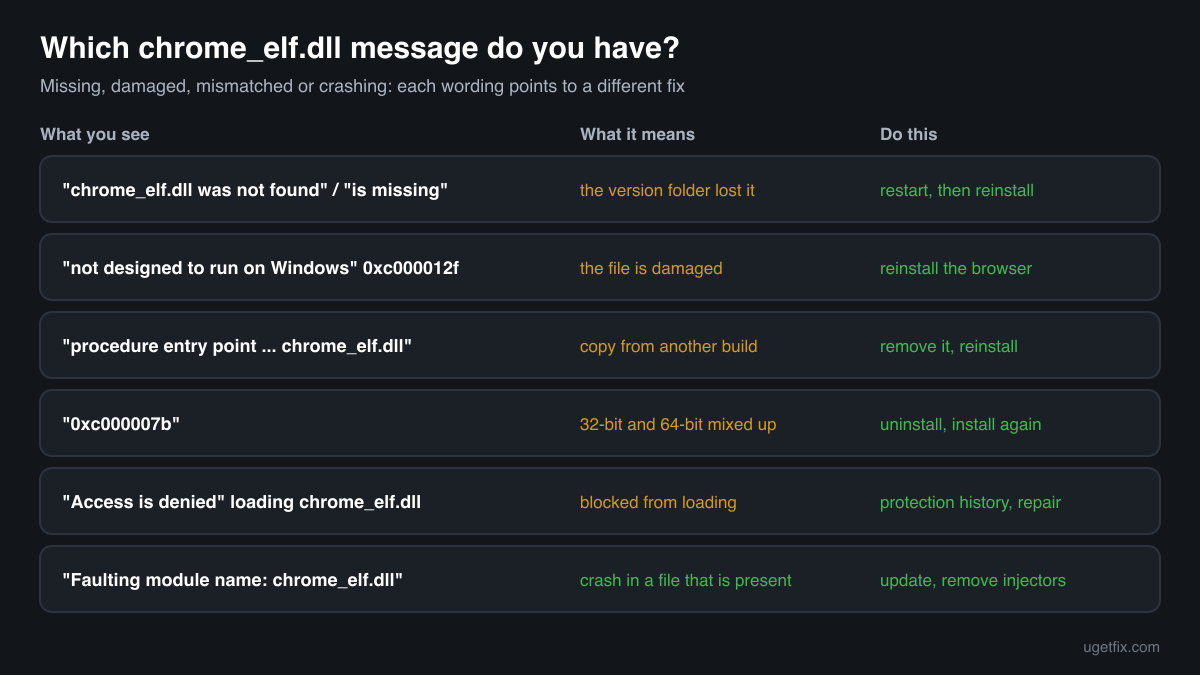
The wording points to the cause: a missing file, a damaged or mismatched one, a file blocked from loading, or a crash in a file that is present. These are the texts Windows shows, with the file name filled in.
The code execution cannot proceed because chrome_elf.dll was not found. Reinstalling the program may fix this problem.
Windows 10 and Windows 11 wording. chrome.exe started, but its version folder has no chrome_elf.dll: an update cut short, a quarantine or a cleanup. Restart the PC, then run the Chrome installer.
The program can't start because chrome_elf.dll is missing from your computer. Try reinstalling the program to fix this problem.
The same situation in the older Windows wording. Same fix: restart, then reinstall the browser that shows it.
chrome_elf.dll is either not designed to run on Windows or it contains an error. Try installing the program again using the original installation media. Error status 0xc000012f.
Windows found the file, but it is damaged or not a valid library for this build, often after a disk error or an interrupted update. Reinstall the browser; if several programs show it, check the drive.
The procedure entry point ... could not be located in the dynamic link library chrome_elf.dll.
A chrome_elf.dll was found, but from another build than chrome.exe: copied from another version folder, another browser or a download site. Remove that copy and run the browser's installer so all files come from one release.
The application was unable to start correctly (0xc000007b).
A 32-bit and a 64-bit file are mixed in the same folder, usually after copying files by hand. Uninstall the browser, then install it again from its maker.
Access is denied when loading chrome_elf.dll
The file is present but Windows or a security program does not let the process read it. Check the protection history for a block on that file, then repair or reinstall the program that shows the message.
Faulting module name: chrome_elf.dll
A line from the Application log in Event Viewer after a crash. The file is there; the browser stopped while it ran. Update the browser, then look for software that injects into it (see the last step above). A path outside the browser's folder points to a copy that does not belong there.
File facts
chrome_elf.dll is short for Chrome Early Loading Framework. Chromium's documentation describes it as a way to run code very early during process start-up, before other imported DLLs, so that the browser can control how libraries get mapped into it. Chrome's entry point on Windows is the DllMain of chrome_elf.dll, and the build makes sure it is the first import of chrome.exe. It also sets up the crash reporter early, which is why programs built on CEF ship it as well. What the catalogue copies of the file report:
- Description in the file
- Google Chrome
- Company in the file
- Google LLC
In Google Chrome the file sits in the version folder inside Application: C:\Program Files\Google\Chrome\Application\<version>\chrome_elf.dll for an install for all users (Program Files (x86) on older 32-bit installs), or the same path under %LOCALAPPDATA%\Google\Chrome for a per-user install. chrome.dll and the other files of the same version sit next to it, and chrome.exe one folder up starts it. Other Chromium-based browsers use the same layout under their own folder, and programs built on CEF keep it next to libcef.dll. The genuine Chrome file describes itself as Google Chrome from Google LLC (Google Inc. in the older builds listed below) and is small: about 120 KB to 1 MB across the copies listed below, growing with newer versions. Its file version matches the Chrome version it came with.
Copies of chrome_elf.dll found on PCs
Public DLL catalogues have collected 170 copies of chrome_elf.dll uploaded from PCs, from version 0.0.0.0 to 88.0.4285.3. Most report Google as the company; others come from Chromium builds and other browsers based on it. The table lists them with their checksums, so you can tell whether your file is one of them.
None of them is the right file for your browser unless it is the same build. Each copy fits only the chrome.exe it came with, and the newest one here, 88.0.4285.3, is not a replacement for an older one. If your copy matches an entry, it is most likely a genuine build; the browser's installer is still the way to get the copy your version needs.
| Version | Build | Size | MD5 | SHA-1 |
|---|---|---|---|---|
88.0.4285.3 | 64-bit | 973 KB | 9c6a5ba4b1ab05725f041150560cefc9 | 45357714a9f53738c61085062ca06426ba5d2750 |
83.0.4103.61 | 64-bit | 840 KB | 696328acec3994dd0851d8577996660e | e172f4f8a4371665c307b75e2340a4036f35ec8a |
81.0.4044.122 | 64-bit | 840 KB | 3d075705cb953e9693fe6340ec87a9b1 | 07446695c06cfb1b420b294b0850b9d3ed85b0e9 |
80.0.3987.163 | 64-bit | 860 KB | 5d9de3f75163c5d69541e04597af87c1 | 7aab6e5aeedba039134b6783c32167005058c2b9 |
80.0.3987.149 | 64-bit | 850 KB | eedcc2fece87a44eab55f2777f0644ca | 1fbe5659d535e8f8ef9e2b16e3256f0137d6b940 |
80.0.3987.149 | 32-bit | 707 KB | c7c83c78839de7fe8f44534353ea388a | 631bbed30928ba4038e6f87c5ae2bf8c0e9bad2f |
80.0.3987.132 | 64-bit | 850 KB | fdc1565e0b31d64d714aaf5234716bc2 | 5b8df645cff49aa1390d76af30571412987b004b |
80.0.3987.122 | 64-bit | 850 KB | e8b84a9596b4c37d1a6f81cc34045505 | eb70c23130eaacddbce573e0b119c8263cdd6e95 |
76.0.3809.132 | 64-bit | 963 KB | 30a1c7bfc3d960214ae9b286b028299c | fa89a9f813b626e382e0320af51fa7a7b840ab67 |
76.0.3809.132 | 32-bit | 819 KB | e4de24adf9e9641b50c87acd40b7401a | 59788b8858511e187ec299fc155c6cae14b8a094 |
75.0.3770.100 | 64-bit | 891 KB | d7ce660e4a2cdf1fad4731c21bee419c | ce0efff1262f3ef351ab9fbcf75f66055376409e |
72.0.3626.121 | 64-bit | 799 KB | 0a00144bdf3535be7452d429ffbe3dd8 | 7023925a1c104316fe031dd35df208383a320860 |
72.0.3626.121 | 32-bit | 594 KB | 4c8e900451830c336a06f8b2aa880449 | 4245c1429f1a13889ce5cf91ff5c38239ec7185d |
71.0.3578.98 | 64-bit | 666 KB | 9a4c0407ba24810b436976d1098e61a7 | fa8d10b7f32fafe4e130711867190c3eac5754e8 |
71.0.3578.98 | 64-bit | 666 KB | c2ec3c40fc684e606dc7d0288ea7e502 | 9f70b14606ab36cb600f5c91d04962431e41c025 |
70.0.3538.102 | 64-bit | 563 KB | 323ac376291a15721ba7dcc983aaafcd | 63d3afbdf4d167c4f43d9920547736b845b37c0c |
70.0.3538.77 | 64-bit | 563 KB | 4c7346914b01e3aefbf4177ad3ff93ac | c51e2c040e00063e00c2c607ff7f960e2dbcf973 |
69.0.3452.0 | 32-bit | 471 KB | fbfcbca4d186a3ce8fb9e5228511723f | e253864c4b4cb20b44dfe09ccee591e02f766ff3 |
68.0.3406.0 | 32-bit | 461 KB | 5106e646e5d91afb261d5518307b5d60 | ea0e23c7d679b8285bfb6778724d178a18f2cde1 |
67.0.3397.119 | 32-bit | 451 KB | 1ae2fbf59db922ad2c4c30d87ba7a13d | 1a9092b6c825d795cbb51878cda76f9b56ab7145 |
67.0.3396.87 | 64-bit | 543 KB | 349c6bc6e0ccd2783259a1a5f4820d1c | 21018a94abeb878aae61d26fdf74f6c56f4a2323 |
67.0.3396.87 | 32-bit | 461 KB | ed7e7361e20b0dba67a1be1a5f75b0aa | 91566775dd1836f90a0a424cddb43e865f50a7b9 |
67.0.3396.62 | 32-bit | 461 KB | 1f356a789817440f3cc4b45b650e5fa6 | e8855f6ff92a8e9633218dac057d5df927469247 |
66.0.3359.181 | 64-bit | 543 KB | 9d2cb3e3f5d6b78ab2f6d8383466071a | 867b43430d237000dd9be2e8e11e773389145150 |
66.0.3359.181 | 32-bit | 461 KB | d41f7fe020ebfd2b5b785fb83a13cf86 | 6a251c2150cc45ba323384dded54ad763ba379bc |
66.0.3359.117 | 32-bit | 461 KB | 0762af6d9b19b82c2b49828faee79593 | a0cd8ce4f467134122ea09c59c8f065e6254cc9c |
66.0.3350.0 | 32-bit | 440 KB | af412ca6367da341f63fc4656cb1b937 | f80be4cbf9ef13a085e0425fffe4ebc4e9bff3a2 |
66.0.3340.0 | 32-bit | 451 KB | 80ada64486020d2de8daa42d8d7c6ed0 | 27f92273915f5f5886a42fd3223a7793e3ae1b0b |
65.0.3325.181 | 64-bit | 522 KB | 0b76435c13948e5c0e8be5c318aed54e | 0dedb16c91337e004ddf3952e0d04f0aa23eed20 |
65.0.3325.181 | 32-bit | 440 KB | 665b85667217522b81d1ad0b29a8811a | 60e669632161e13d19bd9a39f56fa5f1b8ea273b |
64.0.3282.140 | 64-bit | 532 KB | 3e01b229bd5ecfbf581f5724c5b2c8e9 | ea8c8cfde05f5540d581a236bbcdd2ef29cad24a |
63.0.3239.132 | 64-bit | 543 KB | e9dcc22bb3c26af16b3cf2d439d1b2f7 | 28c5b6a16cca47fc802a09d1043d6bc09a6cdfa9 |
63.0.3239.132 | 32-bit | 440 KB | 91e02cef866835b1f2b5fbd04ebd5a18 | be10e128076a3ae848154d114036214475459136 |
63.0.3239.84 | 32-bit | 440 KB | 2c2ff3691a4b3bbcfe90adf2ff85e697 | 81502c5c74977fb79a47e3354e2fb2e529ebae5f |
62.0.3202.94 | 32-bit | 430 KB | b69c7b22fafb2307e51413b2216dca84 | 93259911214dfc3ae7388bf78530a0ec8362e853 |
61.0.3163.100 | 64-bit | 532 KB | c38944aa76510cb7a7af20a53e8c047e | 6f5f82e6341f8468ff7a940798d6132f280d3775 |
61.0.3163.91 | 64-bit | 543 KB | e5c4cf569f1a07d7d56428a51de109e3 | 8125ca4796a8c392e71db1c91023b72785df0e76 |
60.0.3112.113 | 64-bit | 532 KB | 4fa904f98841b105e03eda267dd2b73b | f2e62f1eadd2cf17a1ed3a718f6ac95e1c72efcf |
60.0.3112.113 | 32-bit | 430 KB | 783c4646dae27a207f71d4b6e0be60bc | 1033af75ce68816acc421979bd5b96c2f8473b70 |
60.0.3112.113 | 32-bit | 420 KB | e8e71a12fb50f9f9f56a2f7fd4d3539f | 446256581ad146223b95021157ad1ab1fe60d869 |
60.0.3112.90 | 64-bit | 532 KB | ceaa530c94da90f1af4fcf1afa277401 | f020e2fbded390ae0ae673eeb6e0267572d95f9b |
60.0.3112.90 | 32-bit | 430 KB | c7bf7063f567ee87c183b8589bb9f5b1 | 03fcb700740be7bb281322b6dc10be406e8c30af |
59.0.3071.115 | 64-bit | 532 KB | 92e7268f9bfbbd1e8735d87c9076915f | 5c156044a7f04e8b36ba7be09575d74f927cfc3f |
59.0.3071.115 | 32-bit | 420 KB | 46b3ea441bd0327e2ec9cab6afbca77b | 8d34e7eb256dd2b1c165543566d07928b9cfe563 |
59.0.3071.15 | 32-bit | 430 KB | d15cad2b21ef698995a328336dfb1a5c | b5842ff9101e5e501a585a639e9460a9f7f4b4ac |
58.0.3029.110 | 64-bit | 532 KB | b1e36ff42466841df71791bedcd56250 | 8b3f979162dbda7fc503cb74d71788d2a5425423 |
58.0.3029.81 | 64-bit | 532 KB | d175fa141ba1dcbd1f33851ab1c0eb47 | e6ac7c8766e405e3b1a13327daebf3ed489e5d66 |
58.0.3029.81 | 32-bit | 420 KB | cd05d3804046cff953e73c2b2c399645 | 68b0b3003356d122d092f42f99b8bd49f9bda299 |
57.0.2987.133 | 64-bit | 543 KB | baaa0d0e5ae6697609a0accde3496a31 | ccd8816267ac556798b13569d7b499047b07f932 |
57.0.2987.133 | 32-bit | 420 KB | 008ae0e822a84117fcdfd98f30e714d8 | 716a005c4a903867c5fb80f7070cfad485f8f5c4 |
57.0.2987.110 | 32-bit | 420 KB | 9c497af3e1ab3a8a25b2119aa7290a4e | 5d54d7b655d170e7b6436ab7a051a74342129916 |
57.0.2987.98 | 32-bit | 420 KB | f5a3e341ea2937d0b01c892d1f5ad0f2 | 744501d0f555ef9728230e2f612e982de734115c |
56.0.2924.87 | 64-bit | 522 KB | 7e6fbefbfa098c2cbf9545eacc35a6a6 | c52b08c84c7b33a942c447c2ff9da0724c8d9f0d |
56.0.2924.87 | 32-bit | 420 KB | b9b9246a8b7e8997fe0a1753a624acc8 | d0918c239ad283df441fca1bd9c88c56dd680c02 |
55.0.2883.87 | 64-bit | 522 KB | cfc88a2c569adcc7cee5a1a97dea3233 | e7fcd135d8101d5e20af44e4845dae82088ef97e |
55.0.2883.87 | 32-bit | 410 KB | 2bc566829965b30d0a82058f2eae60ea | 80548359447b8051b67bc2e481cb3978aae6364a |
55.0.2883.75 | 64-bit | 522 KB | 745b59a959d9d460744c9634f99107a9 | 33c325ac81212fdcacee25cc3f28e74cc524d0e4 |
54.0.2840.99 | 64-bit | 451 KB | c3a091d6153d65cf629f140afefecc8f | 9b59f586e44d5172698a85c68cb07f06e665b761 |
54.0.2840.99 | 32-bit | 369 KB | 4964cd23c135f455facbf42ccdd4f10f | 3fd300c21c138d89f7ca2aa549ee129803a8ac90 |
54.0.2840.71 | 64-bit | 451 KB | be17ac908e1edc0fe675ba92b1841ed0 | 6ed4e27fa24f63e5d50b41291c1019c85fe9dbb1 |
54.0.2840.71 | 32-bit | 369 KB | c4b3022907fb6c0748df860dde1e9ee9 | b6b9894e9ddf58a3e27d1625da22f6aeb6ed1c67 |
54.0.2840.59 | 64-bit | 451 KB | ff78beed7cf452fba3343f9aadac3924 | 9e19b68f7dfe50fd5874b20cad4134f9bc0d6135 |
54.0.2840.59 | 32-bit | 369 KB | 2759a6cc1747f07c1c408da734adb82d | 89ba8cd9b40f9f12f96ac688c9e4ef9d4593bc9f |
54.0.2789.0 | 32-bit | 276 KB | 03139ed620771a2de41d9d27b76b46c5 | 3857a2d30c7f83fe03fd55dc0c6269cc3fe25bb3 |
53.0.2785.143 | 64-bit | 328 KB | a5324f571c9ceeedfef9eeb1bf2fa94d | 0ad770be033117a83af038368aa2372bc863fc73 |
53.0.2785.116 | 64-bit | 328 KB | 3094c41220d0bad7d91d1071b8918e2a | 73b3e32e4a79ca35b3f8aeebe09b7f7079fabf70 |
52.0.2743.116 | 64-bit | 164 KB | 4bcee06b606bf67c55e5b2238a1e0f52 | d8ee80f0b32b69f808bdd1156d8fbec0df19fc3e |
52.0.2743.116 | 32-bit | 133 KB | 4b0f6be3850498b8fa7c81bfb007fe9e | d2f6fe20681e91bd8a8d8624628896fea764c3fe |
52.0.2743.82 | 64-bit | 164 KB | 2504f7219d63db620e674c3b18c176fe | 7f6e029a83cf8f174fa59bab3243b7f9bc660d30 |
52.0.2743.82 | 32-bit | 133 KB | 6d64c9273826fb3a6f89c845f91937ea | 5204dbaba24479c8cf81cd43232a27c3882bcff1 |
52.0.2743.41 | 64-bit | 154 KB | 5dd81d7c2523b27e0f23843488ee40d8 | 2ac0f86d319715a3b26f46ecef53989adea04b39 |
51.0.2704.106 | 64-bit | 164 KB | b09c1d6967b093cf0e3c2d8311438801 | d6a854556ff8eb22276516ac7d4e6b2a8f1c12a3 |
51.0.2704.106 | 32-bit | 133 KB | db21487e39f728f06483214cca1ec22b | 8fc0c7cac94ffa5fe4c814c703a6e2731056b730 |
51.0.2704.103 | 64-bit | 154 KB | a45ec191e2173144d103c58cc47b6b7f | da3b3d24784407a979e4f05e2868d88b104b6b72 |
51.0.2704.103 | 32-bit | 133 KB | eefe94741c83846fad47e42f812b8d97 | fc70ec2119eb94b3dda7d29217c0d51f3ce765ee |
51.0.2704.84 | 32-bit | 133 KB | 43ab82ebe76c21e9c2a5274a3ee83c6e | 4ee3f6b1cb9adbae5ae9e8a203d199d044f62b2b |
51.0.2704.79 | 64-bit | 154 KB | 46b91da2c39b3bb38c44c2de3b6fbacb | 60c8f1e50a0e8695fbebf37aebf71fd59349ed46 |
51.0.2704.79 | 32-bit | 133 KB | 6a80f6bc1efb0b91c407e1931b3ad540 | 03b2f12a144bd64f2e952f5153f7012e7bf8a692 |
50.0.2661.102 | 64-bit | 143 KB | 737cec277432d27fa27eb83ef8b5a565 | c3185462d704e00704c5a6c3d3a6909d164728da |
50.0.2661.102 | 32-bit | 123 KB | a5e3594f490c6c135e988f90e00242c7 | e7d22cf44ca532e7a253c3b73b803443382ebfd8 |
50.0.2661.94 | 32-bit | 123 KB | 6cce4be503fa3133cfb4bdaf70cbf609 | 05c651a5ed10b787dd530fc88c8975682c85072a |
50.0.2661.87 | 32-bit | 123 KB | e2fcd5294399598c916ceda128886586 | ee7683949ca93bf0dbb097d431a154a521d96022 |
50.0.2661.75 | 32-bit | 123 KB | bb1f23a2913b550ed109977bd866a27e | 36f2e3906a0a7306dcb0657b6cf7542e424c592d |
49.0.2623.112 | 32-bit | 123 KB | f5aef883cd4c786d907478aaa388246a | 6b011a7596fbec6e660b1519f3936bb2d91f754c |
49.0.2623.108 | 32-bit | 123 KB | b0e5663578c467e3f13e6c3762e8d046 | 90ba488a130be6f76e250231b79fcb5bd42358f3 |
49.0.2623.87 | 32-bit | 123 KB | 9112d26fa95f818c69ba065a5bfe178d | b75d56dc6a039e53f1c05558db2efa7cb6e21b28 |
48.0.2564.116 | 32-bit | 123 KB | e2f3235991948ef3a4cea66c0038145a | 2de82e4430b7fba4c31e98f595bce516869cd9a2 |
48.0.2564.109 | 32-bit | 123 KB | 653bf04886a337e648d8eb012856ff67 | a6113a99d863261e03680c9d5bdff12e01b1acb0 |
48.0.2564.103 | 32-bit | 123 KB | 18fdddbd541fd0f1178eef173e4abc91 | c55c7bbad56b13772f305a4128727cc5e3b99b25 |
48.0.2564.97 | 64-bit | 143 KB | b877c3a1204711552a5001003fb877b7 | 371c9fead9ef773d172d9a5c1bcd5b793b9d6d7b |
48.0.2564.97 | 32-bit | 123 KB | e288fcfeab167d6304fce3205891121d | dfe83f824df177a0f3c3150f0cc44ca2d4823dca |
48.0.2564.82 | 32-bit | 123 KB | 76758313cc5277bbea0126fb369ec8f1 | a9074f9eec4ee169baa1f5c329f6f4feca69eee0 |
48.0.2564.48 | 64-bit | 143 KB | 2e0a43f38af2657b15286231654ceb23 | 028740eb8c9b829a87deb8daf10ef34d1d6e67f7 |
48.0.2540.0 | 32-bit | 133 KB | 1ddf80e110bdc862ce4031776c61e154 | 21dd93a0540e75c69023241d88f981a74c3a3a08 |
47.2.2526.135 | 32-bit | 133 KB | 969e80193797c31e4841c420b36d63c0 | 6c1e8e9061a6abb3c0e92523fbe2af8d11303608 |
47.0.2526.111 | 32-bit | 133 KB | 9444bd530d451658e3ea29aabd3b135a | ced6176f04e2eb49cea1a38aaee9f1e0c059fa02 |
47.0.2526.106 | 32-bit | 133 KB | 540121fe4a6cefc83614890ca70f4c7e | 4f074f2a8db3332eac982a0940aeefb5878c1645 |
47.0.2522.0 | 64-bit | 143 KB | 36f068aa3b87b6226afa882de20750c3 | 3c056c20786f2fbb60101c3e1c5c02df19edb3e2 |
46.0.2490.86 | 32-bit | 133 KB | 2da22cf94f8d1534d0572f5667f88fd1 | 1d541c6af2539a4a005c193d368d8a6a6bf53d0a |
46.0.2490.80 | 32-bit | 133 KB | d4e011d59162d7e1736681cd45f92ad0 | 3a0751d08f627c55beb3a8b2408567a0b3bbb577 |
46.0.2490.71 | 32-bit | 133 KB | e3db99bb721ddedaf8de5ff3621c7c72 | 9ad9014d9b7e29252c47fe91894ae60718d961e9 |
45.0.2454.101 | 32-bit | 133 KB | 7e066fda7611abeb5a016f3fd3f4fad9 | ac57c945f3d8dce1e01ed6b3102177195da630bb |
45.0.2454.93 | 32-bit | 133 KB | a20b0694a9ba3992894b34fb85c5484d | f9acb74b3f2373603bcad5416298263809fef86e |
45.0.2454.85 | 32-bit | 133 KB | 7465e15491e9cdc379442236779e3a91 | 382a392c7b0af30058cfb9c430ba9de16576b369 |
45.0.2454.78 | 64-bit | 143 KB | a6f5e3c2eee62f263fe2e75cfae1c207 | cde3ae15ca8d81020f7f80587196869b9ffeaa90 |
44.0.2403.157 | 32-bit | 133 KB | 21d68e2426e0b998bb940a4c02b405f9 | 00f262897b297eb3d38e8c58b7a10191ec5d365e |
44.0.2403.125 | 32-bit | 133 KB | 178c929b095a55cc1c24c34f41352a1f | 77f1a4cf4aab933dc3f0156d9c7eb06e27a141d3 |
44.0.2403.125 | 32-bit | 133 KB | 4da188d858b3bffe15dbab1a2ee15c3e | 02ece1add038e73e393869098a78d683d18933dd |
44.0.2403.107 | 32-bit | 133 KB | a1bab894a225ea9341408cd1a7574cdf | c355768c15f076db694fcc7a5e81dc6c20ebc518 |
44.0.2403.89 | 32-bit | 133 KB | cd0f534bcdab9a66fd155462b0ae007e | 42febf3715e37774b5d5b0df50849ab7a7608b67 |
44.0.2368.0 | 32-bit | 133 KB | 8d28ac2063563dcc3b2d95ebc57a3fd9 | e865059172884f82d02f49e8a4fd561bf31147ea |
43.0.2357.144 | 32-bit | 133 KB | dd222c3ec1e7635f9236ee9c16b357c3 | 8029dbde1d9ab2b3ab50c36295361ad82f395f28 |
43.0.2357.134 | 32-bit | 133 KB | 4ff88b1c3145f6d4c1956da24ffbf2e5 | cd210ca8a2e5849cbbae8a015f6e9c14d1c1312e |
43.0.2357.132 | 32-bit | 133 KB | c9f093e7b7c6f1f7320eb7ee27003825 | 89a8cb1474fad73173f441322cd90dcf5efadb22 |
43.0.2357.130 | 32-bit | 133 KB | 78ce940fd1ccdf6f743ee1a9aed8aad8 | 03db6f51028ae1553661d31e60b6319c1a160922 |
43.0.2357.126 | 32-bit | 133 KB | ac42e00e4aa7b2d2e9751ae09395069e | a9ad197eb329a45631931de8cfb6cafd939731da |
43.0.2357.124 | 32-bit | 133 KB | 68106da5b5c9cce0ed06bb86ccc77a29 | 98b90d33236709f8d8d3cd7f1d5eaa789284c37d |
43.0.2357.81 | 32-bit | 133 KB | f8eb15c238db34a39fbba989290a5dd2 | cc8daa0d10c4621524297c060c509dcd23b2c157 |
43.0.2357.65 | 32-bit | 133 KB | a92d13b2f9371b6f22a94217197979ae | 10c9c26ed4c6aef2a3e445073524ef374d41dfc9 |
43.0.2357.45 | 32-bit | 133 KB | f315fc823b5fcfb8e5dac56241768156 | 190b9cc1681f2598ee96cb64cb22b47491dfc315 |
43.0.2351.3 | 32-bit | 133 KB | 5b9d6b682fc993a9cede0a18d03027b6 | 8bf2a0e0295d049ad7aba2641d3eb041ef32c222 |
42.0.2311.152 | 32-bit | 133 KB | cfc29ee17efb11ecaf48a1eb3e35945b | f4aa1da39442100cbd65949f430fba46c8d14aff |
42.0.2311.135 | 32-bit | 133 KB | 74eef8f51efd57e72a4d08c28ca2ed76 | 3b0d6f6c09e44515a3a8d818f19ec7e12f5a938c |
42.0.2311.90 | 32-bit | 133 KB | a997bf9b743a4f2e9dbaa4da53a1065e | 93d292b13bedbd671a562a00d61e416611e1f092 |
41.0.2272.118 | 32-bit | 133 KB | 4fd582dec4ac3122d41ba9628d8e0146 | 61e908e5421f51020e84647d58af7f86b21049de |
41.0.2272.101 | 64-bit | 143 KB | f4632fd286b5f92cbbfe1fe2ce4c0749 | 70258da80c0805393cb9541922e173fdad4cb694 |
41.0.2272.101 | 32-bit | 133 KB | 3af7b8a0e4eea206ea3df128f33fd013 | 158a8351a2067547905118b215e3f554fa3b588f |
41.0.2272.89 | 32-bit | 133 KB | d7068c21758e6ec7f3721001270d62db | 1c022d9032c2dc5b3369a8dbe2288bf76a50bcb3 |
41.0.2272.76 | 32-bit | 133 KB | 91373b9c4260217d04a88bdf33978ca2 | 02c9e076064a04b86fb8900446ec2920e076ec31 |
40.0.2214.111 | 32-bit | 133 KB | 91262f88c4ea3b82b761ea6211cfc84c | cabb03c20d7bf8ee342a98ebd113c50150071293 |
40.0.2214.94 | 32-bit | 133 KB | ee39fd8aed2a0ec7e5b8bee5a26726e9 | 6047c3066e3d42d0d0d45f8b12e520acae34c476 |
40.0.2214.93 | 32-bit | 133 KB | bece8c2f27e9f37f5dd2ca2b03dae7d3 | 86553b0d784fe084153dbeae1bce95347da3c33c |
40.0.2214.91 | 32-bit | 133 KB | bd22a4a11236bee8e23f45f4f152bf59 | 134403ffb1b7ea3ffb2b116fd192270bf8220b93 |
39.0.2171.99 | 32-bit | 133 KB | 5247c61807fcaba04c153aea34701503 | 0a5a0cbee596ea2da2ca233d2286cc5dd7267b26 |
39.0.2171.95 | 32-bit | 133 KB | 649aa174d5798b17439eb877b12e6fa3 | 4e63c50810404dfc4f2bfb835b3430040ecb104b |
39.0.2171.71 | 64-bit | 143 KB | e6f72172aa81053c0e3a92ed78a39d02 | 29409f6289d2da9285e741656305d0c88c1ade2c |
39.0.2171.71 | 32-bit | 133 KB | fc7cd5dc9896d1603674d80aa4a87696 | 501ce2c8e7c96c7e225d0806be95ed08707b655d |
38.0.2125.122 | 32-bit | 133 KB | 6f7c96f30fa67f22649174f049217244 | 4ef3155e904232556e42919147b76e57be995cfd |
38.0.2125.111 | 32-bit | 133 KB | 5ac032dca4dab73e0a7c381bf7e9e960 | e1fcd7442eacdef26b6cd1230360ef76315ef2e9 |
38.0.2125.104 | 32-bit | 133 KB | 5e6504432db222547b729b784689bebb | 3f8865451f782a11f0ca0a85f0f694d64f592578 |
38.0.2125.101 | 64-bit | 143 KB | 067c0ee1c99e7a2c018fc3e97193c968 | 5a85249cd5c9a5a2c9d7332dc8198795c2160416 |
38.0.2125.101 | 32-bit | 133 KB | 115c32485b23950c1aa42041630894ba | 8fb7c26e11591074da8ca3fa3b82b4f96a06316d |
38.0.2101.0 | 32-bit | 133 KB | 640e55458784193b41bf77caba25545c | e6494e58095a557618ab3e68b22a5efbc9064126 |
37.0.2062.124 | 32-bit | 133 KB | 4670e9b4c1bee7dccded153f9c80e559 | 93b92367c36b4d30b632c38795aaff4710df439a |
37.0.2062.120 | 32-bit | 133 KB | a93df99adea23202b3ac38e09797a893 | 29601e5c7bb7dff63211d93a0a2ddadbdc7c97df |
37.0.2062.103 | 32-bit | 133 KB | efbd37661afde1b32918364ff47a6dcc | f07e448f37b7904230731c627b5c37a68c1f5cdd |
37.0.2062.94 | 32-bit | 133 KB | 5e8acbc7db6fbcf405408e91df1bc281 | a84d10aa6eeb073300760c689d6b37306eb7e822 |
36.0.1985.143 | 32-bit | 133 KB | bcbf229d45d24fc841a45e36463f7471 | 4a1289bbb7b0344ca7e473c7dae83c8e26e7f114 |
36.0.1985.125 | 32-bit | 133 KB | a8428270f8958e460554698270e65ebf | 073d9bb74388947e3ee101b2f740a7dfced8add5 |
36.0.1985.67 | 32-bit | 133 KB | 9391ffd362f864c9f563430ecf1b44ff | b2754771ed50704680c8dd0acf51f99775b8be18 |
35.0.1916.153 | 32-bit | 133 KB | 0ab40899395f14d74e83410068359d38 | ba851511b675d753bfa29c51219d5a9e9f2bdef5 |
35.0.1916.114 | 32-bit | 133 KB | f8e11363e39e75c7e5a92ba6acdb06ba | 698d5c0c99e6bd79d4931b498a67ab814e8f6afb |
35.0.1916.99 | 32-bit | 133 KB | 11a9ea55715706b816e3c4a5e91e6311 | dc6795794dfa30f8a7c9405b9302e4e84b85a2b3 |
8.8.2.16672 | 32-bit | 205 KB | 0fa6a2fed6f87a4339460000f512ab35 | 31de67e5a0507c8eea7b078597616a05debc7f70 |
8.1.1.256 | 32-bit | 133 KB | d4f295679f2ab83394e31c032005e6de | b8361e5265ccd53b4ee0b2eb0e33719c976ee6df |
0.0.0.3 | 32-bit | 707 KB | a502db458f6039b74fcf389022c22b9c | 43bc17c9aa9749ed8d4824bffbfd44e6bc392ce0 |
0.0.0.0 | 32-bit | 1513179d1f5fae029063fb36341bb806 | 7341f63edb958e054fd8dd96a4c2b6658d9636ec | |
0.0.0.0 | 32-bit | 17543dfdb24be66d20046c228ee6aab1 | 9c0570c7ab569a46a93d91216f9b064c2c5a2d12 | |
0.0.0.0 | 32-bit | 1f786192427c9f0a25ab1f227d0d2f2e | 63c095f0840a80d07d662652c9c4520177850a57 | |
0.0.0.0 | 32-bit | 247bad843ae090831046929b96f50a18 | d06d64894580c078c03478e638451a77c42a813c | |
0.0.0.0 | 32-bit | 40a035d14e5627ee19eabe9df95d0eca | e0ed4b597c2651a1a675bd6a4b768109bae439f1 | |
0.0.0.0 | 32-bit | 4e217d74b2b0ff97f06d348739321e38 | 9649172843c3357a83c155fc8a6bbbcb85c56deb | |
0.0.0.0 | 32-bit | 51802bc4c9c9785b2703ace07b662e22 | 3554a6742c40dcb55ba61fc418ba0707ecbde822 | |
0.0.0.0 | 32-bit | 559a1a56b7fe33b04c2f732281088d80 | bba35882f6b9b53271cc127f9296f31ef0ad72af | |
0.0.0.0 | 32-bit | 758e41b26bcccc16840e5d333f032eef | f824f7018837d04da23b8c902a94397669e0ea58 | |
0.0.0.0 | 32-bit | a8d0481871121f9b0f8709eb542bf3b1 | 2e19bf3b1cdacba237d00b1b992175af7060c36f | |
0.0.0.0 | 32-bit | c272bde298a71835d3742db24fbddc13 | b63c9e97fb39e1289fc90c2e202f15f39dcae9d2 | |
0.0.0.0 | 32-bit | ce5aafcbfe81e14eb702ef971abce0e0 | e934c4c21deda4c12afece3e2671fb1818fdba0a | |
0.0.0.0 | 32-bit | d47d822784a9e9bfd7ae8593e95309b7 | 4267965fe53e861ff92318c2b75d8f2e2b688f75 | |
0.0.0.0 | 32-bit | fdd972588db5a103a239cdb37dfb4491 | 8a17d83c7af3c4354419b8c08b3f16fd3802d74a |
Copies uploaded by users to a public DLL catalogue, read on 18 October 2026. We list their checksums so you can identify a file; we do not offer them for download and we did not verify each one against its maker's signature.
Questions people ask
Is chrome_elf.dll a virus?
Google's chrome_elf.dll is a harmless part of Chrome, signed by Google and kept in Chrome's own version folder. The same name also appears in other Chromium-based browsers, including ones that free software installers bring along unasked. A copy in Chrome's Application folder with Google's signature is genuine. Read the security page linked above for a copy of unknown origin.
Why is chrome_elf.dll missing after a Chrome update?
Chrome prepares each update in a new version folder and switches to it when the browser is closed. If the PC lost power, Chrome was killed during the switch or a cleanup tool removed folders at the same time, chrome.exe can point to a folder without its files. A restart, and if needed the Chrome installer, completes it.
Can I download chrome_elf.dll and put it in the Chrome folder?
You should not. The file must be the exact build of your chrome.exe, and a downloaded one is of unknown origin inside the program that holds your passwords and sessions. Google's installer from google.com/chrome brings the right copy in a few minutes and keeps your profile.
Will reinstalling Chrome delete my bookmarks and passwords?
Running the installer over an existing Chrome keeps the profile, which lives in a separate User Data folder. A full uninstall keeps it too, as long as you leave the option to delete browsing data unticked. If you use sync, your Google Account holds a copy of bookmarks and passwords anyway.
Another program, not Chrome, says chrome_elf.dll is missing. Should I install Chrome?
No. Programs built on the Chromium Embedded Framework and other Chromium-based browsers ship their own copy and never use Chrome's. Installing or reinstalling Chrome leaves that program's folder as it was. Repair or reinstall the program that shows the error.
Why are there several copies of chrome_elf.dll on my PC?
Each Chromium-based browser and each program built on CEF keeps its own copy, and Chrome itself may briefly keep two version folders during an update. That is by design. What matters is that each copy sits next to the browser or program files it belongs to and carries its maker's signature.
Chrome crashes right at start and Event Viewer names chrome_elf.dll. What now?
The file is present, but the browser stopped while it ran its earliest code. Update Chrome first. Then think of software that pushes its own DLLs into browsers, such as older security add-ons, overlays and download helpers, and update or remove the newest one. Reinstall Chrome if the crash continues.
Sources
- Chromium source: Chrome Early Loading Framework (ELF) README
- Chromium Embedded Framework issue 1995: Migrate from breakpad to crashpad (chrome_elf.dll and crash reporting)
- Google Chrome: download the official installer
File data read on October 18, 2026.

The editors who write and check uGetFix guides and reference pages. File facts are read from Microsoft's own installers and documentation, and every page shows the date its data was read.
Questions and experiences
Ask about this page: members and our editors answer. Reading is open; writing needs a free account.
…