
d3dcompiler_47.dll is missing or crashes a program: where the error comes from and how to fix it
d3dcompiler_47.dll is the Direct3D HLSL Compiler that Windows 10 and Windows 11 keep in System32. Browsers, chat and office apps built on Chromium or Qt, and many games call it to prepare graphics code for the card. When it is reported missing, the cause is an old Windows 7 PC without Microsoft's update for the file, a damaged Windows copy, or a broken private copy inside the program's own folder.

Prefer to fix it yourself? The manual steps follow.
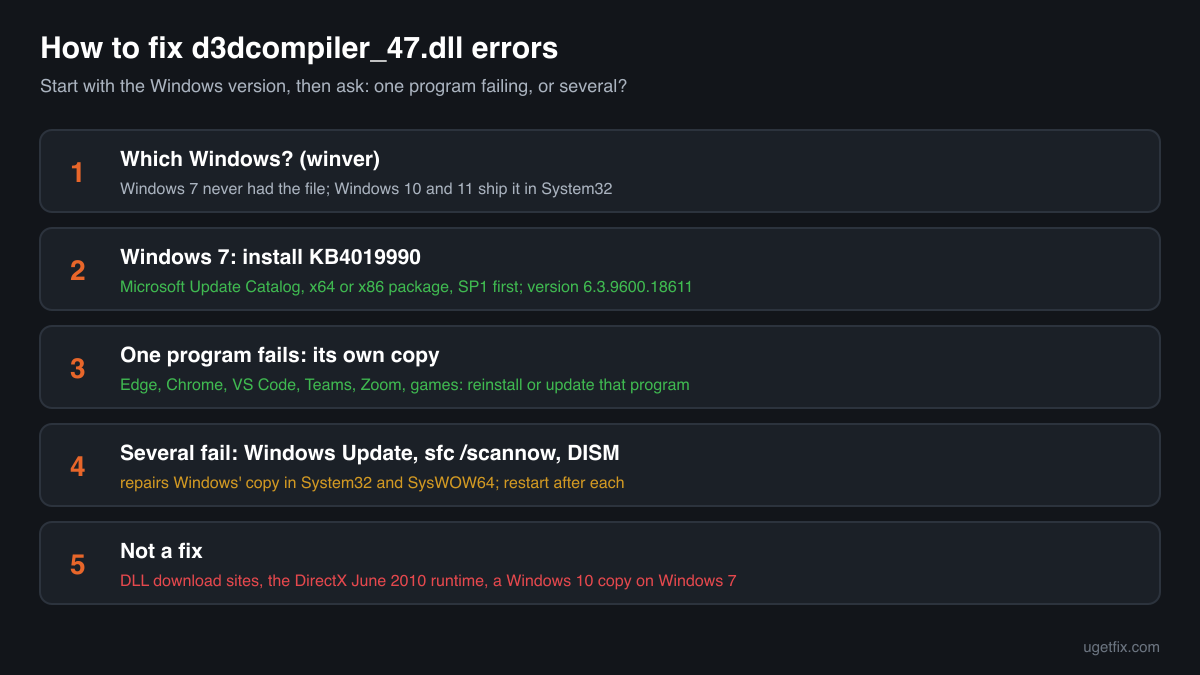
How to fix d3dcompiler_47.dll errors
Note which program shows the error, then press Windows+R, type winver and press Enter. On Windows 7, install Microsoft's update KB4019990, which adds d3dcompiler_47.dll to the system folders; it is offered in the Microsoft Update Catalog. On Windows 10 or Windows 11 the file is already part of Windows. If only one program fails, open its install folder: a d3dcompiler_47.dll there is that program's private copy, and reinstalling or updating the program replaces it. If several programs fail, install the pending Windows updates, then run sfc /scannow and DISM from an administrator Command Prompt.
Neither the DirectX End-User Runtime nor a graphics driver contains this file. The June 2010 runtime stops at d3dcompiler_43.dll, an older compiler with its own name, and a driver update leaves System32's compiler untouched. Windows Update, System File Checker and DISM repair the Windows copy; a program's installer repairs the copy it carries.
Step by step
- Find out which Windows the PC runs. Press Windows+R, type winver and press Enter. The window shows the edition, the version such as 22H2 or 24H2, and the build. The fix branches here: Windows 7 needs a Microsoft update to get the file at all, while Windows 10 and Windows 11 ship it and only need it repaired.
- Windows 7: install KB4019990. Microsoft published the file for Windows 7 SP1, Windows Server 2008 R2 and Windows Server 2012 as the update “Update for the d3dcompiler_47.dll component”, KB4019990, version 6.3.9600.18611. Search the Microsoft Update Catalog for KB4019990, take the x64 package for 64-bit Windows 7 or the x86 package for 32-bit, run the .msu file and restart. If the package says it does not apply, Service Pack 1 is missing; install it first. Programs that still support Windows 7 often list this update as a requirement.
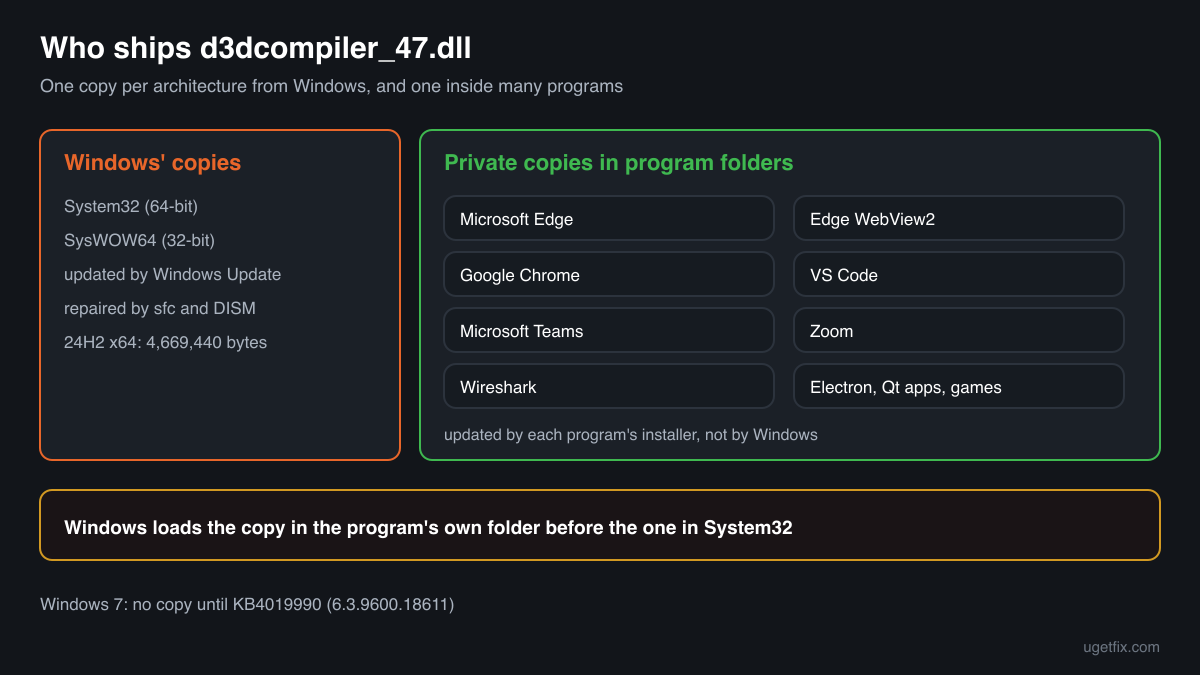
- One program fails: look in its folder. Right-click the program's shortcut and choose Open file location. Many programs carry their own d3dcompiler_47.dll beside the .exe: Microsoft Edge, Edge WebView2, Google Chrome, Visual Studio Code, Microsoft Teams, Zoom and Wireshark are among them, and so are many apps built on Electron or Qt and many games. Windows loads that private copy before the one in System32. If it is damaged, blocked or of the wrong build, only that program fails.
- Reinstall or update that program. Use the program's own update option, or uninstall it in Settings, Apps, Installed apps and install the newest version from its maker. The installer writes a fresh copy of its d3dcompiler_47.dll that matches the program's other files. For a game, the verify or repair option of the game launcher does the same. Avoid fixing the folder by hand with a copy from somewhere else: the program may expect exactly the build it shipped.
- Several programs fail: install Windows updates. Open Settings, Windows Update, install everything that is offered and restart, even if Windows does not ask. Cumulative updates for Windows 10 and Windows 11 carry the current d3dcompiler_47.dll for your release and replace a damaged one in System32 and SysWOW64.
- Run System File Checker. Type cmd in the Start menu, right-click Command Prompt and choose Run as administrator. Run sfc /scannow and let it reach 100%. It compares System32's protected files with the originals Windows stores and puts back a damaged, missing or replaced d3dcompiler_47.dll. Restart after it reports a repair.
- If System File Checker reports files it could not repair, run DISM. In the same administrator window run DISM /Online /Cleanup-Image /RestoreHealth. It downloads clean copies through Windows Update and repairs the component store that System File Checker uses as its source. When it finishes, run sfc /scannow once more and restart.
- A crash, not a missing file: read the crash event. Press Windows+R, type eventvwr.msc and press Enter. Open Windows Logs, Application, and look for an Error from Application Error at the time of the crash. Faulting application name is the program that crashed and Faulting module path shows which d3dcompiler_47.dll it was running. A path inside the program's folder points to that program's copy and its graphics code: update or reinstall the program. A path in System32 or SysWOW64 points to the graphics driver, an overlay or the program itself more often than to the file.
- Crashes in a browser or app: turn graphics acceleration off to test. The setting is Use graphics acceleration when available, under System in Chrome and under System and performance in Edge; many Electron apps offer a similar switch. With acceleration off the app stops compiling shaders for the card, so if the crashes stop, install the newest graphics driver from the card's maker and switch acceleration back on. Close in-game overlays and recording tools while you test games.
- Still failing on Windows 10 or 11: repair Windows in place. On Windows 11, Settings, System, Recovery offers Fix problems using Windows Update, which reinstalls the current Windows and keeps your files, apps and settings. On Windows 10, run Microsoft's installation media from inside Windows and choose to keep personal files and apps.
Download the genuine d3dcompiler_47.dll for your Windows version
These are Microsoft's own d3dcompiler_47.dll files, one per Windows 10 and Windows 11 release, taken from Microsoft's symbol server and matched against Winbindex, which indexes the files inside Windows images and updates. Settings, System, About shows your release. Take the 64-bit file for System32 and the 32-bit file for SysWOW64. For Windows 7 there is no file here: KB4019990 above is Microsoft's way to add it. Prefer the repair steps when you can, since Windows guards these folders and Windows Update keeps its copy current; the files serve to compare a copy you have or to replace one when System File Checker and DISM fail.
Older Windows releases
You need a free uGetFix account to download. Sign in, or register in about a minute, and this page opens again.
What not to do
Do not take d3dcompiler_47.dll from a DLL collection site.
Nothing on such a site proves the Windows release, the build or the architecture of the file, or that nobody changed it. Programs load this file into their own process, so a tampered copy runs with your rights. Use Microsoft's update on Windows 7, Windows' repair tools on Windows 10 and 11, and the checker on this page for a copy you already have.
Do not copy a Windows 10 or Windows 11 copy onto Windows 7.
A file built for a newer Windows can depend on functions Windows 7 lacks, which turns a missing file error into an entry point error or a crash. KB4019990 is the build Microsoft made for Windows 7.
Do not replace the System32 or SysWOW64 copy by hand.
Windows owns and protects these files. A hand-placed copy of the wrong release or architecture affects every program that compiles shaders, and the next cumulative update or System File Checker run can overwrite it anyway. Repair with sfc /scannow.
Do not rename another compiler to d3dcompiler_47.dll.
d3dcompiler_43.dll and d3dcompiler_46.dll are separate releases with fewer functions. A renamed file loads, then fails on the first function it does not have, and a program built for the newer compiler gets an entry point error.
Do not delete a program's private copy to make it use Windows' one.
A program that carries its own d3dcompiler_47.dll was tested with that build. Removing it may work or may break the program after its next update. If the private copy is damaged, reinstall the program so that its installer replaces it.
Do not run regsvr32 on it.
The compiler is a plain library with no registration function. regsvr32 reports an error and changes nothing.
Check the copy on your PC
Choose the d3dcompiler_47.dll you are unsure about, for example one from a program folder. Your browser calculates its checksum and compares it with 491 Microsoft builds of the file from Windows releases and updates.
The file stays on your computer. Its checksum is computed locally and nothing is uploaded.
1 genuine programs have been documented loading a planted copy of d3dcompiler_47.dll. Found a d3dcompiler_47.dll in Downloads, Temp or AppData, or beside a copy of a Windows program outside the Windows folder? That is a question about a planted file, not a missing one. Is d3dcompiler_47.dll genuine or planted? On 2-Spyware
The error messages and what each one means
Read the message word for word: the wording and the Windows version together tell you which fix applies. These are the texts Windows shows, with the file name filled in.
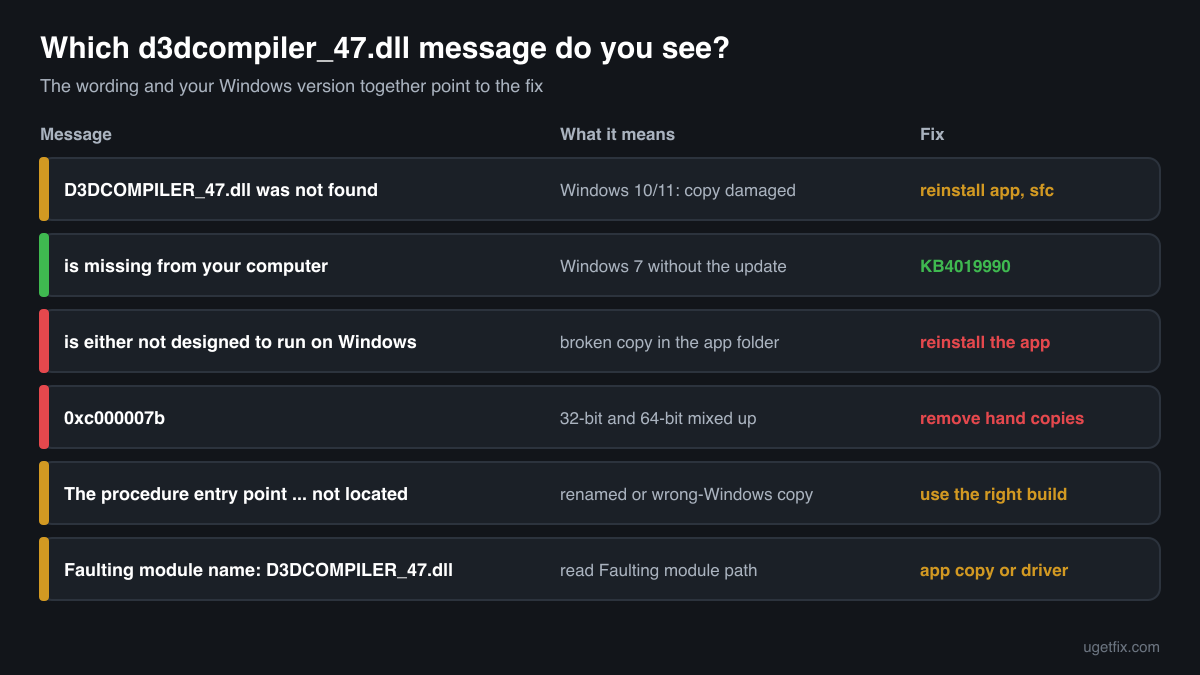
The code execution cannot proceed because D3DCOMPILER_47.dll was not found. Reinstalling the program may fix this problem.
Windows 10 and Windows 11 show this wording. Because Windows ships the file, either the copy in System32 or SysWOW64 is damaged or missing, or the program removed or failed to install its own copy. If one program shows it, reinstall that program; if several do, install updates and run sfc /scannow and DISM.
The program can't start because D3DCOMPILER_47.dll is missing from your computer. Try reinstalling the program to fix this problem.
The Windows 7 wording, and on Windows 7 it usually means just what it says: the PC has never had the file. Install KB4019990 from the Microsoft Update Catalog and restart. Reinstalling the program helps only when that program ships its own copy.
D3DCOMPILER_47.dll is either not designed to run on Windows or it contains an error. Try installing the program again using the original installation media or contact your system administrator or the software vendor for support.
Windows found a file with this name and could not load it. Most often it is a damaged, truncated or quarantined copy in the program's folder, or a 32-bit file where a 64-bit one is expected. Reinstall the program. If the dialog names a System32 path, run sfc /scannow.
The application was unable to start correctly (0xc000007b). Click OK to close the application.
No file is named, but after someone copies d3dcompiler_47.dll by hand this often means the architecture is wrong: a 32-bit copy in a 64-bit program's folder or in System32, or the other way round. Remove hand-placed copies, reinstall the program and run sfc /scannow.
The procedure entry point … could not be located in the dynamic link library D3DCOMPILER_47.dll.
Windows fills in the name of the missing function. The copy that was loaded lacks a function the program calls, which happens with an older compiler renamed to this name, or a newer Windows build copied onto Windows 7. Remove that copy, then use KB4019990 on Windows 7 or Windows' own copy on Windows 10 and 11.
Faulting module name: D3DCOMPILER_47.dll
A line in the Application log of Event Viewer after a crash. The compiler was running when the program stopped, typically while it prepared shaders. Read Faulting module path in the same event: the program's folder means its own copy, so update or reinstall it; System32 or SysWOW64 means look at the graphics driver, overlays and the program before the file.
File facts
d3dcompiler_47.dll is Microsoft's HLSL shader compiler. Programs pass it shader source code and get back compiled bytecode that Direct3D hands to the graphics driver. Chromium-based browsers and apps use it through ANGLE to draw web pages and interfaces on the graphics card, Qt programs use it for their Direct3D drawing, and games use it to compile or reflect shaders at run time. It is not a process and does nothing until a program loads it. What Windows reports for the genuine file:
- Description in the file
- Direct3D HLSL Compiler
- Where the genuine d3dcompiler_47.dll belongs
C:\Program Files\windows kits\10\bin\<version>\x64C:\Program Files\windows kits\10\bin\<version>\x86C:\Program Files\windows kits\10\redist\d3d\x64C:\Program Files\windows kits\10\redist\d3d\x86C:\Program Files\wiresharkC:\Program Files\LogiOptionsPlusC:\Program Files\cisco systems\cisco jabberC:\Program Files\microsoft\edge\application\<version>C:\Program Files\microsoft\edgewebview\application\<version>C:\Program Files\microsoft\edgecore\application\<version>C:\Program Files\Google\Chrome\Application\<version>C:\Program Files\Island\Island\Application\<version>C:\Program Files\Zoom\binC:\Users\<you>\AppData\Roaming\Zoom\binC:\Users\<you>\AppData\Local\microsoft\teams\stageC:\Users\<you>\AppData\Local\Programs\Microsoft VS CodeC:\Windows\System32C:\Windows\SysWOW64- Signed by
- Microsoft Windows, with a Windows catalog signature: the file's Properties show no Digital Signatures tab, which is normal. Check it in PowerShell: Get-AuthenticodeSignature <path to the file> (Status: Valid).
On 64-bit Windows the 64-bit file is in C:\Windows\System32 and the 32-bit file in C:\Windows\SysWOW64. The Windows 10 SDK places redistributable copies in Windows Kits\10\Redist\D3D for developers to ship, which is why so many programs carry the file in their own folders. On Windows 11 24H2 the 64-bit Windows file is version 10.0.26100.9711 and 4,669,440 bytes; on Windows 10 22H2 it is 10.0.19041.7663 and 4,517,376 bytes. Windows 7 gets version 6.3.9600.18611 from KB4019990. A private copy in a program's folder can carry another version: it is Microsoft's compiler too, but built for that program's release cycle rather than for Windows.
d3dcompiler_47.dll versions by Windows release
Each Windows 10 and Windows 11 release has its own build of d3dcompiler_47.dll, delivered with its cumulative updates. Winbindex knows 431 distinct Microsoft builds; the table lists the newest for each release and the update that brought it.
| Windows release | File version | Delivered by | Size, 64-bit |
|---|---|---|---|
| Windows 11 26H1 | 10.0.26100.9711 | KB5127648, October 13, 2026 | 4,669,440 bytes |
| Windows 11 25H2 | 10.0.26100.9711 | KB5127648, October 13, 2026 | 4,669,440 bytes |
| Windows 11 24H2 | 10.0.26100.9711 | KB5127648, October 13, 2026 | 4,669,440 bytes |
| Windows 11 23H2 | 10.0.26100.9711 | KB5127648, October 13, 2026 | 4,669,440 bytes |
| Windows 11 22H2 | 10.0.22621.3233 | KB5066793, October 14, 2025 | 4,927,144 bytes |
| Windows 11 21H2 | 10.0.22000.2600 | KB5044280, October 8, 2024 | 4,575,232 bytes |
| Windows 10 22H2 | 10.0.19041.7663 | KB5126657, October 13, 2026 | 4,517,376 bytes |
| Windows 10 21H2 | 10.0.19041.7663 | KB5126657, October 13, 2026 | 4,517,376 bytes |
| Windows 10 21H1 | 10.0.19041.7663 | KB5126657, October 13, 2026 | 4,517,376 bytes |
| Windows 10 20H2 | 10.0.19041.7663 | KB5126657, October 13, 2026 | 4,517,376 bytes |
| Windows 10 2004 | 10.0.19041.7663 | KB5126657, October 13, 2026 | 4,517,376 bytes |
| Windows 10 1909 | 10.0.18362.1 | original release | 4,474,880 bytes |
Older copies of d3dcompiler_47.dll found on PCs
A public DLL catalogue holds 60 copies of d3dcompiler_47.dll that users uploaded from their PCs, from version 6.3.9600.16384 to 10.0.18362.1. Many come from program folders and from older Windows releases. Their checksums are listed so you can identify yours.
None of them is the file to put into System32: the newest Windows build indexed is 10.0.26100.9711, and each release keeps its own. If the check on this page matches your file to this list, it is most likely a copy a program shipped or someone copied by hand. Check that Microsoft signed it, and let Windows and each program look after their own copies.
| Version | Build | Size | MD5 | SHA-1 |
|---|---|---|---|---|
10.0.18362.1 | 64-bit | 4.3 MB | db088ed3e071762ecc3471736d955ff4 | 50058e2fff965f88b6fc2abe62e56660c2db8688 |
10.0.18362.1 | 32-bit | 3.5 MB | 6bc4ada9a7cab72f49c564e6c86b4c3e | f0fba01542a0fbe585106f7efd884df65e8c89dc |
10.0.17763.132 | 64-bit | 4.3 MB | 57d829f7d174d1a8067612c09cf6566b | 79ed06500dcee028885b00301f7a9a9155c69b62 |
10.0.17763.132 | 64-bit | 4.3 MB | 688b3ee70212f6abda54f11ded8c828f | be4eea95b0a0af69e6c401761bd12ebac8fbe7cb |
10.0.17763.132 | 64-bit | 4.3 MB | b67aba050343e74d70afac269845d194 | 7ad254e8ed1fb7307b163bca11c943cb6be15c82 |
10.0.17763.132 | 64-bit | 4.3 MB | f3a69c17ec103cf8f3e66e46760dc072 | e2c1535688bf660864dfb12f0f69801336cfc94c |
10.0.17763.132 | 32-bit | 3.5 MB | d2d0ff97605d2c2f8921e93062eb01ff | 586cdca915f47fa4b1010f781ec0504e3138efd2 |
10.0.17134.12 | 64-bit | 4.1 MB | 222d020bd33c90170a8296adc1b7036a | 612e6f443d927330b9b8ac13cc4a2a6b959cee48 |
10.0.17134.12 | 64-bit | 4.1 MB | 68065519a1c18fdf12a50e1fdc339ac5 | 32eb6c56b5f6bb15187a2d4f2f74dc344a76f471 |
10.0.17134.12 | 64-bit | 4.1 MB | 7f302daaf789d9c4debb3d84c880de58 | fb87e4fbae06584b3950df47ed4a9b184b1767ad |
10.0.17134.12 | 64-bit | 4.1 MB | 85a215c74aee9151d4c1ac9d4a6d746a | 1d0e0ba1a850a5af92331262c80cc1565ec1a06b |
10.0.17134.12 | 64-bit | 4.1 MB | e66cac9775f5cfd9021731445c2e56e5 | 9dc66b1781652195352fe1f00a9ec84bb7f73ee0 |
10.0.17134.12 | 32-bit | 3.5 MB | 587a415cd5ac2069813adef5f7685021 | ca0e2fe1922b3cdc9e96e636a73e5c85a838e863 |
10.0.17134.12 | 32-bit | 3.5 MB | 7d69636373d1858f4f2dd51ac24da852 | ff8aebd83135d5e96883b5f5e06f2e492959155b |
10.0.17134.12 | 32-bit | 3.5 MB | da7ec34939bdefa19fb25e9791ff2bc7 | e47eb949f9cccd3cd238e9a153d6864b7453425c |
10.0.17134.12 | 32-bit | 3.5 MB | f76b1d2cd95385b21e61874761ddb53a | e5219dc55dcd6b8643e3920ad21d0640fd714383 |
10.0.16299.15 | 64-bit | 4.1 MB | 8c18d8e87e33f9b2f9e57c25c0ec1b46 | c84dcfbbb105bf3d3b59e666c08031148d751219 |
10.0.16299.15 | 64-bit | 4.1 MB | dac36e09ca47f497883b457061199f9f | 693eb050eed6942c1b40ad631c547899f5573849 |
10.0.16299.15 | 32-bit | 3.5 MB | d808acb53436ca8bf04f88d3b40200cb | 493344c681a2269bb8c202f020ae0583814d2816 |
10.0.16299.15 | 32-bit | 3.5 MB | e3cc43aa6f5df79494eba975ca8e5adb | 588c6d2b19002a4b10f4b121cd7f5b1127ccfb0a |
10.0.15063.608 | 32-bit | 3.5 MB | 20c3201d8479fe709e851496a02427cb | 1f4b59e18f82edd54326fe8e0e842eee6be753d1 |
10.0.15063.468 | 64-bit | 4.2 MB | 387575ba5b0ae81a4ea8229c093b80e1 | 9d8da7caa1ea143b699316a7c7fa2268a77e0818 |
10.0.15063.468 | 32-bit | 3.5 MB | e16ca76a141de63a7ca661e489f91e7e | bcfdfd1d6ad72699cd6dbc8e6f281ae4eff2f25a |
10.0.15063.137 | 32-bit | 3.5 MB | 4795e956e695a6e3b5b8a7e447c4d91b | 1eecaf33bd7886aacfbdd2b6bef1c49371d39b78 |
10.0.15063.0 | 64-bit | 4.2 MB | 05aa41b23e2dae0c6e106fd2b4a3ff9e | 299488a8d7c321cdfce5efb30ea16a7e38c36146 |
10.0.15063.0 | 32-bit | 3.5 MB | 5e41f148c9e6af8e4549b353fc4183b8 | aa846b7369329530df99694b9ab2aa9874845b7c |
10.0.14393.795 | 32-bit | 3.6 MB | 1acad23e8a4abaa9619d1c347a2dba3c | b816520c8faa632529cb0495dd022a25101b7995 |
10.0.14393.33 | 64-bit | 4.3 MB | d4b71def47ea7c8d37a4368053c0298e | d2dc1f06e44b291f6ce854921a4218b4f23c5d9b |
10.0.14393.33 | 32-bit | 3.6 MB | 2f5df5882fee47957abbb859df66c1c7 | 271aebd354d51e4e350dc967b9e05276ca6a4b28 |
10.0.14393.33 | 32-bit | 3.6 MB | cfc39f97ff3b32d4e9da845fd46035ec | dbb91a14563712ee6d7b6361ead29ef43c89fe80 |
10.0.14393.0 | 64-bit | 4.3 MB | 9709253e140ad86037d522182b5dd64a | 7948ca08cc6f9c3f8c0ac79eb531ce57a9aef09b |
10.0.14393.0 | 32-bit | 3.6 MB | 54d802fa0a41e67fdac361901188f0a1 | c539fd1b2b5bcca2e0602e554c1715df701d9f42 |
10.0.10586.494 | 64-bit | 4.3 MB | 7fd5dc5e567910fd3b8f6fea9a80dd4e | 17efe9573bd191f8d76acf780ad7d8eceb419b15 |
10.0.10586.494 | 32-bit | 3.5 MB | 9ffef91f0bee39fae2305ace3c11b4a8 | 2b77d821d95ddbb61f509d38203d30026873e6fb |
10.0.10586.212 | 64-bit | 4.3 MB | 91fb24be6bc0efc3e18252bae4f94866 | c2f5c44f3590b3ba9537c0e9023edae371593c37 |
10.0.10586.212 | 32-bit | 3.5 MB | 8d5695f0b0a0330fe07802e4f3576b15 | 42093731a190922774957f73231520fd635ac795 |
10.0.10586.15 | 64-bit | 4.3 MB | b2cc65e1930e75f563078c6a20221b37 | d810a1134da34fd40714b156b704db77a606542e |
10.0.10586.15 | 32-bit | 3.5 MB | 02e034cd47aa9a633f6aaef348dbbba0 | 424682cf2f3878c0195f0f4cd250856a0ef871b8 |
10.0.10586.15 | 32-bit | 3.5 MB | be172b25dbf1e12a3eb7042f418940bc | 5538e64cca74298553d9661b4663c49184c5f7c2 |
10.0.10240.16384 | 64-bit | 4.3 MB | 098528a89afb79008b44b6cc9c393fcc | 426c2b58e5ec9e165f9012921e46a1c7b29f7d67 |
10.0.10240.16384 | 64-bit | 4.3 MB | 23d9f1c6fe08178d09dcfc9cebfe201e | 5ba356258b9034f15ec08ee3095e7981fe93bcf1 |
10.0.10240.16384 | 32-bit | 3.5 MB | 7375633014ca3bcabf6d337abe399afc | bbaf4aa50ffc0d2bd363d5debe56d41121a1fec2 |
10.0.10240.16384 | 32-bit | 3.5 MB | 7ac9a645004744c4e3fb3953ac4ab34d | 4583d67f8ce61244fa2fa55d9f33b2a3e205deaf |
6.3.9600.18773 | 32-bit | 3.4 MB | 5ba71f914b9ee2160087d60a272ecb39 | d83f8801607de467774be7b7fc36ed03d960d523 |
6.3.9600.18611 | 32-bit | 3.4 MB | 960ae99a15b1c8c9fbddde97606478f9 | 0c856ba7367e719466adb73227c39dffeaddde27 |
6.3.9600.17672 | 32-bit | 3.4 MB | 08b8f2e5faac73ef1afd99b2aec104fd | b1b091c621eedc3a4d5eded7e3f8086b8b658773 |
6.3.9600.16428 | 64-bit | 4.0 MB | 9f00a36c242d6d6c886136327c0e2903 | ce64615d1c4a13424b8fa071b809c0ee5c9c609f |
6.3.9600.16428 | 32-bit | 3.3 MB | 22b518ad922924ec41eaad306577c9a6 | 28097dc4e913109f9981039df4dda767c20bbdf4 |
6.3.9600.16384 | 64-bit | 4.0 MB | 575ac7ea4fb17d07ae5cc759291b1ad7 | 331bf571e8eb325f406c23b3b764878158427a6e |
6.3.9600.16384 | 64-bit | 4.0 MB | 699ecc49ca12082ddbda30669690ee35 | 8b3c633aea3c4fcb2f2277b4c1f81b85e4219a96 |
6.3.9600.16384 | 64-bit | 4.0 MB | b0ae3aa9dd1ebd60bdf51cb94834cd04 | ee2f5726ac140fb42d17aba033d678afaf8c39c1 |
6.3.9600.16384 | 32-bit | 3.3 MB | 0fe933842a9c272f93727e7685934101 | 14ab2746a0a9cd4c90571165fbd4492056dde0aa |
6.3.9600.16384 | 32-bit | 3.3 MB | 3781f4e468c7265bb473182a34f51a5b | a010bdde1805aed979ab35a56ebc8e9a7e343630 |
6.3.9600.16384 | 32-bit | 3.3 MB | 771f24861ac413c815d6858810bc6964 | 0f96e264b390e44877a8d5cf9d0224bdf95e43a8 |
6.3.9600.16384 | 32-bit | 3.3 MB | c5b362bce86bb0ad3149c4540201331d | 91bc4989345a4e26f06c0c781a21a27d4ee9bacd |
6.3.9600.16384 | 32-bit | 3.3 MB | cd95b2980a1200664ba7ea9bad80dcfc | 5f509c6bffc3debac4a35ac427f298ee79f1ccc5 |
6.3.9600.16384 | 32-bit | 3.3 MB | d3ac5bef6669460087c00dd44740d53f | a765e656f42fe11de60835c921a59fbb4bda4b0e |
6.3.9600.16384 | 32-bit | 3.3 MB | ef0d72d2b5efcdff979fc62e1386ce2f | 2792a0a537485622c45dd67fc83a24a89ad502b8 |
6.3.9600.16384 | 32-bit | 3.3 MB | f0a90f398c9b8353635ceec09e74b5df | 7bcfb852758a72da1f0e062326a1b4d3567e6849 |
6.3.9600.16384 | 32-bit | 3.3 MB | f151fbacbca1df2e696b51d81e242eff | 2ccdb7298616b05d0cd24d6f92ed434552375482 |
Copies uploaded by users to a public DLL catalogue, read on 17 October 2026. We show their checksums to help you identify a file; we do not offer them for download and did not verify each one against Microsoft's signature.
Questions people ask
Why does a program say d3dcompiler_47.dll is missing on Windows 7?
Windows 7 did not include this compiler when it was released. Microsoft later added it through update KB4019990, version 6.3.9600.18611, for Windows 7 SP1 and Windows Server 2008 R2. Programs that still support Windows 7 rely on it. Install that update from the Microsoft Update Catalog, matching 32-bit or 64-bit Windows 7, and restart.
Why do I have so many copies of d3dcompiler_47.dll?
Windows has two, in System32 and SysWOW64. Apart from those, programs that draw with Direct3D often bring their own: browsers such as Edge and Chrome keep one in every versioned application folder, and Electron and Qt apps, video call tools and games keep one beside their .exe. Each copy belongs to its program and is updated with it, so leave them in place.
Will sfc /scannow fix a program's own d3dcompiler_47.dll?
No. System File Checker repairs the protected copies in the Windows folders only. It does not look inside Program Files or AppData, so a damaged private copy stays until the program's installer or updater replaces it. Reinstall or update that program.
Can I copy d3dcompiler_47.dll from System32 into a program's folder?
Only as a short test, and it is rarely needed: when a program finds no copy in its own folder, Windows falls back to System32 anyway. If the program ships its own copy and that copy is damaged, reinstalling the program is the better fix, because the installer puts back the build the program was tested with.
Is d3dcompiler_47.dll part of DirectX 12?
It is a separate component. Direct3D 12 and Direct3D 11 run the shaders, and d3dcompiler_47.dll is a tool programs use to compile shaders into the bytecode those runtimes accept. Many programs compile their shaders before they ship and never load the compiler, which is why only some programs complain when it is damaged.
Should I use the 32-bit or the 64-bit file?
Windows itself uses both: 64-bit in System32 and 32-bit in SysWOW64, and the repair tools restore both. A program's private copy must match the program, not Windows: a 32-bit program needs the 32-bit file even on 64-bit Windows. The Details tab of Task Manager marks 32-bit programs with (32-bit).
Is d3dcompiler_47.dll a virus?
The copies in System32, SysWOW64 and in the folders of the programs you installed are Microsoft's compiler, not malware. The name is known to be usable for side-loading, though, so a copy in a user or temporary folder, or one without Microsoft's signature, needs a closer look. The security page linked above explains how to tell.
Sources
- Winbindex, the Windows binaries index (m417z)
- Microsoft Learn: Use the System File Checker tool to repair missing or corrupted system files
- HijackLibs: d3dcompiler_47.dll
File data read on October 17, 2026.

The editors who write and check uGetFix guides and reference pages. File facts are read from Microsoft's own installers and documentation, and every page shows the date its data was read.
Questions and experiences
Ask about this page: members and our editors answer. Reading is open; writing needs a free account.
…