
discord_game_sdk.dll is missing or fails to load: what the file is and how to fix it
discord_game_sdk.dll is the library of the Discord Game SDK, the kit Discord gave game developers to connect a game to Discord for Rich Presence, game invites and the overlay. The game that shows the error ships its own copy in its own folder. When that copy is deleted, quarantined by security software or replaced, the launcher you installed the game with can put the right one back.

Prefer to fix it yourself? The manual steps follow.
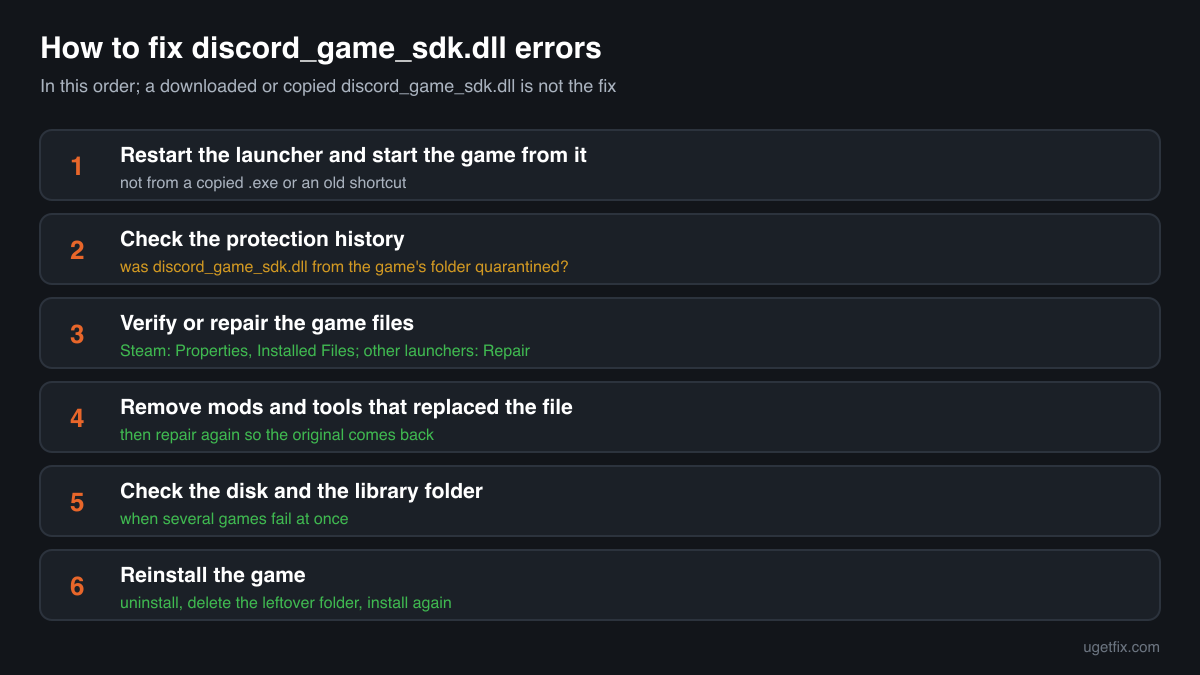
How to fix discord_game_sdk.dll errors
The file belongs to the game that shows the error. It is not part of Windows, not part of the Discord app, and not a package you can install on its own. Open the launcher you installed the game with and run its file repair: in Steam that is Properties, Installed Files, Verify integrity of game files; other launchers have a Verify, Scan and Repair or Repair entry in the game's menu. The launcher compares the game's files with its servers and downloads what is missing, discord_game_sdk.dll included, in the build the game was made with. If the file disappears again after the repair, your security software is removing it: look at its protection history first.
A discord_game_sdk.dll from a DLL download site or from another game is not the fix. Each game is built against one release of the SDK and expects the matching file, and the catalogue copies differ in size by more than ten times. A copy from elsewhere either fails to load or loads and breaks the game's Discord features.
Which games and programs ship discord_game_sdk.dll
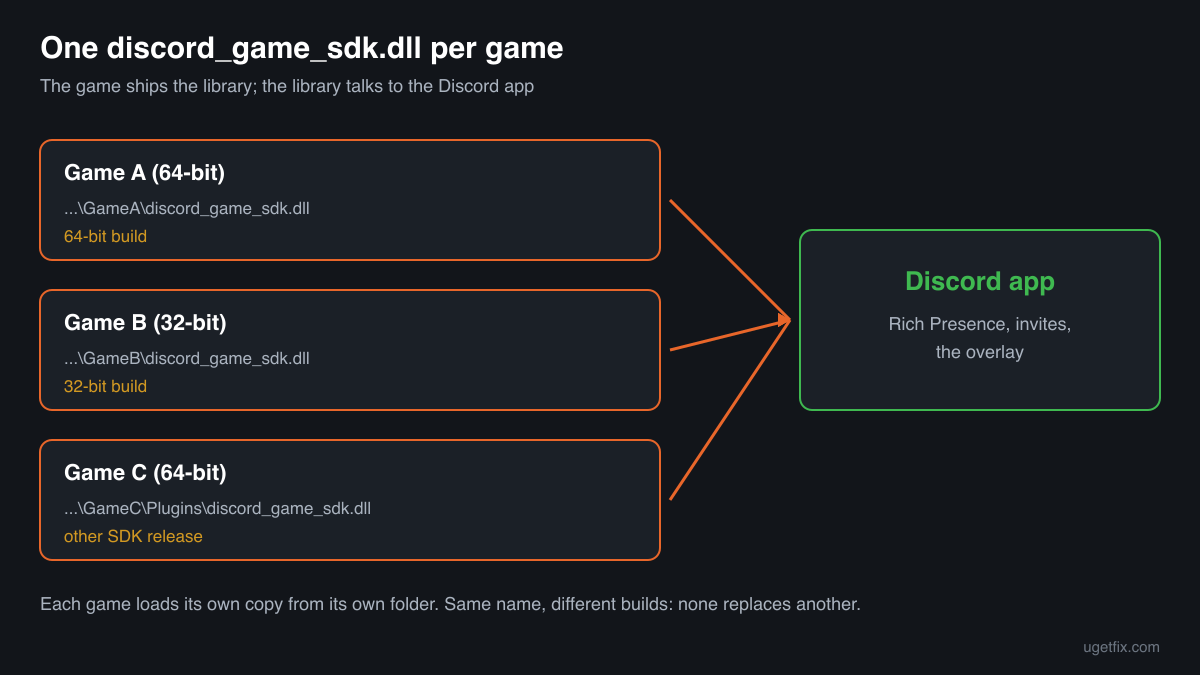
Discord handed the library to developers as part of the Game SDK download, with a 32-bit build in the lib\x86 folder and a 64-bit build in lib\x86_64, both named discord_game_sdk.dll. The developer puts the one that matches the game next to the game's .exe or in a plugin folder. There is no single copy on a PC: there is one per game. Discord has since archived the Game SDK and points new projects to its Discord Social SDK, but games built with the old kit keep shipping the file. These are the cases you will meet.
| Program | Made by | What to know |
|---|---|---|
| Games with Discord Rich Presence or invites | Discord Inc. (library), shipped by the game's developer | The game shows what you are playing in your Discord status, lets friends join from Discord or uses the Discord overlay. Each game keeps its own copy in its own install folder. The launcher's verify or repair restores it. |
| 64-bit games | Discord Inc., from the SDK's lib\x86_64 folder | The 64-bit build. It has the same file name as the 32-bit one, so the name alone does not tell you which build you have. A 64-bit game cannot load the 32-bit file. |
| 32-bit games | Discord Inc., from the SDK's lib\x86 folder | The 32-bit build under the same name. Copying a file between a 32-bit and a 64-bit game ends with error 0xc000007b or a Failed to load message. |
| Games built with an engine plugin | Discord Inc., packaged by the game's integration | The copy may sit in a Plugins or Binaries subfolder rather than next to the .exe. The error names only the file, so search the whole game folder before you assume it is gone. |
| The Discord app | Discord Inc. | The app on your PC is what the library talks to, but the game does not load the library from the app's folder. Reinstalling Discord does not restore a game's discord_game_sdk.dll; repairing the game does. |
| Modified or cracked copies of games | Unknown | A game from an unofficial download may carry a replaced or extra copy of this file. No launcher can repair such a copy, and a security detection there may be correct. |
Step by step
- Restart the launcher and start the game from it. Close the launcher completely, start it again, sign in and launch the game from its library. A game started from a copied .exe or an old shortcut may point to a folder where the file never was.
- Look at your security software's protection history. In Windows Security open Virus and threat protection, Protection history; other security programs have a quarantine or history list of their own. If discord_game_sdk.dll from the game's folder is listed, you know why it is gone. Do not restore it yet: the repair in the next step brings back a clean copy from the launcher anyway.
- Verify or repair the game files. Steam: right-click the game, Properties, Installed Files, Verify integrity of game files. Other launchers: open the game's menu or settings and choose Verify, Scan and Repair or Repair. Wait until it finishes. The launcher replaces missing and changed files with the ones the game shipped.
- If the file was removed again, deal with the detection. Only for a game you installed through an official launcher: when the security program removes the game's own copy a second time, it is likely a false positive. Repair again or restore the file from quarantine, then allow that one file or the game's folder in the security program and report the file to its maker as a false detection. Never allow a file that came from a cracked copy of a game.
- Remove mods and tools that replaced the file. Some mods, overlays and status tools replace or rename the game's discord_game_sdk.dll. Remove them with their own uninstaller, then repair the game so the launcher puts the original file back.
- Check the disk and the game folder's permissions. If several games fail with damaged files, run a disk check on that drive and make sure the launcher can write to its library folder. In Steam, Settings, Storage, the menu next to the library has a Repair Folder entry for this. Then repair the game once more.
- Reinstall the game. Uninstall it from the launcher, check that its install folder is gone (move your own save files first if the game keeps them there) and install it again. A clean install also removes files that a repair leaves in place.
What not to do
Do not download discord_game_sdk.dll from a DLL site.
You cannot know which game or SDK release the file came from, or whether it is Discord's at all. The copies in public catalogues carry no company name or description, so a downloaded one gives you nothing to check it against, and it runs with your rights every time you play.
Do not copy the file from another game.
It is Discord's library in both folders, but not always the same release or the same build. A copy from another game may lack what your game asks for, or be the 32-bit file in a 64-bit game.
Do not restore a quarantined copy from a cracked or repacked game.
Downloads of cracked games often bring malware with them, and a detection on a file in such a folder may be correct. Restoring it and switching protection off is how infections from free game downloads start.
Do not put discord_game_sdk.dll into System32 or SysWOW64.
The game looks in its own folder first, and a copy in the Windows folders fixes nothing. It stays behind, of unknown origin, for any program that might load it.
Do not reinstall Discord to fix the game.
The Discord app keeps its own files in its own folder. The game's copy of the library is part of the game, so only repairing or reinstalling the game brings it back.
Check the copy on your PC
Choose the discord_game_sdk.dll from your game folder. Its checksum is calculated in your browser and compared with 4 copies of the file collected from PCs.
The file stays on your computer. Nothing is uploaded: the checksum is computed locally.
Found a discord_game_sdk.dll outside any game folder, in Downloads, Temp or AppData, or in a game you did not get from an official store? Then the question is whether it is Discord's file at all, and that is a security question rather than a missing-file one. Is discord_game_sdk.dll Discord's file or a planted copy? On 2-Spyware
The error messages and what each one means
The wording points to the cause: a missing file, a file of the wrong build, a file that cannot be loaded, or a crash inside the library. These are the texts Windows and games show, with the file name filled in.
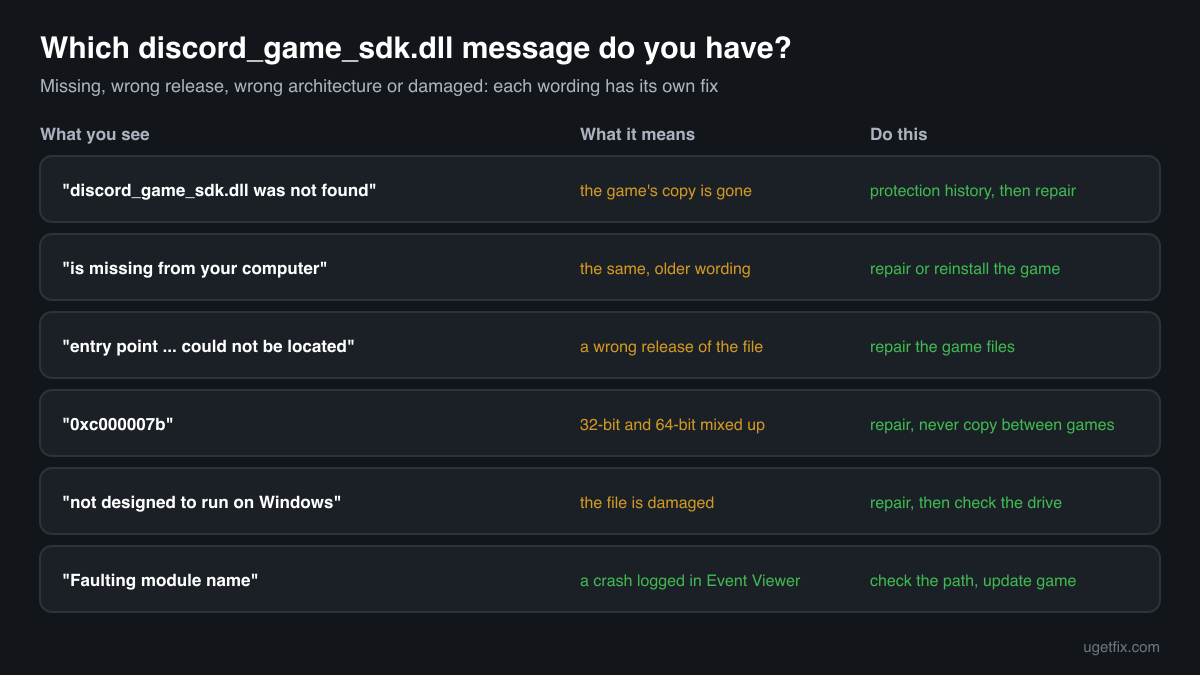
The code execution cannot proceed because discord_game_sdk.dll was not found. Reinstalling the program may fix this problem.
Windows 10 and Windows 11 wording. The game's own copy is gone: deleted, quarantined, or moved by a mod. Check the protection history, then repair the game files in its launcher.
The program can't start because discord_game_sdk.dll is missing from your computer. Try reinstalling the program to fix this problem.
The same situation in the older Windows wording. Same fix: verify or repair the game, or reinstall it.
The procedure entry point ... could not be located in the dynamic link library discord_game_sdk.dll.
A discord_game_sdk.dll was found, but not the release the game was built with: the function the game asks for is missing from it. Typical after copying the file from another game or a download site. Repair the game so the launcher puts back the matching copy.
The application was unable to start correctly (0xc000007b).
Often a 32-bit discord_game_sdk.dll in a 64-bit game or the other way round, because both builds share one name. Repair the game; do not copy the file between games.
discord_game_sdk.dll is either not designed to run on Windows or it contains an error.
Windows found the file but it is damaged or not a valid library, often after an interrupted download or a disk error. Repair the game. If several games show it, check the drive.
Error loading discord_game_sdk.dll. The specified module could not be found.
The game tried to load the library at start-up and could not find or open it. The fix is the same as for a missing file: protection history first, then repair the game.
Faulting module name: discord_game_sdk.dll
A line from the Application log in Event Viewer after a crash. Look at the Faulting module path of the same event: a path outside the game's install folder points to a mod or a modified file. Inside the game folder, repair the game and update both the game and Discord.
File facts
discord_game_sdk.dll is the native library of the Discord Game SDK. Discord describes the SDK as the way to develop a third-party game or app and integrate it with Discord: Rich Presence, which shows your game in your Discord status, game invites posted in chat, and interaction with Discord's built-in overlay. The game calls the library, and the library talks to the Discord app running on the same PC. Discord has archived the Game SDK and recommends its Discord Social SDK for new projects, so the file you have comes with a game built on the older kit. What the catalogue copies of the file report:
- Description in the file
- -
- Company in the file
- Discord Inc.
The SDK download holds two builds under one name, discord_game_sdk.dll in lib\x86 for 32-bit games and in lib\x86_64 for 64-bit games, and the developer ships the matching one with the game. It belongs in the game's own install folder, next to the .exe or in a plugin subfolder, never in the Windows folders. The copies in the catalogue below carry no company name or description in their version resource and all report version 0.0.0.0, so Properties, Details tells you little. Their sizes run from about 240 KB to about 3.8 MB, which is why the only reliable comparison is the copy your game's launcher installs.
Copies of discord_game_sdk.dll found on PCs
Public DLL catalogues have collected 4 copies of discord_game_sdk.dll uploaded from PCs. None of them fills in the version, company or description fields, so the table identifies them by build, size and checksums. Each one came from some game's folder.
None of them is the right file for your game unless it came from that same game. Games are built against different releases of the SDK, and the copies range from about 240 KB to about 3.8 MB. A match tells you the file is a known copy; whether it fits the game is something only the launcher's repair can confirm.
| Version | Build | Size | MD5 | SHA-1 |
|---|---|---|---|---|
0.0.0.0 | 64-bit | 3.7 MB | 706dcf953f150c66961a0976ad4ca43d | c190cd3ca45f982c29849dce3f1298c4ce4fce9f |
0.0.0.0 | 32-bit | 3.0 MB | 2dacb1b350cbcba43dc7e2e2a42db595 | a90c3d4a3beda7796c2d529afea2fc2cd48d7dcc |
0.0.0.0 | 32-bit | 3.0 MB | 955af9be4a97316d73afae1e7365e97e | 62cd6f527be6c82e1c1669fde807a4b34774691b |
0.0.0.0 | 32-bit | 236 KB | 9a092ba3678ec0db251693b5621bc876 | b9278e6854dfe1f4928ebfb92930ca835b5f7a43 |
Copies uploaded by users to a public DLL catalogue, read on 18 October 2026. We list their checksums so you can identify a file; we do not offer them for download and we did not verify each one against Discord's own builds.
Questions people ask
Is discord_game_sdk.dll a virus?
Discord's discord_game_sdk.dll is a harmless library that games ship in their own folders. Security programs sometimes flag it, and some of those detections hit the genuine file. A copy in a game you installed through an official launcher is the game's own; repair the game to be sure. Read the security page linked above for a copy of unknown origin.
Why does my security software keep deleting discord_game_sdk.dll?
If the game came from an official store, the detection is most likely false: repair the game, allow that game's folder in the security program and report the file to its maker. If the game came from an unofficial download, the detection may be right, and the file should not be restored.
Can I download discord_game_sdk.dll and put it in the game folder?
You should not. There is no single correct file: each game needs the build and release it was made with, and a downloaded one is of unknown origin. The right copy for your game is on its launcher's servers, and a verify or repair downloads exactly that one.
Does reinstalling Discord fix discord_game_sdk.dll errors?
No. The file lives in each game's folder, not in Discord's own folder, so reinstalling the app leaves the game's copy as it was. Repair the game in its launcher instead, and reinstall the game itself if that does not help.
Do I need Discord installed to play a game that has this file?
The library is how the game reaches the Discord app for Rich Presence, invites and the overlay. The error about a missing discord_game_sdk.dll is about the game's own file, not about the app, so installing Discord does not fix it. Restore the game's copy first.
Is there a 32-bit and a 64-bit discord_game_sdk.dll?
Yes. Discord's SDK ships one build in lib\x86 for 32-bit games and one in lib\x86_64 for 64-bit games, both with the same file name. A game loads the build that matches its own .exe, and the two cannot replace each other.
The game was working yesterday. Why is discord_game_sdk.dll missing today?
Most often a security scan or an update of its detection rules removed the file overnight. Look at the protection history first. Other causes are a mod installed or removed since, an interrupted game update, and a disk problem. Repairing the game fixes all of them once the cause is clear.
Sources
File data read on October 18, 2026.

The editors who write and check uGetFix guides and reference pages. File facts are read from Microsoft's own installers and documentation, and every page shows the date its data was read.
Questions and experiences
Ask about this page: members and our editors answer. Reading is open; writing needs a free account.
…