
mfc140u.dll is missing or will not load: the MFC library and how to restore it
mfc140u.dll is the Unicode build of Microsoft Foundation Classes (MFC), the library behind many desktop programs with classic menus, toolbars and dialog boxes. Windows does not supply it to programs. It is part of the Microsoft Visual C++ Redistributable, so you restore it by installing or repairing that package from Microsoft rather than by hunting for the single file.

Prefer to fix it yourself? The manual steps follow.
Download mfc140u.dll the official way
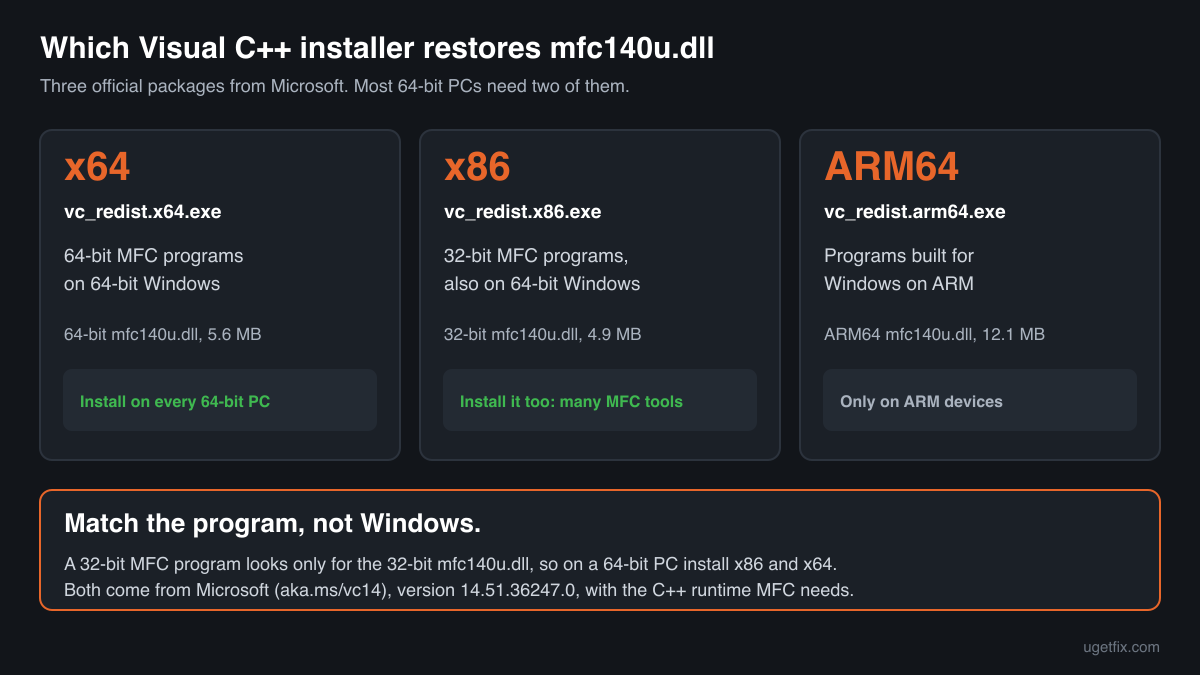
14.51.36247.0Install the current Microsoft Visual C++ Redistributable (version 14.51.36247.0). Along with the C++ runtime it installs the MFC libraries, mfc140u.dll among them, into the Windows folders that programs search, and records them so that the next update or repair can replace them.
On a 64-bit PC you usually need two packages, x64 and x86. Many MFC programs, especially older tools and device utilities, are 32-bit and look only for the 32-bit mfc140u.dll. With the x64 package alone they still report the file as missing.
“DLL files only” is meant for a program that wants its runtime next to its .exe, or for a PC where the installer will not run: mfc140u.dll plus the Visual C++ runtime files it needs (version 14.51.36247.0), taken unchanged from Microsoft's installer. Downloading needs a free uGetFix account. Sign in or register, which takes about a minute, and you come back to this page.
We fetched these installers from Microsoft on October 14, 2026 and opened them to read the files they contain. Each download page states the installer's size and SHA-256 checksum, so you can confirm that what you saved is the same file. The installers come from Microsoft's own server (aka.ms).
Step by step
- Find out whether the program is 32-bit or 64-bit. Start it, open Task Manager, Details, right-click a column header, Select columns and tick Platform. If the program does not start at all, look at its folder: a path under C:\Program Files (x86) usually means a 32-bit program.
- Install the matching package, and on 64-bit Windows also the other one. Run vc_redist.x86.exe and vc_redist.x64.exe from the links above. Installing both costs nothing and covers every MFC program on the PC, whatever its build. Restart if the installer asks, then open the program.
- Already installed: repair it. Open Settings, Apps, Installed apps, find “Microsoft Visual C++ 2015-2022 Redistributable” or “Microsoft Visual C++ v14 Redistributable”, choose Modify and then Repair. Do this for the x86 entry and the x64 entry. Repair writes fresh MFC files without touching the programs that use them.
- An “ordinal” error: update, do not hunt for files. If the message says an ordinal could not be located in mfc140u.dll, the file is there but older than the program expects. Install the current packages above; the newer mfc140u.dll contains every entry point the older ones had.
- Only one program fails: check what it carries. Some programs keep mfc140u.dll in their own folder, and Windows loads that copy first. If it is old or damaged, the program fails no matter what is in System32. Reinstall or update that program, or ask its maker whether it supports the Visual C++ 2015-2022 runtime.
What not to do
Do not take mfc140u.dll alone from a DLL download site.
MFC files come in a set: the Unicode and ANSI libraries, their language resources and the C++ runtime under them. A lone file gives you one piece of an unknown version, and nothing replaces it when Microsoft ships an update. Unverified copies are also how altered libraries reach a PC. If a program needs loose files, use “DLL files only” above, and to judge a copy you already have, use the checker below.
Do not replace mfc140u.dll with mfc140.dll, or the other way round.
The names look alike, but they are two different libraries with different entry points. A program built for one cannot use the other, so renaming a file only changes the error message.
Do not run regsvr32 on mfc140u.dll.
It is a class library that programs link to, not a COM server, so there is nothing to register. regsvr32 fails and the original error stays.
Do not paste it into System32 or SysWOW64 by hand.
A file placed manually is unknown to the installer. A later repair may not overwrite it, and a 64-bit file in SysWOW64 or a 32-bit file in System32 produces a new error that is harder to trace than the first.
Check the copy on your PC
Choose the mfc140u.dll you want to check. Your browser calculates its checksums and compares them with 21 builds we know: the files in the current official redistributable, the builds indexed from Windows images and the older versions found on PCs.
The file stays on your computer. Nothing is uploaded: the checksum is computed locally.
1 genuine programs have been documented loading a planted copy of mfc140u.dll. Seeing mfc140u.dll in Temp, Downloads, AppData or next to a program you do not recognise? That is a question of whether the copy is genuine, not of a missing file. How to tell if mfc140u.dll is malware, on 2-Spyware
The error messages and what each one means
Programs and Windows describe an mfc140u.dll problem in several ways. Each wording points to a different cause, so read yours before you act.
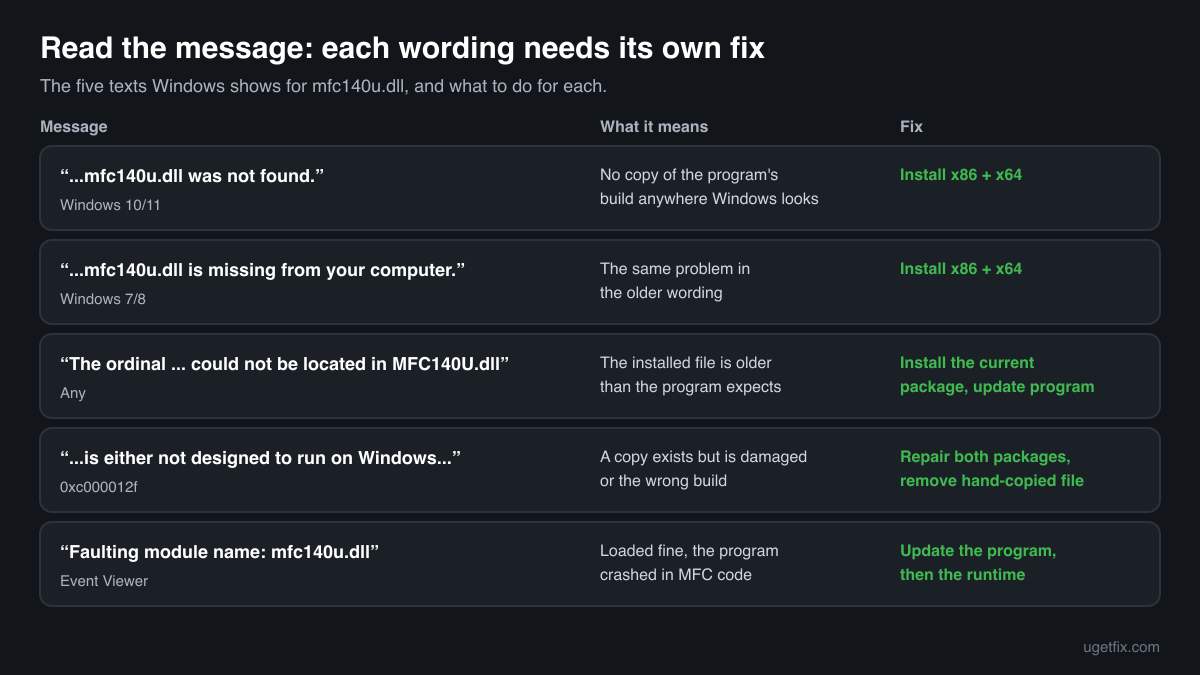
The code execution cannot proceed because mfc140u.dll was not found. Reinstalling the program may fix this problem.
Shown by Windows 10 and Windows 11 when no mfc140u.dll of the program's build exists anywhere Windows looks. Install the redistributable; on 64-bit Windows install x86 and x64.
The program can't start because mfc140u.dll is missing from your computer. Try reinstalling the program to fix this problem.
The older wording of the same problem, from Windows 7 and Windows 8. The redistributable fixes it the same way.
The ordinal [number] could not be located in the dynamic link library MFC140U.dll.
MFC programs call the library's functions by number. This message means the program asked for a number the installed mfc140u.dll does not have, because that file is older than the one the program was built with. Install the current redistributable. If the program keeps its own old copy in its folder, update or reinstall the program.
mfc140u.dll is either not designed to run on Windows or it contains an error. Error status 0xc000012f.
Windows found a file with this name and could not load it. Typical causes are a 64-bit file where a 32-bit one is needed, a truncated download or a damaged disk sector. Repair both redistributable packages, then remove any hand-copied mfc140u.dll from the program's folder.
Faulting module name: mfc140u.dll
An Application log entry in Event Viewer after a crash. mfc140u.dll loaded and the crash happened while the program was running MFC code, for example while drawing a window or handling a dialog. The program is the usual cause: update it first, and install the current redistributable so that it runs on the newest MFC fixes.
File facts for the current official version
Read from the files inside Microsoft's installers, version 14.51.36247.0. MFCDLL Shared Library - Retail Version, Microsoft Corporation.
| Build | Version | Size | Exported functions | Signed by |
|---|---|---|---|---|
| x64 | 14.51.36247.0 | 5,597,112 bytes | 9,307 | Microsoft Windows Software Compatibility Publisher |
| x86 | 14.51.36247.0 | 4,882,368 bytes | 9,279 | Microsoft Windows Software Compatibility Publisher |
| ARM64 | 14.51.36247.0 | 12,122,976 bytes | 9,294 | Microsoft Corporation |
- SHA-256 · x64
fc5848eb58982e193cdfe73f1f26cd04fce4e196f717f42b89ae27315cd52f6f- SHA-256 · x86
c5822d9f3965a6982623c2d691df397f3e71c35f1b552f74dc24e5e7e40f07ff- SHA-256 · ARM64
8d9b990e8f2eba21ea6c5eb024fedaab828b2a0d91c31fd0c68ee4019363454f
- Where the genuine mfc140u.dll belongs
C:\Program Files\CheckMAL\AppCheck
Once installed, the 64-bit mfc140u.dll sits in C:\Windows\System32 and the 32-bit one in C:\Windows\SysWOW64. Its file description reads “MFCDLL Shared Library - Retail Version”. Each build exports more than 9,000 functions: the classes MFC programs are made of, such as windows, dialog boxes, menus, toolbars, documents and views. Programs reach most of them by number (ordinal) rather than by name, which is why a version mismatch shows up as an ordinal error.
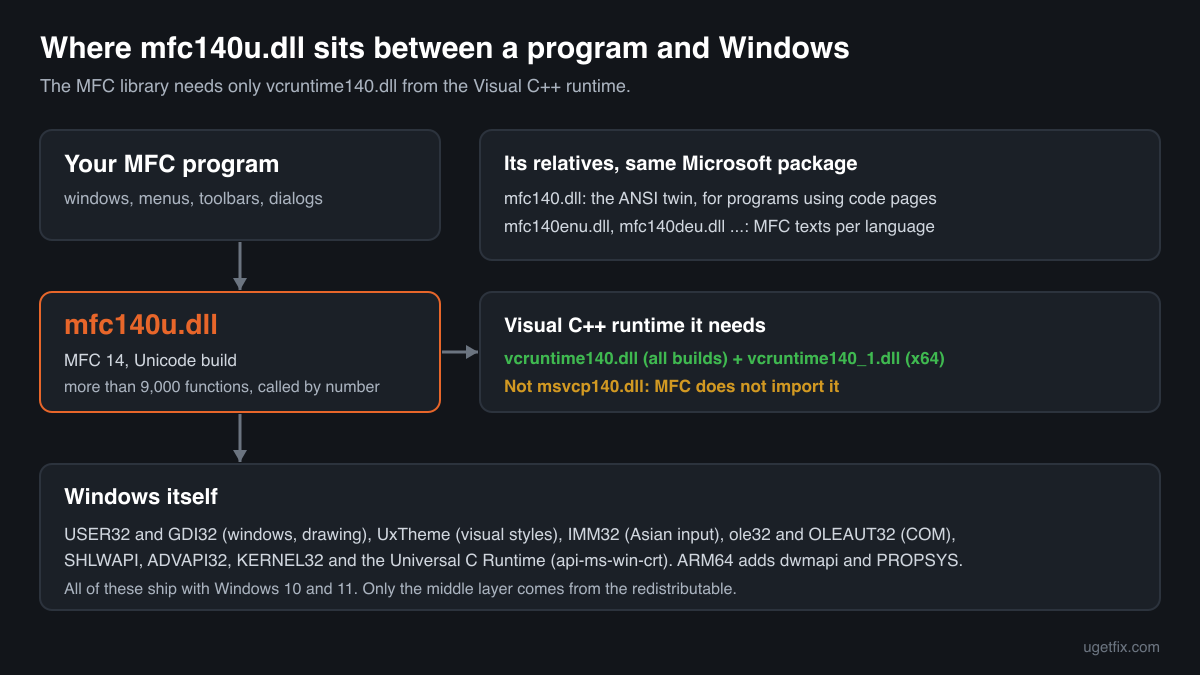
What mfc140u.dll itself depends on
MFC is a layer over the Windows interface, and its import table shows it. mfc140u.dll asks Windows for USER32.dll and GDI32.dll to create and paint windows, UxTheme.dll for visual styles, IMM32.dll for keyboard input in Asian languages, ole32.dll and OLEAUT32.dll for COM and drag and drop, and SHLWAPI.dll, ADVAPI32.dll and KERNEL32.dll for paths, the registry and memory. The ARM64 build adds dwmapi.dll and PROPSYS.dll. All of these are part of Windows.
From the Visual C++ runtime it needs only VCRUNTIME140.dll, and in the x64 build also VCRUNTIME140_1.dll. It does not import msvcp140.dll. So if Windows says vcruntime140.dll is missing right after you copied mfc140u.dll by hand, the copied file is fine and its runtime is what is absent; the redistributable brings both.
VCRUNTIME140_1.dllVCRUNTIME140.dllADVAPI32.dllapi-ms-win-crt-convert-l1-1-0.dllapi-ms-win-crt-filesystem-l1-1-0.dllapi-ms-win-crt-heap-l1-1-0.dllapi-ms-win-crt-math-l1-1-0.dllapi-ms-win-crt-multibyte-l1-1-0.dllapi-ms-win-crt-runtime-l1-1-0.dllapi-ms-win-crt-stdio-l1-1-0.dllapi-ms-win-crt-string-l1-1-0.dllapi-ms-win-crt-time-l1-1-0.dllapi-ms-win-crt-utility-l1-1-0.dlldwmapi.dllGDI32.dllIMM32.dllKERNEL32.dllole32.dllOLEAUT32.dllPROPSYS.dllSHLWAPI.dllUSER32.dllUxTheme.dllThe api-ms-win-crt files in the list are the Universal C Runtime, built into Windows 10 and Windows 11 and updated through Windows Update, not through the Visual C++ package.
What the redistributable installs
Runtime files of the x64 installer, version 14.51.36247.0: 13 libraries that Microsoft installs and updates as one set. mfc140u.dll is the largest of them. MFC's companions, such as the ANSI library mfc140.dll and the language resources (mfc140enu.dll, mfc140deu.dll and others), come from the same Microsoft package.
| File | Microsoft's description | Size |
|---|---|---|
concrt140.dll | Microsoft® Concurrency Runtime Library | 365 KB |
mfc140u.dll | MFCDLL Shared Library - Retail Version | 5,466 KB |
msvcp140.dll | Microsoft® C Runtime Library | 628 KB |
msvcp140_1.dll | Microsoft® C Runtime Library _1 | 35 KB |
msvcp140_2.dll | Microsoft® C Runtime Library _2 | 268 KB |
msvcp140_atomic_wait.dll | Microsoft® C Runtime Library _atomic_wait | 56 KB |
msvcp140_codecvt_ids.dll | Microsoft® C Runtime Library _codecvt_ids | 30 KB |
vcamp140.dll | Microsoft® C++ AMP Runtime | 408 KB |
vccorlib140.dll | Microsoft ® VC WinRT core library | 342 KB |
vcomp140.dll | Microsoft® C/C++ OpenMP Runtime | 208 KB |
vcruntime140.dll | Microsoft® C Runtime Library | 174 KB |
vcruntime140_1.dll | Microsoft® C Runtime Library | 49 KB |
vcruntime140_threads.dll | Microsoft® C Runtime Library | 38 KB |
Older versions of mfc140u.dll found on PCs
Programs that ship MFC in their own folder leave those copies behind for years, long after Microsoft has published newer builds. A public DLL catalogue holds 13 such copies, from version 14.0.23026.0 to 14.25.28508.3. The table gives the checksums of each, so you can see which one you have.
The redistributable above installs 14.51.36247.0, newer than any copy in this list. A match here usually means an old Microsoft build, but the list is not verified, so confirm the Microsoft signature too. An older mfc140u.dll is the usual reason for an ordinal error: install the current package, and update any program that keeps its own copy.
| Version | Build | Size | MD5 | SHA-1 |
|---|---|---|---|---|
14.25.28508.3 | 64-bit | 5.4 MB | 3a305efd3cdd331c177b5566f5b756fb | 6a25ffe2590db71a66d1340e317771e7381d5161 |
14.25.28508.3 | 32-bit | 4.8 MB | 109e1488c848f17e370f3973efde2c38 | 7f2feb94cf7fd1378df4963316c7941067e7edc0 |
14.24.28127.4 | 64-bit | 5.5 MB | c6a732f23b907bc6d37982f47f4b4453 | c27dd881cd6d1e3337fd5dfc0031f8975a5c44a0 |
14.16.27012.6 | 32-bit | 4.8 MB | 06f307b7ddb0994b448b9786cf5811b8 | 4d70c5206e84b23916e4c686f430e5dcdc70dfc3 |
14.14.26405.0 | 64-bit | 5.6 MB | 63f32671b2207e0ede9b813353657bb9 | 3f0f94d25da4dea37df4d163cc2dbb7c9be90f7f |
14.13.26020.0 | 32-bit | 4.9 MB | 118f2bc2314ab6ea8a64d86162e38582 | ab5ebcd6b064dee8020979be2d6c836fe1167e31 |
14.12.25810.0 | 32-bit | 4.9 MB | d6c87b75c8641349d2ce1fcd0757b6d4 | fc4a354d08f7b2bc8f86f577d495d2c5c7760905 |
14.0.24215.1 | 64-bit | 5.8 MB | d442e95540feb1423f19563effaddfcc | 4068cf07722f7d71e369368cd49e0c3ea2ecd2e3 |
14.0.24215.1 | 32-bit | 4.5 MB | ff62af7574cba15e3192ad6a9d3d19b8 | 892ff33d139e9b9227ae03f2934de5921c74364f |
14.0.24212.0 | 64-bit | 5.8 MB | 974ca2b25b954453d7be5c793f53cc30 | 1301d97f621110989f86443d5149d0cf0a944e6d |
14.0.24210.0 | 32-bit | 4.5 MB | 2296ab849839fdb3b186d07c829d7ebe | 4115a9f544090ccea91fd71faf5c60964b17321d |
14.0.23026.0 | 64-bit | 5.4 MB | 356cda31c77d6f99028d8ed1d95271c7 | ecda65beeb891b5190ca23e35ef141fac9c19ae1 |
14.0.23026.0 | 32-bit | 4.2 MB | 6a8d94346a834482957f41b9c2b6d22e | aa87337d304cb04d7de18c665b1c8202c536d93f |
Copies users uploaded to a public DLL catalogue, read on 14 October 2026. The checksums are listed for identification only. We do not offer these copies for download and have not checked each one against Microsoft's signature.
Questions people ask
What is the difference between mfc140u.dll and mfc140.dll?
Both are MFC version 14 from the same redistributable. The u stands for Unicode: mfc140u.dll handles text as Unicode, which is how nearly all programs are built today. mfc140.dll is the ANSI (multibyte) twin for programs that still use code pages. A program asks for exactly one of them by name, so you cannot swap them; installing the redistributable gives you both.
What are mfc140enu.dll, mfc140deu.dll and similar files?
They hold MFC's built-in texts, such as standard prompts and messages, in other languages. The three letters after mfc140 name the language: enu for English, deu for German, fra for French, jpn for Japanese and so on. They belong to the same Microsoft package as mfc140u.dll, so an error about one of them has the same fix.
Which Visual C++ version do I need for mfc140u.dll?
The 140 in the name means MFC version 14, shared by Visual Studio 2015, 2017, 2019 and 2022. The current 2015-2022 (v14) redistributable serves programs built with any of them. Older MFC versions have their own names, for example mfc120u.dll for Visual Studio 2013 and mfc100u.dll for 2010, and need their own packages.
The error names mfc140ud.dll. Is that the same file?
No. The d marks the debug build of MFC, which is made for developers testing their own code. Microsoft does not allow debug libraries to be redistributed, so no installer for end users contains it. The program you are running is a debug build; ask its maker for the normal release version.
Is the mfc140u.dll on my PC safe?
The genuine file is signed by Microsoft and is safe. Check a copy you are unsure about with the tool on this page; the 2-Spyware link above explains where suspicious copies turn up.
Why do I already have mfc140u.dll and still get the error?
Most often the copy you have is the wrong build. A 32-bit program cannot use the 64-bit file in System32, so it fails even though the name is on the disk. The other common case is an older copy in the program's own folder that lacks the functions the program calls. Installing both packages and updating the program covers both cases.
Sources
- Microsoft: Latest supported Visual C++ Redistributable downloads
- Winbindex, the Windows binaries index (m417z)
File data read on October 14, 2026.

The editors who write and check uGetFix guides and reference pages. File facts are read from Microsoft's own installers and documentation, and every page shows the date its data was read.
Questions and experiences
Ask about this page: members and our editors answer. Reading is open; writing needs a free account.
…