
oo2core_8_win64.dll is missing or fails to load: what the file is and how to fix it
oo2core_8_win64.dll is the 64-bit core of Oodle Data Compression from RAD Game Tools, the library a game uses to unpack its compressed levels, textures and other data while it loads. Every game built with Oodle ships its own copy in its own folder. When a game or a tool says the file is missing, the fix is that game's own files, not a DLL from the internet.

Prefer to fix it yourself? The manual steps follow.
How to fix oo2core_8_win64.dll errors
The file belongs to the game that shows the error. Windows does not include it, and no runtime, driver or redistributable package installs it. If the game came from a store, let its launcher check the files: in Steam right-click the game, choose Properties, Installed Files, Verify integrity of game files; the EA app, Epic Games Launcher, GOG Galaxy and Ubisoft Connect have a Repair or Verify option in the game's menu. The launcher downloads the oo2core_8_win64.dll this game was built with and puts it back where the game expects it. If the file disappears again after the check, your security software is removing it: look at its protection history before anything else.
A copy from a DLL download site is not the fix. The game reads its packed data through this exact library, and you cannot tell where a downloaded file came from or whether it is RAD's at all. The missing file is also one of the most common errors in cracked game downloads that left it out: no download from a third-party site turns such a copy into a working, safe game.
Which games and programs ship oo2core_8_win64.dll
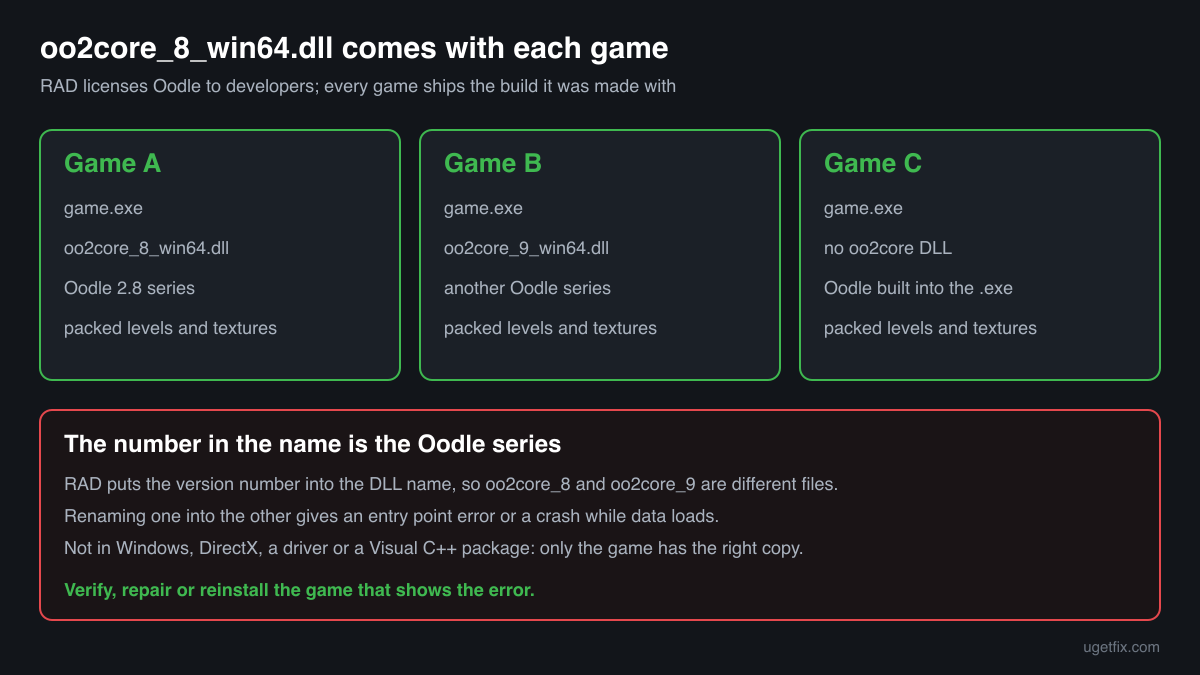
RAD licenses Oodle to game developers as an SDK, and the developer either builds it into the game or ships it as this DLL next to the game's .exe. The number in the name is the Oodle version series, so a game made with another series asks for a file with another number. There is no shared copy on a PC: each game has its own. These are the cases you will meet.
| Program | Made by | What to know |
|---|---|---|
| 64-bit PC games that pack their data with Oodle 2.8 | RAD Game Tools (library), shipped by the game's developer | The game calls the file whenever it loads a packed archive: at start-up, on every level and often for streamed textures. If the file is gone, the game usually stops before the first menu. The copy sits in the game's own folder, next to the .exe or in a bin folder. |
| Games that use another Oodle series | Their own developers | They ship a file with another number, such as oo2core_9_win64.dll for a newer series. The numbers are not interchangeable, and renaming one file into another does not work: a game asks for the functions of the series it was built with. |
| Games with Oodle built in | Their own developers | Many games link Oodle into their .exe and have no separate DLL at all. Such a game never asks for oo2core_8_win64.dll, so an error naming the file always comes from a game, a mod or a tool that loads the DLL itself. |
| Modding and unpacking tools | Their own authors | Tools that open or repack the archives of an Oodle game need this library to read them and often do not include it. Their instructions tell you to copy oo2core_8_win64.dll from your own installed game into the tool's folder. That is the only safe source for a tool. |
| Cracked and repacked games | Unknown | A frequent source of this error: the download left the file out or a security program removed something from it. Asking around for the missing DLL leads to files of unknown origin. The fix is a legitimate copy of the game, and the risk of such downloads is covered on the security page. |
Step by step
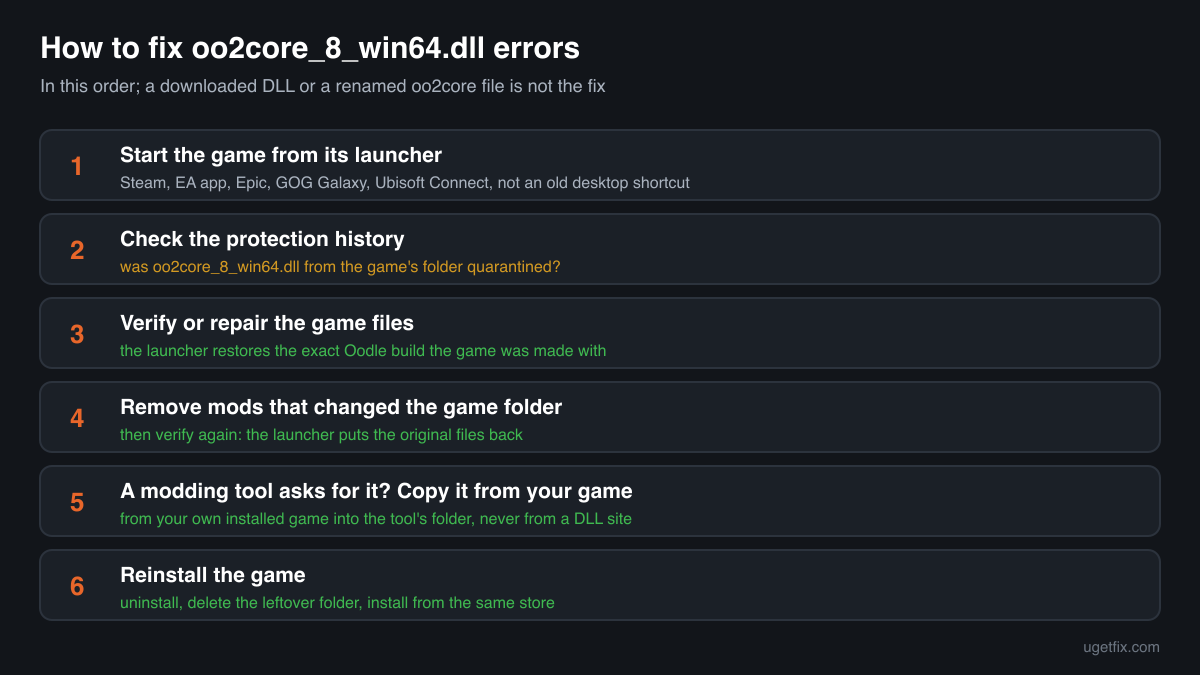
- Start the game the way it was installed. Launch a store game from its launcher (Steam, EA app, Epic, GOG Galaxy, Ubisoft Connect) rather than from an old desktop shortcut. A shortcut that points to an old install folder or another copy of the game can fail at the same point as a missing file.
- Look at your security software's protection history. In Windows Security open Virus and threat protection, Protection history; other security programs have a quarantine or history list of their own. If oo2core_8_win64.dll from the game's folder is listed, you know why it is gone. Do not restore it yet: the verify in the next step brings back a clean copy anyway.
- Verify or repair the game files. Steam: right-click the game, Properties, Installed Files, Verify integrity of game files. EA app, Epic Games Launcher, GOG Galaxy and Ubisoft Connect: open the game's menu or settings and choose Repair or Verify. Wait until it finishes and do not run it for several games at once. The launcher replaces missing and changed files, this DLL included.
- If the file was removed again, deal with the detection. Only for a game you bought from a store: when the security program removes the copy a second time, compare it with the file check on this page, restore it from quarantine, allow that file or the game's folder and report the false detection to the program's maker. Never allow a file that came with a cracked or repacked game.
- Remove mods that changed the game folder. Mods that repack the game's archives or add loaders sometimes move or replace files in the game folder. Remove the mod with its own uninstaller or by its instructions, then verify the game again: the launcher restores the original files, but it may leave the extra files the mod added.
- Fix a modding tool that asks for the file. If the message comes from a tool rather than the game, copy oo2core_8_win64.dll from your installed game's folder into the tool's folder, as its instructions say. Use the file from the same game the tool is made for. Do not download the DLL for a tool from a DLL site.
- Reinstall the game. Uninstall it, check that its folder is gone (move your own save files first if the game keeps them there) and install it again from the same store. A clean install also removes files that a verify leaves in place.
What not to do
Do not download oo2core_8_win64.dll from a DLL site.
The catalogue copies of this file carry no version, company or description, so a downloaded file cannot be told apart from a modified one by its properties. It also runs inside the game with your rights every time you play. The copy your game needs is already on the store's servers.
Do not rename another oo2core file.
oo2core_9_win64.dll or a file with any other number is a different Oodle series. A game built against the 2.8 series looks for the functions it knows by name, and a renamed file either fails with an entry point error or breaks when the game unpacks its data.
Do not put oo2core_8_win64.dll into System32 or SysWOW64.
The game looks in its own folder first, so a copy in the Windows folders fixes nothing. It stays behind, of unknown origin, for any other program that loads a DLL by this name.
Do not restore a quarantined copy from a cracked or repacked game.
In such downloads a detection may be right, and malware is often bundled with them. Restoring files and switching protection off is how many infections from free game downloads start.
Do not reinstall graphics drivers or Visual C++ packages for this error.
Oodle is not part of a driver, DirectX or any redistributable. Those installers never place oo2core_8_win64.dll in a game folder, so they cannot fix a missing copy.
Check the copy on your PC
Choose the oo2core_8_win64.dll from your game folder. Its checksum is calculated in your browser and compared with 2 copies of the file collected from PCs.
The file stays on your computer. Nothing is uploaded: the checksum is computed locally.
Found an oo2core_8_win64.dll in a game from a repack, in Downloads or Temp, or outside any game or tool folder? Then the question is whether it is RAD's file at all, and that is a security question rather than a missing-file one. Is oo2core_8_win64.dll RAD's Oodle file or a planted copy? On 2-Spyware
The error messages and what each one means
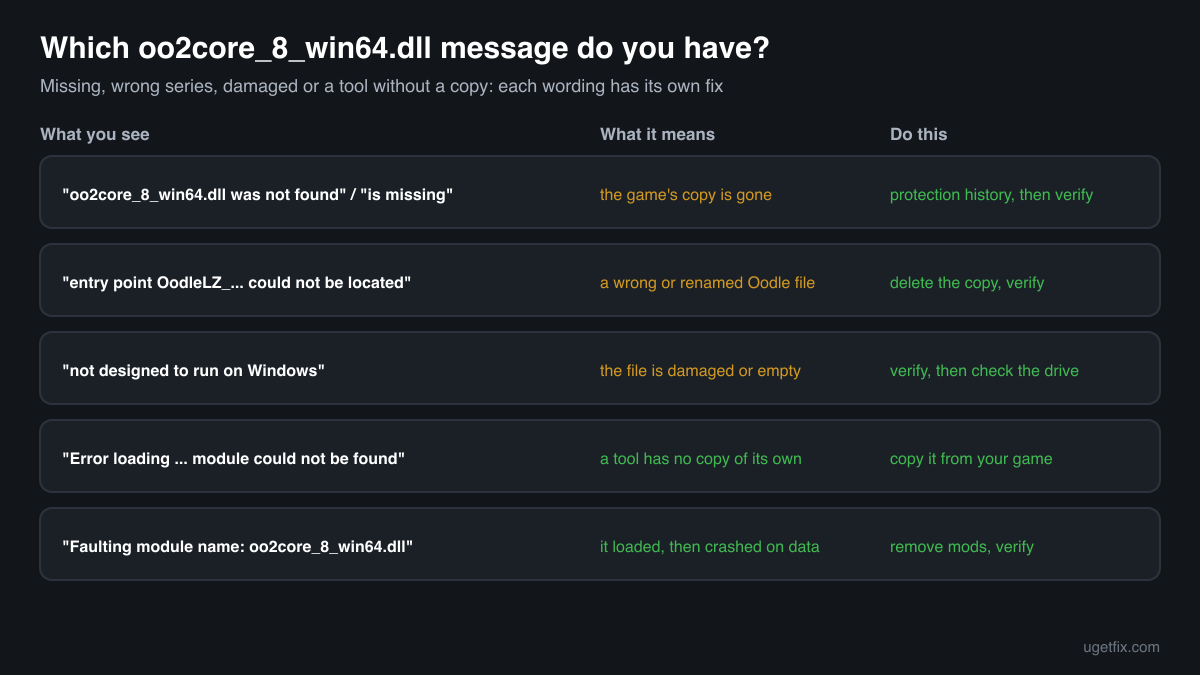
The wording points to the cause: a missing file, a file of the wrong series, a damaged file, or a tool that has no copy of its own. These are the texts Windows, games and tools show, with the file name filled in.
The code execution cannot proceed because oo2core_8_win64.dll was not found. Reinstalling the program may fix this problem.
Windows 10 and Windows 11 wording. The game's own copy is gone: deleted, quarantined, or never there in the download. Check the protection history, then verify or repair the game.
The program can't start because oo2core_8_win64.dll is missing from your computer. Try reinstalling the program to fix this problem.
The same situation in the older Windows wording. Same fix: let the launcher verify the files, or reinstall the game from its store.
The procedure entry point OodleLZ_... could not be located in the dynamic link library oo2core_8_win64.dll.
A file with this name was found, but it is not the build the game needs: the Oodle function named in the message is missing from it. Typical after renaming another oo2core file or downloading one. Delete the copied file and verify the game.
oo2core_8_win64.dll is either not designed to run on Windows or it contains an error.
Windows found the file but it is damaged, empty or not a valid 64-bit library, often after an interrupted download or a disk error. Verify or reinstall the game; if several games show it, check the drive.
Error loading oo2core_8_win64.dll. The specified module could not be found.
Wording used by many programs, modding and unpacking tools among them, when the DLL is not in the folder they load it from. Copy the file from your installed game into the tool's folder, as the tool's instructions say.
Faulting module name: oo2core_8_win64.dll
A line from the Application log in Event Viewer after a crash, usually while the game loads data. Look at the Faulting module path of the same event: a path outside the game's folder or a file you added points to a mod or a copied DLL. Inside the game's folder, verify the game and remove mods that repack its archives.
File facts
oo2core_8_win64.dll is the 64-bit Windows build of the core library of Oodle Data Compression, the compression family RAD Game Tools makes for games; RAD's website carries the copyright of Epic Games, Inc. Developers use Oodle to make a game smaller to download and its levels faster to load: the data is packed once when the game is built, and the game unpacks it with this library every time it loads. RAD's Oodle history notes that the version number is part of the DLL name, which is why the file is called oo2core_8 and not simply oo2core. What the catalogue copies of the file report:
- Description in the file
- -
- Company in the file
- RAD Game Tools, Inc.
The game loads oo2core_8_win64.dll from its own folder, next to its .exe or in a subfolder it was built to use, and Windows looks there first. A genuine copy therefore lives inside a game's install folder and never in the Windows folders. The copies in the public catalogue are 64-bit, about 1 MB each, and report no version, company or description, so the Details tab in Properties shows little for this file and blank fields alone prove nothing. Only the game's own installer or launcher can tell whether a copy is the one that game shipped.
Copies of oo2core_8_win64.dll found on PCs
Public DLL catalogues have collected 2 copies of oo2core_8_win64.dll uploaded from PCs. Both report version 0.0.0.0, which means the file carries no version information, and neither names a company or a description. Each one came from some game's folder. The table lists them with their checksums, so you can tell whether your file is one of them.
The two copies have the same size but different checksums: they are two different builds under the same name, each from some game's folder. A match tells you your file is a copy seen on other PCs; whether it is the one your game ships only the game's own launcher can confirm.
| Version | Build | Size | MD5 | SHA-1 |
|---|---|---|---|---|
0.0.0.0 | 64-bit | 983 KB | 9b7f9e3e4931b80257da5e1b626db43a | 9751f044b85b6c9360cd810e54d1cdd1d40a77c9 |
0.0.0.0 | 64-bit | 983 KB | c1a0dd317543035221327d44f07c3d06 | 360c78a8cdcc0237bb4583568826e75194bcaed5 |
Copies uploaded by users to a public DLL catalogue, read on 17 October 2026. We list their checksums so you can identify a file; we do not offer them for download and we did not verify them against RAD's own builds.
Questions people ask
Is oo2core_8_win64.dll a virus?
RAD's oo2core_8_win64.dll is a harmless compression library that games ship in their own folders. It is searched for so often because cracked game downloads leave it out, and the files offered to fill the gap are of unknown origin. A copy in a game you bought, in that game's folder, is normally RAD's. Read the security page linked above for a copy of unknown origin.
Can I download oo2core_8_win64.dll and put it in the game folder?
You should not. The file has no version or company information to check, a downloaded copy is of unknown origin, and the right build for your game is on the store's servers. Verify or repair the game in its launcher, or reinstall it, and you get the matching copy in minutes.
A modding tool asks for oo2core_8_win64.dll. Where do I get it?
From your own installed game. Tools that read the archives of an Oodle game need the same library the game uses and expect you to copy it from the game's folder into the tool's folder. Copy it, do not move it, so the game keeps its own copy.
Can I rename oo2core_9_win64.dll to oo2core_8_win64.dll?
No. The number in the name is the Oodle version series, and a game built against one series asks for the functions of that series. A renamed file usually fails with an entry point error, and if it loads, the game can crash while it unpacks its data. Restore the right file through the game instead.
Does reinstalling a graphics driver or DirectX help?
No. Oodle is a compression library that the game developer licenses from RAD and ships with the game. It is not part of a graphics driver, DirectX, a Visual C++ package or Windows, and none of those installers puts the file in a game folder.
The game worked yesterday. Why is oo2core_8_win64.dll missing today?
Most often a security scan or an update of its detection rules removed the file. Other causes are a mod installed or removed since, an interrupted game update and a disk problem. Check the protection history first, then verify the game files, which fixes all of these once the cause is clear.
Why does my file show no version or company in Properties?
Because the copies of oo2core_8_win64.dll collected from PCs carry no version information at all. Blank Details fields are normal for this file and do not mean it is fake. Use the folder it sits in, where the game came from and the file check on this page instead.
Sources
- RAD Game Tools: Oodle Compression (Oodle Data Compression for games)
- RAD Game Tools: Oodle Development History (version number in the DLL name, 2.8.x long term support release)
- Steam Support: Verify Integrity of Game Files
File data read on October 17, 2026.

The editors who write and check uGetFix guides and reference pages. File facts are read from Microsoft's own installers and documentation, and every page shows the date its data was read.
Questions and experiences
Ask about this page: members and our editors answer. Reading is open; writing needs a free account.
…