
x3daudio1_7.dll was not found: what the 3D audio file is and how to install it properly
x3daudio1_7.dll is X3DAudio 1.7, Microsoft's 3D Audio Library. A game hands it the position of the player and of every sound, and it works out how loud each sound should be in each speaker. Windows 10 and Windows 11 do not include this file. It comes with Microsoft's DirectX End-User Runtimes (June 2010), and that installer, not a loose DLL, is the fix.

Prefer to fix it yourself? The manual steps follow.
Download x3daudio1_7.dll the official way
9.28.1886.0Run Microsoft's DirectX End-User Runtimes (June 2010) installer. It copies x3daudio1_7.dll version 9.28.1886.0 into the Windows system folders, together with xaudio2_7.dll, the XAudio2 sound engine that games using X3DAudio 1.7 normally load as well. Files that are already present are left as they are, so running it on a PC that has part of the runtime does no harm.
There is one installer for every PC. On 64-bit Windows it installs the x64 copy for 64-bit games and the x86 copy for 32-bit games in the same run, so you never have to work out which one a game wants.
“DLL files only” is for a game that wants the file next to its .exe, or a PC where DXSETUP.exe refuses to run: x3daudio1_7.dll version 9.28.1886.0, taken unchanged from Microsoft's installer. It loads on its own, with no other DirectX file. Downloading needs a free uGetFix account. Sign in, or create one in a minute, and you come straight back to this page.
We downloaded this installer from Microsoft on October 17, 2026 and unpacked it. The download page lists the size and SHA-256 checksum of each file, so you can compare them with what you got. The installer comes straight from Microsoft's download server (download.microsoft.com).
Step by step
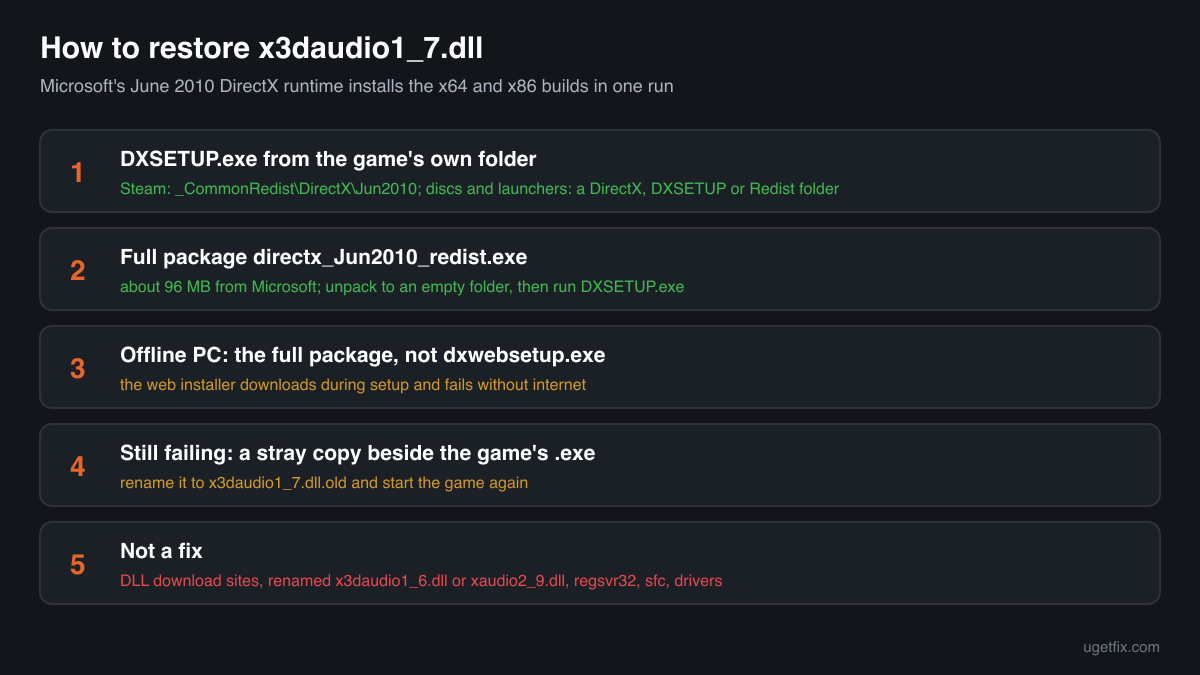
- Look in the game folder for Microsoft's installer first. Games that need X3DAudio often bring the June 2010 runtime with them. In a Steam library it is usually in _CommonRedist\DirectX\Jun2010 inside the game's folder; disc and launcher installs tend to use a folder named DirectX, DXSETUP or Redist. Run DXSETUP.exe from there and the job is done without any download.
- Otherwise, download the full package and unpack it. The download is directx_Jun2010_redist.exe, about 96 MB. Running it does not install anything yet: it is a self-extracting archive and asks where to put its contents. Make an empty folder, for example C:\DXJun2010, and choose that.
- Run DXSETUP.exe from the unpacked folder. Accept the license and wait for the message that installation is complete. Then start the game. The unpacked folder is no longer needed, but you can keep it for the next PC, because it installs offline.
- No internet on that PC? Skip the web installer. Microsoft also offers dxwebsetup.exe, a small installer that fetches only the missing parts during setup. It fails without a working connection. The full package above carries every file and does not need one.
- The error stays: look for a copy beside the game's .exe. Windows loads an x3daudio1_7.dll from the game's own folder before the one in System32. A copy left there by an old repack, a mod or a manual fix may be damaged or the wrong build. Rename it to x3daudio1_7.dll.old and start the game again. If it now works, that copy was the cause; if not, compare the exact message with the list below.
What not to do
Do not take x3daudio1_7.dll from a DLL download site.
There is no way to know which build you receive, whether it is 32-bit or 64-bit, or whether someone changed it. A game loads this file every time it starts, so a tampered copy would run with it. If you need the loose file, use the “DLL files only” ZIP above, unpacked unchanged from Microsoft's installer, and check any copy you already have with the tool below.
Do not rename x3daudio1_6.dll or xaudio2_9.dll.
Some guides suggest copying another audio file under the name x3daudio1_7.dll. Each X3DAudio release is a separate file built for the XAudio2 version a game was made with, and xaudio2_9.dll is a whole sound engine, not this helper. A renamed file at best moves the error elsewhere and at worst gives you crashes or wrong positional sound. Install the genuine file instead.
Do not drop the file into System32 yourself.
On 64-bit Windows, System32 is the folder for 64-bit files and SysWOW64 the one for 32-bit files, the opposite of what the names suggest. Putting the 32-bit x3daudio1_7.dll into System32 is a classic way to end up with 0xc000007b. DXSETUP.exe puts each build where it belongs.
Do not register it with regsvr32.
x3daudio1_7.dll exports exactly two functions, X3DAudioInitialize and X3DAudioCalculate, and no registration entry point. regsvr32 has nothing to call and just reports another error.
Do not expect sfc, Windows Update or a graphics driver to restore it.
None of them installs the legacy DirectX runtime. System File Checker repairs files that belong to Windows, and this one never did. A new graphics driver does not touch audio libraries. dxdiag can show DirectX 12 on a PC that still lacks x3daudio1_7.dll, because the two are unrelated packages.
Check the copy on your PC
Choose the x3daudio1_7.dll you have. Its checksums are calculated in your browser and compared with 4 builds we know: the official files from Microsoft's DirectX installer and the copies found on PCs.
The file stays on your computer. Nothing is uploaded: the checksum is computed locally.
Found an x3daudio1_7.dll you cannot explain, in Downloads, Temp or AppData, or one that arrived with a crack or trainer? That is a security question rather than a missing-file one. How to tell if x3daudio1_7.dll is malware, on 2-Spyware
The error messages and what each one means
The wording points to the cause. These are the texts Windows and games show, as written.
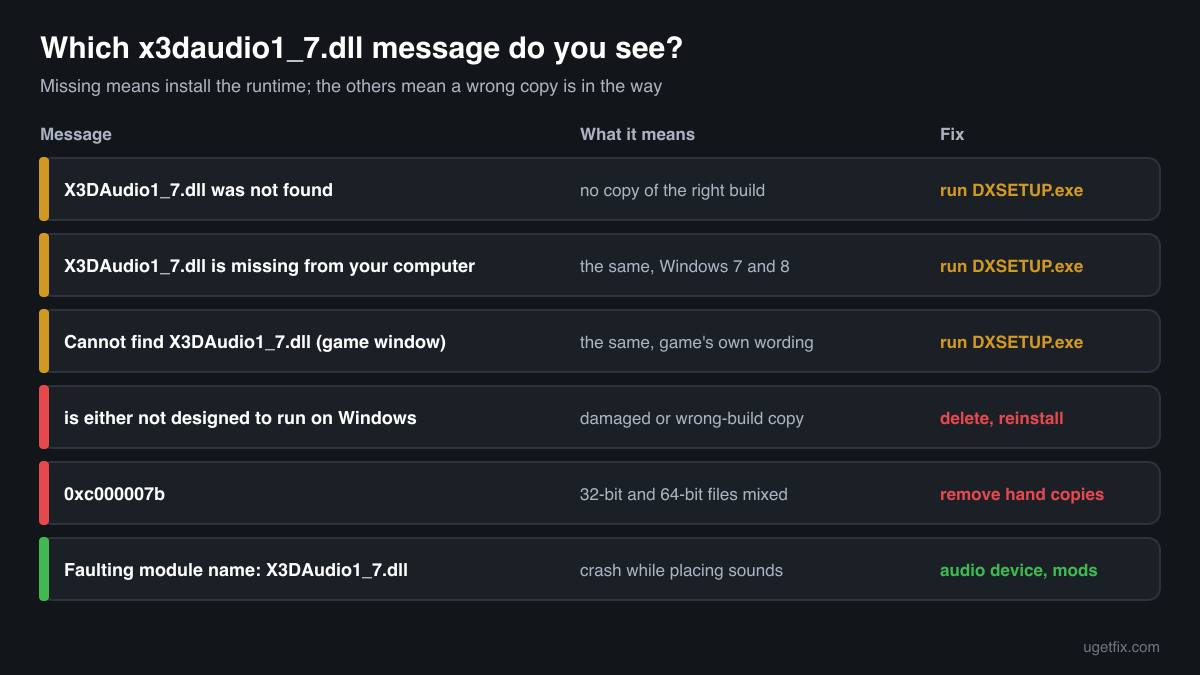
The code execution cannot proceed because X3DAudio1_7.dll was not found. Reinstalling the program may fix this problem.
How Windows 10 and Windows 11 put it. The game asked for X3DAudio 1.7 and Windows found no copy of the matching build. Reinstalling the game rarely helps unless its setup runs DXSETUP.exe; installing the DirectX End-User Runtimes (June 2010) does.
The program can't start because X3DAudio1_7.dll is missing from your computer. Try reinstalling the program to fix this problem.
The same problem in the wording of Windows 7 and Windows 8. The fix is the same installer.
Cannot find X3DAudio1_7.dll. Please, re-install this application.
A message some games show in their own window instead of the Windows one. It means the same thing: the file is absent. A fresh install of the game, even several in a row, does not add it if the game expects the runtime to be on the PC already. Run DXSETUP.exe.
X3DAudio1_7.dll is either not designed to run on Windows or it contains an error. Try installing the program again using the original installation media or contact your system administrator or the software vendor for support.
Here a file was found and could not be loaded. It is damaged, cut short or built for the other architecture, which usually means it was copied in by hand. Remove that copy from System32, SysWOW64 or the game folder, then run DXSETUP.exe.
The application was unable to start correctly (0xc000007b). Click OK to close the application.
No file is named, but with older games this code often comes from a 32-bit and a 64-bit DirectX file mixed up, x3daudio1_7.dll among them. Delete hand-placed copies and let the installer put both builds in place.
Faulting module name: X3DAudio1_7.dll
This line appears in Event Viewer, Windows Logs, Application, after a game crashed. The library loaded and the crash happened while its code was running. With the genuine file, check the audio side first: switch the Windows output to plain stereo or a different device, update the game, and remove audio mods.
File facts for the official version
Read from the files inside Microsoft's installer, version 9.28.1886.0. 3D Audio Library, Microsoft Corporation.
| Build | Version | Size | Exported functions | Signed by |
|---|---|---|---|---|
| x64 | 9.28.1886.0 | 24,920 bytes | 2 | Microsoft Corporation |
| x86 | 9.28.1886.0 | 22,360 bytes | 2 | Microsoft Corporation |
- SHA-256 · x64
9460709339701ad471a5cabe6365355f4d586dc4fcb86507c1331839dc555446- SHA-256 · x86
288c701bdedf1d45c63dd0b7d424a752f8819f90feb5088c582f76bc98970ba3
Once installed on 64-bit Windows, the x64 file sits in C:\Windows\System32 and the x86 file in C:\Windows\SysWOW64; 32-bit Windows keeps the x86 file in C:\Windows\System32. The two exported functions are the whole X3DAudio 1.7 interface: X3DAudioInitialize sets up the speaker layout and the speed of sound, and X3DAudioCalculate turns the positions of a listener and a sound source into per-speaker volume, delay and Doppler values that the game passes on to XAudio2. Both files carry Microsoft's build date of 4 February 2010.
What x3daudio1_7.dll itself depends on
Most DLLs need other DLLs. The import table of the official file names the libraries Windows has to load first; if one of them were missing, the error would name that file instead of this one.
x3daudio1_7.dll has a very short list. Both builds use KERNEL32.dll and the Windows C library msvcrt.dll, and the x86 build also loads USER32.dll. It does not depend on XAudio2 or any other DirectX file. If a game reports x3daudio1_7.dll and then xaudio2_7.dll, that is not a chain of dependencies: the game needs both, and the June 2010 installer carries both.
KERNEL32.dllmsvcrt.dllUSER32.dllEvery library on this list is part of Windows itself. Nothing else has to be installed for x3daudio1_7.dll to load.
What the DirectX runtime installs for X3DAudio
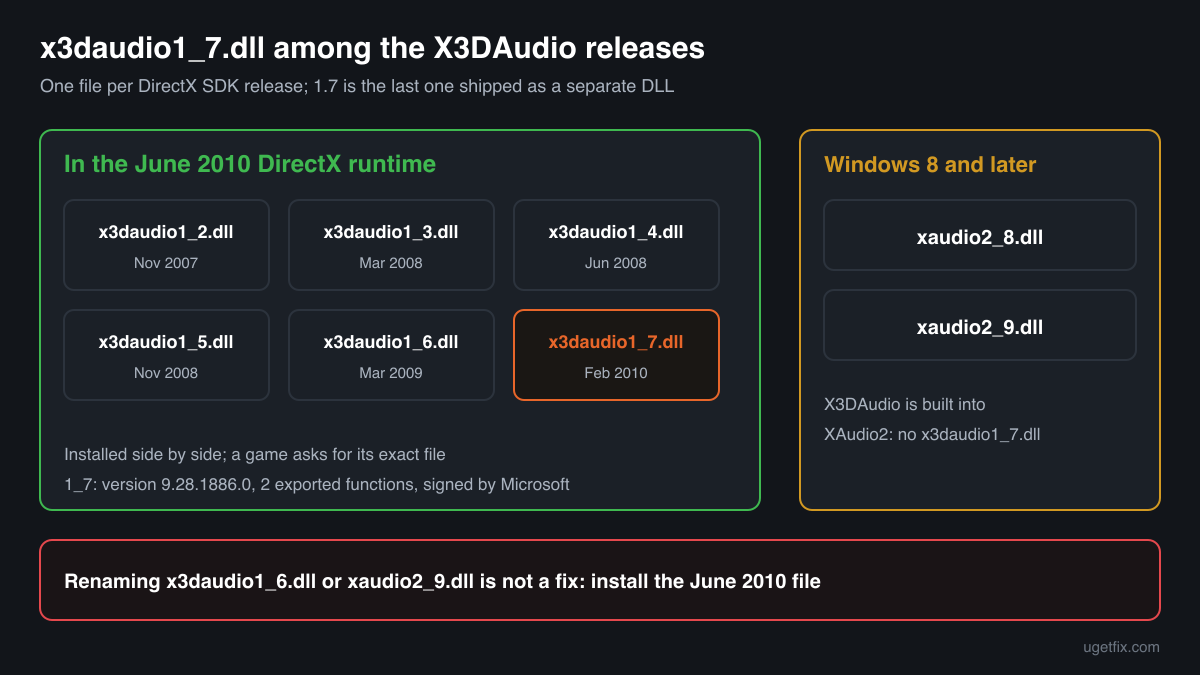
The June 2010 package keeps one cabinet per X3DAudio release, from x3daudio1_2.dll (November 2007) to x3daudio1_7.dll (February 2010), and installs all of them side by side so that every game finds the version it was built with. x3daudio1_7.dll version 9.28.1886.0 comes from the Feb2010_X3DAudio cabinets, one for x64 and one for x86. It is the newest X3DAudio file in the package: the June 2010 release brought a new XAudio2 engine but no new X3DAudio. The two oldest names, x3daudio1_0.dll and x3daudio1_1.dll, are not in it.
| File | Microsoft's description | Size |
|---|---|---|
x3daudio1_7.dll | 3D Audio Library | 24 KB |
Copies of x3daudio1_7.dll found on PCs
A public DLL catalogue lists 2 copies of x3daudio1_7.dll collected from PCs, each with its checksums, so you can see which one you have.
All of them are version 9.28.1886.0, the build the installer above provides, and their MD5 and SHA-1 checksums are the same as those of the x64 and x86 files in Microsoft's package. X3DAudio 1.7 was built once and never updated, so a copy with another version number or another checksum is not one Microsoft published. If the check on this page does not recognise your file, open its Properties, Digital Signatures tab: only a copy signed by Microsoft Corporation is genuine.
| Version | Build | Size | MD5 | SHA-1 |
|---|---|---|---|---|
9.28.1886.0 | 64-bit | b4ff2a39685c1a6d43f0e56eb350af3a | 466f80be26352f8331900a6da5b0a18dc7b39c0e | |
9.28.1886.0 | 32-bit | c811e70c8804cfff719038250a43b464 | ec48da45888ccea388da1425d5322f5ee9285282 |
Copies uploaded by users to a public DLL catalogue, read on 14 October 2026. We list their checksums so you can identify a file; we do not offer them for download and we did not verify each one against Microsoft's signature.
Questions people ask
Is x3daudio1_7.dll a virus?
The genuine file is a small library signed by Microsoft and is harmless. A name can be copied by anything, though, so check the file itself with the tool on this page: a match with Microsoft's build means it is the real one. A copy you cannot explain is covered on the security page linked above.
Does Windows 11 or Windows 10 include x3daudio1_7.dll?
No. Since Windows 8, Windows has its own XAudio2 (xaudio2_8.dll, and xaudio2_9.dll from Windows 10), with the X3DAudio functions built in. Microsoft says so in its XAudio2 version notes. A game made with the June 2010 DirectX SDK still asks for the separate file x3daudio1_7.dll, which only the DirectX End-User Runtimes install. The same is true on Windows 10 and 11.
I installed DirectX and the game still cannot find it. Why?
“Installed DirectX” usually means Windows Update or a graphics driver, and neither touches the June 2010 runtime. Reinstalling the game does not help either unless its setup runs DXSETUP.exe. Run the June 2010 installer itself, from the game folder or from Microsoft, and then look for a stray copy in the game's folder as described in the steps.
Do I need the x64 or the x86 version?
With the installer you do not choose: on 64-bit Windows it installs both. When you copy the file into a game folder by hand, match the game, not Windows. A 32-bit game needs the x86 file even on 64-bit Windows. Task Manager, Details tab, shows a running game's architecture in the Platform column if you add it.
Is there a newer version than 9.28.1886.0?
Not for this file. X3DAudio 1.7 has one build, dated February 2010, and the June 2010 runtime that carries it was the last DirectX SDK release. Games built later use the XAudio2 inside Windows and do not ask for x3daudio1_7.dll at all.
Can I use x3daudio1_6.dll or another version instead?
No. Each X3DAudio release is a separate file name, and a game asks for the one it was built against. The June 2010 package installs every release from 1.2 to 1.7 side by side, so installing it covers games that want an older version too.
Sources
File data read on October 17, 2026.

The editors who write and check uGetFix guides and reference pages. File facts are read from Microsoft's own installers and documentation, and every page shows the date its data was read.
Questions and experiences
Ask about this page: members and our editors answer. Reading is open; writing needs a free account.
…