How to remove
Uninstall VirusBarrier X8
from Windows
Discover effective methods to remove unwanted software like VirusBarrier X8 on Windows 10 or 11. Expert-tested solutions for clean uninstallation, zero …

How does How to Uninstall VirusBarrier X8 from Mac OS X end up on your PC?
- Complex tool with many components
- Hidden application files complicate uninstallation
- Manual removal often fails due to residual files
- Multiple files loaded by Intego software
- Possible user frustration with performance issues
Repairs Windows system files, removes malware, and restores a clean OS state — without reinstalling.
Hello. I would like to find out the right way to uninstall VirusBarrier X8. I have been using this program for a while, but I have decided to replace it with another antivirus program since it is not serving great recently. Can you please explain how to remove VirusBarrier X8?
Virus Barrier is a complex tool that has many components that you initially select when you install the program yourself. Intego antivirus program has many features and can even include other apps when you install the program on your machine. This file creates frustration when people[ref en-1] want to remove it due to unsatisfying performance and so on.
It is not a secret that Mac computers are quite vulnerable to various computer threats at the moment, even though some people may claim that macOS is immune to malware.[ref en-2] Mac users look for applications that can secure their computers from virus attacks in addition to the feature operating system offers.
VirusBarrier X8, developed by Intego, is a legitimate anti-virus application, which can secure your Mac computer from Mac viruses, Unix viruses, Trojan horses, adware, scareware, keyloggers, worms, and various other threats that come to such machines.[ref en-3]
This program automatically scans your computer from time to time and looks for possibly dangerous apps that need to be uninstalled. What is more, it also automatically scans iOS devices that you plug into your computer, so you can check whether your iPhone or iPad is free of viruses, too. This software guarantees real-time protection; however, if it does not seem like the best Mac security software for you, you can uninstall it yourself. 
How to Uninstall VirusBarrier X8 from Mac OS X
Mainly, it is difficult to uninstall VirusBarrier X8 from Mac OS because there are many files that Intego software loads on the machine. Even when you try to manually get rid of it, all the hidden application files cause the failed uninstallation. You can try to uninstall the app by running the Uninstaller. Nevertheless, it is more recommended to use another method for such uninstallation due to those suspicious files that keep on affecting the performance. 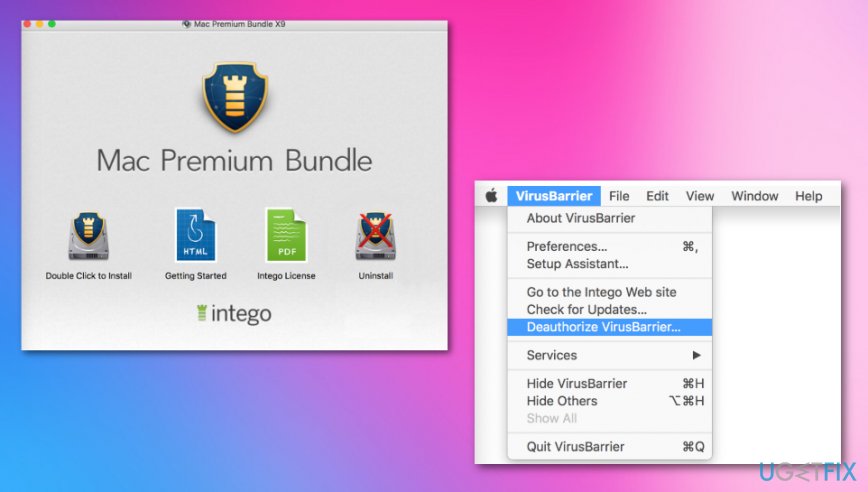
Deauthorize VirusBarrier X8 before doing anything else
You should deauthorize the software if you may want to get anything from Intego again in the future.
- Select the Apple logo at the top left of your screen when VirusBarrier X8 is opened.
- Choose the Deauthorize VirusBarrier.
Terminate the Intego processes via Activity Monitor
- Press Cmd+Options+Esc to open the force quit window and choose the Intego apps there and click Force Quit to terminate the process.
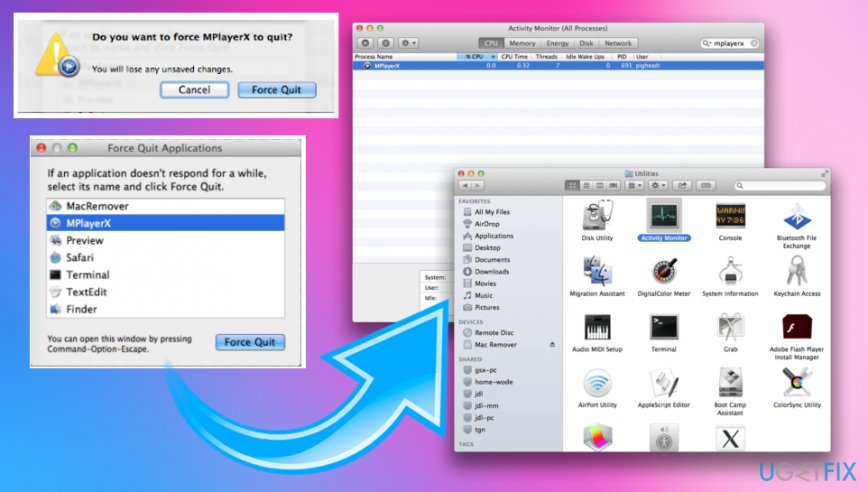
How to uninstall virusbarrier x8 from mac os x quiting - Open Activity Monitor and in the Utilities folder select All Processes.
- Quit all the processes that are suspicious. Force Quit if needed.
Drag VirusBarrier X8 to Trash
The first thing that you need to do is to remove the VirusBarrier X8 icon from the Applications folder:
- Open the folder named Applications;
- Click on VirusBarrier X8 icon and hold it;
- Drag VirusBarrier X8 icon to the Trash folder;
- Select the Empty Trash option.
Get rid of leftover files
You need to find and eliminate all files that belong to VirusBarrier X8. Otherwise, these unnecessary leftovers might diminish your computer's performance later:
- Go to Finder and click on the Go to from the menu bar and choose Go to Folder.
- Type Library and hit Enter.
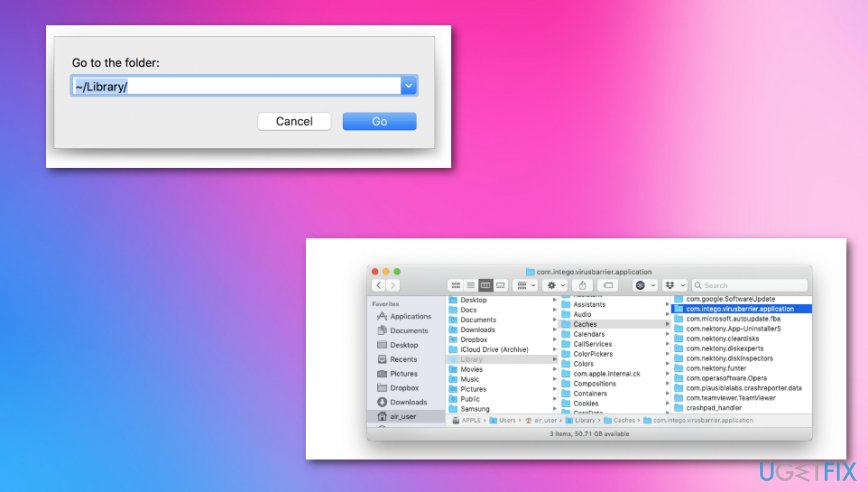
You need to search for items related to the application ins these locations:
Library/Intego
Library/LaunchDaemons
Library/LaunchAgents
Library/Preferences/Intego
Library/Application Support/Intego
Bottom line
To uninstall VirusBarrier X8, you can try running the Uninstaller provided with the application. However, due to the presence of hidden files, it may be more effective to use a different method for uninstallation. If these methods do not work, consider seeking further assistance or using specialized software to remove the application.
Frequently asked questions
No, VirusBarrier X8 is a Mac application and cannot be uninstalled from Windows operating systems.
If you installed VirusBarrier X8 on Windows, you should remove it using the Control Panel's 'Programs and Features' section.
Yes, Windows 10 and Windows 11 users can consider antivirus programs like Windows Defender, Bitdefender, or Norton as alternatives.




Report an issue
What's wrong with this guide? We review every report and update or remove content.
Report received — thank you. We'll review and fix it.
You need a free account to submit a report.
Be the first to comment