How to remove
Uninstall Wizard101
from Windows
Easily uninstall Wizard101 on Windows 10 or 11 with our expert-tested guide. Get it done swiftly and leave zero traces behind!

How does How to uninstall Wizard101 end up on your PC?
- No program in Programs and Features folders
- Files needed for uninstallation cannot be run
- Errors locking the uninstallation process
- Processes using the program preventing uninstallation
- Files and folders belonging to the game not found on the disk
- Incomplete uninstallation leaving behind data
Repairs Windows system files, removes malware, and restores a clean OS state — without reinstalling.
Hello, I have the issue with this game Wizard101. I have tried to get rid of it for a while now, and when I try to uninstall the program I get various error codes, and I have no idea what that means. I thought it happened one time, but multiple programs features still got left, and it is not uninstalled at all. Do I have any hope?
Uninstalling Wizard101 may become a hassle, especially when particular errors come up during the attempts[ref en-1], but the issue is common for Windows users as well as for macOS supporters. The game is not going to delete itself entirely even when you remove all the features, programs, and files separately. Unfortunately, the developers at KingsIsle also provide no help for users.
Wizard101 uninstallation has a few solutions for various devices, so we have a few methods and tips that help to delete all the files from your machine thoroughly. However, we should first talk about all the problems occurring while trying to uninstall the game and reasons behind the frustration.
Uninstalling Wizard101, according to users' reports, causes issues when there is no program in Programs and Features folders, files needed for the uninstallation cannot be run or errors keep locking the process entirely. The system is not allowing uninstallation of this game when there is any process using the program even though you cannot indicate this particular issue yourself.
Users also cannot uninstall Wizard101 game when files and folders belonging to the game are not found on the disk. An incomplete uninstallation is also an issue because some data left behind can cause errors without having the main game on the PC. Solutions for these issues also include a few different techniques based on your operating system and the need to remove all the files associated with this questionable game.[ref en-2]
Methods to uninstall Wizard101 completely
You may have a problem or cannot uninstall Wizard101 because of many reasons, that include issues with your machine or the state of security and even infectious files or malware.[ref en-3] Since people tend to download games and applications from suspicious sources, there is a potential risk installing malware besides the game or software needed. For that reason alone, get [d1] and check the machine entirely. When the program detects any malicious content or shows possibly corrupted files, you can remove them with the same tool. Also, such system utilities help to fix particular issues with your OS and can be enough to end the frustrations during the uninstallation of the game entirely.
Uninstall Wizard101 via Programs and Features
- Find the Programs and Features in Control Panel, or you can search for the section directly.
- Then look for the program you need on the list and choose the Uninstall button at the top.
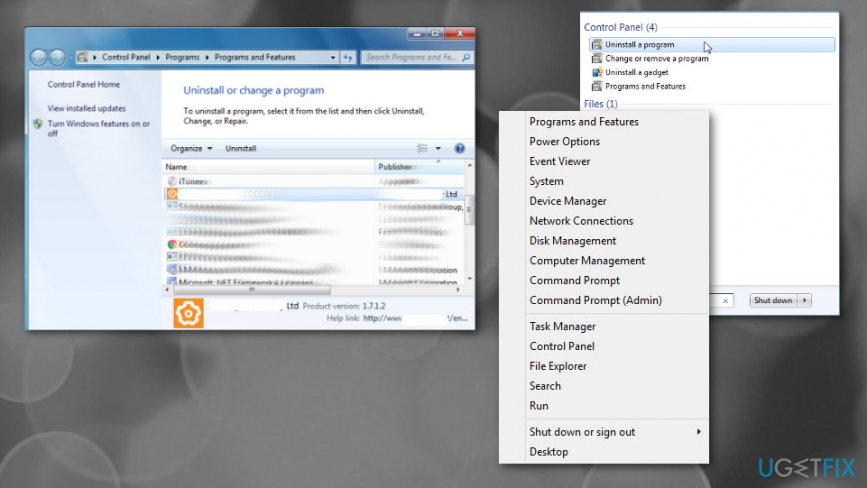
How to uninstall wizard 101 programs features
Use the Wizard101 uninstaller
- Go to the folder of Wizars101 and find the uninstall.exe or unins000.exe file.
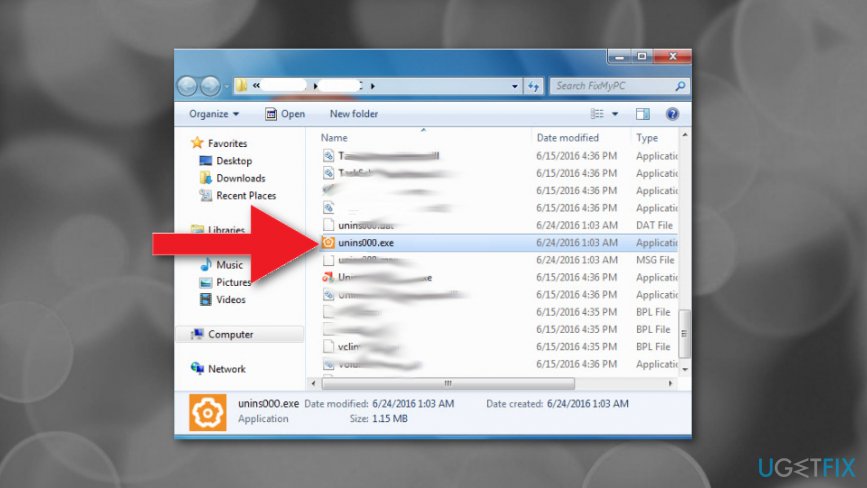
How to uninstall wizard 101 uninstall - Double-click the executable and follow the uninstallation wizard that appears on the screen.
Try System Restore feature to uninstall Wizard101
- Go to Computer and find Properties.
- Then select System Protection and click System Restore.
- You need to choose the point before all the issues and restore the system to that time.
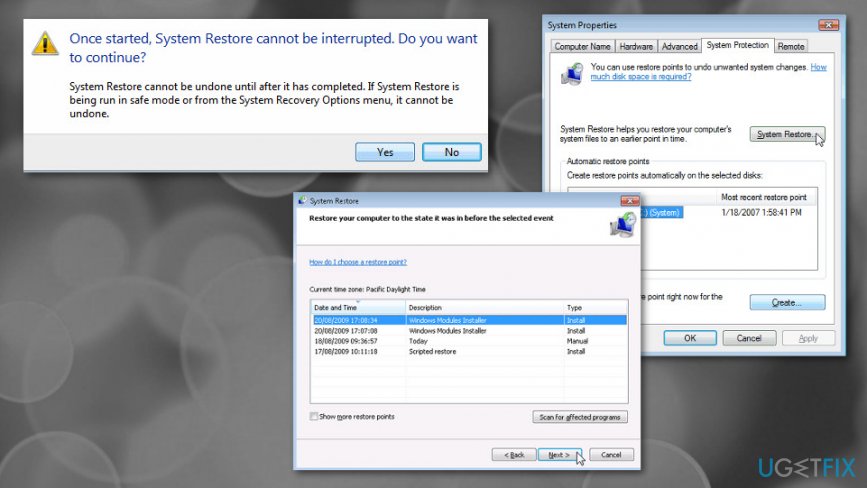
How to uninstall wizard 101 system restore
Uninstall Wizard101 on your MAC
- Go to Applications.
- Find Wizard101 folder and move it to Trash.
- Don't forget to Empty the Trash.
Bottom line
To uninstall Wizard101 completely, users can try various methods based on their operating system, including checking for running processes, ensuring all game files are deleted, and using specific uninstallation tools. If these solutions do not work, consider seeking further assistance or using a third-party uninstaller.
Frequently asked questions
To uninstall Wizard101 on Windows 10, go to Settings > Apps, find Wizard101 in the list, click on it, and select Uninstall.
If Wizard101 won't uninstall on Windows 11, try using the Control Panel: go to Control Panel > Programs > Programs and Features, find Wizard101, and click Uninstall.
Yes, removing Wizard101 from your Windows system is safe if you no longer play the game, and it will free up disk space.




Report an issue
What's wrong with this guide? We review every report and update or remove content.
Report received — thank you. We'll review and fix it.
You need a free account to submit a report.
Be the first to comment