How to remove
Fix error 0x8000000b
from Windows
Resolve error 0x8000000b on Windows 10 and Windows 11 effortlessly. Our expert-tested guide ensures smooth program uninstallation in minutes.

How does How to fix error 0x8000000b end up on your PC?
- Outdated operating system
- Bad internet connection
- Antivirus software
- Incorrect time and date settings
Repairs Windows system files, removes malware, and restores a clean OS state — without reinstalling.
Hello. I recently bought an HP laptop, and I would like to add my email to it, but as soon as I try doing so, I receive and error 0x8000000b. Please help me fix this problem? Thanks.
Windows 10 came with multiple useful features, and one of them is the possibility to sync your other email accounts into one and keep them all conveniently in one place - it applies to Google, Hotmail, and other email services. Unfortunately, some users started complaining about the syncing email error - 0x8000000b. Due to the error, users unable to connect their most used email services.
The message that users see upon encountering 0x8000000b error says:
Something went wrong
We're sorry, but we weren't able to do that,
Error code: 0x8000000b
Error codes are provided by Windows for users to be able to troubleshoot the problem and finding ways to fix 0x8000000b. Fortunately, there are several solutions for the problem, and they work well for most of the users.
There might be several reasons for 0x8000000b error appearance, such as outdated operating system, bad internet connection, antivirus software, incorrect time and date settings, etc. However, in most of the cases, users reported that they managed to fix the 0x8000000b error as soon as they used Advanced IMAP settings.
IMAP[ref en-1] stands for Internet Message Access Protocol and is used by email service providers to retrieve messages from the server using the TCP/IP[ref en-2] connection. Therefore, using advanced settings helps users to resolve the issue with the 0x8000000b error.
Please carefully follow 0x8000000b error fixes below. We will start from the more simple solutions and will then moved to more advanced ones (they should not take too much time to complete).
Before you start, however, we want to advise you to check your computer for malware with the help of security software such as [d1]. It can also repair multiple issues when it comes to corrupted system files, virus damage, and many other sections. It can save you much time when dealing with various errors and the Blue Screen of Death.[ref en-3]
Fix 1. Check your time and date
It is surprising how many problems computer users resolved after realizing that their date and time settings were incorrect.
- Right-click on the Date and time widget you can find at the bottom-right of your screen
- From the menu, select Adjust time/date
- In the newly-opened window, you should see Date & time parameters on the right side
- Toggle the Set time automatically and Set time zone automatically switches off
- Wait a few seconds and toggle them to the on position
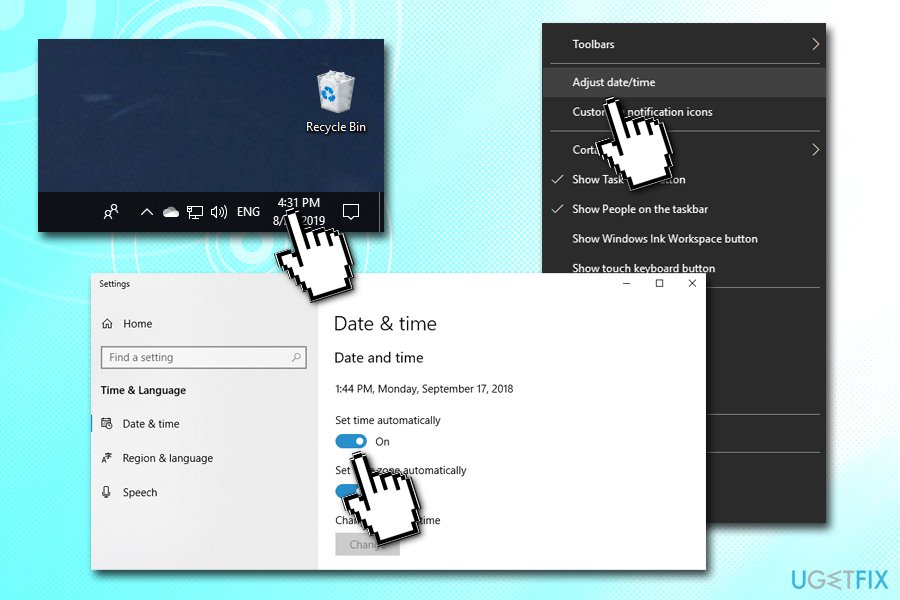
How to fix error 0x8000000b check time and date
Fix 2. make sure your operating system is updated
Make sure your Windows is updated appropriately:
- Right-click on Start and select Settings
- Click on Update & Security
- In the right pane, pick Check for Updates
- The updates should download and apply automatically
- Reboot your PC
Fix 3. Temporarily disable Windows Defender or other security application
- Right-click on Start and pick Settings
- Click on Update & Security
- On the left pane, click on Windows Security
- Under Protection areas, select Virus & Threat protection
- Under Virus & threat protection settings, pick Manage settings
- Under Real-time protection, toggle the switch to the left to turn the protection Off
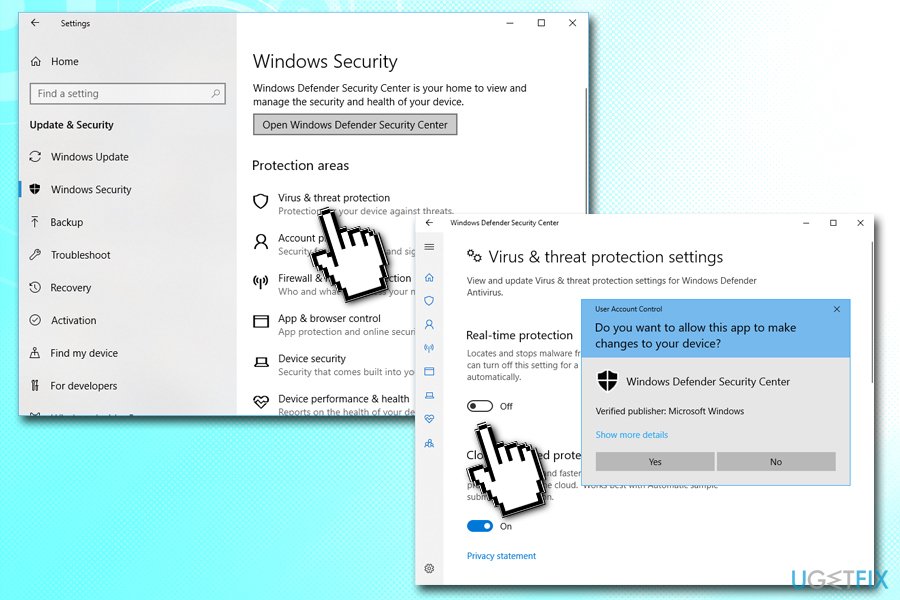
How to fix error 0x8000000b disable windows defender
Fix 4. Re-add your email account
- Type in Mail into the search box and hit Enter
- Click on Accounts
- Select your account
- Pick Delete account from this device
- Confirm with Delete
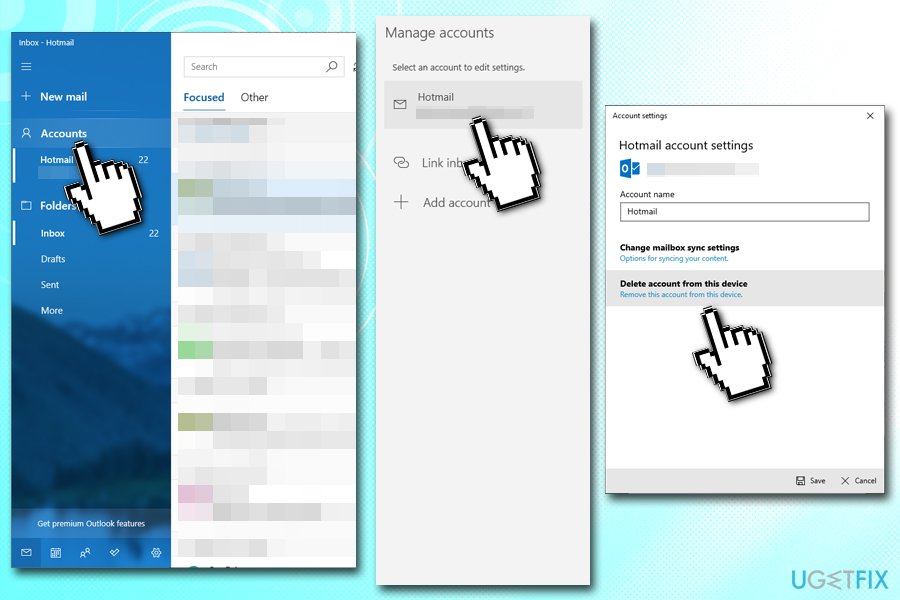
How to fix error 0x8000000b re add email account fixed - Re-add your account once again and see if it still shows up with 0x8000000b error
Fix 5. Use advanced IMAP settings
We will show how to use advanced IMAP settings for Google and Outlook accounts:
Gmail
Before you do anything, you need to make sure that IMAP is enabled on your Google account. Login to your email via the browser and then go the following link: https://mail.google.com/mail/u/0/#settings/fwdandpop. Under IMAP access, select Eable IMAP and click on Save Changes.
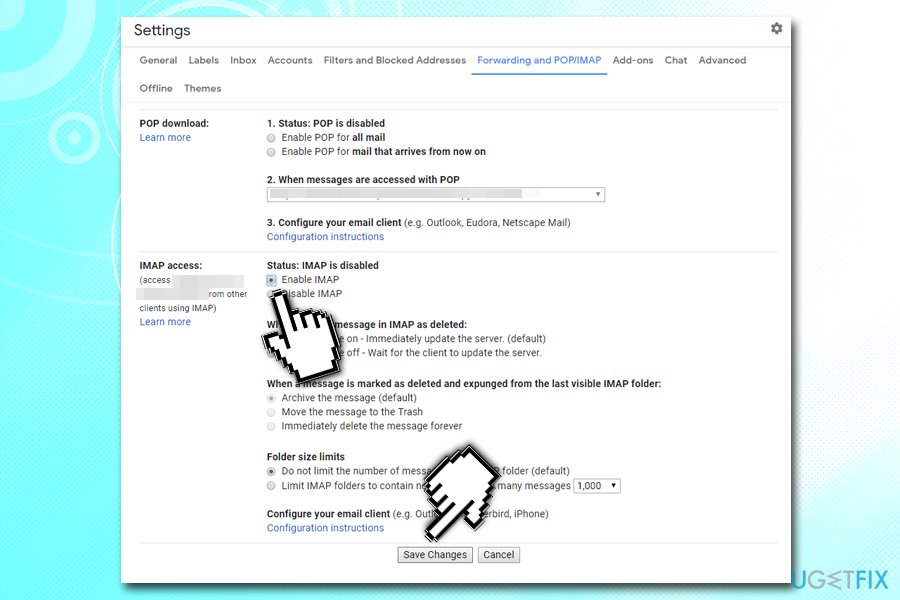
Then go back to your Windows mail app and follow these steps:
- Open Mail app and click on Accounts again
- Select Add account
- In the newly-opened window, pick Internet email
- Enter your details
- Once you reach the Incoming email server section, type in the following:
imap.gmail.com:993
- At the very bottom, you should see Outgoing (SMTP) email server section. Type in the following:
smtp.gmail.com:46
- Finalize the registration with Sign in
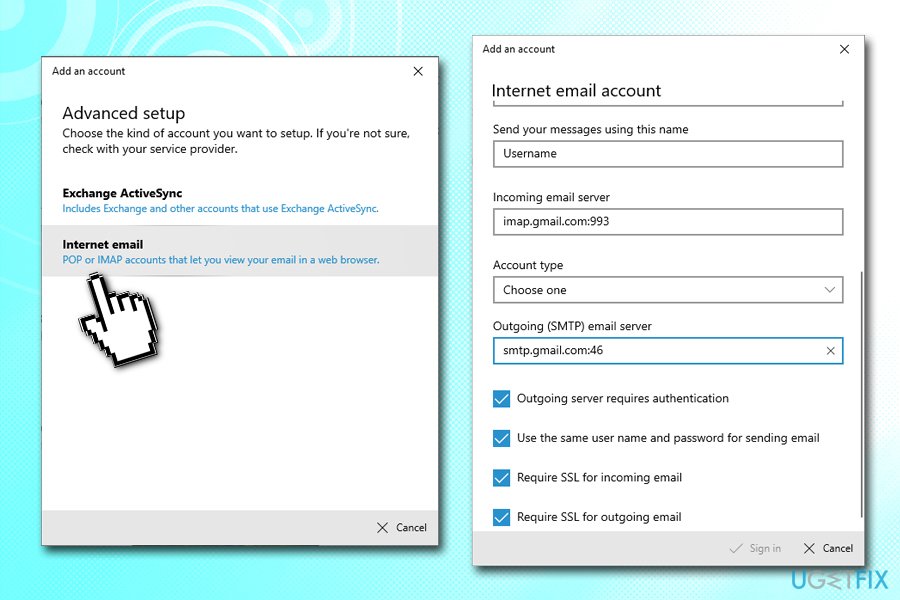
How to fix error 0x8000000b chrome imap account advanced settings
Outlook
- Go to Add account section on the Email app
- Select Exchange
- Enter your email address and click on Next
- Enter your password
- Select Sign-in
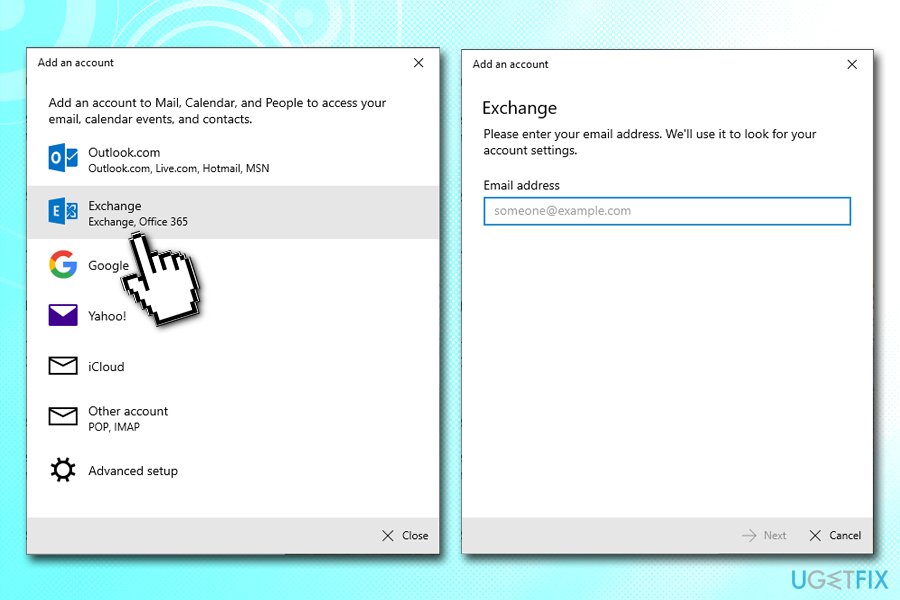
How to fix error 0x8000000b outlook imap account advanced settings
Bottom line
To fix the error 0x8000000b, users should check their time and date settings, ensure their operating system is up to date, and consider adjusting their antivirus software settings. If these solutions do not resolve the issue, users may need to explore advanced IMAP settings or check for malware.
Frequently asked questions
Error 0x8000000b typically indicates a problem with the Windows Installer service, which can prevent successful uninstallation of programs.
To resolve this error, try running the Microsoft Program Install and Uninstall troubleshooter, which can fix issues related to uninstalling programs.
Yes, you can manually remove programs by deleting their installation folders and registry entries, but it's recommended to use automated tools or the built-in troubleshooter for safety.




Report an issue
What's wrong with this guide? We review every report and update or remove content.
Report received — thank you. We'll review and fix it.
You need a free account to submit a report.
Be the first to comment