How to recover
.Kvag ransomware files
from Windows
Recover your .Kvag ransomware files on Windows 10 or 11 quickly and effectively. Expert-tested methods ensure your data is restored with zero traces left.

What leads to How to recover .Kvag ransomware files?
- Computer infected with STOP/Djvu ransomware
- Files appended with .kvag extension
- Data locked using AES symmetric encryption
- Ransomware developers demand payment in Bitcoin
- Ransom note dropped in folders with encrypted files
Repairs Windows system files, removes malware, and restores a clean OS state — without reinstalling.
Please help me. Today I found out that I cannot open any of my files on the PC, including the photos that are very important to me. It seems like every file is replaced with a blank icon and the file ending has changed to .kvag. What is this? Is it possible to recover my files?
If your files have been appended with .kvag extension, your computer was infected with STOP/Djvu ransomware. Ransomware viruses are among one of the most devastating ones in the wild, as they lock up all personal data like pictures, videos, music, database, and others. While other malware can be successfully eliminated with anti-virus software without major consequences, ransomware-encrypted files remain locked.
STOP ransomware was first released in December 2017 by unknown cybercriminals and remained one of the most prominent malware families in the world. At the time of the writing, over 150 variants of this ransomware exist, Kvag being one of the latest ones.
Data is locked with the help of AES[ref en-4] - symmetric encryption algorithm. It means that a secret key is used to lock all the files and then sent off to a Command and Control[ref en-3] server that is in the control of hackers behind Kvag ransomware. To decrypt files, users need the key that malicious actors hold, and, obviously, they are not willing to give it up for free.
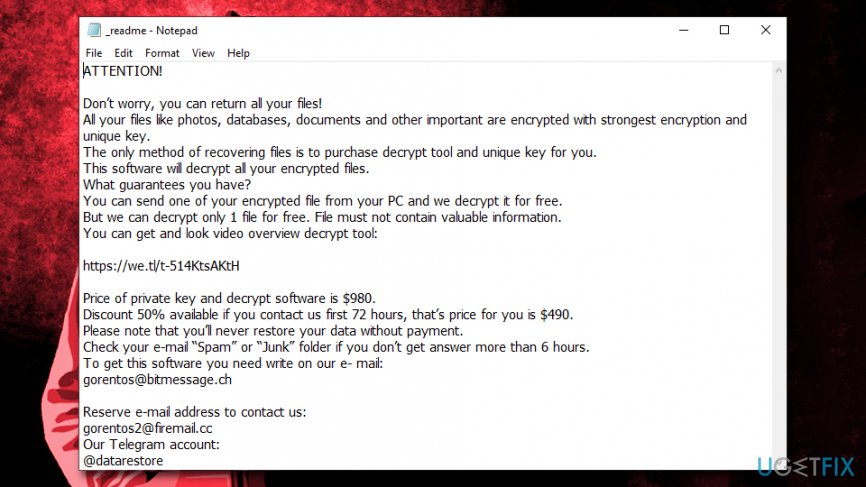
Kvag ransomware developers are asking for a ransom in digital currency Bitcoin - usually $980. However, to gain users' trust, they also offer a 50% discount if the contact is made within first 72 hours of the infection. Here's the extract from the ransom note _readme.txt which is dropped into each of the folders that hold the encrypted files:
Price of private key and decrypt software is $980.
Discount 50% available if you contact us first 72 hours, that’s price for you is $490.
Please note that you’ll never restore your data without payment.
Check your e-mail “Spam” or “Junk” folder if you don’t get answer more than 6 hours.
To get this software you need write on our e- mail:
[email protected]
Paying ransom is highly discouraged, as the possibility of being scammed remains high. Crooks don't have to send you the required key after you pay, as they already got their money. Instead, you can try alternative solutions on how to decrypt files encrypted by Kvag ransomware - we provide them below.
Unlike stealthy malware, ransomware does not hide its presence and does not touch any files that are vital to the operating system, as its goal is money extortion rather than OS corruption or data theft. Nevertheless, Kvag ransomware might inject several modules into the PC - these can spy on users' web browser activities and steal sensitive information, including credit card details.
However, it is not the only factor why Kvag ransomware removal should be performed as soon as possible. If you attempt to recover encrypted files while the malicious payload or its modules are still present, the files will be encrypted repeatedly, making the recovery process useless.
Because new versions like Kvag virus are being released relatively often, not all antivirus engines detect them. Nevertheless, at this present time, 50 AV engines could detect and eliminate the infection. The malware is recognized under these names:[ref en-1]
- Win32:Ramnit-CC [Trj]
- Trojan:Win32/CryptInject.BG!MTB
- Trojan.GenericKD.32452318
- Trojan.Ransom.Stop
- TROJ_GEN.R002C0OIE19
- Trojan.MalPack.GS, etc.
Once you make sure that the virus is gone, you can proceed with file recovery. While first versions of STOP ransomware were relatively quickly deciphered with the help of custom-made tools from security experts, later variants were drastically improved by criminals. Additionally, Kvag ransomware can no longer be deciphered with the help of STOPDecrypter - a tool that could retrieve the locked files under certain circumstances.
Remove Kvag ransomware and Windows hosts file before proceeding to file recovery
As mentioned above, you need to remove Kvag ransomware to ensure the recovered files will not be encrypted once again. For that we recommend using [d1] - this tool can also restore Windows registry that was modified by malware.
Kvag ransomware is known to prevent users from entering security sites for guidelines by modifying the Windows hosts file.[ref en-2] Additionally, it might also interfere with anti-malware software when trying to remove it. In such a case, you should enter Safe Mode with Networking and perform a full system scan:
- Right-click on Start and pick Settings
- Click on Update & Security and select Recovery
- Find Advanced startup section and click on Restart now ( this will immediately reboot your PC)
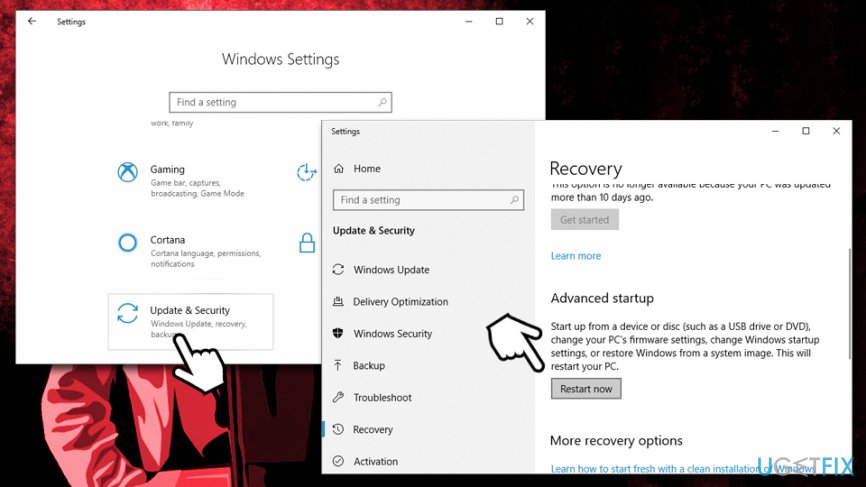
How to recover kvag ransomware files enter safe mode - After a restart, select Troubleshoot > Advanced options > Startup Settings and click Restart
- Once the PC reboots once more, press F5 or 5 to to access Safe Mode with Networking
After you terminate the virus, you should go to C:\\Windows\\System32\\drivers\\etc on your computer and delete the hosts file.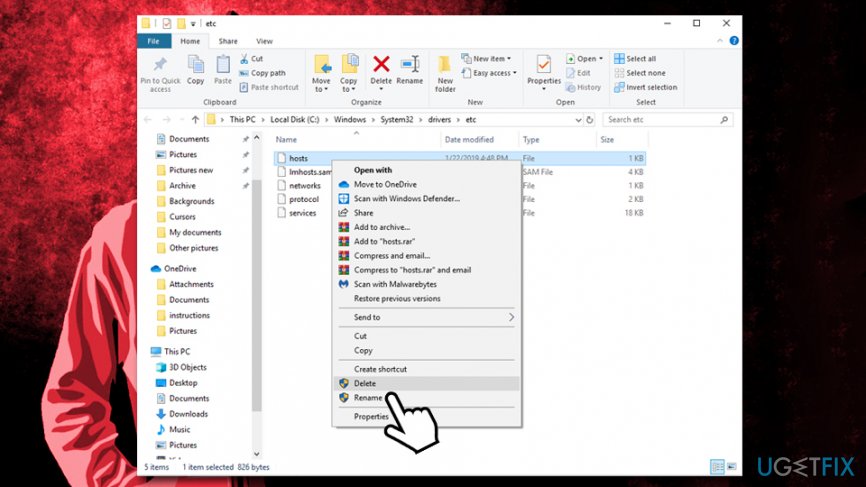
Option 1. Make use of Data Recovery Pro
Data Recovery Pro is one of the leading recovery products. Initially, this application was not designed to decipher files encrypted by Kvag or other ransomware - it simply does not possess such a function. However, it tries to get to the location where a file was located before it got altered, and, if no new information was written on top of it (it depends on how much the PC was used since the infection), Data Recovery Pro could retrieve the working copy. Thus, the program might be able to recover at least some of your data this way.
- Download Data Recovery Pro [download link] and initiate the installation process
- Follow on-screen instructions to finalize the installation and double-click on Data Recovery Pro shortcut on your desktop to start the program
- Pick Full Scan option and select Start Scan (you can also search for individual files based on keywords)
- Once the scan is finished, you will be able to select files that might be recoverable, and pick Recover
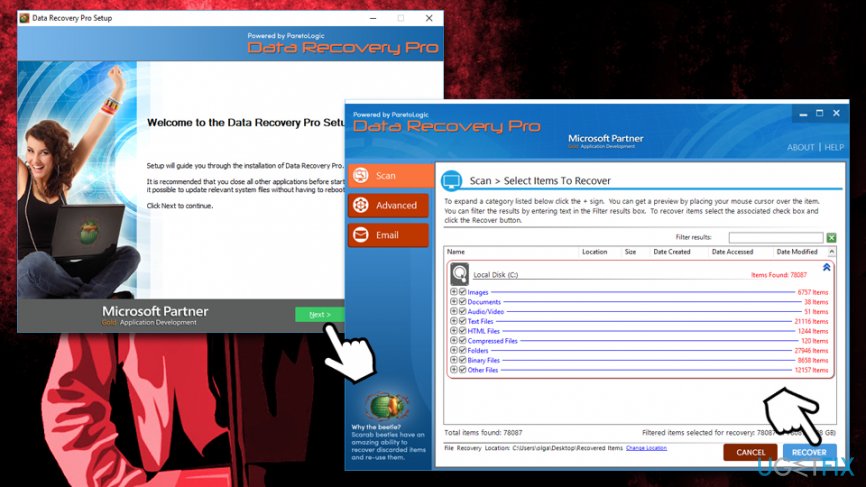
How to recover kvag ransomware files ransom note use data recovery pro
Option 2. ShadowExplorer might be able to recover all your data if Kvag ransomware failed to delete Shadow Volume Copies
ShadowExplorer is a simple application that can use Shadow Volume Copies to recover healthy versions of files encrypted by Kvag ransomware. However, the malware should have failed the deletion of these Windows backups for the program to work effectively:
- Download ShadowExplorer [download link] and install it
- Follow on-screen instructions to complete the installation and click on program shortcut in order to launch it
- Select the drive and the the folder you want to recover
- Right-click and pick Export
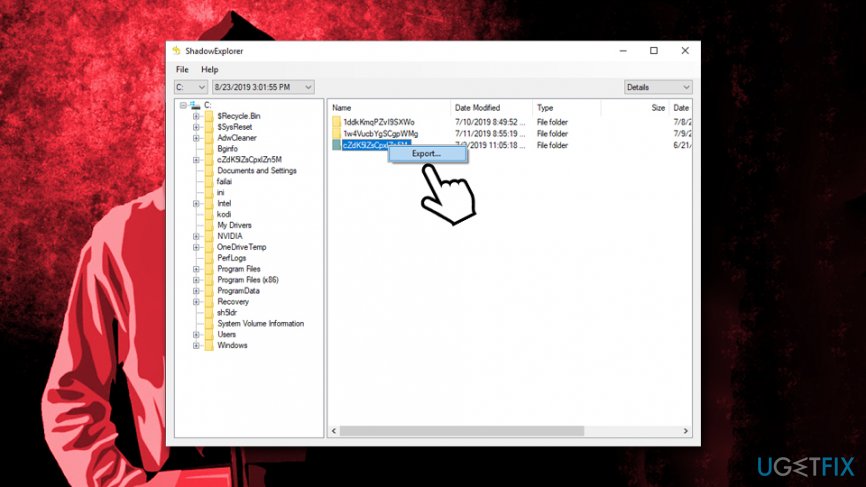
How to recover kvag ransomware files useshadow explorer
Option 3. Windows Previous Versions feature might work if System Restore was enabled
This method only works if you had System Restore enabled. Note that this method requires you to recover .Kvag encrypted files one-by-one, so it might take a while:
- Locate the file you want to recover
- Right-click on it and select Restore previous versions
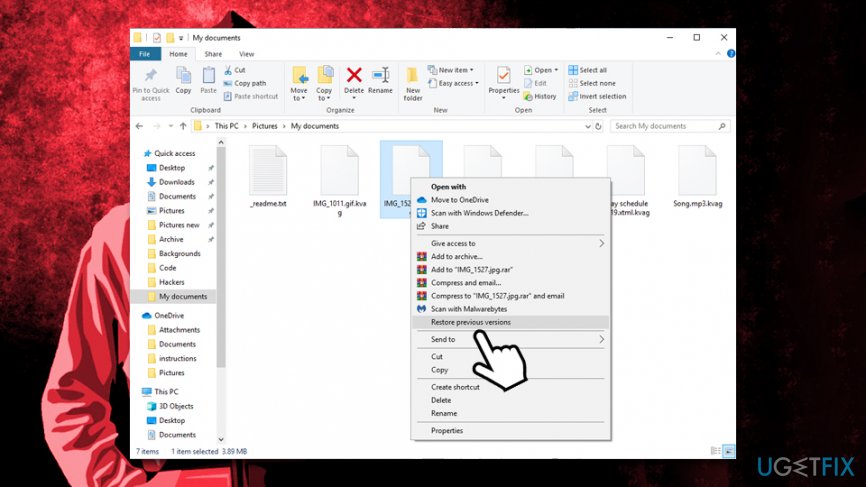
How to recover kvag ransomware use previous versions feature - Click on the previous version and select Restore
Option 4. Contact Dr. Web if you are willing to pay for the decryption process
Dr. Web is a Russian anti-malware software maker specializing in various security solutions for home and business users. The firm is also known to be actively involved in developing ransomware decryptors for various stop variants - .DATAWAIT, .INFOWAIT and others have a working tool by Dr. Web.
Kvag ransomware, along with other most recent variants can be partially decrypted by Dr. Web. However, only PDF and MS Office files can be recovered in such a way (no pictures or other files).
The downside of all of this is that the service is not free - the Rescue pack costs €150. If you are interested, you can request the decryption service here. Nevertheless, the service is free for users who already had Dr. Web software installed when prior to Kvag ransomware infection.
If nothing worked...
If none of the methods above worked, there are currently no other ways to recover files encrypted by Kvag ransomware. The only way currently is to pay the ransom to hackers and hope that they will actually provide a working tool. However, be warned that threat actors cannot be trusted - they might send you a malicious executable instead or never contact you again once you pay the ransom.
As of now, you should make a copy of all the encrypted files and wait till security researchers manage to find ways to recover files encrypted by Kvag file virus, and it might take a while.
Bottom line
To recover .kvag ransomware files, users may need to consider paying the ransom for the decryption key, although this is not recommended. It's crucial to back up files regularly and use reliable antivirus software to prevent future infections. If none of these options work, seeking professional data recovery services may be necessary.
Frequently asked questions
First, disconnect your device from the internet to prevent further encryption. Then, use a reputable antivirus program to remove the ransomware and follow recovery steps from backup if available.
Yes, you can try using free decryption tools like Emsisoft Decryptor or other reputable ransomware recovery programs specifically designed for .Kvag ransomware.
To prevent future attacks, ensure your Windows 10 or Windows 11 system is regularly updated, use reliable antivirus software, and maintain frequent backups of important files.




Report an issue
What's wrong with this guide? We review every report and update or remove content.
Report received — thank you. We'll review and fix it.
You need a free account to submit a report.
Be the first to comment