How to remove
Uninstall Tumblr
from Windows
Easily remove unwanted software from your system. Follow our expert-tested guide for uninstalling programs on Windows 10 and Windows 11. Fixed in minutes!

How does How to Uninstall Tumblr on Mac OS X end up on your PC?
- Uninstalling an application might leave additional files behind.
- Removing only the main file does not eliminate all associated data.
- Mac users may not be aware of the difference between uninstalling and removing an application.
- Fake optimization tools can complicate the uninstall process.
- Users may lack knowledge about using special utilities for uninstallation.
Repairs Windows system files, removes malware, and restores a clean OS state — without reinstalling.
Hello, have downloaded Tumblr to my Mac but now I see that I don’t need it anymore. Unfortunately, but I’m new with Macs and I don’t know how can I uninstall Tumblr on this OS. Could you help me?
If you are looking for a way to uninstall Tumblr on Mac OS X, you've ended up at the right place. This article will guide you through the process of uninstalling the app and getting rid of it once and for all.
What many Mac users don't know, however, is that uninstalling this app might be more difficult than initially expected. Have no fear, however, since this article is here show you all the steps ensuring your Mac is completely Tumblr-free.
Firstly, all you need is a special utility which is perfect for uninstalling useless programs and indicating other problems in the system like malware or potentially unwanted programs[ref en-1] and anything else you may find unnecessary on your Mac because this system is often targeted with fake optimization tools.[ref en-2]
What you should know before starting with the uninstall, however, is the difference between “uninstalling an application on Mac” and “removing an application from Mac”.
These phrases might sound like synonyms, but their effect is rather different. Let's start from “removing an application from Mac”, which helps you to get rid of the main file but fails to remove the additional files installed together with the main one.
Therefore, if your intention is to remove Tumblr from your Mac completely, removing only the main file will leave a lot of useless data occupying space on your Mac.[ref en-3]
Removal looks, of course, as the best method because of its simplicity, as it takes only 4 steps:
- Go to the Applications folder.
- Click the Tumblr icon and hold it.
- Drag the Tumblr icon to your Trash.
- Then select Empty Trash.
This procedure is enough to remove the application from your Mac. However, there is a better solution that will ensure your Mac is free of all Tumblr files and thus answer the question “How to uninstall Tumblr on Mac OS X”. There are two ways to do it: by uninstalling it manually and uninstalling the app using [rev id=”MacKeeper”]. Let's see what's the difference.
How to Uninstall Tumblr on Mac OS X
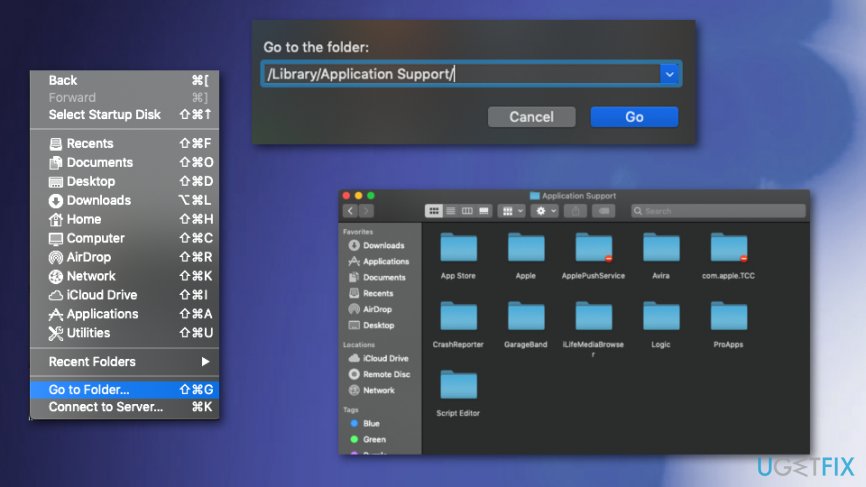
As it has been discussed above, if you simply drag the Tumblr file to Trash, it will not get rid of all the files that have been installed with the main one. Locate the folders and delete unnecessary files. First of all, check:
/Library/Preferences/
/Library/Application Support/
Check these folders for anything related to Tumblr and delete them. There's no guarantee, however, that you'll find and uninstall the app completely.
Remove your blog from Tumblr altogether
Firstly, you should know that deleting your account could remove the Tumblr blog. However, you can delete Tumblr blogs you own separately.
- Open Tumblr on your browser and log in.
- Select Account icon on the upper-right side of the Tumblr page.
- This step would open the drop-down menu.
- Here choose Settings.
- Select the name of a blog that you want to delete, this way you would open the blog settings page.
- At the bottom of this page, you can find the button that says Delete and the name of your blog.
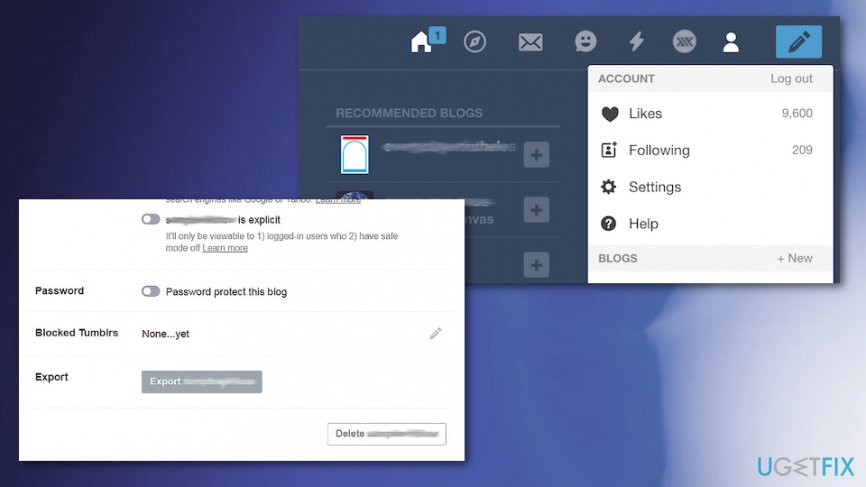
How to uninstall tumblr on mac os x delete blog - You should be prompted to enter your credentials again and re-enter them again to confirm that you want to delete the blog you selected.
If you want to delete the Tumblr account completely, you can do so in the account settings on the first Tumblr page.
Bottom line
To completely uninstall Tumblr on Mac OS X, you should use the Applications folder to remove the main file and then empty the Trash. However, for a thorough removal, consider using a special utility that can eliminate all associated files. If these methods do not work, further investigation into potential malware or unwanted programs may be necessary.
Frequently asked questions
Yes, you can uninstall Tumblr from Windows 10 or Windows 11 by going to Control Panel, selecting 'Programs and Features', finding Tumblr in the list, and clicking 'Uninstall'.
To completely remove Tumblr from Windows 10 or Windows 11, ensure you uninstall it through the Control Panel and also check for any leftover files in the AppData folder.
If Tumblr is not listed in the Programs and Features on Windows 10 or Windows 11, you can try using third-party uninstaller software to fully remove it from your system.




Report an issue
What's wrong with this guide? We review every report and update or remove content.
Report received — thank you. We'll review and fix it.
You need a free account to submit a report.
Be the first to comment