How to remove
Uninstall Camtasia
from Windows
Discover effective methods to uninstall stubborn programs from Windows 10 and 11 effortlessly. Expert-tested tips for a clean removal, zero traces left.

How does How to Uninstall Camtasia on Mac OS X end up on your PC?
- Users do not use Camtasia
- Camtasia diminishes system performance
- Camtasia uses excessive system resources
- Camtasia collides with other software
- Camtasia scatters files around the system
Repairs Windows system files, removes malware, and restores a clean OS state — without reinstalling.
Hello. I need help with Camtasia because for some reason I cannot delete it permanently. Don't know what to do. Please provide Camtasia removal or uninstall guide on Mac OS X.
Camtasia by TechSmith Corporation is “The best all-in-one video editor and screen recorder”, as the developer presents it.[ref en-1] It allows creating videos, record screen, import user’s camera footage, edit videos easily, and perform many other video development related tasks. However, in this post, we will describe neither pros nor cons of this application.
There are many people on the Internet who are looking for the guide on how to uninstall Camtasia on Mac OS X or Windows or fix other issues regarding the application.[ref en-2] While some of the users opt for its removal due to the fact that they don’t use it, the others claim that it diminishes the performance of the system, uses lots of resources or collides with other software. The problem is that Camtasia removal on Mac may appear to be a challenging task.
Unlike software developed for Windows OS, Mac OS X applications can be uninstalled easily. However, it’s a third-party application, which scatters its files all around the system and, therefore, has to be installed completely. Otherwise, it may keep using the system’s resources and may eventually trigger software incompatibilities. Also, Mac malware is a huge problem nowadays that causes various system malfunctions.[ref en-3] Therefore, the following guide will explain how to check for system problems and uninstall Camtasia on Mac OS X completely.
Ways to uninstall Uninstall Camtasia from Mac OS
First of all, we would like to emphasize that simple drag-and-drop Camtasia to Trash is not everything that you have to do. While that’s an indispensable step, it requires additional clearance of system folders. If you are not fond of checking your Mac for miscellaneous files to uninstall Camtasia completely, you may try to get rid of it automatically. For this purpose, you will have to install additional software, install it, and launch a system scan. However, automatic Camtasia removal is an easier, faster, and assured way to for proper system clearance. Thus, try using [rev id=”Reimage”].
Terminate Camtasia Processes via Activity Monitor
- In case Camtasia is frozen, click Cmd + Opt + Esc, select Camtasia, and click Force Close.
- After that, open Activity Monitor, select All Processes, find all processes related to Camtasia, click on each f them separately, and select Quit Process.
Remove Camtasia to Trash
- Log into your Mac with an administrator account.
- Open Go menu on the Menu Bar and select Applications.
- Find Camtasia, click it, hold it, and then drag to Trash folder.
- After that, click on the Trash and select Empty Trash.
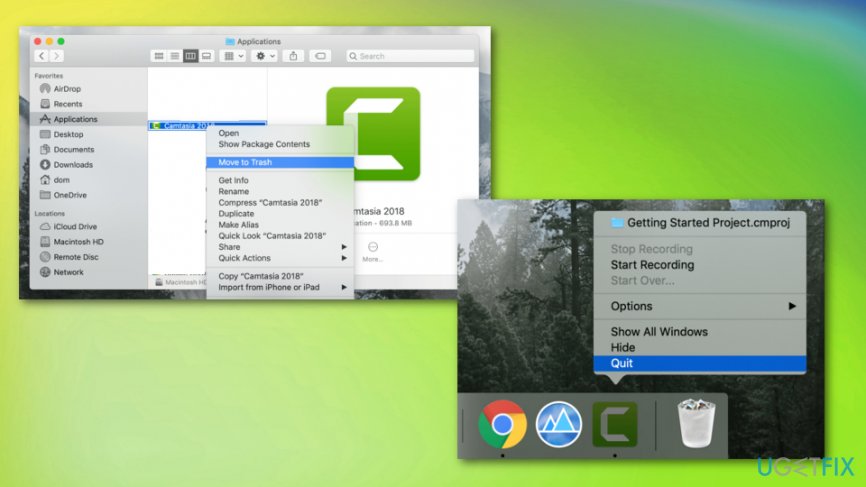
How to uninstall camtasia on mac os x trash
Remove all components that are related to Camtasia
As we have already pointed out, moving Camtasia to Trash does not mean the end of the uninstalling. In addition to that, you have to delete all files, logs, caches, and other scattered files from the hard disk. Therefore, for complete Camtasia removal, do the following:
- Look for the Camtasia’s components in the following locations:
~Library/Application Support/TechSmith
~Library/Caches/com.techsmith.identityprofile.data
~Library/Containers/
~Library/Preferences/
~Library/Cookies/
~Library/LaunchAgents/
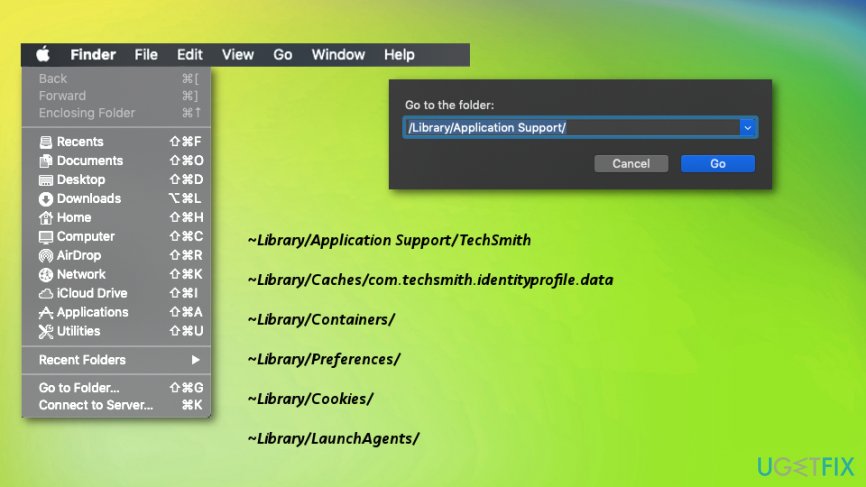
- If you find any files related to the Camtasia or its developer, right-click on them and select Move to Trash. Once done, empty the Trash.
Bottom line
To uninstall Camtasia on Mac OS X, you should first drag and drop it to Trash and then clear additional system folders. If you prefer an automated approach, consider installing software to perform a system scan for complete removal. If these methods do not work, further investigation into system issues may be necessary.
Frequently asked questions
Yes, you can uninstall Camtasia on Windows 10 or Windows 11 through the Settings app by navigating to Apps > Apps & features, then selecting Camtasia and clicking 'Uninstall.'
If you face errors while uninstalling Camtasia on Windows 10 or Windows 11, try using the built-in Troubleshooter for apps or consider using a third-party uninstaller tool to remove any leftover files.
No, uninstalling Camtasia on Windows 10 or Windows 11 will not delete your project files unless you manually remove them from their saved location.




Report an issue
What's wrong with this guide? We review every report and update or remove content.
Report received — thank you. We'll review and fix it.
You need a free account to submit a report.
Be the first to comment