How to remove
Uninstall All In One Keylogger
from Windows
Easily uninstall All In One Keylogger from Windows 10 or 11 with our expert-tested guide. Remove unwanted programs in minutes, zero traces left.

How does How to Uninstall All In One Keylogger in Windows end up on your PC?
- All In One Keylogger is designed to hide itself from users.
- The program may not be listed in the usual uninstallation menus.
- Users may not be familiar with the Windows Task Manager.
- The keylogger may be running as a background process that needs to be terminated first.
- Users may lack the technical knowledge to locate and uninstall the software.
Repairs Windows system files, removes malware, and restores a clean OS state — without reinstalling.
Hello. I have been using All In One Keylogger to spy on my wife because I had an inkling that she's cheating on me. However, I was wrong, and there was nothing to worry about. I feel a bit ashamed of what I did, and I want to remove All In One Keylogger now. However, there is a problem - even I cannot find it on the computer. Can you please help me to locate this keylogger and uninstall it?
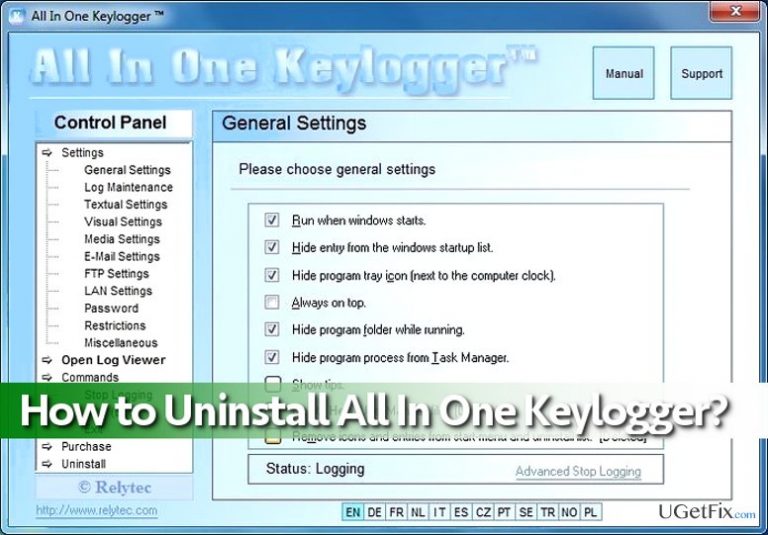
All In One Keylogger (by Relytec) is a tracking software that can be used to spy on a certain computer user. Unlike malicious keyloggers, this surveillance program is legitimate. The program is designed to track computer user’s keystrokes, monitor chats (on both sides of conversations), desktop activities and even record audio through the computer’s microphone. What is more, the program records user’s activity online, and grabs such pieces of information such as the list of visited websites, clicked links, and time stamp data. All In One Keylogger hides itself from the computer user, so removing it is not a piece of cake. If you cannot remove All In One Keylogger on your own, do not worry - we have prepared a detailed All In One Keylogger removal tutorial. Follow these instructions carefully, and you will uninstall this keylogger shortly.
How to Uninstall All In One Keylogger in Windows?
You can delete All In 1 Keylogger manually, but you must understand that it takes time and patience to complete this task without an automatic program. Please follow these instructions carefully - it is very important!
Method 1.
- Open Windows Task Manager by clicking Control+Alt+Delete buttons at once. Go to the Processes tab, and find a process called Reg_xxx (32/54 bit), select it and click End.
- Open Start menu, and depending on what Windows version you are using, go to Programs and Features menu or simply to Add or Remove Programs or Programs > Uninstall a program.
- In the list of programs installed on your computer, find All In One Keylogger. Right-click on it or simply select it and click Uninstall. A pop-up will appear and request you to a password that you set when you created your All In One Keylogger account.
- Finally, check for All In One Keylogger’s remains in Windows Registry. Open Start Menu again, and type Regedit in the search bar. Then open the search result that appears to launch Windows Registry Editor.
- Click Edit > Find and type All In One Keylogger to find all associated files. Delete results and then restart your PC.
Method 2.
If you do not want to touch Windows Registry or simply if you do not have time and patience to complete All In One Keylogger removal manually, just use an automatic tool to get rid of it. We recommend using [rev id="Perfect Uninstaller"] or [rev id=”Reimage”].
Bottom line
To uninstall All In One Keylogger, you can manually terminate its process in the Windows Task Manager and then remove it from the Programs and Features menu. If you cannot find it or encounter issues, consider seeking professional help or using an automatic removal program.
Frequently asked questions
To uninstall All In One Keylogger from Windows 10, go to Settings > Apps, find the application in the list, click on it, and select 'Uninstall.' Follow the prompts to complete the removal process.
Yes, you can remove All In One Keylogger from Windows 11 by opening the Control Panel, selecting 'Programs and Features,' finding the program, and clicking 'Uninstall.'
If All In One Keylogger does not appear in the installed programs list on Windows, you may need to check for hidden files or use an uninstaller tool to remove it completely.




Report an issue
What's wrong with this guide? We review every report and update or remove content.
Report received — thank you. We'll review and fix it.
You need a free account to submit a report.
Be the first to comment