How to recover
Files Encrypted by Zzzzz Ransomware
from Windows
Recover your files encrypted by Zzzzz Ransomware on Windows 10 or Windows 11 effortlessly. Get expert-tested strategies for quick solutions.

What leads to How to Recover Files Encrypted by Zzzzz Ransomware?
- Infection via fictitious emails
- Opening malicious .zip attachments
- Targeting Amazon users with fake order status emails
- Corruption of files by adding .zzzzz extension
- Replacement of desktop background with ransomware note
Repairs Windows system files, removes malware, and restores a clean OS state — without reinstalling.
I understand that my PC has been infected because I cannot open the majority of the files stored on it. The ones that I cannot open have a .zzzzz file extension. Luckily, I have backups of the most important documents, but most of the photos, videos, and other personal info is locked. I‘m asked to pay the ransom, which I‘m not going to do. However, I wonder if there is another way to recover files encrypted by Zzzzz virus? Would highly appreciate any help!
Zzzzz virus or .zzzzz file extension is the latest installment of the notorious Locky ransomware. The hackers of this insidious virus started actively distributing it during the holiday season and the first massive wave of infections has been registered right after Black Friday. Apparently, Locky developers are not going to stop as they are taking all possible measures to spread Zzzzz ransomware further and it seems that their efforts are paying off.
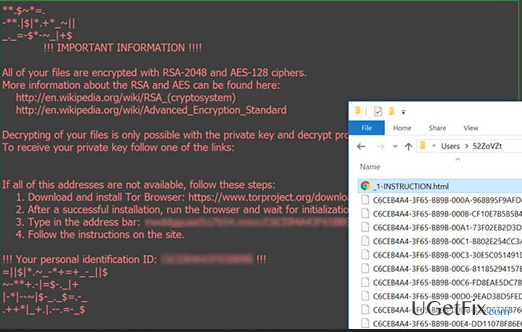
All of the Locky ransomware versions gained their names according to the file extension appended. For example, previously we had .odin, .thor, .aesir, while the latest Locky ransomware updated version showed up with a .zzzzz file extension. Despite this alteration, the other traits typical to Locky haven’t been changed. The infection is typically spread via fictitious emails that contain a .zip file. Security specialists have noticed that the virus is often targeting Amazon users by sending them fake emails reporting the status of the order. If the computer owner opens the attachment, the Trojan is activated and transfers the malicious .zzzzz ransomware code to the targeted system. When the virus roots deeply into the operating system, it corrupts documents, audio, video, and image files by adding a .zzzzz file extension to each of them. Thus, the names of encrypted files look like this - [8_random_characters]-[4_random_characters]-[4_random_characters]-[4_random_characters]-[12_random_characters].zzzzz extensions. In addition, the desktop background picture is replaced by a Locky-specific ransomware note, while the demands are presented in .html, _6-INSTRUCTION.html, and -INSTRUCTION.bmp files. The victim is expected to pay 740 USD ransom, but the sum can vary.
Zzzzz is a severe cyber infection that is capable of finding the least security breach. That‘s why it‘s vital to keep the system protected by using a professional anti-virus and anti-malware. If, unfortunately, you have already been infected, please DO NOT pay the ransom because by doing so you will support cyber crooks and get a zero guarantee that encrypted data will be restored. Instead of that, we would highly recommend you to install [d1] and remove Zzzzz ransomware immediately. After that, try to recover your data by following the methods provided below.
NOTE: DO NOT fall for installing Locky Decrypter promoted on the Zzzzz ransomware note. The tool has been developed by the same hackers who have invented the infection. Having this in mind, mace your own conclusions on how trustworthy this tool may be.
How to Recover Files Encrypted by Zzzzz Ransomware?
Method 1. Use a Data Backup
If you have listened to the warnings of security experts about an increasing ransomware hijacks, then you must have created data backups some time ago. Recovering files encrypted by Zzzzz ransomware using data backups is the most reliable method. Therefore, try to recall if you have some files on cloud storage, external drive, USB flash drive, CD, DVD or other storages and use them to recover lost data.
NOTE: Before plugging in the external drive or opening a cloud storage, make sure that the Zzzzz virus has been removed successfully. For this purpose, run a scan with anti-virus to remove it and then reappear the scan to ensure that the infection has gone permanently.Otherwise, it may damage the restored files and even corrupt the drive.
Method 2. Retrieve Shadow Volume Copies
Microsoft operating system is set to create backups automatically on a particular schedule. The Volume Shadow Copies Service is handy when the PC owner accidentally removes or modifies important files or if they are damaged after a system crash. Recent researches have shown that Shadow Volume Copies benefit a lot when trying to decrypt files encrypted by ransomware. While it hasn't been tested with Zzzzz ransomware code, it's worth given a try. However, we must warn you that most of the Locky virus variants tend to damage Shadow Volume Copies, so do not get upset if this method won't help you.
- Download and install ShadowExplorer. You may find it here.
- Open the program and click on a menu (top left corner).
- Find the disk on which the encrypted files are located and select it.
- Select the folder that you want to restore the first.
- Click on it and select Export.
- Repat the same with all folders that contain compromised files.
Method 3. Use Data Recovery Pro
The initial purpose of Data Recovery Tool is to restore files that have been deleted by accident or lost due to the system crash. However, it has recently been improved, so that it can now detect and restore virus-infected files. NOTE: it does not work as a ransomware decryptor primarily, it may not be able to restore files damaged by .zzzzz file extension virus.
- Download [rev id=”Data Recovery Pro”] and run the setup file.
- Follow the on-screen instructions to install it to your PC.
- Open the program and set it to run a scan.
- It should detect all files that have .zzzzz file extension. Click the file you want to restore and select Recover.
Method 4. Use a System Restore Point
System Restore Point is yet another innovation, which has been presented in Windows 10 OS. This service enables PC users to register a particular point of the PC's condition, including data stored on it. Consequently, if the system gets slow, crashes or experiences virus infection, the user can restore the system to the previous point. So, if your files have been corrupted by Zzzzz ransomware, but you have a System Restore Point created some time ago, then you should try doing the following:
- Right-click on a file that you wish to restore.
- Select Properties from the drop-down menu.
- Open Previous Versions tab.
- Find Folder versions and mark the point you want your system to be restored.
- Click Restore and wait for the command to be executed.
Bottom line
To recover files encrypted by Zzzzz ransomware, consider restoring from backups, using file recovery software, or seeking professional help. If these methods do not yield results, it is advisable to consult cybersecurity experts for further assistance.
Frequently asked questions
Immediately disconnect your device from the internet to prevent further encryption and data loss. Then, use a reliable antivirus program to scan and remove the ransomware before attempting any file recovery.
Yes, there are several data recovery tools and decryption software specifically designed for ransomware like Zzzzz that can help recover your files on Windows 10 or Windows 11.
If you have System Restore enabled on your Windows 10 or Windows 11 device, you can revert your system to a previous state, which may help recover unencrypted files.




Report an issue
What's wrong with this guide? We review every report and update or remove content.
Report received — thank you. We'll review and fix it.
You need a free account to submit a report.
Be the first to comment