How to remove
“Call Windows Help Desk Immediately” pop-up
from Windows
Easily eliminate the “Call Windows Help Desk Immediately” pop-up on Windows 10 or 11. Follow our expert-tested guide for a quick fix!

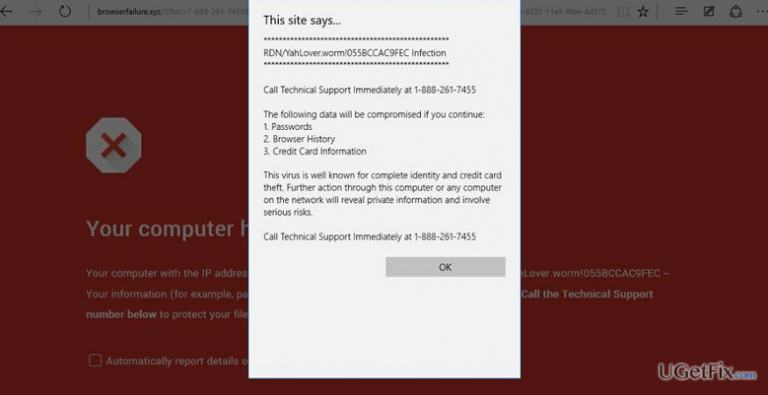
How does How to remove “Call Windows Help Desk Immediately” pop-up end up on your PC?
- Scammers targeting your PC
- Web browser working slower than usual
- Various websites failing to load
- Increased CPU consumption by web browser
- Attempts to open new tabs causing alerts
Repairs Windows system files, removes malware, and restores a clean OS state — without reinstalling.
“Call Windows Help Desk Immediately” pop-up on Chrome each time when trying to open new tab window. Looks suspicious. Should I call?
Windows users have to be aware of the fact that Microsoft is NOT transferring warning about security flaws or virus infections with the Windows technical support number. All information related to Windows news, including the contacts (email address, telephone number, location, etc.) of the technical support can be found on the Microsoft’s official website. Therefore, if your web browser generates “Call Windows Help Desk Immediately” pop-up, it means that scammers targeted your PC and you are now a potential victim of a tech support scam.
“Call Windows Help Desk Immediately” is a typical example of the tech support scam alert since it is based on the old strategy, which is to make people believe that their PCs are suffering from a severe virus or system error, which may lead to information loss or PC’s crash. It seems that scammers know well how to convince people and arouse the feeling of urgency. Before the emergence of the “Call Windows Help Desk Immediately” pop-up, web browser may start working slower than it used to, various websites may fail to load, crash, etc. Besides, web browser may start consuming more CPU than it usually does, which is why PC’s performance may go down. After that, PC user's attempts to open a new tab window or access any website by clicking on a link cause web browser's screen to get stuck with the “Call Windows Help Desk Immediately” alert, which informs about a virus infection, which may cause the loss of credit card details, passwords or browsing history. Although the alert claims that “The virus is well known for complete identity and credit card theft,” the name of a virus or, at least, references to it, is not give, except the error code 0x80070424. That’s because these claims are bogus, but used in the alert to make it look more convincing and threatening.
“Call Windows Help Desk Immediately” tech support scam pop-up is not dangerous, except that it freezes web browser and disrupts web browsing heavily. However, the call for a supposed tech support technicians may have negative consequences, such as money loss, PC’s hijack, and similar. Having all this in mind, do not hesitate and remove “Call Windows Help Desk Immediately” pop-up immediately.
How to fix “Call Windows Help Desk Immediately” pop-up?
There are two reasons why you may encounter “Call Windows Help Desk Immediately” error. First of all, you might have landed on a compromised website, which might have been injected with a malicious code. If, however, the website that you tried to access was reliable, tech support scam pop-up must be generated by a potentially unwanted program (PUP), known as adware. Therefore, to get rid of “Call Windows Help Desk Immediately” pop-up you will have to terminate the adware and then reset your web browser. The instructions provided below will explain how to do that.
The 100% reliable method to get rid malware from the system is to perform a scan with a reputable anti-malware. Our recommendation would be [d1]. This tool will not only remove existing malware, but will also optimize the system.
NOTE: when you perform automatic “Call Windows Help Desk Immediately” malware removal, don't forget to reset your web browsers manually.
As an alternative to automatic adware removal method, you can remove it manually. However, be careful and make sure to remove all suspicious/unknown programs that have been installed recently.
- Open the list of programs that have recently been installed. For that, navigate to:
Start > Control Panel > Programs and Features > Add/Remove Programs (Windows 7, XP).
Right-click on Win key > select Control Panel > Uninstall a Program (Windows 8, 10). - Carefully check what programs have been recently installed. The best way to do that is to sort the programs by date. Select unknown programs and click Uninstall. To confirm the removal, click OK/Uninstall.
- After that, reset your web browser.
How to reset web browser?
How to reset Microsoft Edge?
How to reset Internet Explorer?
How to reset Mozilla Firefox?
How to reset Google Chrome?
Bottom line
To remove the 'Call Windows Help Desk Immediately' pop-up, users should check for malware, clear browser cache, and reset browser settings. If these fixes do not resolve the issue, consider seeking professional technical support.
Frequently asked questions
If you encounter this pop-up on Windows 10, immediately close your browser and run a full antivirus scan to remove any potential malware causing the issue.
Yes, you can uninstall suspicious programs from Windows 11 by going to Settings > Apps > Apps & features, and removing any unfamiliar software.
To prevent this pop-up from reappearing, ensure your antivirus software is up to date, avoid clicking on unknown links, and regularly clear your browser's cache.




Report an issue
What's wrong with this guide? We review every report and update or remove content.
Report received — thank you. We'll review and fix it.
You need a free account to submit a report.
Be the first to comment