How to remove
Uninstall Privacy Dr
from Windows
Easily uninstall Privacy Dr. from your Windows 10 or Windows 11 device with our expert-tested guide. Get quick fixes and zero traces left!

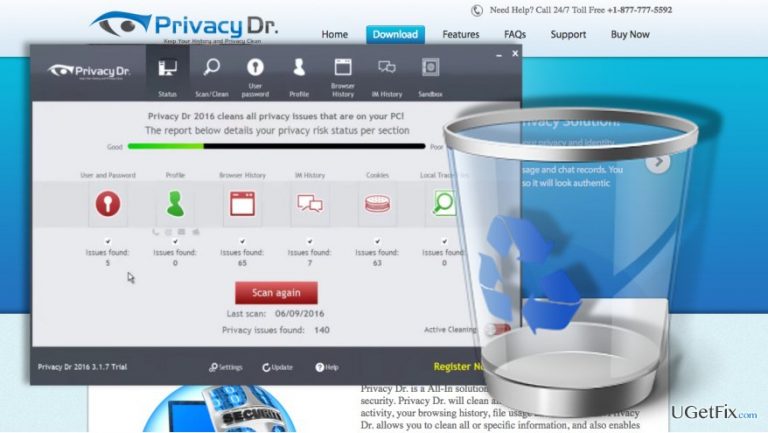
How does How to uninstall Privacy Dr end up on your PC?
- Constant pop-ups urging purchase of full version
- Over exaggerated reports about system's condition
- Nagging advertisements extending to web browsers
- Questionable advertising practices by developers
- Sophisticated malware can obfuscate files
Repairs Windows system files, removes malware, and restores a clean OS state — without reinstalling.
I’m looking for a way to remove Privacy Dr. from my computer. The software looked promising when I first got it, but now I’m getting really tired from the constant pop-ups that this program generates, urging me to purchase its full version. I don’t want to obtain it, but what I do want is to remove this software from my PC. Can you help me with this? I’m using Windows 10 by the way.
Privacy Dr. is a questionable privacy-oriented application developed by a company called EuroTrade A.L. Ltd. On the official website, the program is introduced as a useful tool which supposedly allows the users to record, clean and view file usage data, chat records and browsing history easily. The site represents every aspect of the program is a very convincing manner which makes people download the software without even considering there might be anything wrong with it. Unfortunately, not all software developers stick to their promises. Some only use fake advertising to attract people in order to benefit themselves. Looking at Privacy Dr. reviews, it seems that the program drifts strongly towards these tendencies. Like most fraudulent system optimization tools, this one displays over exaggerated reports about the system's condition, urging the users to buy a full version of the program and fix these issues without delay. If you refuse to do it -- prepare yourself for a marathon of repetitive pop-ups and nagging advertisements that extend even to the infected computer’s web browsers. Antivirus software like [rev id=”Malwarebytes”] can prevent you from being tricked, but more sophisticated malware can obfuscate their files and avoid elimination; thus you should not rely on security tools to do all the job for you.
The software has been updated several times already, and its latest version is Privacy Dr. 2.2.2. While the software developers try to project a trustworthy image of the app, the actual user feedback shows quite the opposite results. Over 50 % of the users who have downloaded the software recommend to remove Privacy Dr. as soon as possible. When you are at it, make sure you remove software executable PC_Privacy_DR.exe and update manager updater.exe along with other 26 files that this shady program deploys on the computer upon installation. Carry out the elimination as described in the tutorial below.
How to uninstall Privacy Dr.?
- Close the application
- Open your Task Manager and terminate the process called PrivacyDr2016.exe running in the Processes list.
- Then, go to Control Panel -> Add/Remove Programs, select Privacy Dr. application along with other software that may have come along with it (e.g.: Registry Dr.) and select uninstall.
- Finally, delete the PrivacyDr2016 installer from your Downloads folder.
When you are done with the virus removal, make sure you clean your Windows Registry to get rid of the unwanted leftover files. You can do that with the help of free software like [rev id=”CCleaner”] or professional utility, such as [rev id=”Reimage”]. Then it is time to clean up the %temp% folder where the program may also have left bits of its data.
- Open the “Run” command prompt by entering “Run” into Windows search
- Once the “Run” window opens, type in %temp% and hit Enter. Delete whatever files you find there.
- Reset your computer.
Bottom line
To uninstall Privacy Dr., you can use the built-in Windows uninstaller, access the Control Panel, or utilize a third-party uninstaller tool. If these methods do not work, consider using antivirus software to help remove the program.
Frequently asked questions
To uninstall Privacy Dr. from Windows 10, go to Settings > Apps, find Privacy Dr. in the list, and click 'Uninstall.' Follow the prompts to complete the uninstallation.
Yes, you can remove Privacy Dr. by opening Control Panel, selecting 'Programs,' then 'Programs and Features,' right-clicking on Privacy Dr., and choosing 'Uninstall.'
If Privacy Dr. is not listed, try using a third-party uninstaller tool or check for any remnants in the Program Files directory before manually deleting them.




Report an issue
What's wrong with this guide? We review every report and update or remove content.
Report received — thank you. We'll review and fix it.
You need a free account to submit a report.
Be the first to comment