How to remove
Delete Yahoo Account
from Windows
Easily remove your Yahoo account on Windows 10 or Windows 11 with our expert-tested guide. Get it done quickly and efficiently—fixed in minutes!


How does How to Delete Yahoo Account end up on your PC?
- Account was hacked in 2013
- Data breach affected at least 3 billion user accounts
- User data was not secured efficiently
- Identical passwords used on other accounts
- Linked mobile devices to the compromised account
Repairs Windows system files, removes malware, and restores a clean OS state — without reinstalling.
I just found out that my Yahoo account was hacked in 2013. I am perplexed, and I would like to find out how I can delete my Yahoo account? I have changed all my passwords, but I no longer want to use Yahoo - it just does not seem to be securing user data efficiently!
Yahoo data breach that took place in 2013 was firstly discovered in 2016. It was stated that the data breach affected at least 1 billion user accounts, and the data breach was quickly ranked as “the biggest data breach of all times.”

However, it seems that the extent of the data breach wasn’t calculated precisely enough. Yahoo has recently posted an update stating that the data breach affected 3 billion user accounts, meaning ALL of Yahoo accounts that existed in 2013.
The data stolen from hacked accounts included names, hashed passwords, birthdays, encrypted or unencrypted security questions and answers and also phone numbers. According to Yahoo, cyber criminals did not stole the passwords in clear text, meaning that they could not access financial or banking data connected to hacked Y! accounts.
Before deleting Yahoo account, there are some key things users whose accounts were hacked need to do:
- If you used an identical password on any other account online, change it ASAP.
- Change passwords on every account you registered with Yahoo’s email account that was compromised.
- Unlink mobile devices from your Yahoo account before deleting it.
- Go through your emails in Yahoo! Mail to find any accounts you forgot that existed. Make sure you cut any relations to the compromised Yahoo account. Change passwords everywhere you can.
- Connect a new email account to accounts you are trying to protect. As long as they are linked to the compromised Yahoo account, hackers can recover login information quickly even if you change the password.
- Save any information you need from your Yahoo account. Once you close your account, it won't be possible to recover it.
Delete your Yahoo Account
Ready to say goodbye to your Yahoo account? Then do it using these instructions:
- First of all, go to Terminating your Yahoo! Account page.
- Now, log in using compromised Yahoo! Account username and password.
- Enter the password to confirm your identity.
- Enter the code displayed in the picture to confirm that you’re human.
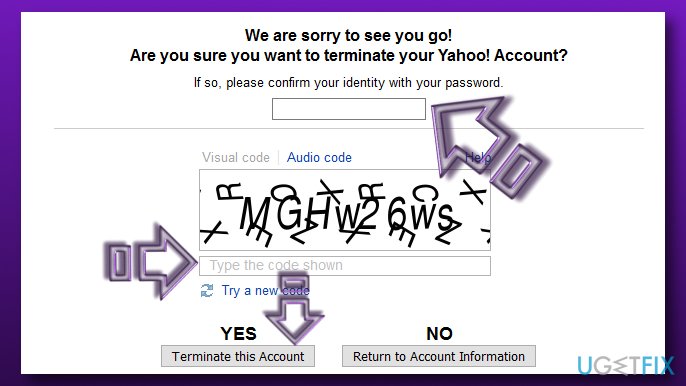
Terminate yahoo account - Click Yes to deactivate your Yahoo account. You will see a pop-up saying “Yahoo! Account Terminated.” A short message provided on the screen will state that your account has been scheduled for deletion and will be deleted within 90 days.
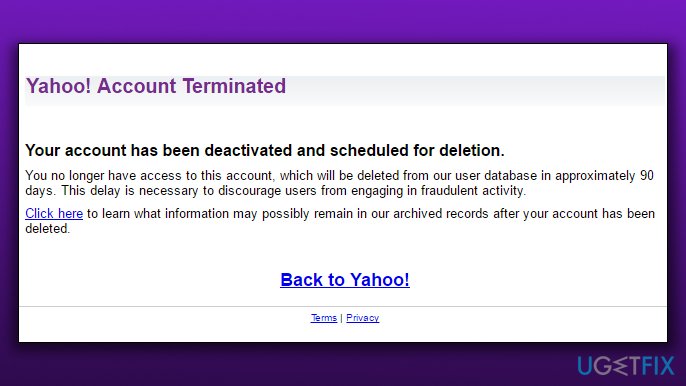
Yahoo account terminated
In case you are unsure what deleting your account does check this list provided below. Deleting your Yahoo! account will erase the following data:
- Yahoo! Mail data;
- Yahoo! Address Book data;
- My Yahoo! data;
- HotJobs data;
- Flickr account;
- Yahoo! GeoCities data;
- Yahoo! Small Business data.
Bottom line
To delete your Yahoo account, ensure you have changed passwords on all linked accounts, unlinked mobile devices, and saved any necessary information. If you have completed these steps and still wish to proceed, follow the deletion instructions provided by Yahoo. If none of these solutions worked, consider reaching out to Yahoo support for further assistance.
Frequently asked questions
To delete your Yahoo account on Windows 10, visit the Yahoo account termination page, sign in, and follow the prompts to confirm your account deletion.
Yes, you can remove your Yahoo account from the Windows 11 Mail app by going to Settings, selecting Accounts, and then choosing the Yahoo account to remove it.
If you accidentally delete your Yahoo account, you may have a chance to recover it within 30 days by signing in again on Windows 10 or Windows 11.




Report an issue
What's wrong with this guide? We review every report and update or remove content.
Report received — thank you. We'll review and fix it.
You need a free account to submit a report.
Be the first to comment