How to remove
Get rid of Amazon gift card scam
from Windows
Eliminate Amazon gift card scams on Windows 10/11 with our expert tips. Follow our guide for a hassle-free fix—zero traces left!

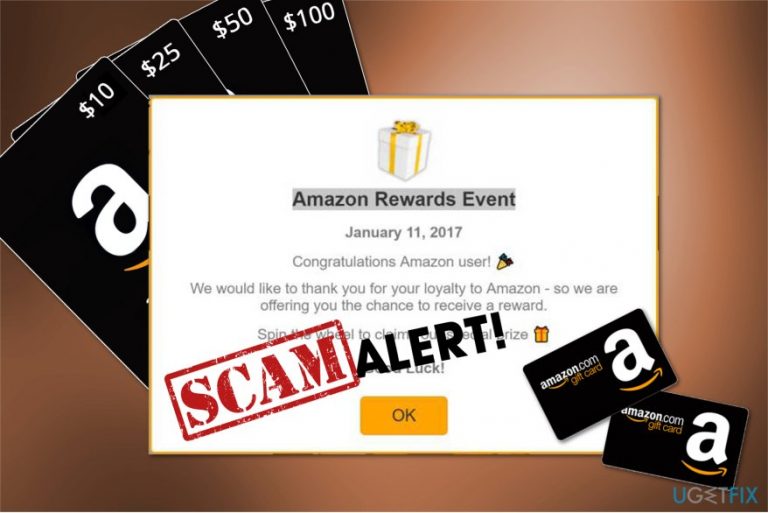
How does How to get rid of Amazon gift card scam end up on your PC?
- Amazon gift card scams trick people into giving personal information
- Scammers use Amazon's name to gain trust
- Fraudulent emails claim users have won gift cards
- Pop-up messages ask users to confirm orders with links
- Clicking on links can lead to malware infection
- Scammers target users with fake voucher offers
Repairs Windows system files, removes malware, and restores a clean OS state — without reinstalling.
Hi. I continuously receive various Amazon gift card offers. Recently, I found one in my email and another day I encountered one during my browsing session. Are they legitimate? Because it seems odd for $1000 Amazon gift card giveaway to be valid. If they are fake, I would like to know how to get rid of Amazon gift card scam. Please, help.
Amazon gift card scam is a type of business model used to trick people into giving personal information or installing malicious software.[ref en-1] Due to the success of this well-known retailer, hackers are using its name for their benefit. Note that there are multiple types of this hoax that you can encounter online.
Most commonly, people receive Amazon gift card hoax in the form of voucher offers and claim that the company wants to thank its customers[ref en-2]. However, such messages are fake and designed to defraud credentials or other sensitive information from credulous people.
Another favorite way used by cyber criminals to make profits from Amazon gift card pop-ups is saying that the person was chosen as a random winner and should receive its gift.[ref en-3] Once the person agrees to click on the indicated link, he/she will be immediately redirected to an unsafe website where not only personal data can be stolen, but also there is a high risk of malware infection.

Additionally, you can be asked to confirm your order by Amazon gift card pop up on iPad, iPhone or Android devices. Such emails are also fraudulent, and you should never click on the given links. Note that by doing so you might encounter financial losses in the future or even identity theft.
Below you will find ways how to get rid of Congratulations Amazon user scam since it will help you protect your system from unwanted programs and secure private information. For that, read down below.
Ways to get rid of Amazon gift card pop-up
Therefore, you want to warn you that you should never trust such claims and get rid of Amazon gift card scam immediately. For that, you can install a powerful protection tool like [rev id="Perfect Uninstaller"] and let it clean your system from the potentially unwanted program which displays such fake messages.
However, there is a way how you can get rid of Amazon gift card pop-up manually. For that, we suggest following instructions which are given below. Note that it is essential to read and follow them strictly in order not to harm your computer during the procedure. Please, be attentive.
Uninstall suspicious software from your computer
- Go to Start menu and select Control Panel;
- Pick Uninstall a program;
- Now, search for any suspicious, Amazon-related or even recently installed software;
- Once you find it, double-click on it;
- Select Uninstall and hit OK to save the alterations.
Reset your browser to get rid of Amazon gift card scam
NOTE: The instructions are prepared for Google Chrome users. Although, similar actions can be taken to clean other popular browsers from Amazon gift card pop-ups as well.
- Open Google Chrome and click on three vertical dots in the top-right corner of the window;
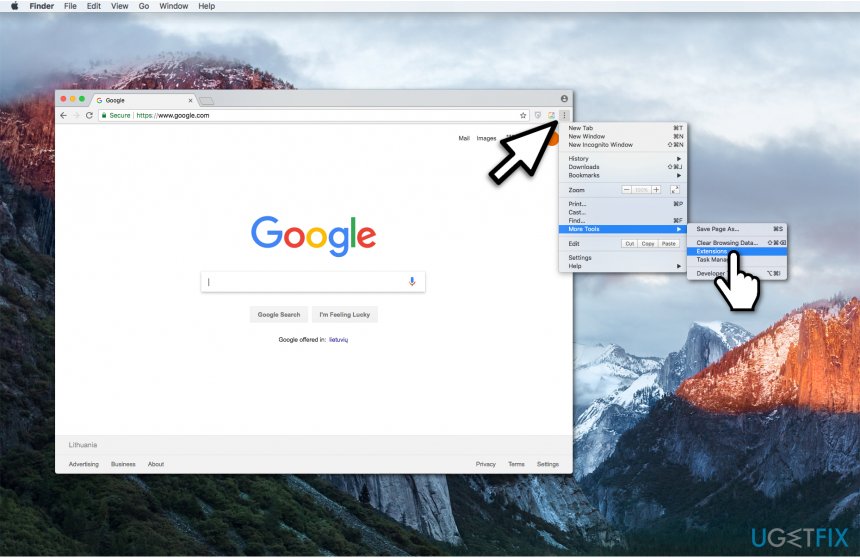
Open extensions on google chrome - Select More Tools and pick Extensions;
- Search for suspicious entries that might be related to Amazon scam and delete them;
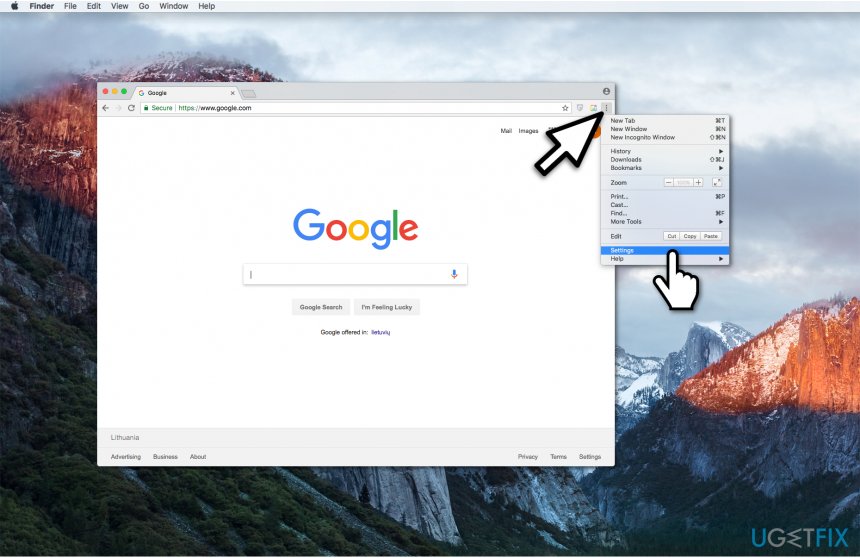
Open settings on google chrome - Click again on the three vertical dots and select Settings;
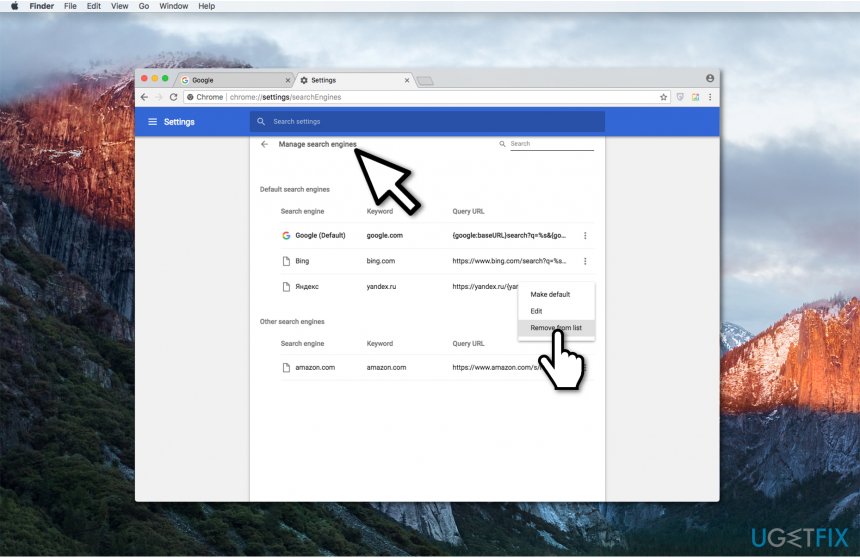
Removing amazon gift card scam - Then pick Manage Search Engines delete other malicious URLs;
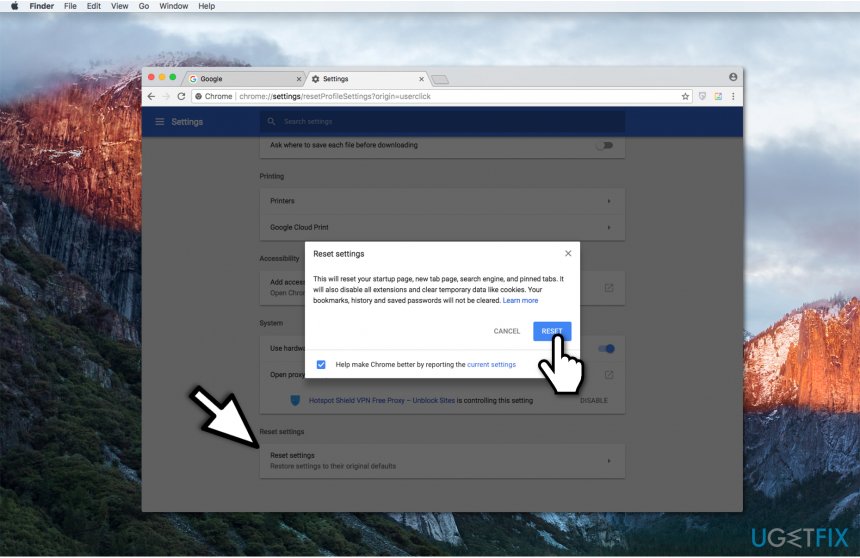
Resetting chrome after amazon scam - Go back to Settings and select Reset at the end of the page.
Bottom line
To get rid of Amazon gift card scams, you should avoid clicking on suspicious links and install a powerful protection tool. Additionally, be cautious of unsolicited emails claiming you have won a gift card. If these measures do not work, consider seeking professional help to secure your system.
Frequently asked questions
To remove a suspicious program, go to Settings > Apps > Apps & features, find the unwanted program, and click 'Uninstall.' Ensure you also check for any related browser extensions that may have been installed.
Open Task Manager by right-clicking the taskbar and selecting 'Task Manager,' then look for any unfamiliar processes and end them. After that, uninstall the suspicious program from the Apps settings.
Yes, keep your Windows 10 or Windows 11 system updated and use a reputable antivirus to scan for malware, which can help prevent these scams from taking hold.




Report an issue
What's wrong with this guide? We review every report and update or remove content.
Report received — thank you. We'll review and fix it.
You need a free account to submit a report.
Be the first to comment