How to remove
Delete Inetpub Folder
from Windows
Easily delete the Inetpub folder in Windows 10 with our expert-tested guide. Get quick solutions and zero traces left behind.

How does How to delete Inetpub Folder in Windows 10 end up on your PC?
- Inetpub folder is related to Internet Information Services (IIS)
- The folder is used for hosting web pages on the PC
- Subfolders are designed for specific functions like administration and website content
- The folder contains samples for developers which can pose risks
- The folder manages Simple Mail Transfer Protocol (SMTP) services
Repairs Windows system files, removes malware, and restores a clean OS state — without reinstalling.
Hi, I have recently noticed Inetpub folder on my computer. Even though I know that this folder is related to Internet Information Services and used when hosting web pages on the PC. Although, I have never used IIS and would like to delete Inetpub folder. Is it safe to do so?
Inetpub is a folder which consists of five subfolders and is categorized as a default folder for Microsoft Internet Information Information Services (IIS)[ref en-1]. You can locate Inetpub folder in the C drive that is also known as C:\\inetpub. Note that all web apps and content will be stored in this folder.[ref en-4] The website content and other web apps are stored in this folder for security and organization purposes. Also, this way more domains can be served from one Inetpub.
The \\inetpub\\adminscripts subfolder stores administration scripts which allow administrating the website hosted from Inetpub folder remotely. The second subfolder named as \\inetpub\\iissamples holds samples which are used for developers to learn how web apps and websites work.
Also, you can find \\inetpub\\mailroot subfolder and similar ones in the Inetpub folder. All of them are used to manage the Simple Mail Transfer Protocol (SMTP)[ref en-2] server for mail. Finally, the \\inetpub\\scripts subfolder contains apps which improve the functionality of the website while \\inetpub\\wwwroot subfolder stores all website content.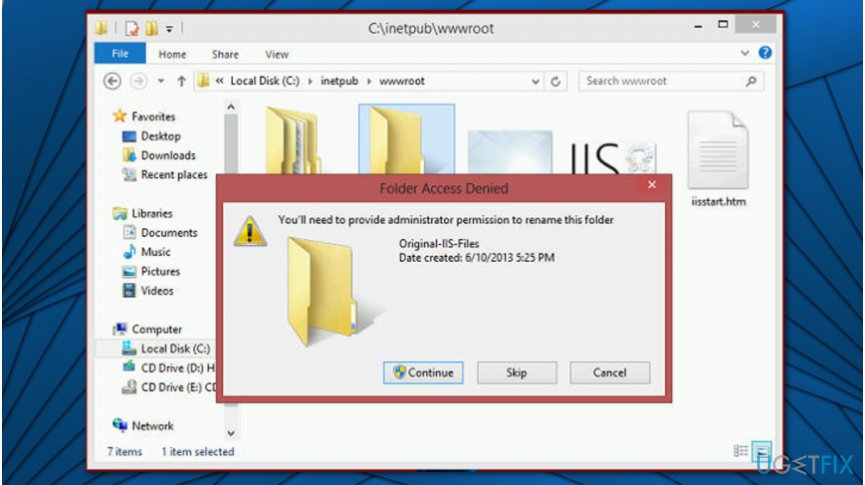
Inetpub works in a pretty simple manner. Found in the C drive, Inetpub folders have five different ones that are designed for a specific function from administration scripts to applications and functionality of the website. All those Inetpub subfolders:
- adminscripts - allows to automate server administrative tasks and remotely manage the website and its server from the Inetpub.
- iisamples - allows developers to learn about how the website and applications work. This folder is for demonstration purposes and using any sample can put the computer at risk.
- mailroot - this folder is used to process SMTP services for mail.
- scripts - the folder contains applications with website functionality.
- wwwroot - contains the web page and material that will be published on the website. This is the default directory for web page publishing.
The IIS web server gives the advantage of running a website from anywhere on the computer. While Inetpub subfolders contain all this data, the website can be secured properly. Developers who use IIS can easily start and set up a website in comparison to other hosting methods.
Main Inetpub principles and possible issues
Since this is a Microsoft product, the company is putting a lot of resources into developing the IIS web server and offering support for troubleshooting problems. Also, developers for a community and help each other to work any issues. Although, various developers have IIS as a web server and uses Apache that is an open source web server and is more difficult.
Note that if you are not using Inetpub folder or IIS, you might need to delete Inetpub as it makes Windows computers vulnerable. In some rare cases, you might encounter the following problems:
- Microsoft index server buffer overflow;
- HTTP protocol stack vulnerability;
- File fragment disclosure.
- Etc.
Unfortunately, there might be some vulnerabilities with Inetpub because of the ability to serve web pages from the folder. But these issues can be prevented if you delete iissamples subfolder from the Inetpub. Those samples may not even get used and it is possible that instructional sites have vulnerabilities.
Additional things you can do to prevent vulnerabilities with Inetpub:
- Restrict the access and NTFS permissions to the Inetpub files.
- Move the website to another drive since it is commonly found in C: disk.
- Turn IIS off if the PC is not serving as a web server.
However, Inetpub can be removed from the device if needed and it is safe, no essential parts of the computer should be affected by this process. Regular computer users can easily delete the folder from Windows 10 operating systems. When the computer is not supposed to be used as a web server, you can delete Inetpub folder. Especially when this is causing some issues or you don't want to risk any of the vulnerabilities.
This folder is useless and you can definitely delete it if you are not using the IIS or hosting websites on the computer. However, it might be difficult because of the Windows Settings that you need to change before removing the folder completely. Those who are not aware of how to do that might check the instructions presented below. The guidelines will explain how to delete Inetpub in detail.
How to delete Inetpub folder in Windows 10 safely?
Our IT experts recommend scanning your computer with [d1] if you have any Windows-related issues. This system optimization tool is designed to get rid of errors, fix damaged DLLs[ref en-3] and recover the system after a virus attack.
When your system is cleared from additional or unwanted content and you are sure to delete Inetpub, you can follow the guide for help since this process requires a few additional changes.
Eliminate Inetpub folder via Control Panel:
- Press Windows key and enter Control Panel;
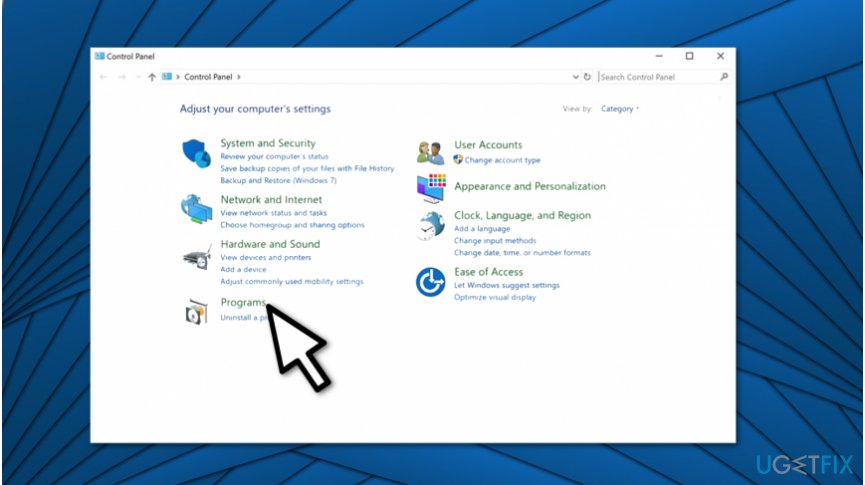
Eliminate inetpub folder - Open Control Panel and click on Programs;
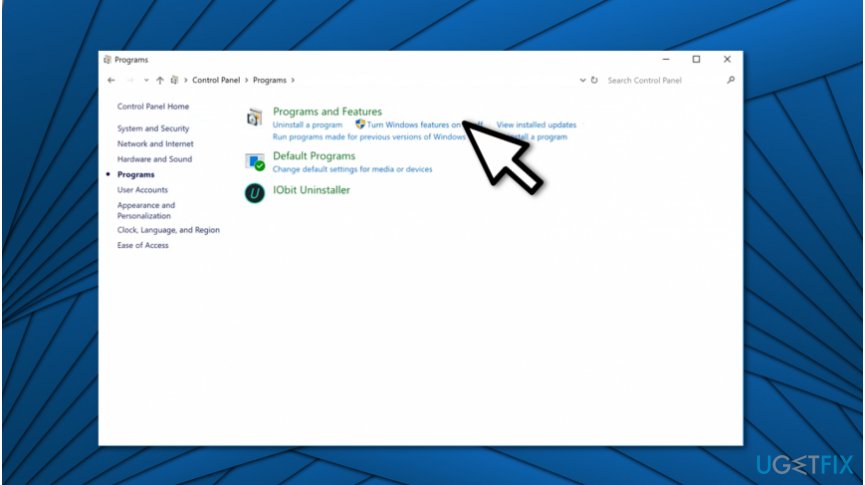
Get rid of inetpub folder on windows - Hit Programs and Features button;
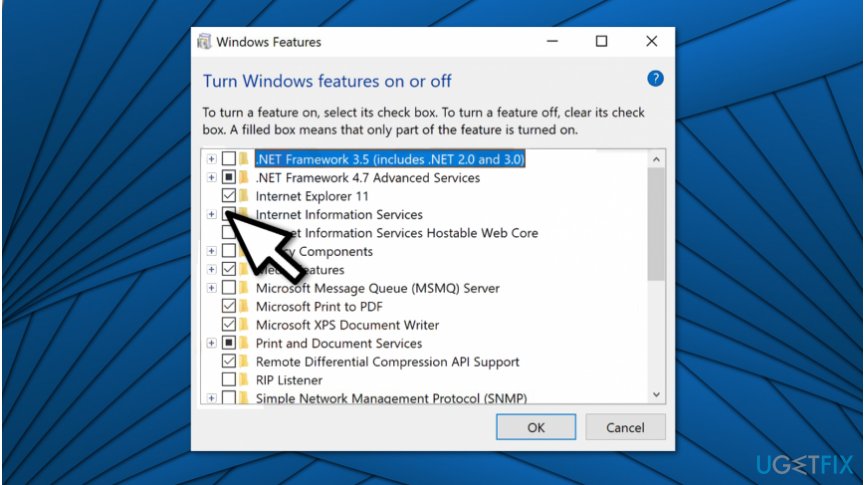
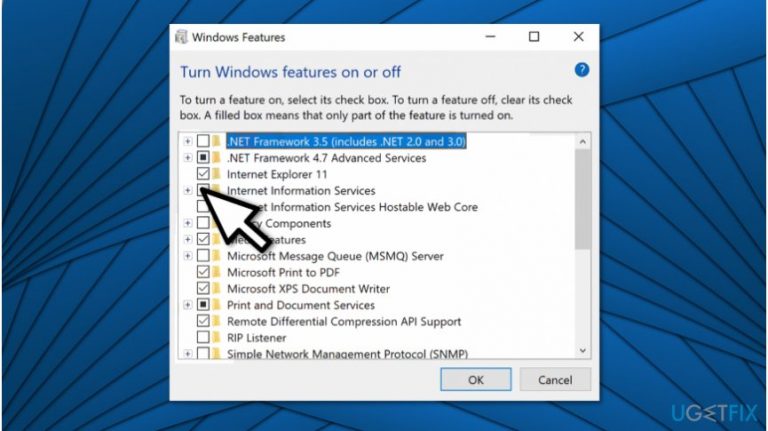
Inetpub folder removal on windows - Find Internet Information Services box and opt it out;
- Click OK.
Bottom line
To delete the Inetpub folder safely, ensure that IIS is not being used and that you do not need any of the content stored within it. If you encounter issues or if the folder cannot be deleted, consider disabling IIS through the Windows Features settings. If none of these solutions work, consult further technical support.
Frequently asked questions
The Inetpub folder is a default directory for Internet Information Services (IIS) that stores web files and applications. If you do not use IIS, you may consider deleting this folder to free up space.
Yes, you can delete the Inetpub folder using File Explorer, but ensure that IIS is not installed or used on your system to avoid issues. Right-click on the folder and select 'Delete' to remove it.
If you do not have applications relying on IIS, deleting the Inetpub folder can actually improve system performance by freeing up disk space. However, if IIS is in use, it may cause web applications to malfunction.




Report an issue
What's wrong with this guide? We review every report and update or remove content.
Report received — thank you. We'll review and fix it.
You need a free account to submit a report.
Be the first to comment