
api-ms-win-core-path-l1-1-0.dll is missing: why Windows 7 shows it and what actually fixes it
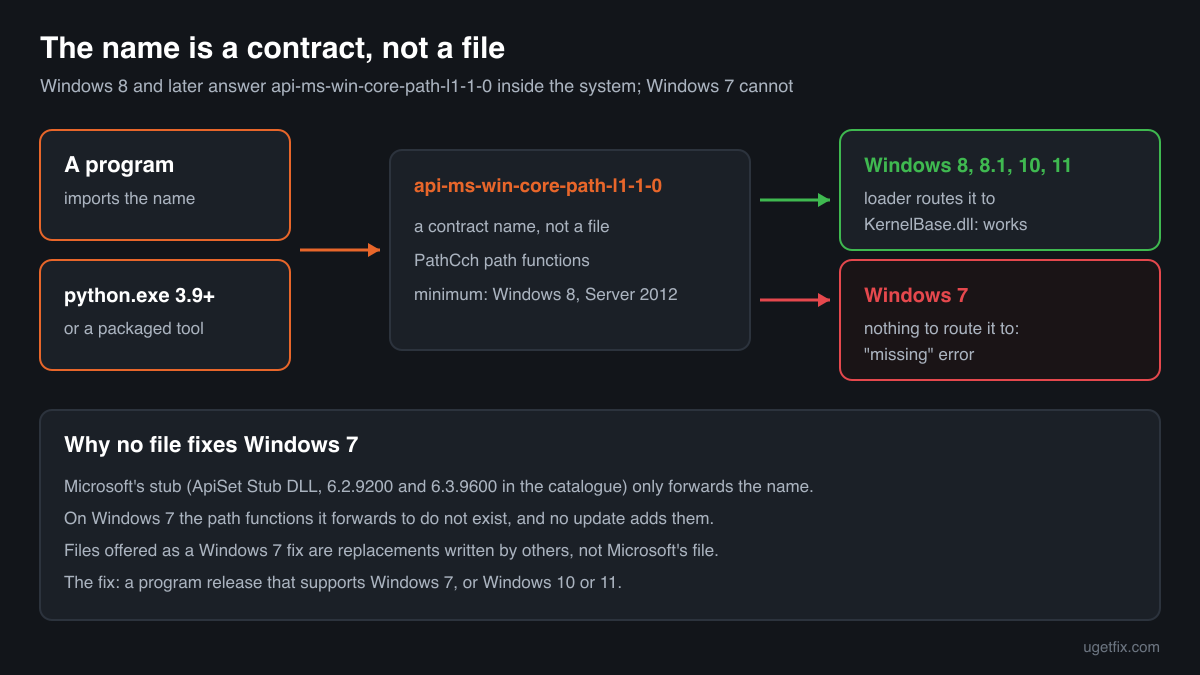
api-ms-win-core-path-l1-1-0.dll is not a normal program file. It is the name of a Microsoft API set, a group of Windows path functions that arrived with Windows 8. Windows 8, 8.1, 10 and 11 answer the name inside the system. Windows 7 does not have those functions at all, so a program built for Windows 8 or later, such as Python 3.9 or a tool packaged with it, stops with this error.

Prefer to fix it yourself? The manual steps follow.
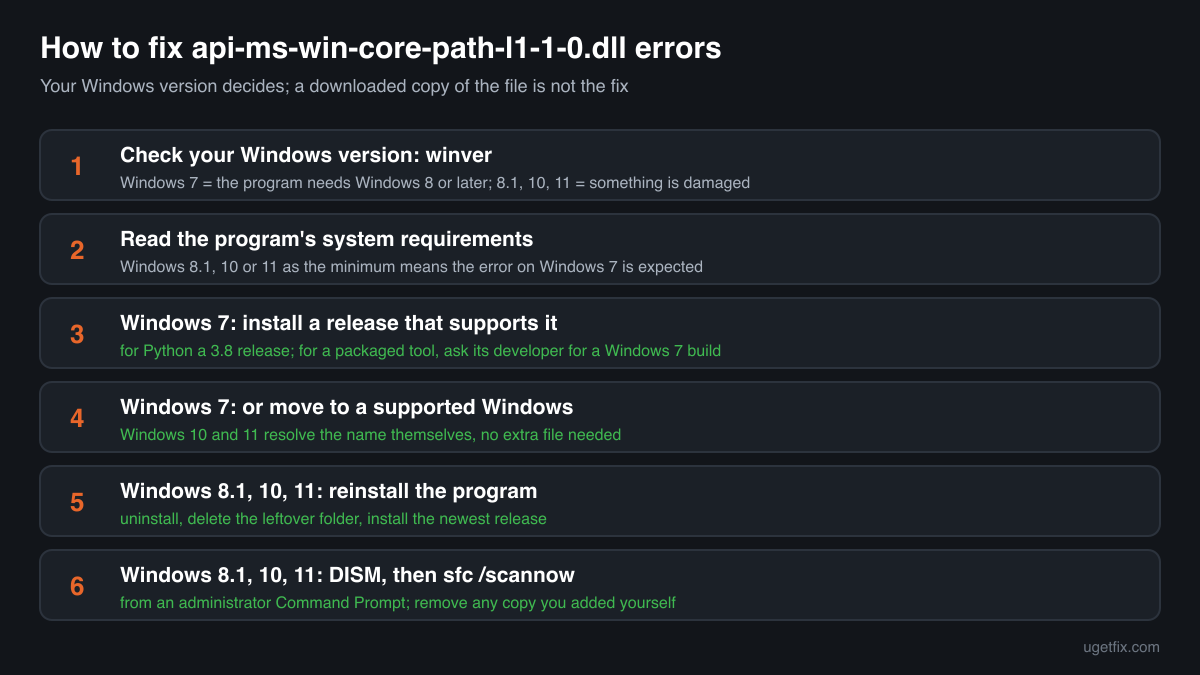
How to fix api-ms-win-core-path-l1-1-0.dll errors
First find out which Windows you have: press Windows key + R, type winver and press Enter. On Windows 7 the error means the program was built for Windows 8 or later and uses path functions that Windows 7 does not contain. No file can add them. Install a release of the program that still supports Windows 7 (for Python, a 3.8 release, because Python's own download page says 3.9 and later cannot be used on Windows 7), or move to a supported Windows. On Windows 8.1, 10 or 11 the name is resolved by Windows itself, so the error points to a damaged program install or damaged system files: reinstall the program, then run the system file check described below.
A downloaded api-ms-win-core-path-l1-1-0.dll is not the fix. Microsoft's own copy is only a stub that forwards the name to code inside Windows 8 and later; on Windows 7 there is nothing for it to forward to. Files offered as a Windows 7 fix are unofficial replacements written by others, not Microsoft's file.
Which programs need api-ms-win-core-path-l1-1-0.dll
No program really ships this file. Programs name it in their list of imports because their developer used the Windows path functions it stands for, and Windows 8 and later route the name to the code that implements them. Microsoft documents the functions, such as PathCchCombineEx, with Windows 8 and Windows Server 2012 as the minimum. These are the cases you will meet.
| Program | Made by | What to know |
|---|---|---|
| Python 3.9 and later for Windows | Python Software Foundation | The most common reason people search the name. Python 3.9 and later use the Windows 8 path functions, and python.org states that they cannot be used on Windows 7 or earlier. On Windows 7 python.exe stops with this message as soon as it starts. Python 3.8 is the last line that supports Windows 7. |
| Programs packaged with Python 3.9 or later | The program's own developer | Many tools and small games are Python scripts bundled with their own copy of Python into one .exe. If that copy is 3.9 or later, the .exe needs Windows 8 or later too, and it may fail with an Error loading Python DLL message instead of naming this file. Only the developer can make a Windows 7 build. |
| Other programs built for Windows 8 and later | Their own developers | Any program that calls the PathCch functions imports this name. A developer who no longer supports Windows 7 has no reason to avoid them. The program's system requirements usually say Windows 8.1, 10 or 11; take that as the answer. |
| Windows 8, 8.1, 10 and 11 | Microsoft Corporation | The API set is part of the system. The loader maps the name to the code in KernelBase.dll, so a program never needs a file with this name next to it. The catalogue copies, described as ApiSet Stub DLL, carry the build numbers of Windows 8 and Windows 8.1. |
| Windows 7 and Windows Server 2008 R2 | Microsoft Corporation | The functions do not exist here, and no Windows Update, Visual C++ redistributable or Universal C Runtime update adds them. This is the Windows where the error appears. |
| Unofficial replacement files for Windows 7 | Not Microsoft | Some people post their own api-ms-win-core-path-l1-1-0.dll that imitates the functions on Windows 7. It is not Microsoft's file, may lack functions a program needs, and runs with your rights inside every program that loads it. |
Step by step
- Check your Windows version. Press Windows key + R, type winver and press Enter. The window shows the edition and build. Windows 7 means the program needs a newer Windows; Windows 8.1, 10 or 11 means something is damaged, and steps 5 to 7 are for you.
- Read the program's system requirements. Look at the download page or the release notes of the program that shows the error. If it lists Windows 8.1, 10 or 11 as the minimum, the error on Windows 7 is expected behaviour and nothing on the PC is broken.
- Install a release that supports Windows 7. Uninstall the version that fails in Control Panel, Programs and Features, then install the last release that the developer still built for Windows 7. For Python that is a 3.8 release from python.org. For a tool packaged with Python, ask its developer whether an older build or a Windows 7 build exists.
- Or move to a supported Windows. Windows 7 receives no security updates from Microsoft, and more programs drop it with every release. On Windows 10 or 11 the same program runs without any extra file, because the system resolves the name itself.
- On Windows 8.1, 10 or 11: reinstall the program. Uninstall it, delete what is left of its folder, restart the PC and install the newest release from the developer's own site. A program started from a damaged or incomplete copy can report a file it should never miss.
- On Windows 8.1, 10 or 11: repair the system files. Open Command Prompt as administrator and run DISM /Online /Cleanup-Image /RestoreHealth, wait until it finishes, then run sfc /scannow. Together they restore damaged Windows files, the API set data included, from Windows' own sources.
- Remove copies of the file you added yourself. If you or a fixer program put an api-ms-win-core-path-l1-1-0.dll into System32, SysWOW64 or a program folder, delete that copy. Windows 8 and later never need it there, and on Windows 7 it is an unofficial file that can break the program in new ways.
What not to do
Do not download api-ms-win-core-path-l1-1-0.dll from a DLL site.
Microsoft's stub only forwards the name to code that Windows 7 does not have, so even a genuine copy fixes nothing there. What DLL sites offer under this name is of unknown origin, and a file dropped next to a program runs inside it with your rights.
Do not use a fixer program that promises the missing DLL.
No tool can add Windows 8 functions to Windows 7. Such programs either copy a file of unknown origin into your Windows folders or bring software you did not ask for.
Do not copy the file from a Windows 8 or Windows 10 PC.
The stub from a newer Windows points into that Windows' own system libraries. On Windows 7 it loads nothing useful, and the program stops with an entry point error or crashes instead.
Do not change compatibility mode and expect a fix.
Compatibility mode changes what Windows reports about itself to a program. It cannot create functions that the installed Windows does not have, so on Windows 7 the error stays the same.
Do not install every Visual C++ redistributable and update in a row.
This name belongs to Windows itself, not to a runtime. The Visual C++ packages and the Universal C Runtime update fix api-ms-win-crt errors, a different family of names, and change nothing here.
Check the copy on your PC
Choose the api-ms-win-core-path-l1-1-0.dll you found. Its checksum is calculated in your browser and compared with 2 copies of the file collected from PCs, all reporting Microsoft Corporation.
The file stays on your computer. Nothing is uploaded: the checksum is computed locally.
Found an api-ms-win-core-path-l1-1-0.dll in a program folder, in Downloads or on a Windows 7 PC? Microsoft never puts it there, so the question is where it came from, and that is a security question rather than a missing-file one. Is api-ms-win-core-path-l1-1-0.dll Microsoft's file or a planted copy? On 2-Spyware
The error messages and what each one means
The wording tells you which Windows you are on and what failed: the name itself, a function inside a replacement file, or the Python runtime inside a packaged program. These are the texts Windows and programs show.
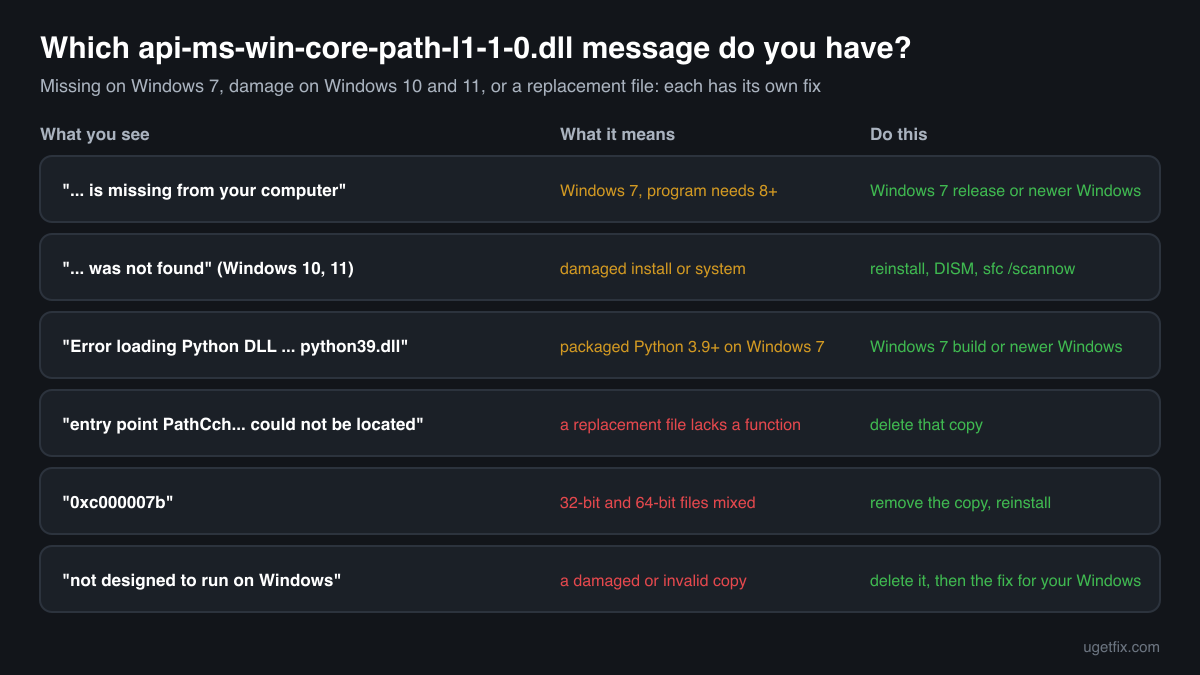
The program can't start because api-ms-win-core-path-l1-1-0.dll is missing from your computer. Try reinstalling the program to fix this problem.
The usual message on Windows 7. The program was built for Windows 8 or later. Reinstalling the same version does not help: install a release that supports Windows 7, or move to a newer Windows.
The code execution cannot proceed because api-ms-win-core-path-l1-1-0.dll was not found. Reinstalling the program may fix this problem.
Windows 10 and Windows 11 wording. Rare, because these systems resolve the name themselves. Reinstall the program, then run DISM and sfc /scannow to repair the system files.
Error loading Python DLL '...\python39.dll'. LoadLibrary: The specified module could not be found.
A program packaged with Python 3.9 or later, started on Windows 7. The bundled Python cannot load because it needs this API set. Ask the developer for a Windows 7 build, or use a newer Windows.
The procedure entry point PathCch... could not be located in the dynamic link library api-ms-win-core-path-l1-1-0.dll.
A file with this name was found, but it lacks a function the program needs. Typical for an unofficial replacement or a stub copied from another PC. Delete that copy and follow the fix for your Windows.
The application was unable to start correctly (0xc000007b).
Often a 32-bit and a 64-bit file mixed up: for example a 64-bit api-ms-win-core-path-l1-1-0.dll copied next to a 32-bit program, or the other way round. Remove the copy you added and reinstall the program.
api-ms-win-core-path-l1-1-0.dll is either not designed to run on Windows or it contains an error.
Windows found a file under this name and could not use it: damaged, incomplete or not a valid library. On Windows 8.1, 10 or 11 delete any copy outside the Windows folders and run sfc /scannow; on Windows 7 remove the copy and use a supported program release.
File facts
api-ms-win-core-path-l1-1-0 is a Microsoft API set, a contract name that stands for a group of Windows functions rather than for a file. This one holds the PathCch functions, which combine, canonicalize and check file paths, including long paths with the \\?\ prefix. Microsoft lists them with Windows 8 and Windows Server 2012 as the minimum and names KernelBase.dll as the library that implements them. When a program imports a name that starts with api-, the Windows loader resolves it through the API set schema and routes the call to that library, so there need not be a file with this name anywhere on the PC. What the catalogue copies of the stub report:
- Description in the file
- ApiSet Stub DLL
- Company in the file
- Microsoft Corporation
On Windows 8 and later the name lives in the system's API set data, and any stub file with the name sits only in the Windows folders, never in a program folder or in your user folders. A genuine stub describes itself as ApiSet Stub DLL from Microsoft Corporation (Properties, Details) and is signed by Microsoft. Its version follows the Windows build it came with: the copies below carry 6.2.9200, the build number of Windows 8, and 6.3.9600, the build number of Windows 8.1. Windows 7 has no such file and no part of Windows 7 uses one.
Copies of api-ms-win-core-path-l1-1-0.dll found on PCs
Public DLL catalogues have collected 2 copies of api-ms-win-core-path-l1-1-0.dll uploaded from PCs, version 6.2.9200.16384 and version 6.3.9600.16384, both 32-bit, both reporting Microsoft Corporation as the company and ApiSet Stub DLL as the description. Their version numbers are the build numbers of Windows 8 and Windows 8.1, which is where such stubs come from.
Neither of them helps on Windows 7. A stub only hands the name on to the path functions inside a newer Windows, and Windows 7 does not have them. We list the checksums so that you can tell whether a copy you found is one of these Microsoft builds, not as a source to copy from.
| Version | Build | Size | MD5 | SHA-1 |
|---|---|---|---|---|
6.3.9600.16384 | 32-bit | 0ed28b807adb89aa37f9b3c057134f4a | d2c4da154e9ea35f722c4d30b0dbd4dba6be4dab | |
6.2.9200.16384 | 32-bit | 582edc1b799f2321cc476003b0fa5f98 | ad32f14dad931fecbbecfb543bd7e1d1c719ed7a |
Copies uploaded by users to a public DLL catalogue, read on 17 October 2026. We list their checksums so you can identify a file; we do not offer them for download and we did not verify each one against Microsoft's signature.
Questions people ask
Can I download api-ms-win-core-path-l1-1-0.dll to make a program run on Windows 7?
No download makes the error go away for good. Microsoft's file with this name is only a stub that forwards calls to path functions inside Windows 8 and later. Windows 7 does not have those functions, so a genuine stub has nothing to forward to, and a file that imitates them is someone else's code, not Microsoft's.
Why does Python show this error on Windows 7?
Python 3.9 and later use Windows path functions that exist only from Windows 8, and python.org states that these releases cannot be used on Windows 7 or earlier. Install a Python 3.8 release on Windows 7, or move to Windows 10 or 11 to use a current Python.
Which Windows update adds api-ms-win-core-path-l1-1-0.dll to Windows 7?
None. The API set belongs to Windows 8 and later, and Microsoft never brought these functions to Windows 7. KB2999226 and the Visual C++ redistributables install the Universal C Runtime, whose api-ms-win-crt names are a different family and do not include this one.
Is api-ms-win-core-path-l1-1-0.dll a virus?
The name itself is Microsoft's. A stub in the Windows folders of Windows 8 or later, signed by Microsoft, is part of the system. A copy that you downloaded, that came with a fixer program, or that sits in a program folder or on Windows 7 is not Microsoft's file and is worth checking; the security page linked above explains how.
I have Windows 10 and still see this error. Why?
Windows 10 resolves the name inside the system, so the message there points to damage: a broken program install, damaged system files, or a wrong copy of the file placed next to the program. Delete such a copy, reinstall the program, then run DISM and sfc /scannow from an administrator Command Prompt.
Will compatibility mode or running as administrator help?
No. Compatibility mode changes what Windows reports to a program and administrator rights change what it may access. Neither adds functions that the installed Windows does not have, so on Windows 7 the program stops in the same place.
Does upgrading to Windows 10 or 11 fix it?
Yes, for programs that need Windows 8 or later. Those systems include the path functions and resolve the api-ms-win-core-path-l1-1-0 name on their own, so the program starts without any extra file. Remove any copy of the file you placed in the Windows folders or the program folder before the upgrade.
Related guides
api-ms-win-core-path-l1-1-0.dll is missing: why Windows 7 shows it and what actually fixes it
Sources
- Microsoft Learn: PathCchCombineEx function (pathcch.h), requirements and API set
- Microsoft Learn: Windows API sets
- Python.org: Python Releases for Windows (Windows 7 note)
File data read on October 17, 2026.

The editors who write and check uGetFix guides and reference pages. File facts are read from Microsoft's own installers and documentation, and every page shows the date its data was read.
Questions and experiences
Ask about this page: members and our editors answer. Reading is open; writing needs a free account.
…