
dbghelp.dll is missing or crashes a program: what the file is and how to fix it
dbghelp.dll is the Windows Image Helper, the debugging library programs use to write crash reports and read debug symbols. Windows includes it, so there is nothing to install. Many games and programs also carry their own copy in their folder, and when an error names dbghelp.dll, that private copy or the program's crash handler is usually the cause. Reinstalling the program fixes most cases; System File Checker repairs Windows' copy.

Prefer to fix it yourself? The manual steps follow.
How to fix dbghelp.dll errors
Note which program shows the error, then open its folder and look for a dbghelp.dll next to its .exe. If the program says the file is missing, repair or reinstall that program, or verify its files in the game launcher: it expects its own copy, and a cleanup tool, a security scan or a broken update removed it. If the copy is there but the program reports an entry point error or crashes in it, the copy is older or newer than the program expects, and reinstalling the program puts back the matching one. Only when every program fails, or Windows tools such as Event Viewer or Task Manager do, install Windows updates and run sfc /scannow and DISM from an administrator Command Prompt.
Do not copy dbghelp.dll into System32 or SysWOW64, and do not copy Windows' file into a program folder. Microsoft says the debugger versions of the file should never be installed into the Windows folders, and the copy that ships in Windows is not meant to be handed around: each program uses the build it was tested with.
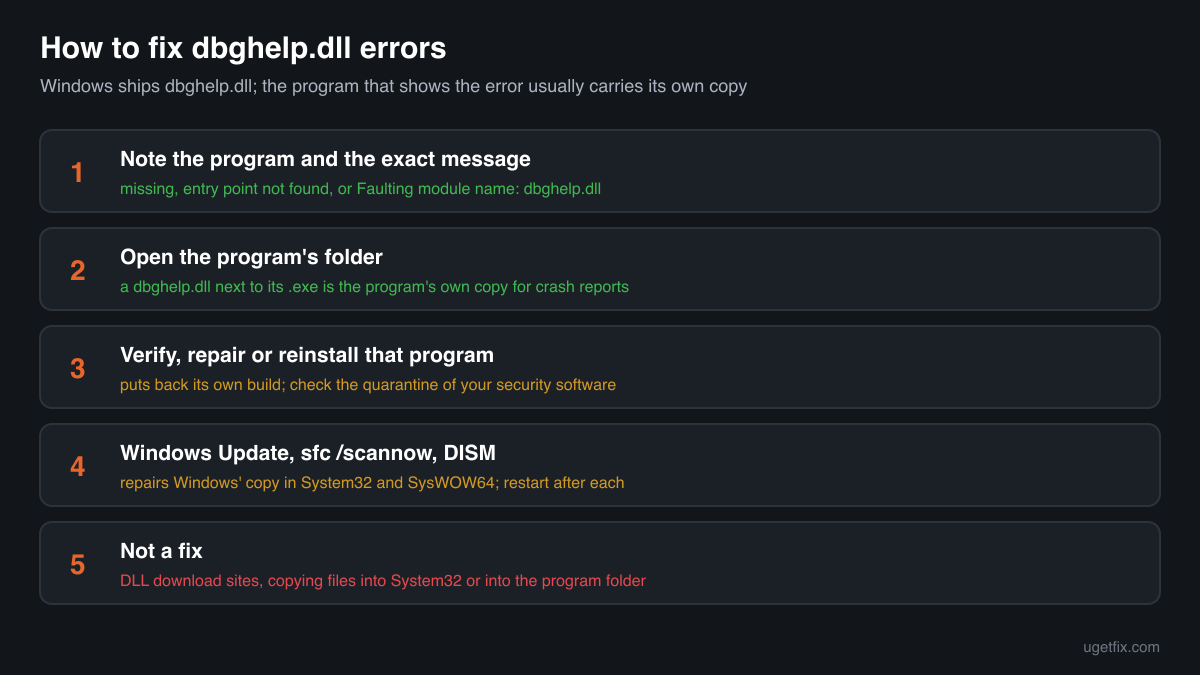
Step by step
- Read the whole message and note the program. Three kinds of messages name dbghelp.dll: the file was not found or is missing, an entry point (a function) could not be located in it, or a crash report lists it as the faulting module. Write down which program shows it and the exact wording. The table of messages below says which fix belongs to which one.
- Open the program's folder. Right-click the program's shortcut and choose Open file location, or in a game launcher use the option to browse local files. Many programs keep a dbghelp.dll next to their .exe, sometimes in a bin, crash reporter or tools subfolder, because they use it to write a crash report when something goes wrong. If the error says missing and there is no copy there although the program came with one, something removed it.
- Repair or reinstall that program. For a game, use the verify or repair option of its launcher: it compares the installed files with the publisher's and downloads what is missing or changed, and a dbghelp.dll that shipped with the game is one of them. For other programs, open Settings, Apps, Installed apps, choose the program and pick Modify or Repair if offered, otherwise uninstall it, restart and install the newest version from the publisher's own site.
- Check your security software's quarantine. If the file disappeared right after a scan, open the protection history or quarantine of your security software. A dbghelp.dll from a game or program you installed from its publisher may have been removed by mistake; restore it only if you trust where the program came from, and add the program's folder as an exclusion only if you are sure. If you do not know the program, leave the file in quarantine.
- Install Windows updates and restart. Open Settings, Windows Update, install everything that is offered, optional updates included, and restart even if Windows does not ask. Updates replace Windows' own dbghelp.dll in System32 and SysWOW64 with the current build for your Windows release. They do not touch a copy that a program keeps in its own folder.
- Run System File Checker, then DISM. Type cmd in the Start menu, right-click Command Prompt and choose Run as administrator. Run sfc /scannow and wait until it reaches 100%. If it reports files it could not repair, run DISM /Online /Cleanup-Image /RestoreHealth in the same window, then sfc /scannow once more and restart. This repairs a damaged or deleted dbghelp.dll in the Windows folders.
- Still crashing: read the crash event and test a clean start. Press Windows + X, open Event Viewer, then Windows Logs, Application, and find the Error with the source Application Error at the time of the crash. The faulting application line is the program that really failed. Update it and its add-ons. If several programs fail, run msconfig, hide all Microsoft services, disable the rest and restart: software that loads into every program, such as overlays or recorders, is a common cause.
Download the genuine dbghelp.dll for your Windows version
Each file below is Microsoft's own dbghelp.dll for one Windows release, fetched from Microsoft's own server and checked against Winbindex, the index of the files in Windows images and updates. It is here for comparison and for repairing the copy in the Windows folders: to check a file you found, or to see which build your Windows should have. A program that carries its own dbghelp.dll needs the copy its publisher shipped, which reinstalling the program restores. Pick your Windows version (Settings, System, About shows it) and the build: 64-bit for System32, 32-bit for SysWOW64.
Older Windows releases
A free uGetFix account is needed to download. Sign in, or create one in a minute, and you come straight back here.
What not to do
Do not put a downloaded dbghelp.dll into System32 or SysWOW64.
Windows protects its own copy and repairs it with sfc /scannow and DISM. Microsoft warns that the newer copies that come with its Debugging Tools for Windows are untested in the Windows folders and likely to make the system unstable. A file of the wrong build or release does the same.
Do not copy Windows' dbghelp.dll into a program folder.
A program that ships its own copy was built and tested with that build. Windows' copy can lack functions the program calls, which turns a missing file error into an entry point error or a crash. Reinstall the program instead.
Do not download dbghelp.dll from a DLL collection site.
You cannot tell which release, update or architecture the file comes from, or whether it was changed. Because programs load a dbghelp.dll from their own folder first, a changed copy runs its code inside them.
Do not run regsvr32 on dbghelp.dll.
It is not a COM component and has nothing to register. The command ends with an error message and changes nothing about the problem.
Do not delete dbghelp.dll from a program folder to stop a crash.
The program then either reports the file as missing or falls back to Windows' copy, which may lack what it needs. If the crash happens in that copy, update or reinstall the program, which replaces it with the right build.
Check the copy on your PC
Choose the dbghelp.dll you are unsure about, for example one from a program folder or one you found elsewhere. Its checksum is calculated in your browser and compared with 186 Microsoft builds of the file from Windows releases and updates.
The file stays on your computer. Nothing is uploaded: the checksum is computed locally.
17 genuine programs have been documented loading a planted copy of dbghelp.dll. Found a dbghelp.dll in Downloads, Temp, AppData or a folder with no program you know? Programs load it from their own folder first, so a planted copy there is a security question, not a repair one. Is the dbghelp.dll on your PC genuine? On 2-Spyware
The dbghelp.dll messages and what each one means
The wording tells you where to look. A missing file points to the program's own copy or its installation, an entry point error to a mismatched copy, and a crash report to the program or its crash handler.
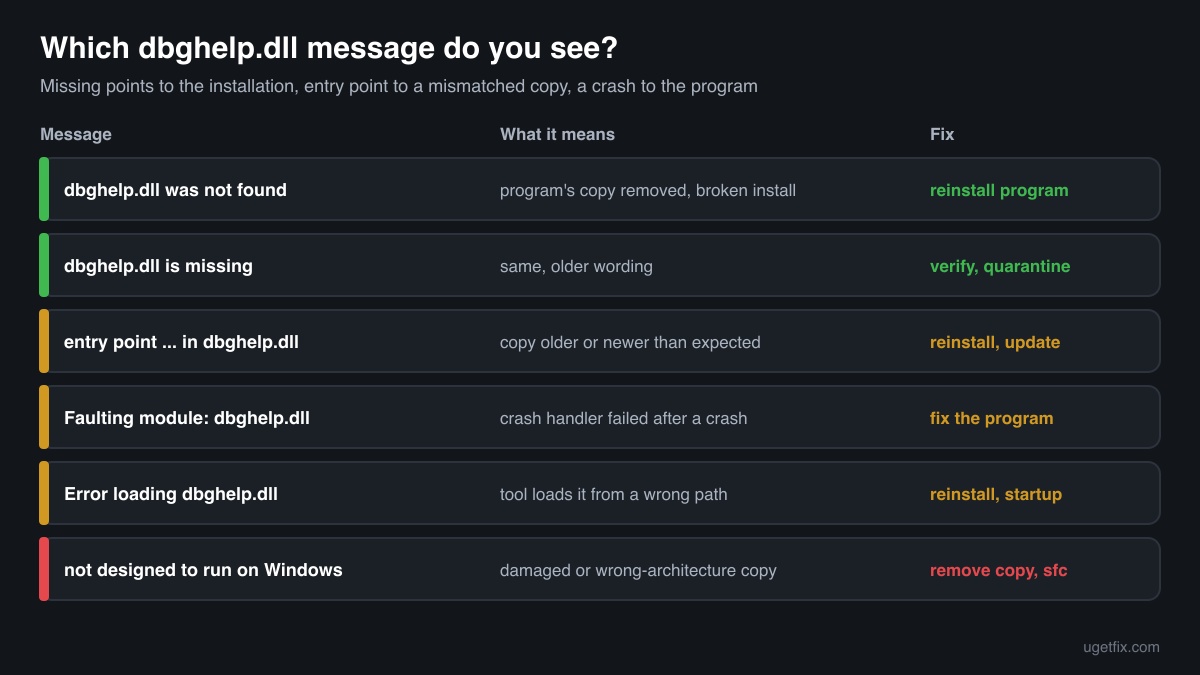
The code execution cannot proceed because dbghelp.dll was not found. Reinstalling the program may fix this problem.
The program could not load a dbghelp.dll at start. Because Windows has its own copy, this usually means the program's installation is broken, a cleanup tool or a security scan removed its private copy, or Windows' copy was deleted. Repair or reinstall the program first, then run sfc /scannow.
dbghelp.dll is missing from your computer.
The same problem in the wording of older programs and installers. Check the program's folder and your security software's quarantine, verify or reinstall the program, and repair Windows' copy with System File Checker if other programs report it too.
The procedure entry point SymGetLineFromAddrW64 could not be located in the dynamic link library dbghelp.dll.
The program asked for a debugging function that the dbghelp.dll it loaded does not have. The function name changes from program to program. Usually an older copy sits in the program's folder, or the program was built for a newer Windows. Reinstall the program, install Windows updates, and check its system requirements.
Faulting module name: dbghelp.dll
Event Viewer recorded a crash inside dbghelp.dll. The program usually crashed first and then failed again while its crash handler was writing a report, or it uses a copy that does not match. The faulting application line names the program to update or reinstall. If many programs crash this way, run sfc /scannow and DISM.
Error loading dbghelp.dll. The specified module could not be found.
A program or a tool inside it tried to load dbghelp.dll from a path where it is not. Reinstall the program that shows the message. If it appears at Windows start, an app that starts with Windows is broken: find it in Task Manager, Startup apps.
dbghelp.dll is either not designed to run on Windows or it contains an error.
The file was found but could not be loaded: it is damaged, truncated or built for the other architecture, often after a copy was placed by hand. Remove a hand-copied file, reinstall the program, and run sfc /scannow if the path in the message is System32 or SysWOW64.
File facts
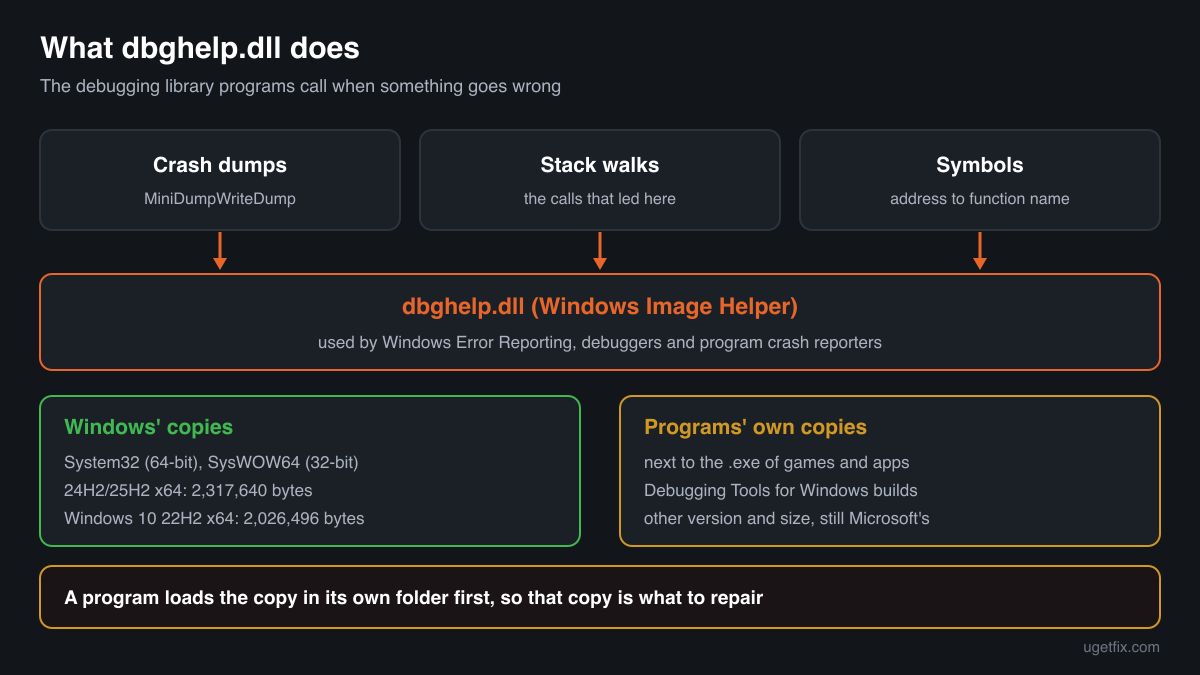
dbghelp.dll is the Windows Image Helper, Microsoft's DbgHelp library. Programs call it to write minidump crash files, walk the call stack of a thread and turn memory addresses into function names and source lines using debug symbols. Windows' own error reporting uses it, and many programs bundle a copy so their crash reporter works on every Windows version. Microsoft notes that the copy in Windows is rarely the newest and lacks Symbol Server and Source Server support, which is why debuggers and developer tools ship their own. What Windows reports for the genuine file:
- Description in the file
- Windows Image Helper
- Where the genuine dbghelp.dll belongs
C:\Program Files\windows kits\10\debuggers\armC:\Program Files\windows kits\10\debuggers\arm\srcsrvC:\Program Files\windows kits\10\debuggers\arm64C:\Program Files\windows kits\10\debuggers\arm64\srcsrvC:\Program Files\windows kits\10\debuggers\x64C:\Program Files\windows kits\10\debuggers\x64\srcsrvC:\Program Files\windows kits\10\debuggers\x86C:\Program Files\windows kits\10\debuggers\x86\srcsrvC:\Program Files\cisco systems\cisco jabberC:\Program Files\microsoft office\root\office<version>C:\Program Files\microsoft office\root\vfs\programfilesx86\microsoft analysis services\as oledb\140C:\Windows\System32C:\Windows\SysWOW64- Signed by
- Microsoft Windows, with a Windows catalog signature: the file's Properties show no Digital Signatures tab, which is normal. Check it in PowerShell: Get-AuthenticodeSignature <path to the file> (Status: Valid).
On 64-bit Windows, System32 holds the 64-bit file and SysWOW64 the 32-bit one; the folder names are historical. The genuine file describes itself as Windows Image Helper (Properties, Details, File description). In Windows 11 24H2 and 25H2 the 64-bit file delivered by update KB5127648 is 2,317,640 bytes and the 32-bit one 1,894,776 bytes; in Windows 10 22H2 they are 2,026,496 and 1,659,392 bytes. A dbghelp.dll in a program folder usually has another version and size, because it comes from the Debugging Tools for Windows or from the program's publisher, not from Windows.
dbghelp.dll versions by Windows release
Every Windows release has its own build of dbghelp.dll, and many monthly updates bring a new one. Winbindex lists 132 distinct Microsoft builds; the table shows the newest one indexed for each release and the update that delivered it.
| Windows release | File version | Delivered by | Size, 64-bit |
|---|---|---|---|
| Windows 11 26H1 | 10.0.28000.2605 | KB5121000, August 11, 2026 | 2,856,432 bytes |
| Windows 11 25H2 | 10.0.26100.9549 | KB5127648, October 13, 2026 | 2,317,640 bytes |
| Windows 11 24H2 | 10.0.26100.9549 | KB5127648, October 13, 2026 | 2,317,640 bytes |
| Windows 11 23H2 | 10.0.22621.5471 | KB5120240, August 11, 2026 | 2,205,112 bytes |
| Windows 11 22H2 | 10.0.22621.5471 | KB5120240, August 11, 2026 | 2,205,112 bytes |
| Windows 11 21H2 | 10.0.22000.1 | original release | 2,121,728 bytes |
| Windows 10 22H2 | 10.0.19041.7725 | KB5126657, October 13, 2026 | 2,026,496 bytes |
| Windows 10 21H2 | 10.0.19041.7725 | KB5126657, October 13, 2026 | 2,026,496 bytes |
| Windows 10 21H1 | 10.0.19041.7725 | KB5126657, October 13, 2026 | 2,026,496 bytes |
| Windows 10 20H2 | 10.0.19041.7725 | KB5126657, October 13, 2026 | 2,026,496 bytes |
| Windows 10 2004 | 10.0.19041.7725 | KB5126657, October 13, 2026 | 2,026,496 bytes |
| Windows 10 1909 | 10.0.18362.1440 | KB5013945, May 10, 2022 | 1,930,752 bytes |
Older copies of dbghelp.dll found on PCs
Public DLL catalogues have collected 54 copies of dbghelp.dll uploaded from PCs, from version 5.1.2600.0 to 10.0.18362.1. Many come from older Windows releases, from the Debugging Tools for Windows or from program folders. The table lists each with its checksums, so you can tell which one you have.
None of these replaces the file your Windows ships: the newest build indexed for Windows is 10.0.28000.2605, and each release keeps its own. A copy in a program folder should be the one its publisher shipped, which reinstalling the program restores.
| Version | Build | Size | MD5 | SHA-1 |
|---|---|---|---|---|
10.0.18362.1 | 64-bit | 1.8 MB | 3fbb5bbc320109a3adf8866289a81211 | 543b936a89fbdb0220381eeff0824b3968390e82 |
10.0.16299.91 | 64-bit | 1.7 MB | 055639db92f74cb375074352b8dea799 | ff1bc61847a4834cef10549876d082f9d34445b5 |
10.0.14321.1024 | 64-bit | 1.5 MB | 2c92df5d32661fb4b81b08b72b2102a7 | 41138e197edcaf1acc159084fa553ea34de2cf70 |
10.0.14321.1024 | 64-bit | 1.5 MB | 82bc9782a8ee5e060fdf50d992fda1ab | c77a28c3c89837621ae7211839469b67ee1e4836 |
10.0.14321.1024 | 32-bit | 1.2 MB | 529408e2c123d00d4cc2bebcc8479566 | 4e41552b377adf48c6506fe1bf2b492ae38091a5 |
10.0.14321.1024 | 32-bit | 1.2 MB | 7729b3c3fb2bcc34147770879ca64ad9 | d022b6167a76b2f0b7f83196deb4ec4e852ecc0c |
10.0.10586.0 | 64-bit | 1.4 MB | 96dfc0bf6bf1187770cb3ec07542d57c | 8cfa68c2950ad4c72da351e40ff94e8f14a34525 |
10.0.10586.0 | 32-bit | 1.1 MB | bce2721ce55ed38d3ec41014c46a1f69 | dc2389976bf626da254f4851f526a62b792f05bc |
10.0.10240.16384 | 64-bit | 1.4 MB | 39e4335cee44bc72b051d507a96c6d3c | 24dfe29595c84de0116bc4e38b01dfd9b5057eb6 |
6.12.2.633 | 64-bit | 1.5 MB | a5e4b3ff51cf5b7926d9651908feb666 | 4ef5d229709e40f3f84e46c3a28341eadbd1a044 |
6.12.2.633 | 32-bit | 1.2 MB | 1884ef9859fbd389677957e70a72f63d | c63f56488d6869338fe786b0476212e51a26e2f1 |
6.12.2.633 | 32-bit | 1.2 MB | 344fe91885f691ea5efa3e47304cef3b | 976f4b1345638b6cd4beba85aef7b3e63c35cdb6 |
6.12.2.633 | 32-bit | 1.2 MB | 4003e34416ebd25e4c115d49dc15e1a7 | faf95ec65cde5bd833ce610bb8523363310ec4ad |
6.12.2.633 | 32-bit | 1.2 MB | 4ac51f48887c993a1d45cbbdbfe6fe04 | a61c83f27ce8ad4c1f3c15d0a48075785951d610 |
6.12.2.633 | 32-bit | 1.2 MB | 96cf51d39a6fddd94ed910879c706f11 | c312cf245f3d325c9e2d0f112bfcc61f799fd68e |
6.12.2.633 | 32-bit | 1.2 MB | e3880a4372a86197843db0a1f6d000f4 | cf116bd2e44ace84e2af4aaf1e1da9813fbb817a |
6.11.1.404 | 64-bit | 1.3 MB | 15ee5c7404fa5b6de0eb0c042474d3bf | ec3a7fd5861447d615968c51e507cd376a48bd6b |
6.11.1.404 | 64-bit | 1.3 MB | f5dca815478a67f72d4f003eb24d3f0d | d5f55f0d36c36e43d635030643d7bbbe67cde4b8 |
6.11.1.404 | 32-bit | 1.0 MB | 5c5e3afd499e5146fef1da5ef8a23205 | 8245691416e509a3a1bd8e321aa6d2ff1925a224 |
6.10.3.233 | 64-bit | 1.3 MB | 4fd675bfb8d41358ae2ff8fa58ded555 | b16485213c8733d76ba22bcaa6927a8795511728 |
6.10.3.233 | 32-bit | 1.0 MB | 379afd26403cca7908f4b39c1ad0a86c | 3e787ac853c7608b725a2020380ed2364cb00f04 |
6.9.3.113 | 64-bit | 1.3 MB | cdb95f53012fb066e7e113ce01fdd8d4 | a3b21641ca376b332ca1b4537ff9e0e657259c28 |
6.9.3.113 | 32-bit | 1.0 MB | f2b8855b667fa274853cd21332eab89e | fd7a15ab082aabfd5d2e936041ee16cb4dbc0574 |
6.8.4.0 | 64-bit | 1.3 MB | 971ffc32025dca6d5a74c4ff3e86e687 | 4377da8f96898b4ff7267f10190b4254a62cbb68 |
6.8.4.0 | 32-bit | 1.0 MB | 74edbb03de3291fcf2094af1fb363f1d | 16b5d948ed7843576781dc4f2a391607ac0120a4 |
6.8.4.0 | 32-bit | 1014 KB | 9194e3746fcb5562bac6fa8243b1e8d3 | e075812e61237d9ee6e639fa93b6e2cc583bda2f |
6.8.4.0 | 32-bit | 1014 KB | a29a12c5d5187dd442a7fb153db12147 | 0b41dfdef789d6c243845b0f7febb484a122a22c |
6.8.4.0 | 32-bit | 1014 KB | fedc6a6d4ed4a1a90b0c762386e5e482 | 0f1026f9435ba03054a7864b4bf7f814f5791de7 |
6.7.5.0 | 32-bit | 1014 KB | a7532e66ea2f168a0970e829d8986423 | fdc1a8198e2e129ffb427361d870e194b966ade8 |
6.5.3.7 | 32-bit | 1.0 MB | 3497fe3ec41e84944052b04cb64108ad | 57aa6f7e10f054ac3fdac4894f58c53e2bf594a6 |
6.4.4.3 | 32-bit | 963 KB | 0ad21fb6df251b914ff8a2fa9e835ad1 | ac255835c4e57d65f1a77be4bc5e78a6a7ae5e43 |
6.3.9600.17298 | 64-bit | 1.5 MB | b165aa1eedd13f7b43eeb32d663a7b66 | d2c165d4f752f863dda697a160c97713154fcdbc |
6.3.9600.17237 | 32-bit | 1.2 MB | dee832103585ee41bd7f1a905f0726f7 | 74d43e48cf87c48168a65159c308bb67cf691012 |
6.3.9600.17200 | 64-bit | 1.4 MB | 6b811708c844e865859b25c097534e4b | d54e8dc391a7e6eeaa7cc746ecd4f8cc1008c17b |
6.3.9600.17029 | 32-bit | 1.2 MB | b4f1c646ae9244ffcd01557f6742983f | 46e4bba9e9afa6ec4a23cc057cecc2eb62fe9619 |
6.3.9600.16520 | 32-bit | 1.2 MB | f5033f3c6f8e706d78acb9351ebf7b3e | 01f3a99775357e0a7ae17b6e46a66d1cc7d28146 |
6.3.9600.16384 | 64-bit | 1.4 MB | 893ec728b6fa9d7277963847bd408f4f | 99d461999f631457b38df82d849d81b8fad946aa |
6.3.9600.16384 | 32-bit | 1.2 MB | 750f6e09044b88636ed257fd0305c689 | fe1619fded4b1c09f211579cb360d2ad19883d1b |
6.3.9600.16384 | 32-bit | 1.2 MB | 9139604740814e53298a5e8428ba29d7 | c7bf8947e9276a311c4807ea4a57b504f95703c9 |
6.2.9200.20512 | 64-bit | 1.3 MB | 0b87e39fdc945037635f50b5e0c0d30a | 78513c5065b9f9e6849472f2a64134cd53b5a446 |
6.2.9200.20512 | 32-bit | 1.1 MB | 88d62065f635baae190eccf04a37a4fe | ae79e513debde83462147954e71c7e7e11af4a28 |
6.2.9200.16384 | 32-bit | 1.1 MB | 5125c1f27f8537f33076d0c0151f6b7f | ca0f0a1a3d8417939b0d8d1a99f1a5f8ecc9208f |
6.1.7601.17514 | 64-bit | 1.0 MB | a7a8ca53d9c9fd90c07ab0eb38e5316b | 8835dbda73b15f87cceedfe707b9166bad409440 |
6.1.7601.17514 | 32-bit | 829 KB | 53223b673a3fa2f9a4d1c31c8d3f6cd8 | 4d4fb558ca4207ff53b81d11307e6819c1be287d |
6.1.7600.16385 | 32-bit | 829 KB | 79c7cfaea6879a8c1a1e8b5ffe8983aa | 40dee6a8869038714b0faf69c20cc10403881c40 |
6.1.7600.16385 | 32-bit | 840 KB | f820008ada2f4ea3d47d717bd90b3fa3 | 3141e84f735a80fe1b9e63f06c7ab2960b7085f4 |
6.0.6001.18000 | 64-bit | 993 KB | 900b9b25c345aaa4f90913ba9aecabf4 | f019f6145a4e370a64773045513218b027e0ccfd |
6.0.6001.18000 | 32-bit | 778 KB | 4934241cd20ac87d78121352e3ba8318 | b6b7452b34a8b70344dabd723d981fbd7c34cfd3 |
6.0.17.0 | 32-bit | 707 KB | 500386015a3261a143588f7ea78e66d6 | f0c64e8122f6bdab3b16dbca203576e624028ae3 |
5.1.2600.5512 | 32-bit | 625 KB | 87d26da0a528596618a5b018aba8307b | 5f4dab09a94fbf3c2c3ebbc859816d0e29aab6e0 |
5.1.2600.5512 | 32-bit | 635 KB | ebeda22387a41a5afde400b4ef3fd58f | 6ec5ff5178a2944cd7ee854d6d6141b7e8e6092d |
5.1.2600.2180 | 32-bit | 625 KB | 6479a184873f7ca797ff0375d711e9a6 | 34dfc72feee446e658a2c168632d216ed90589ca |
5.1.2600.2180 | 32-bit | 625 KB | 9b5af17e3f6ffd01f5dead33477f127f | 32026efd623c3ab628e9d451e26665fffa11b2e9 |
5.1.2600.0 | 32-bit | 471 KB | 6f29e2085a059f54409ff90ec44b522b | 73ae6d1622fd14d29bac40c09712a1a39742fbd9 |
Copies uploaded by users to a public DLL catalogue. We list their checksums so you can identify a file; we do not offer them for download and we did not verify each one against Microsoft's signature.
Questions people ask
What is dbghelp.dll?
It is the Windows Image Helper, Microsoft's debugging help library. Programs use it to write crash dump files, to read the call stack when they fail and to turn memory addresses into readable function names. Windows includes it in System32 and SysWOW64, and many programs and games carry their own copy for their crash reporter.
Why does a game have its own dbghelp.dll?
So that its crash reporter works the same on every Windows version. The copy in Windows is often older than the one developers build against and lacks some features, so publishers ship the build they tested next to the game's .exe. Verifying the game files in the launcher restores that copy if it goes missing.
dbghelp.dll is missing although Windows has it. Why?
Either the program looks for its own copy in its folder and it was removed, often by a cleanup tool or a security scan, or the installation is incomplete. Repair or reinstall the program. If several programs report the file missing, Windows' copy is damaged and sfc /scannow and DISM repair it.
Will a new dbghelp.dll from the internet fix the error?
Rarely, and it can make things worse. A program needs the build it was made for, and a file of unknown origin can be changed or of the wrong architecture. Reinstalling the program restores its own copy, and System File Checker restores Windows' copy from Microsoft's sources.
Can I use the dbghelp.dll from the Windows SDK?
Developers can ship the version from Microsoft's Debugging Tools for Windows with their own program, inside its folder. Microsoft warns against installing that version into System32 or SysWOW64, because it is untested there and can destabilize Windows. As a user you do not need it.
Can dbghelp.dll be a virus?
The copies in System32 and SysWOW64 are genuine Windows files. A dbghelp.dll in a folder where no program you installed lives is not Windows' copy and deserves a check; the security page linked above explains how to tell a genuine file from a planted one.
Why does Event Viewer show dbghelp.dll as the faulting module?
Usually because the program had already failed and its crash handler then failed too while writing a report through dbghelp.dll, or because it uses a copy that does not match. The faulting application line tells you which program to update or reinstall. A healthy Windows copy is used by many programs without trouble.
Related guides
dbghelp.dll is missing or crashes a program: what the file is and how to fix it
Sources
- Winbindex, the Windows binaries index (m417z)
- Microsoft Learn: Use the System File Checker tool to repair missing or corrupted system files
- HijackLibs: dbghelp.dll
File data read on October 18, 2026.

The editors who write and check uGetFix guides and reference pages. File facts are read from Microsoft's own installers and documentation, and every page shows the date its data was read.
Questions and experiences
Ask about this page: members and our editors answer. Reading is open; writing needs a free account.
…