
isdone.dll error while installing: what the file is and how to fix the installation
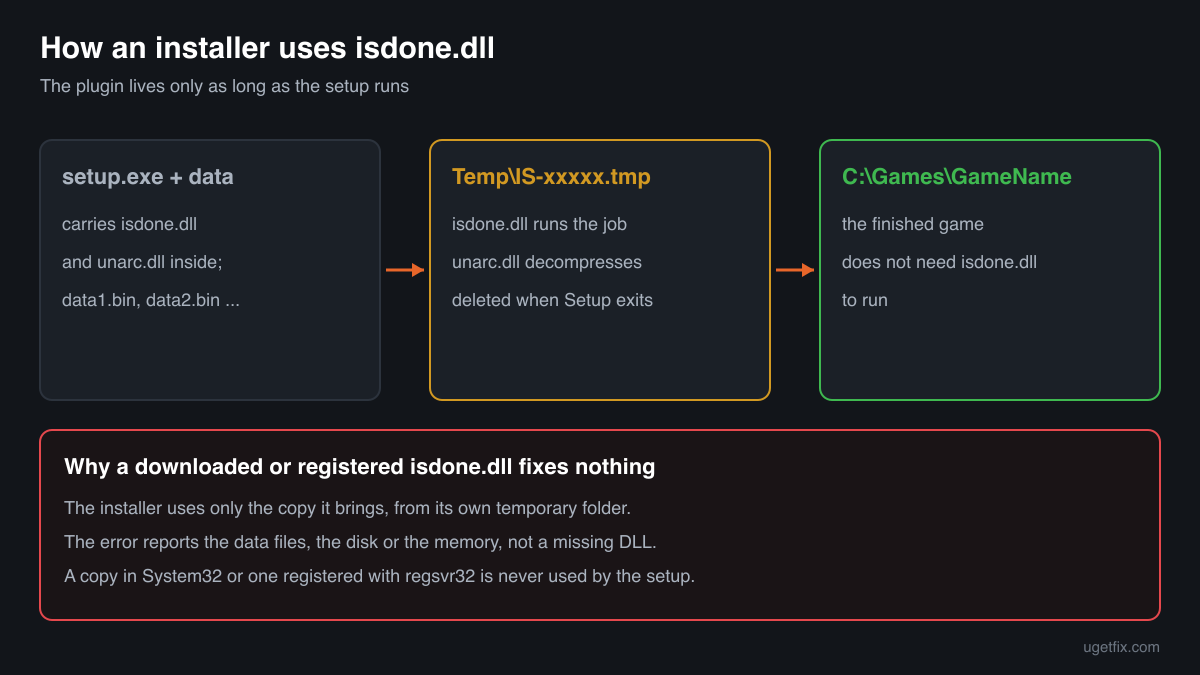
isdone.dll is a helper plugin that some setup programs, mostly built with Inno Setup, carry inside the setup .exe. During the install it is extracted to a temporary folder, opens the installer's compressed data files, hands them to an unpacking library such as unarc.dll and shows the progress bar and the error window. When it reports an error, the DLL is almost never broken: the data it was asked to unpack is missing or damaged, or the disk, the memory or your security software stopped the job.

Prefer to fix it yourself? The manual steps follow.
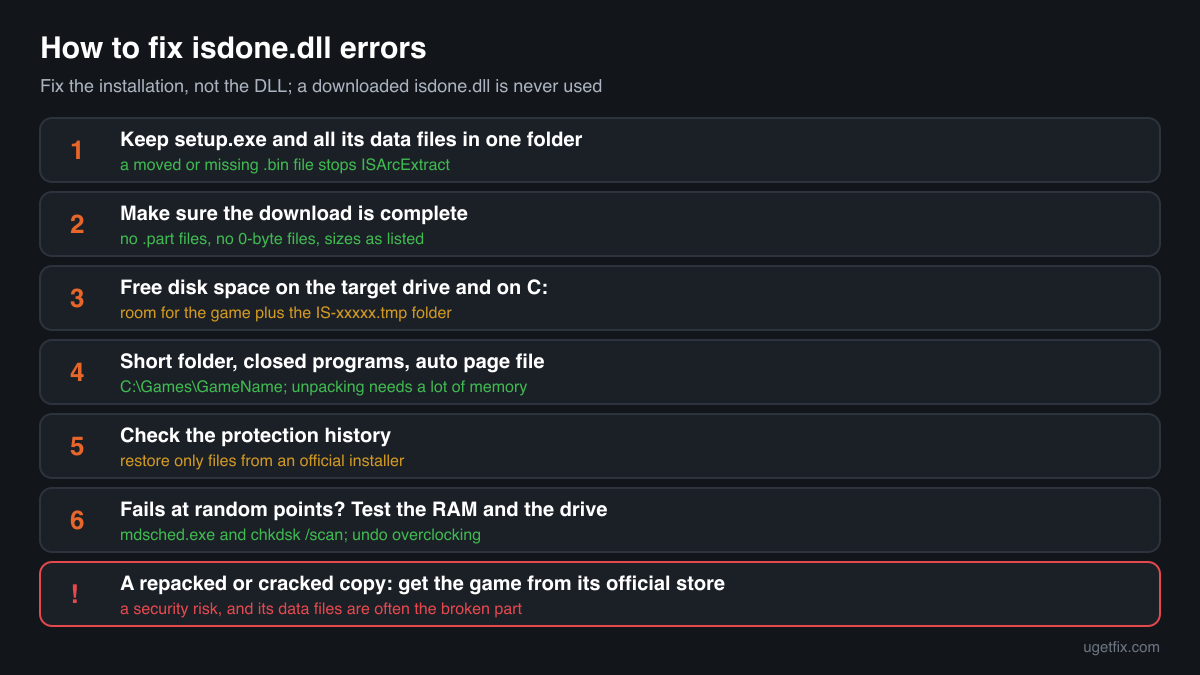
How to fix isdone.dll errors
Read the whole error window before you change anything. isdone.dll is the part of the installer that runs the unpacking and reports how it ended, so its message names the real cause. If it says a file was not found, the installer's data files, often several .bin or .arc files next to setup.exe, are missing, renamed or in another folder. If it quotes unarc.dll and an error code, the unpacking itself failed: the code tells you whether it was damaged data, a full disk or too little memory. Keep all the installer's files together in one folder, free space on the target drive and on C:, close other programs, install to a short folder such as C:\Games and look at your security software's protection history. If the error returns at the same point, the data is damaged and only a fresh copy of the installer from the place you bought the game fixes it.
A downloaded isdone.dll changes nothing. The installer brings its own copy, extracts it to its own temporary folder and uses only that one, so a file placed in System32 or the game folder is never loaded. If the installer is a repacked or cracked copy of a game, the honest answer is the game from its official store: such downloads are a security risk, and their data files are often the part that fails.
Which installers and programs use isdone.dll
Inno Setup, the free installer builder, lets the author of a setup program add plugins that the setup extracts to its temporary folder and calls while it runs. isdone.dll is one of these plugins. It does not unpack data by itself: it reads the installer's data files and passes them to unpacking libraries, most often FreeArc's unarc.dll, while it shows progress and catches errors. The catalogue copies report no publisher, so there is no company behind the file to turn to. These are the cases you will meet.
| Program | Made by | What to know |
|---|---|---|
| Inno Setup installers that unpack large data files | Third-party plugin added by the author of the installer; no publisher in the file | The setup extracts isdone.dll to its IS-xxxxx.tmp folder, unpacks the separate data files with it and deletes the folder at the end. An error here is about those data files, the disk or the memory, not about the DLL. |
| Repacked game installers | Unknown third parties, not the game's publisher | Most isdone.dll errors people search for come from these. They split a heavily recompressed game into many data files, need a lot of memory and time to unpack, and are often modified copies. A damaged or missing part of such a download cannot be repaired on your PC. |
| Installers that pair it with unarc.dll | FreeArc library by Bulat Ziganshin, wrapped by isdone.dll | The error window then reads ISDone.dll and quotes unarc.dll's error code. The code belongs to unarc.dll and says what failed; the unarc.dll guide explains each number. |
| Small installers from independent developers | Their own developers | Some smaller programs and mods use the same plugin to keep their download small. Get a fresh copy of the installer from the developer's own site if it fails. |
| Games from official stores and launchers | Their publishers | A game installed through Steam, the EA app, Epic, GOG Galaxy, Ubisoft Connect or the Xbox app is downloaded and unpacked by the launcher with its own tools and never shows an isdone.dll error. A store copy that fails is fixed in the launcher, with a verify or repair. |
Step by step
- Keep all of the installer's files together. Many installers that use isdone.dll are not one file: setup.exe sits next to data files with names such as data1.bin or setup-1.bin, sometimes in a subfolder. isdone.dll looks for them in the place the installer expects. If you moved setup.exe on its own, renamed a file, or extracted only part of a download, the plugin stops with a file not found message. Put every file back into one folder, exactly as the download came, and start setup.exe from there.
- Make sure the download is complete. Compare the number and size of the data files with what the store or publisher lists, and look for files that end in .part, .crdownload or a size of 0 bytes. An interrupted download is the most common reason the unpacking fails part way. Where the publisher lists checksums for its setup files, compare yours before you run it.
- Free disk space on both drives. The installer needs room for the finished game on the target drive and room for its temporary folder on the system drive, usually C:. Tightly compressed data can need several times its download size while it unpacks. Leave at least the full installed size free on the target drive plus a generous margin on C:, then run the installer again.
- Install to a short, plain folder. Choose a folder such as C:\Games\GameName instead of a deep path under Documents, Desktop or Downloads. Windows has a classic limit of 260 characters for a full path, and games contain deeply nested files, so a long target folder can make writing fail part way. Use plain letters and numbers in the folder name and avoid a folder synced by OneDrive.
- Close other programs and give the installer memory. Unpacking needs a lot of RAM, and isdone.dll may run several unpacking steps one after another. Close the browser, launchers and anything else heavy, and do not run two installers at once. Let Windows manage the paging file: open System, About, Advanced system settings, Performance Settings, Advanced, Virtual memory, and tick Automatically manage paging file size for all drives.
- Look at your security software's protection history. In Windows Security open Virus and threat protection, Protection history; other security programs have a quarantine of their own. A detection on isdone.dll, unarc.dll or a data file in the IS-xxxxx.tmp folder breaks the unpacking at once. Restore and allow files only when the installer came from the game's official store or publisher. If it came from anywhere else, the detection may well be correct: leave it in quarantine.
- Test the RAM and the disk if the error moves. If the installer fails at a different percentage each time, or other installers fail too, the hardware may be corrupting data while it unpacks. Run Windows Memory Diagnostic (type mdsched.exe in Start) and let it restart the PC. For the drive, open an administrator Command Prompt and run chkdsk C: /scan, and the same for the target drive. Return an overclocked processor or memory to default speeds for the install.
- Install the game from its official store. If the installer is a repacked or cracked copy, stop here. You cannot make such a copy reliable from your side, and it is a security risk: these downloads are a common way malware reaches PCs. The clean fix is the game from its official store, where the launcher downloads, checks and repairs every file for you.
What not to do
Do not download isdone.dll from a DLL site.
The installer carries its own copy and extracts it to a fresh temporary folder each time it runs, so a downloaded file is never the one it uses. You only add a library of unknown origin to your PC, and the data that failed to unpack is still the same.
Do not register isdone.dll with regsvr32.
A common tip says to run regsvr32 isdone.dll. The installer loads its own copy directly from its temporary folder, not through a registration in Windows. Registering a copy elsewhere does not reach the installer and does not touch the data files.
Do not put isdone.dll into System32 or SysWOW64.
Windows does not use it, and the installer does not look there. A file in the Windows folders fixes nothing and stays behind for any program that might load it.
Do not turn off your security software to get an installer through.
Installers that ask you to switch protection off are the usual way malware bundled with game downloads gets in. A clean installer from an official store does not need it.
Do not use another repack as the fix.
A second repacked or cracked copy of the same game comes from the same kind of unknown source, with the same risks and the same fragile data files. The fix is the game from its official store.
Check the copy on your PC
Choose the isdone.dll you found. Its checksum is calculated in your browser and compared with 2 copies of the file collected from PCs. Installers delete their copy after they finish, so you only need this for a copy left somewhere else.
The file stays on your computer. Nothing is uploaded: the checksum is computed locally.
Found an isdone.dll outside an installer's temporary folder, in a game folder that came from a repack, or one your security program flagged? Then the question is whether that copy and the download it came with are safe, and that is a security question rather than an unpacking one. Is isdone.dll safe or part of a cracked download? On 2-Spyware
The error messages and what each one means
isdone.dll shows its own window when the unpacking stops. The first line names the plugin, the rest tells you which step failed. When the window quotes unarc.dll and a code, that number comes from unarc.dll; the unarc.dll guide explains each code, so here you see what the isdone.dll side of the message means.
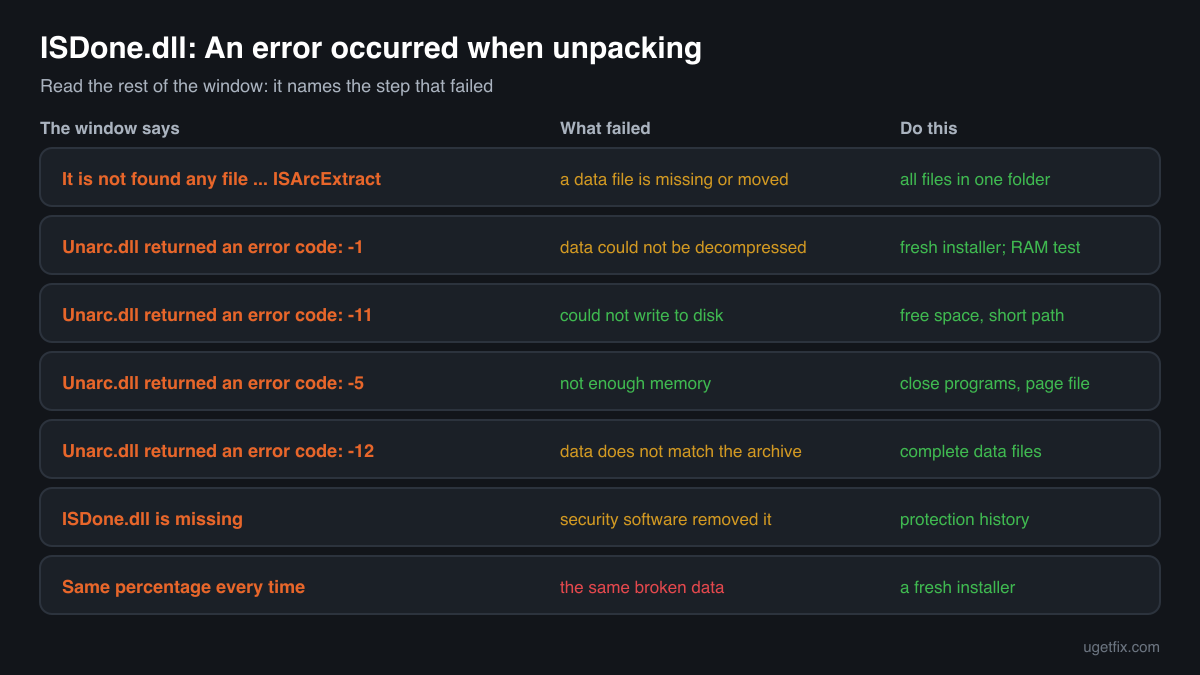
ISDone.dll: An error occurred when unpacking! Unarc.dll returned an error code: -1. ERROR: archive data corrupted (decompression fails)
isdone.dll handed a data file to unarc.dll and the data could not be decompressed. Most often a data file is damaged or incomplete. If it fails at a different point every time, suspect RAM or the disk. Get a fresh copy of the installer, then test memory and drive.
ISDone.dll: An error occurred when unpacking! Unarc.dll returned an error code: -11
The data was unpacked but could not be written to disk. A full target drive or C:, a path that is too long, or a folder blocked by security software or permissions. Free space, install to C:\Games and check the protection history.
ISDone.dll: An error occurred when unpacking! Unarc.dll returned an error code: -12
The data does not match what the archive expects, which is the same kind of failure as -1 in practice. Make sure every data file is complete and in place, then test the RAM before anything else.
It is not found any file specified for ISArcExtract
isdone.dll could not find the data file it was told to unpack. A data file is missing, renamed, still downloading, in a different folder from setup.exe, or was removed by security software. Put all the installer's files together and check the protection history.
The program can't start because ISDone.dll is missing from your computer
The setup program could not extract or load its own copy, usually because security software removed it from the IS-xxxxx.tmp folder at once, or the setup .exe itself is damaged. Check the protection history and download the installer again from its official source.
ISDone.dll: An error occurred when unpacking! Unarc.dll returned an error code: -5
The unpacking could not get the memory it needs. Close other programs, let Windows manage the paging file and run the installer again with nothing else open.
The installer stops at the same percentage with an ISDone.dll error every time
The same broken data is reached on every run. Running the installer again, as administrator or in compatibility mode, does not change the data. Only a complete, fresh copy of the installer does.
File facts
isdone.dll is a plugin for Inno Setup installers that coordinates the unpacking of external data files. It does not compress or decompress data itself: it calls unpacking libraries, most often FreeArc's unarc.dll, checks the result of each step and shows the progress and the error window. The copies in the DLL catalogue carry no company name and no description, so there is no publisher whose signature could confirm a copy. What the catalogue copies of the file report:
- Description in the file
- -
- Company in the file
- Third-party Inno Setup plugin (no publisher in the file)
Inno Setup creates a temporary folder for each setup run, a subfolder of your user's Temp folder named IS- followed by random letters and .tmp, and deletes it with everything in it when Setup exits. Installers that use isdone.dll extract it there together with unarc.dll and any other helpers, use them while they unpack, and remove them at the end. That is why you usually find no isdone.dll on your PC after an install, and why a copy you put anywhere else is never the one the next installer uses. The catalogue copies are 32-bit builds of a few hundred kilobytes with versions 0.5 and 0.6, and a blank Details tab on your copy is expected for this file.
Copies of isdone.dll found on PCs
Public DLL catalogues have collected 2 copies of isdone.dll uploaded from PCs, versions 0.5.0.0 to 0.6.0.0. Both are 32-bit builds that report no company and no description, so a blank Details tab on your copy is not a warning sign by itself. The table lists them with their checksums, so you can tell whether your file is one of them.
A match or no match says little about your error. Every installer brings the build its author chose, and isdone.dll errors come from the data being unpacked, the disk and the memory, not from the plugin's version. Use the check only to identify a copy you found somewhere you did not expect.
| Version | Build | Size | MD5 | SHA-1 |
|---|---|---|---|---|
0.6.0.0 | 32-bit | 451 KB | dce6d68da86f44ba0cb70fa7718e2e84 | 58cd39196abfc70b5b9bcc964f41a21024a61480 |
0.5.0.0 | 32-bit | 655 KB | 289d426cc7cfcfb49adf3b995eabd0eb | 5731285b0d7562d79032aad09e23a4177fb13b74 |
Copies uploaded by users to a public DLL catalogue, read on 17 October 2026. We list their checksums so you can identify a file; we do not offer them for download and we could not verify them against a publisher's signature, because the catalogue copies report no publisher.
Questions people ask
Is isdone.dll a virus?
The plugin itself is a harmless installer helper. Security programs flag it often because it is so common in repacked and cracked game installers, which are a frequent way malware is spread. Read the security page linked above if you found a copy you cannot explain.
Can I download isdone.dll to fix the error?
No. The installer carries its own isdone.dll and extracts it to a new temporary folder each time it runs, so a downloaded file is never used. The error reports a problem with the data files, the disk or the memory, and a new DLL does not change any of them.
Should I run regsvr32 isdone.dll?
It does not help. The plugin is loaded directly by the installer from its own temporary folder, not looked up through the Windows registry. Registering a copy in System32 leaves the installer and its data files exactly as they were, and the next run fails the same way.
What does It is not found any file specified for ISArcExtract mean?
isdone.dll was told to unpack a data file and could not find it. A data file is missing, renamed, still downloading, in a different folder from setup.exe, or was quarantined by security software. Put every file of the installer into one folder and check the protection history.
What is the difference between isdone.dll and unarc.dll?
isdone.dll is the plugin that runs the unpacking and shows its progress and errors. unarc.dll is FreeArc's library that does the actual decompression for it. When the isdone.dll window quotes an unarc.dll error code, the number comes from unarc.dll; the unarc.dll guide explains each one.
Why does the installer always fail at the same percentage?
Because a data file is damaged at that point. The unpacking reaches the same broken data on every run and stops there. Running it again, as administrator or in compatibility mode, does not change the data. A fresh, complete copy of the installer from where you bought the game is the fix.
Is it safe to use a repacked installer once the isdone.dll error is gone?
A repacked or cracked copy is a security risk whether it installs or not: you cannot know what was changed in it, and such downloads often carry malware. The clean fix is the game from its official store, where the launcher installs and repairs it for you.
Related guides
isdone.dll error while installing: what the file is and how to fix the installation
Sources
- Inno Setup Help: Constants ({tmp}, the IS-xxxxx.tmp folder deleted when Setup exits)
- FreeArc source code: Compression.h (unarc.dll error codes)
- FreeArc source code: example of using unarc.dll in an Inno Setup installer
- Microsoft Learn: Maximum Path Length Limitation
File data read on October 17, 2026.

The editors who write and check uGetFix guides and reference pages. File facts are read from Microsoft's own installers and documentation, and every page shows the date its data was read.
Questions and experiences
Ask about this page: members and our editors answer. Reading is open; writing needs a free account.
…