
libcef.dll is missing or crashes: what the file is and how to fix it
libcef.dll is the main library of the Chromium Embedded Framework (CEF), an open-source browser engine built on Google's Chromium. A program uses it to show web pages inside its own window: a store, a sign-in screen, news, a settings panel. Each program that uses CEF ships its own copy next to its .exe. When the file is missing or crashes, the program that shows the error is the one to repair.

Prefer to fix it yourself? The manual steps follow.
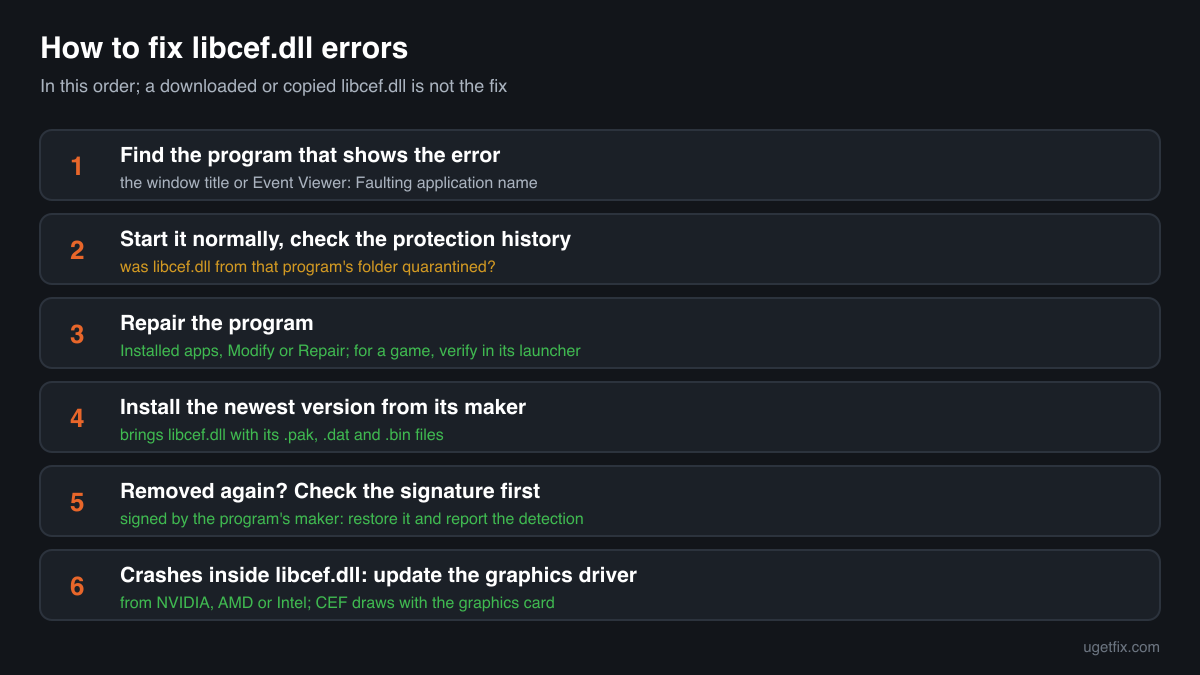
How to fix libcef.dll errors
The file belongs to the program that shows the error, not to Windows and not to a runtime you can install. First find out which program it is: the error window's title or the program you just started tells you. Look at your security software's protection history to see whether it removed libcef.dll from that program's folder. Then repair the program: use its own Repair option in Settings, Apps, Installed apps, the verify or repair button of the launcher it came from, or uninstall it and install the newest version from its maker's site. That puts back libcef.dll together with the dozen files it needs next to it, in the build the program was made with.
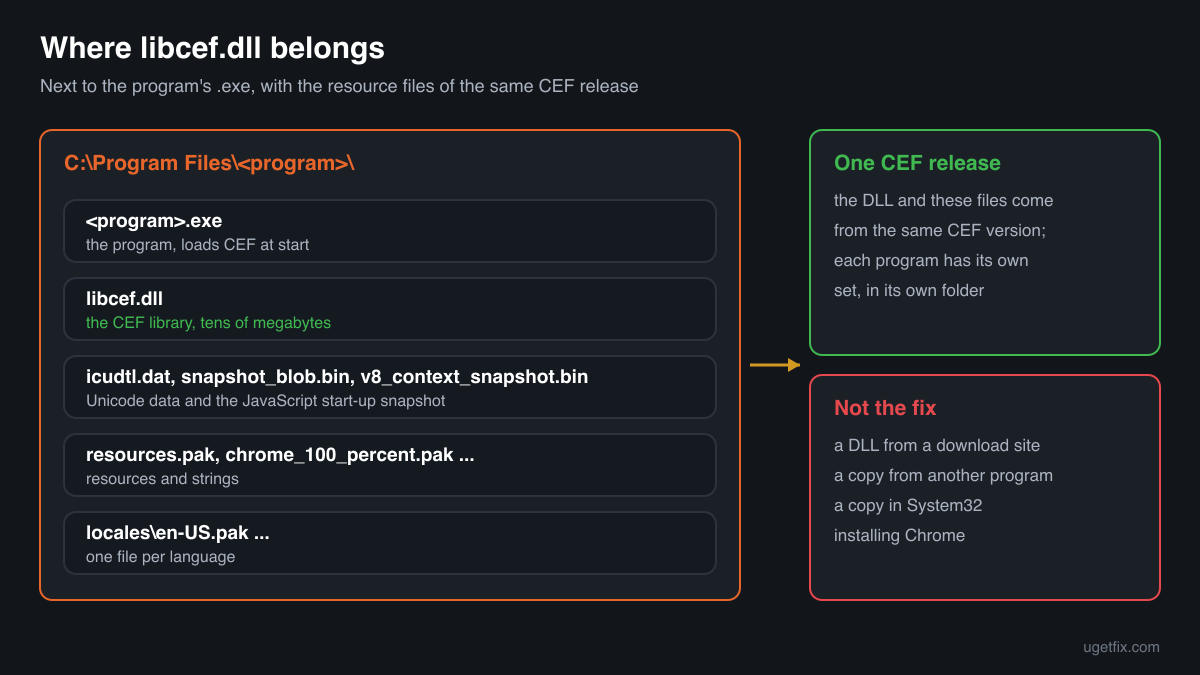
A libcef.dll from a DLL download site or from another program is not the fix. CEF follows Chromium's releases, every program is built against one CEF version, and the library only works with the matching .pak, .dat and .bin files beside it. A copy from elsewhere fails with an entry point error, crashes, or opens blank windows.
Which programs ship libcef.dll
The CEF project publishes the framework for developers, and each developer puts libcef.dll in their own program's folder. There is no shared libcef.dll in Windows, and there is no CEF installer for end users. A PC with several CEF programs has several copies, each in a different version. These are the cases you will meet.
| Program | Made by | What to know |
|---|---|---|
| Desktop programs with a built-in web view | The program's own maker, using the open-source CEF | Launchers, chat and music apps, design, office and engineering tools use CEF to draw parts of their interface as web pages. The copy sits in the program's install folder, next to its .exe or in a bin or cef subfolder. Repairing or reinstalling that program restores it. |
| NVIDIA GeForce Experience | NVIDIA Corporation | HijackLibs lists %PROGRAMFILES%\NVIDIA Corporation\NVIDIA GeForce Experience as the expected folder, where NVIDIA Share.exe loads it. An error that names this folder is fixed by installing the current GeForce software from NVIDIA's own site. |
| Game launchers and in-game stores | The game's or launcher's publisher | When a launcher or a game shows a store, news or a sign-in page inside its own window, that page may be drawn by CEF. Use the launcher's verify or repair option for a game, or reinstall the launcher itself when its own window fails. |
| .NET and other programs built on a CEF wrapper | The program's maker, through a wrapper such as CefSharp | The wrapper adds its own files, but libcef.dll is still the CEF library underneath. Errors that name libcef.dll in these programs are fixed by the program's update or repair, not by changing the wrapper yourself. |
| Security and utility suites | Their own makers | One copy in the public DLL catalogue names a security software company as its maker, so such suites can ship it as well. Use the suite's own repair or reinstall; do not restore its files by hand. |
| Programs HijackLibs lists by .exe name | Not named in the data | HijackLibs also records QnWallpaper.exe and QnwPlayer.exe as programs that load libcef.dll from their own folder. If one of these is yours, reinstall it from the place you first got it. |
| A libcef.dll with no program around it | Unknown | A copy alone in Downloads, Temp, AppData or C:\Users\Public, without a program's .exe and .pak files next to it, belongs to no installed program. Do not try to make it work: read the security note below. |
Step by step
- Find the program that shows the error. The title of the error window names the .exe that failed. If you are not sure, open Event Viewer, Windows Logs, Application, and look at the Application Error event at that time: Faulting application name is the program, Faulting module path shows where its libcef.dll is.
- Restart the PC and start the program normally. Use the Start menu entry or the launcher, not a copied .exe. A program started from another folder looks for libcef.dll in that folder and fails even though its own copy is fine.
- Look at your security software's protection history. In Windows Security open Virus and threat protection, Protection history; other security programs have a quarantine list of their own. If libcef.dll from that program's install folder is listed, you know why it is gone. Do not restore it yet: a repair in the next step brings a clean copy from the program's maker.
- Repair the program. Open Settings, Apps, Installed apps, find the program, open the menu next to it and choose Modify, Repair or Advanced options, Repair if it offers one. For a game, use Verify or Repair in the launcher it came from. A repair checks the program's files and puts back the missing ones.
- Install the newest version from the maker's site. If there is no repair option, uninstall the program, restart, and download the current installer from its maker's own website or the store you bought it in. A fresh install brings libcef.dll in the build the program needs, with its .pak, .dat and .bin files and the locales folder.
- If the file was removed again, deal with the detection. Only for a program you installed from its maker: when security software removes that program's libcef.dll a second time, check the file's digital signature first (see File facts). If it is signed by the program's maker, restore it from quarantine, allow that file or folder, and report it to the security program's maker as a false detection.
- For crashes inside libcef.dll, update the graphics driver. CEF draws its windows with the graphics card. When Event Viewer shows libcef.dll as the faulting module of a program that otherwise starts, install the current driver from NVIDIA, AMD or Intel. If the program has a setting for hardware acceleration, turning it off is a quick test.
What not to do
Do not download libcef.dll from a DLL site.
You cannot know which program or CEF version the file came from, or whether it is a CEF build at all. libcef.dll is a name attackers use for planted files, and a file of unknown origin in a program folder runs every time you start that program.
Do not copy libcef.dll from another program.
Both are CEF, but almost never the same version. The program asks the library for the functions of the CEF release it was built with, and the library expects resource files of the same release next to it. The result is an entry point error, a crash at start-up, or windows that stay white.
Do not put libcef.dll into System32 or SysWOW64.
No program loads CEF from the Windows folders. The CEF documentation places the library next to the application's executable, and programs look there. A copy in System32 fixes nothing and stays behind for anything that might load it.
Do not mix 32-bit and 64-bit copies.
A 64-bit program cannot load a 32-bit libcef.dll, and the other way round. Windows answers with error 0xc000007b. Only a repair or reinstall of the program gets the build that matches it.
Do not restore a quarantined copy you cannot place.
If the quarantine shows libcef.dll from Temp, AppData, Downloads or a folder of a program you did not install, the detection may be right. Leave it there and read the security note on this page instead.
Check the copy on your PC
Choose the libcef.dll from the program folder. Its checksum is calculated in your browser and compared with 15 copies of the file collected from PCs, all describing themselves as the Chromium Embedded Framework library.
The file stays on your computer. Nothing is uploaded: the checksum is computed locally.
3 genuine programs have been documented loading a planted copy of libcef.dll. Found a libcef.dll of only a megabyte or two, without a signature, or sits in Temp, AppData, Downloads or C:\Users\Public next to a signed .exe you never installed? Then the question is whether it is a CEF build at all, and that is a security question rather than a missing-file one. Is libcef.dll a genuine CEF library or a planted file? On 2-Spyware
The error messages and what each one means
The wording points to the cause: a missing file, a file of the wrong version or architecture, a damaged file, or a crash inside a file that is present. These are the texts Windows and programs show, with the file name filled in.
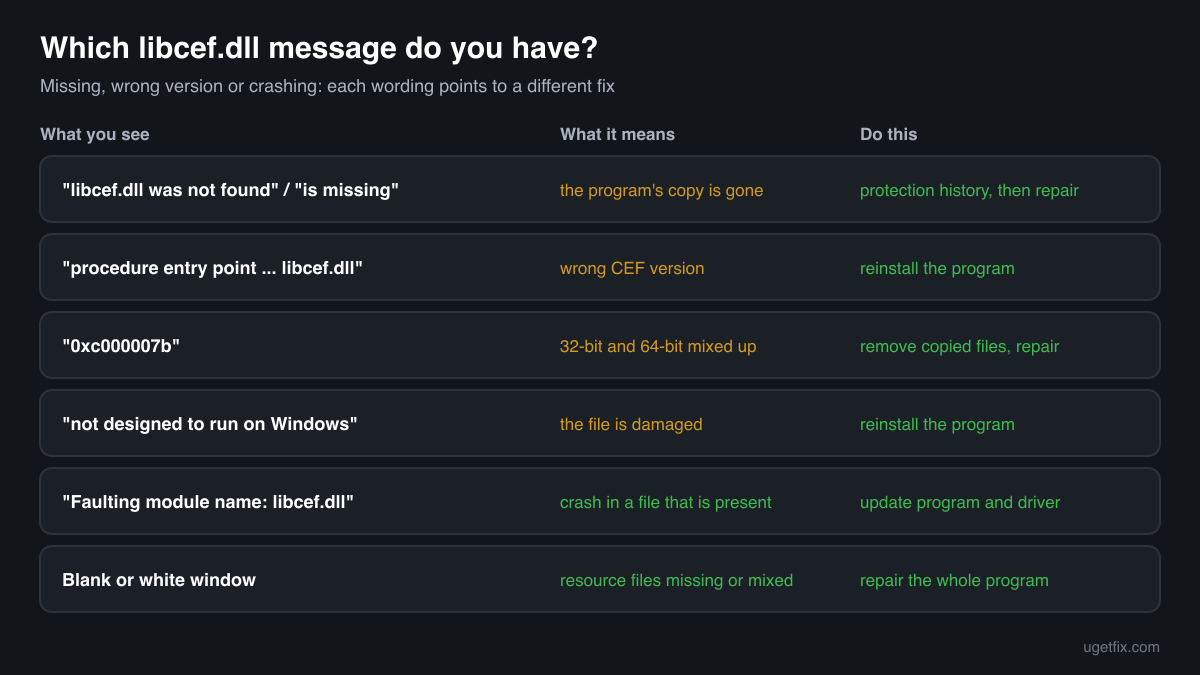
The code execution cannot proceed because libcef.dll was not found. Reinstalling the program may fix this problem.
Windows 10 and Windows 11 wording. The program's own copy is gone: deleted, quarantined, or the program was started from another folder. Check the protection history, then repair or reinstall the program named in the window title.
The program can't start because libcef.dll is missing from your computer. Try reinstalling the program to fix this problem.
The same situation in the older Windows wording. Same fix: repair the program, or install its newest version from the maker.
The procedure entry point ... could not be located in the dynamic link library libcef.dll.
A libcef.dll was found, but it is not the CEF version the program was built with. Typical after copying the file from another program or a download site, or after an update stopped halfway. Reinstall the program so its matching copy comes back.
The application was unable to start correctly (0xc000007b).
Often a 32-bit libcef.dll next to a 64-bit program, or the reverse, after files were copied by hand. Remove the copied file and repair or reinstall the program.
libcef.dll is either not designed to run on Windows or it contains an error.
Windows found the file but it is damaged or not a valid library, often after an interrupted download or a disk error. Reinstall the program. If several programs show this, check the drive.
Faulting module name: libcef.dll
A line from the Application log in Event Viewer after a crash. The file loaded and then failed while running. Check the Faulting module path: inside the program's install folder, update the program and the graphics driver; anywhere else, the copy does not belong to that program and needs a closer look.
A blank or white window, or a window that opens and closes at once
No message, but the same cause in many cases: libcef.dll loads but its resource files (.pak, icudtl.dat, the locales folder) are missing or from another version. Repair or reinstall the program so the whole set matches again.
File facts
libcef.dll is the main library of the Chromium Embedded Framework. CEF is an open-source project based on Google Chromium that lets other programs embed a full web browser: an HTML5 browser control inside a native program, a light program whose interface is written in web technologies, or web content drawn off-screen. CEF is distributed under a BSD license, and a program that uses it shows the license on an About or Credits page. The library itself does not run as a process of its own: the program loads it, and CEF then starts helper processes of that program for pages and graphics. What the catalogue copies of the file report:
- Description in the file
- Chromium Embedded Framework (CEF) Dynamic Link Library
- Company in the file
- Chromium Embedded Framework (CEF) open-source project
- Where the genuine libcef.dll belongs
C:\Program Files\NVIDIA Corporation\NVIDIA GeForce Experience
The CEF documentation's default Windows layout places libcef.dll next to the application's executable, together with icudtl.dat (Unicode data), chrome_100_percent.pak, chrome_200_percent.pak and resources.pak (resources and strings), snapshot_blob.bin and v8_context_snapshot.bin (the JavaScript engine's start-up snapshot) and a locales folder with en-US.pak and other language files. A developer may move these files into a subfolder, but they stay inside the program's own install folder and never in the Windows folders. The library is large: the copies listed below range from about 11 MB to 69 MB. Its description reads Chromium Embedded Framework (CEF) Dynamic Link Library, while the company field is often empty or set by the program's maker, so the digital signature in Properties tells you more than the text fields.
Copies of libcef.dll found on PCs
Public DLL catalogues have collected 15 copies of libcef.dll uploaded from PCs, from version 1.0.0.1 to 3.3071.1639.0. Each one came from some program's folder, and most do not name the program's maker. The table lists them with their checksums, so you can tell whether your file is one of them.
None of them is the right file for your program unless it came from that same program. CEF versions follow Chromium releases, and the newest copy here, 3.3071.1639.0, is not a newer replacement for an older one: a program only works with the version it was built with. If your copy matches an entry, it is a known CEF build; whether it fits the program is something only a repair or reinstall can settle.
| Version | Build | Size | MD5 | SHA-1 |
|---|---|---|---|---|
3.3071.1639.0 | 32-bit | 65.3 MB | ad7fa6b22711ebc731bbf4357a7b2222 | 4f53bdc676717c78f4b738373d1a77b59916d6ca |
3.2357.1323.0 | 64-bit | 51.2 MB | ae0f4a20ae6e15e839afc739a6cefd6c | 78223823d6627c52cc37dd6d374ac3cb4312f5e4 |
3.2272.32.0 | 32-bit | 39.4 MB | c0f5717ece21c5c526e05c5d9ba91754 | b3960f9d51be90cfc48068ff17f35ade1946f222 |
3.2171.1957.0 | 32-bit | 38.6 MB | 9ce0714e10606351d7639da409d1889c | b01960bc97b906b9290ac14e988ab904ca76e4f0 |
3.1547.1412.0 | 32-bit | 34.9 MB | 24aed70e729e2e5fca261084aae6fa4c | 2f705c0c63c91f3fcc68ae529c353dd70a2b47c8 |
2.0.0.1021 | 32-bit | 21.4 MB | 6bd2c65c3cc612891b552ebb3a7f5370 | 75f8ffed18f873b9f002bb2b630f5acb2e3a135f |
1.1453.1255.0 | 32-bit | 18.4 MB | 6d961ee2903ca42c673d72f3cc331b11 | d4a0fd4975740c096d6ac7d167e9bf0b0eea0784 |
1.1453.1247.0 | 32-bit | 24.9 MB | e343f135f64dcbb6aa7c6ff1c3520cea | 2d507abf1897024fcee767991fe5d4b630002241 |
1.1364.1123.0 | 32-bit | 23.8 MB | e9610e3e8ec4043767601f5f16c6d4ec | a07330f91b4b2b4abad140c03ecce48b0a1467b4 |
1.989.464.0 | 32-bit | 19.3 MB | 3798435e9055bd114773e707864d05c0 | 2aba439858a5e56fcd2e84ec46981fafbe26436b |
1.989.464.0 | 32-bit | 19.4 MB | 60be2cec0d95bb135d4452f39aac6805 | e2de1c24e924d16d66d7d128bc63213f04500d9a |
1.989.456.0 | 32-bit | 19.4 MB | d9be5b7e0aec5abb8632235985e02a06 | 36f0441d6679f85d27a0f52298918b6c6477e2d5 |
1.0.231.0 | 32-bit | 12.8 MB | 6b5ee17db184171590d4c4c4637e17d1 | 988521527321f3da543d4ebb3bb52607d7087a01 |
1.0.231.0 | 32-bit | 12.8 MB | f6a2521d00c69f3b9aaca3138891d554 | 9e02e9011f6899fd888ebe5555ed222b393f751e |
1.0.0.1 | 32-bit | 10.7 MB | c0be9442a48a7c73a1340865b8d63ac7 | 172567f2988a6cd5ab3b915bbfe6aff2c87ca4fe |
Copies uploaded by users to a public DLL catalogue, read on 17 October 2026. We list their checksums so you can identify a file; we do not offer them for download and we did not verify each one against its maker's signature.
Questions people ask
Is libcef.dll a virus?
The genuine libcef.dll is the open-source Chromium Embedded Framework, shipped by ordinary programs. Attackers have also planted fake files under this name next to signed programs, which is why the name shows up in security reports. A copy in the install folder of a program you chose, signed by its maker, is normal. Read the security page linked above for a copy of unknown origin.
Which program does my libcef.dll belong to?
Look at the folder it sits in. The program's .exe is usually in the same folder or one level up, together with .pak files and a locales folder. In File Explorer, the folder name under Program Files or AppData normally names the program. Event Viewer's Faulting application name tells you the same after a crash.
Can I download libcef.dll and put it in the program folder?
You should not. There is no single correct file: each program needs the CEF version it was built with, plus the matching resource files, and a downloaded one is of unknown origin. Repairing or reinstalling the program brings the right copy in a few minutes.
Do I need to install CEF or Chromium to fix it?
No. CEF is not something end users install. It comes inside each program that uses it, and installing a browser such as Chrome does not give programs the libcef.dll they need. The program's own installer is the only source of the correct copy.
Why are there several libcef.dll files on my PC?
Every program that uses CEF ships its own copy, often in a different version and of a different size. Three programs with web-based windows can mean three copies. That is by design and nothing to clean up, as long as each sits in the folder of a program you installed.
Why does a program crash in libcef.dll?
The library draws web pages with the graphics card, so a graphics driver problem, an overlay or a damaged program install can all end in a crash logged with libcef.dll as the faulting module. Update the program, then the graphics driver, and reinstall the program if the crash stays.
The program worked yesterday. Why is libcef.dll missing today?
Most often a security scan or a new detection rule removed the file overnight, or an automatic update of the program stopped halfway. Look at the protection history first, then repair or reinstall the program. Both causes are fixed the same way once you know which one it was.
Related guides
libcef.dll is missing or crashes: what the file is and how to fix it
Sources
File data read on October 17, 2026.

The editors who write and check uGetFix guides and reference pages. File facts are read from Microsoft's own installers and documentation, and every page shows the date its data was read.
Questions and experiences
Ask about this page: members and our editors answer. Reading is open; writing needs a free account.
…