
libcurl.dll is missing or fails to load: what the file is and how to fix it
libcurl.dll is the Windows build of libcurl, the free network transfer library of the curl project. A program uses it to download updates, send files and talk to web servers over HTTPS and other protocols. Each program that uses it ships its own copy in its own folder. When the file is missing, the program that shows the error is the one to repair, update or reinstall.

Prefer to fix it yourself? The manual steps follow.
How to fix libcurl.dll errors
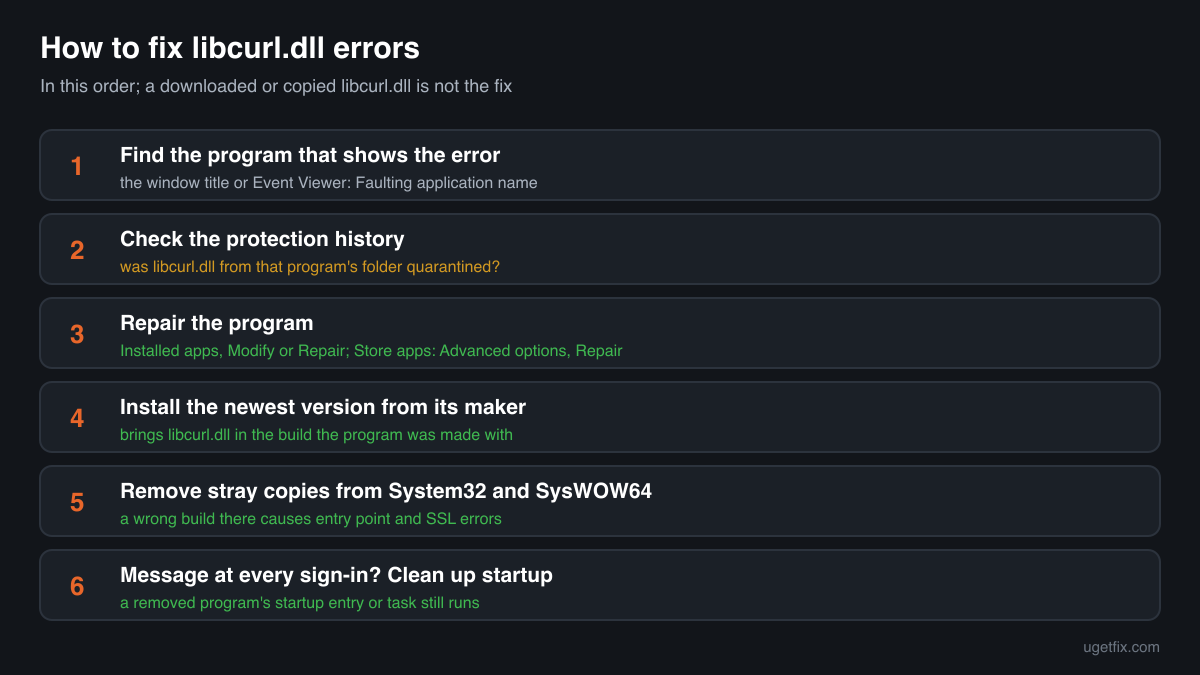
The file belongs to the program that shows the error, not to Windows and not to a runtime you can install. Find out which program it is: the title of the error window, or the program you just started or updated, tells you. Look at your security software's protection history to see whether it removed libcurl.dll from that program's folder. Then repair the program with its own Repair option in Settings, Apps, Installed apps, or install the newest version from its maker's own site. That puts back the libcurl.dll the program was built with, together with the other files it needs beside it.
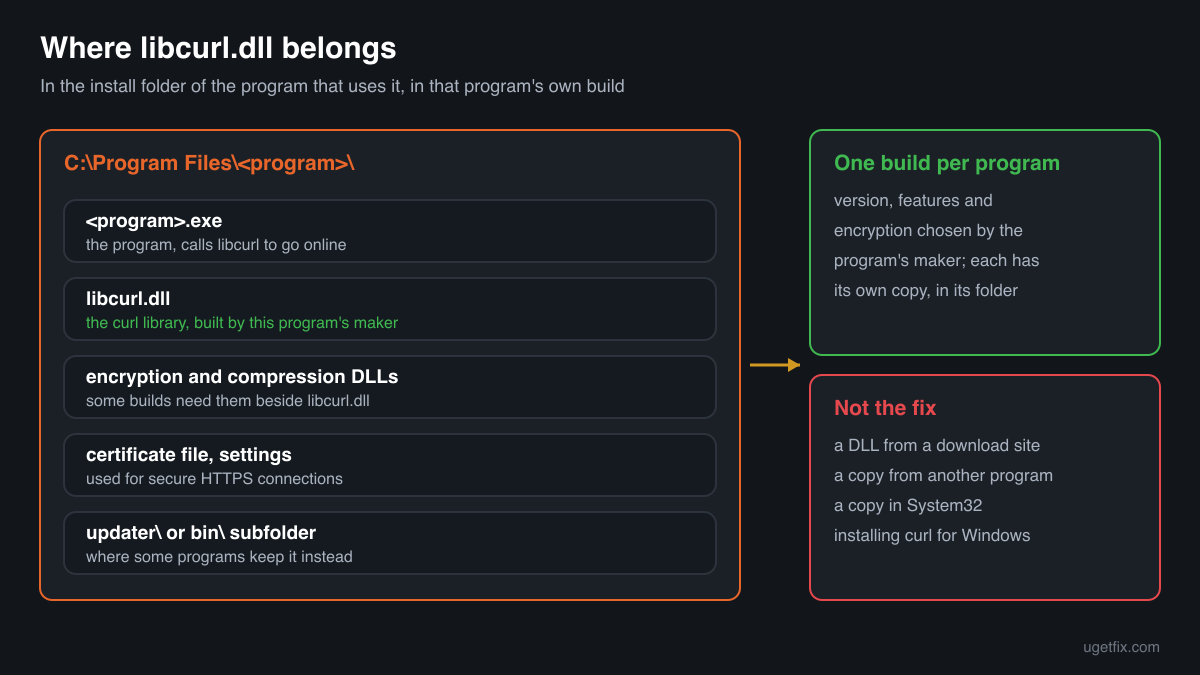
A libcurl.dll from a DLL download site or from another program is not the fix. Every program builds libcurl with its own choice of version, features and encryption library, and some builds need extra DLLs next to them. A copy from elsewhere fails with an entry point error, a 0xc000007b error, or loads and then cannot make secure connections.
Which programs ship libcurl.dll
The curl project publishes libcurl as source code and as official builds for developers. Each developer decides how to build it and puts the DLL in their own program's folder. There is no shared libcurl.dll that Windows installs, and no libcurl installer for end users. A PC with several such programs can have several copies, each in a different version. These are the cases you will meet.
| Program | Made by | What to know |
|---|---|---|
| Notepad++ updater (GUP.exe) | Notepad++ team, using the open-source libcurl | HijackLibs lists %PROGRAMFILES%\Notepad++\updater as an expected folder, where WinGup for Notepad++ loads libcurl.dll to check for and download updates. An error there is fixed by installing the newest Notepad++ from its official site over the old one. |
| Microsoft Teams | Microsoft Corporation | HijackLibs lists the Teams app folder %PROGRAMFILES%\WindowsApps\MSTeams_<version> as an expected location. That folder is managed by Windows: repair or reset Teams in Settings, Apps, Installed apps, Advanced options, or reinstall it. Never copy files into WindowsApps by hand. |
| Coolmuster PDF Creator Pro | Coolmuster | HijackLibs lists the program's Bin folder under %PROGRAMFILES%\Coolmuster as an expected location. Reinstall the program from the maker's own site if it reports the file missing. |
| Older Apple software for Windows | Apple Inc., using libcurl | Two copies in the public DLL catalogue report Apple Inc. as the company and describe themselves as Open Source libcurl ver: 7.16.2. Apple software for Windows that includes this build brings it in its own folder. Repair or reinstall the Apple program that shows the error. |
| Games, launchers and patchers | The game's or tool's publisher | Updaters and launchers that download patches often use libcurl. The copy sits in the game or launcher folder, sometimes in a bin subfolder. Use the launcher's verify or repair option, or reinstall the launcher. |
| Developer tools and language bindings | Their own projects, built on libcurl | curl lists bindings for many programming languages, and tools built on them may bring a libcurl.dll. Fix the error through that tool's own installer or package manager, not by dropping a DLL into its folder. |
| A libcurl.dll with no program around it | Unknown | A copy alone in Downloads, Temp, AppData or C:\Users\Public, next to a single .exe you did not install, belongs to no program you use. Do not try to make it work: read the security note below. |
Step by step
- Find the program that shows the error. The title of the error window names the .exe that failed. If the message appears at sign-in with no window you recognise, a startup entry is loading a program whose files are gone. Open Event Viewer, Windows Logs, Application, and look at the Application Error event at that time: Faulting application name is the program, Faulting module path shows where its libcurl.dll is.
- Look at your security software's protection history. In Windows Security open Virus and threat protection, Protection history; other security programs have a quarantine or a history list of their own. If libcurl.dll from that program's folder is listed, you know why it is gone. Do not restore it yet: read the detection first, and check the signature in step 5.
- Repair the program. Open Settings, Apps, Installed apps, find the program, open its menu and choose Modify or Repair if it offers one. For Microsoft Teams and other Store apps choose Advanced options, then Repair, and Reset if Repair does not help. For a game, use the launcher's verify or repair option.
- Install the newest version from its maker. Download the program's current installer from its maker's own site and install it over the old one, or uninstall first and then install. A fresh install brings libcurl.dll in the build the program expects, with any encryption and compression DLLs it needs beside it.
- If the file was removed again, check it before you allow it. Right-click the quarantined or restored libcurl.dll, Properties, Digital Signatures. If the program came from its maker and the copy sits in its install folder, a repeated removal is likely a false positive: restore it, allow that program's folder and report the file to the maker of your security program. Never allow a copy outside a program you installed.
- Remove a stray copy from the Windows folders. If an old guide made you copy libcurl.dll into C:\Windows\System32 or SysWOW64, delete that copy. Programs that load the file by name can pick up the wrong build from there and fail with entry point or SSL errors. Then repair the program again.
- Clean up startup entries of removed programs. A libcurl.dll message at every sign-in, from a program you uninstalled, comes from its leftover startup entry or scheduled task. Open Task Manager, Startup apps, and Task Scheduler, and disable or delete the entry that points to the missing program.
What not to do
Do not download libcurl.dll from a DLL site.
You cannot know which program or build the file came from, whether it has the features your program needs, or whether it is a curl build at all. A DLL of unknown origin inside a program folder runs with your rights every time that program starts.
Do not copy the file from another program.
It is the same open-source library in both folders, but not the same build. One program links it with one encryption library and set of features, another with a different one, and a mismatch shows up as an entry point error or failed HTTPS connections.
Do not put libcurl.dll into System32 or SysWOW64.
No program needs it there, and a copy in the Windows folders can be loaded by programs that expected their own build. It fixes nothing and leaves a file of unknown version behind for every program that looks for the name.
Do not rename a 64-bit build to fix a 32-bit program, or the other way round.
A 32-bit program cannot load a 64-bit DLL under any name, and a 64-bit program cannot load a 32-bit one. Windows answers with error 0xc000007b or a not designed to run on Windows message.
Do not restore a quarantined copy that sits outside any program you installed.
A libcurl.dll next to a lone signed .exe in Downloads, Temp or AppData is the pattern of a planted file. The detection may be correct, and restoring it lets the planted code run.
Check the copy on your PC
Choose the libcurl.dll from your program's folder. Its checksum is calculated in your browser and compared with 8 copies of the file collected from PCs.
The file stays on your computer. Nothing is uploaded: the checksum is computed locally.
2 genuine programs have been documented loading a planted copy of libcurl.dll. Found a libcurl.dll next to a single signed .exe in Downloads, Temp or AppData, or in a folder no program you installed uses? A program that loads libcurl.dll by name can be tricked into loading a planted one, and that is a security question rather than a missing-file one. Is libcurl.dll the curl library or a planted file? On 2-Spyware
The error messages and what each one means
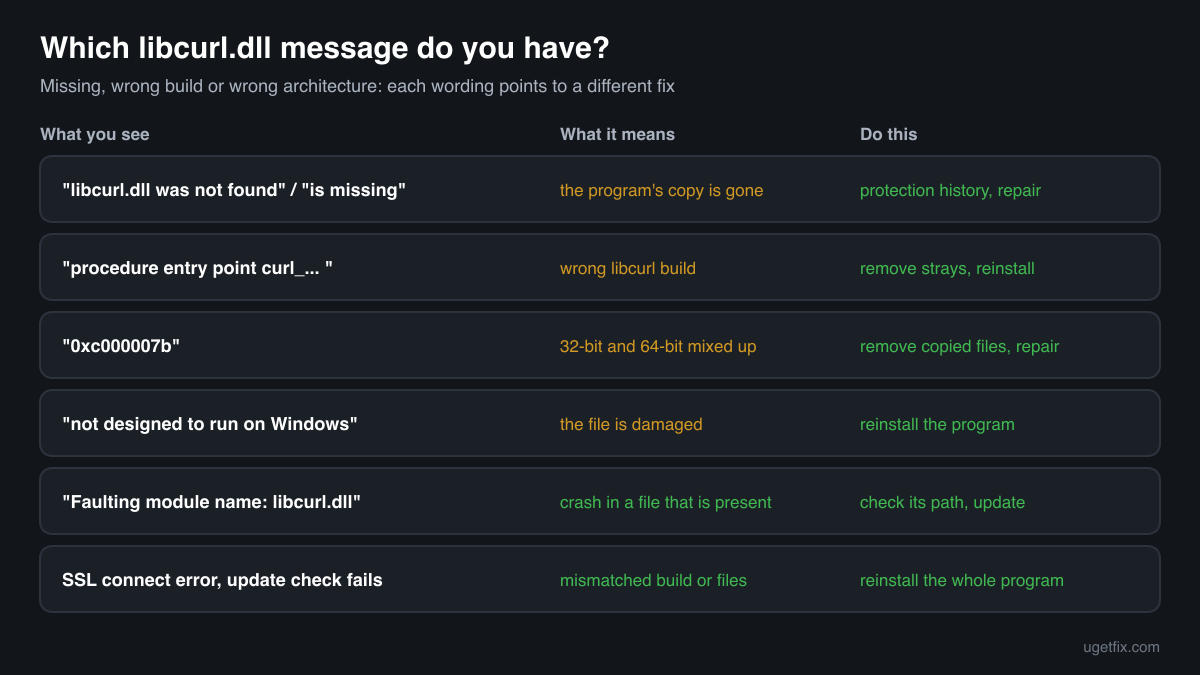
The wording points to the cause: a missing file, a file of the wrong build, a file of the wrong architecture or a damaged file. These are the texts Windows and programs show, with the file name filled in.
The code execution cannot proceed because libcurl.dll was not found. Reinstalling the program may fix this problem.
Windows 10 and Windows 11 wording. The program's own copy is gone: deleted, quarantined, or left out by an interrupted update. Check the protection history, then repair or reinstall the program.
The program can't start because libcurl.dll is missing from your computer. Try reinstalling the program to fix this problem.
The same situation in the older Windows wording. Same fix: repair the program, or install its newest version from its maker.
The procedure entry point curl_... could not be located in the dynamic link library libcurl.dll.
A libcurl.dll was found, but not the build the program needs: the curl function named in the message is missing from it. Typical after a copy from another program, a download site or a stray file in System32. Remove the stray copy and reinstall the program.
The application was unable to start correctly (0xc000007b).
A 32-bit and a 64-bit file are mixed: a libcurl.dll of the other architecture sits in the program's folder or in a Windows folder. Remove copied files and repair the program.
libcurl.dll is either not designed to run on Windows or it contains an error.
Windows found the file but it is damaged or not a valid library for this program, often after an interrupted download or update. Reinstall the program.
Faulting module name: libcurl.dll
A line from the Application log in Event Viewer after a crash. Look at the Faulting module path of the same event: a path outside the program's install folder points to a stray or planted copy. Inside the folder, update the program.
SSL connect error, or the update check fails without a message
The file loaded, but the program cannot make a secure connection. A libcurl.dll from another build, a missing certificate file or a missing encryption DLL beside it are the usual causes. Reinstall the program so all of its files match.
File facts
libcurl is the library behind the curl command-line tool. The curl project describes it as a free, client-side URL transfer library that supports HTTP, HTTPS, FTP, SFTP, SMTP, IMAP and many other protocols, with proxies, cookies, authentication and resumed transfers. libcurl.dll is the form a Windows program carries it in. The program calls it whenever it fetches something from the internet: an update check, a download, a file upload or a sign-in. What the catalogue copies of the file report:
- Description in the file
- Open Source libcurl ver: 7.16.2
- Company in the file
- The curl project (open-source libcurl)
- Where the genuine libcurl.dll belongs
C:\Program Files\Notepad++\updaterC:\Program Files\WindowsApps\MSTeams_<version>C:\Program Files\Coolmuster\Coolmuster PDF Creator Pro\<version>\Bin
A program that uses libcurl keeps libcurl.dll in its own install folder, next to its .exe or in a bin, updater or similar subfolder, and Windows looks there first when the program starts. Windows itself includes the curl command-line tool, which the curl project lists as shipped by Microsoft with Windows 10 and 11, but programs that ask for libcurl.dll bring their own copy. The copies in the public catalogue are 32-bit builds from about 215 KB to 614 KB and describe themselves as libcurl Shared Library from the curl library, or as Open Source libcurl from Apple Inc. A real build can be larger or smaller, because the size depends on the features each program builds in.
Copies of libcurl.dll found on PCs
Public DLL catalogues have collected 8 copies of libcurl.dll uploaded from PCs, from version 7.13.0.0 to 10.2.0.232. Most report the curl library as the company, two report Apple Inc. Each one came from some program's folder. The table lists them with their checksums, so you can tell whether your file is one of them.
None of them is the right file for your program unless it came from that same program. Programs build libcurl in different ways, and the newest copy here, 10.2.0.232, is not a newer replacement for an older one. If your copy matches an entry, it is most likely a known build; whether it fits the program is something only the program's repair or reinstall can settle.
| Version | Build | Size | MD5 | SHA-1 |
|---|---|---|---|---|
10.2.0.232 | 32-bit | 430 KB | 7fdfdbbd37aab05bbd0500acec74f4f8 | 65f30bcabc0889626225cb9b58a414968ad4d80b |
10.2.0.196 | 32-bit | 430 KB | 34ad5d91e28863dc37169406194ba54e | b6c1bff29a0e5151d23cea188d7ff43d727cd5a1 |
7.59.0.0 | 32-bit | 338 KB | d65e280a639a13e77e9697cf797c2568 | f2352e315bd1a48803f964e77f53d418a6d358f9 |
7.51.0.0 | 32-bit | 276 KB | f0fd306150fc6c0b30ed219d52dbebca | 8b5b912bc5e784bb83d936a8204846e80e53c68c |
7.32.0.0 | 32-bit | 266 KB | cf9e69a2cf43adc6454abc8bba7df7ac | 89a1948276acb93fde76188b684751737352c030 |
7.26.0.0 | 32-bit | 328 KB | a57642859ad916250cd5d914d4cbb664 | 9c4544e95c6953dd9b14f1792cc58399cfb1bca0 |
7.23.1.0 | 32-bit | 215 KB | f8a9e198f0aa282cc5b298d23f22caa4 | 0cd9147e745bc1b5313df1b9f0e68793897d3f92 |
7.13.0.0 | 32-bit | 614 KB | bb3f3512ecc2ac7574b7ec2248c29122 | 7411a8cce6b3aa3096354bc77170fb51f148450e |
Copies uploaded by users to a public DLL catalogue, read on 18 October 2026. We list their checksums so you can identify a file; we do not offer them for download and we did not verify each one against its maker's signature.
Questions people ask
Is libcurl.dll a virus?
The genuine libcurl.dll is the open-source curl library, shipped by ordinary programs to download and upload data. HijackLibs lists it among the DLLs that a signed program can be made to load from the wrong folder, which is why a copy outside a program you installed needs checking. Read the security page linked above for a copy of unknown origin.
Which program does my libcurl.dll belong to?
Look at the folder it sits in: the program's name is usually part of the path, such as Notepad++\updater or a game's folder. If the error names no program, Event Viewer's Application Error event at that time shows the Faulting application name and the path of the libcurl.dll it tried to load.
Can I download libcurl.dll and put it in the program folder?
You should not. There is no single correct file: each program needs the build it was made with, and a downloaded one is of unknown origin and features. The right copy for your program is in its own installer, and a repair or fresh install puts it back in a few minutes.
Does installing curl for Windows fix libcurl.dll errors?
No. The official curl builds for Windows give you the curl tool for your own use; they do not put a libcurl.dll into the folder of the program that reports the error, and that program expects its own build anyway. Repair or reinstall the program that shows the message.
A vulnerability scanner flags an old libcurl.dll. What do I do?
The copy belongs to the program in whose folder it sits, and old curl versions have known security flaws that the curl project lists. Update that program to its newest version, or uninstall it if you no longer use it. Replacing the DLL by hand with a newer curl build often breaks the program and is not a fix its maker supports.
The program was working yesterday. Why is libcurl.dll missing today?
Most often a security scan or an update of its detection rules removed the file. Look at the protection history first. Other causes are an update of the program that was interrupted, an uninstall that left a startup entry behind, and a disk problem. Repairing or reinstalling the program fixes all of them once the cause is clear.
Why are there several libcurl.dll files on my PC?
Every program that uses libcurl ships its own copy in its own folder, usually in a different version and size. An editor's updater, a chat app and a game launcher can mean three copies. That is by design. What matters is that each copy sits in the folder of a program you installed.
Related guides
libcurl.dll is missing or fails to load: what the file is and how to fix it
Sources
- curl: libcurl, the network transfer library (overview, protocols, bindings)
- curl: official curl builds for Windows (curl shipped by Microsoft with Windows 10 and 11)
- HijackLibs: libcurl.dll
File data read on October 18, 2026.

The editors who write and check uGetFix guides and reference pages. File facts are read from Microsoft's own installers and documentation, and every page shows the date its data was read.
Questions and experiences
Ask about this page: members and our editors answer. Reading is open; writing needs a free account.
…