
LogiLDA.dll error at startup: what the file is and how to fix it
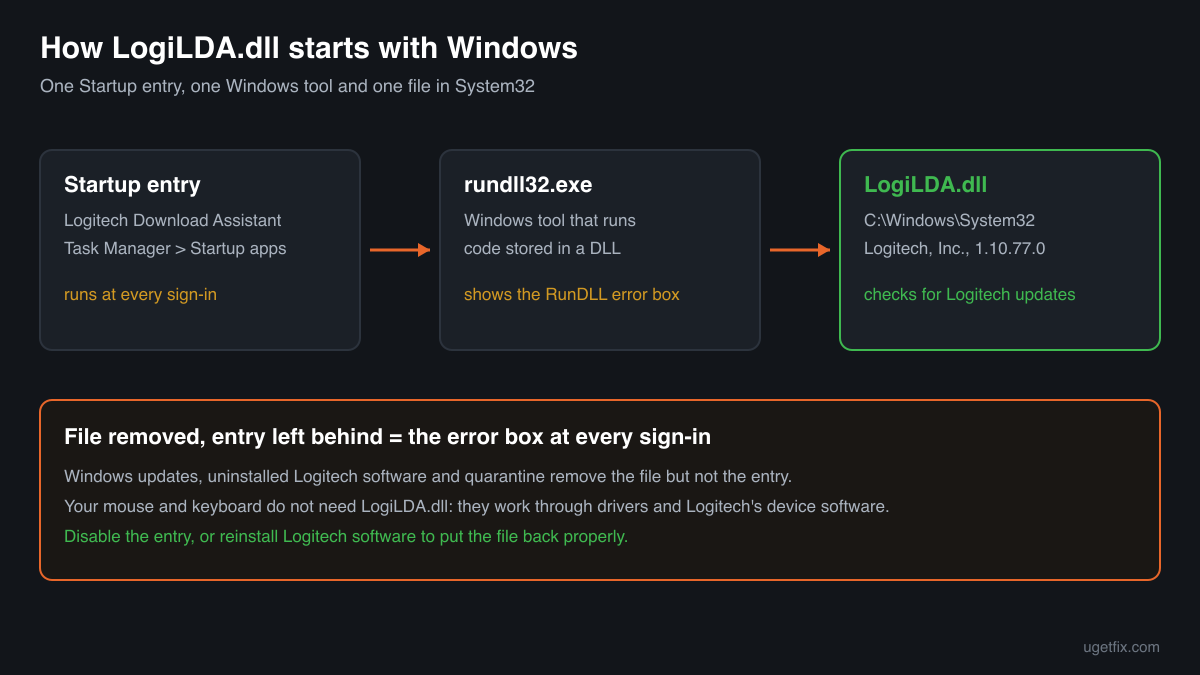
LogiLDA.dll is the Logitech Download Assistant, a small Logitech library that Logitech mouse and keyboard software places in C:\Windows\System32 and starts each time you sign in to Windows. When the file is gone but its Startup entry is still there, Windows shows a box that it had a problem starting LogiLDA.dll. You fix that through the Startup entry and Logitech's own software, not by putting a downloaded copy in System32.

Prefer to fix it yourself? The manual steps follow.
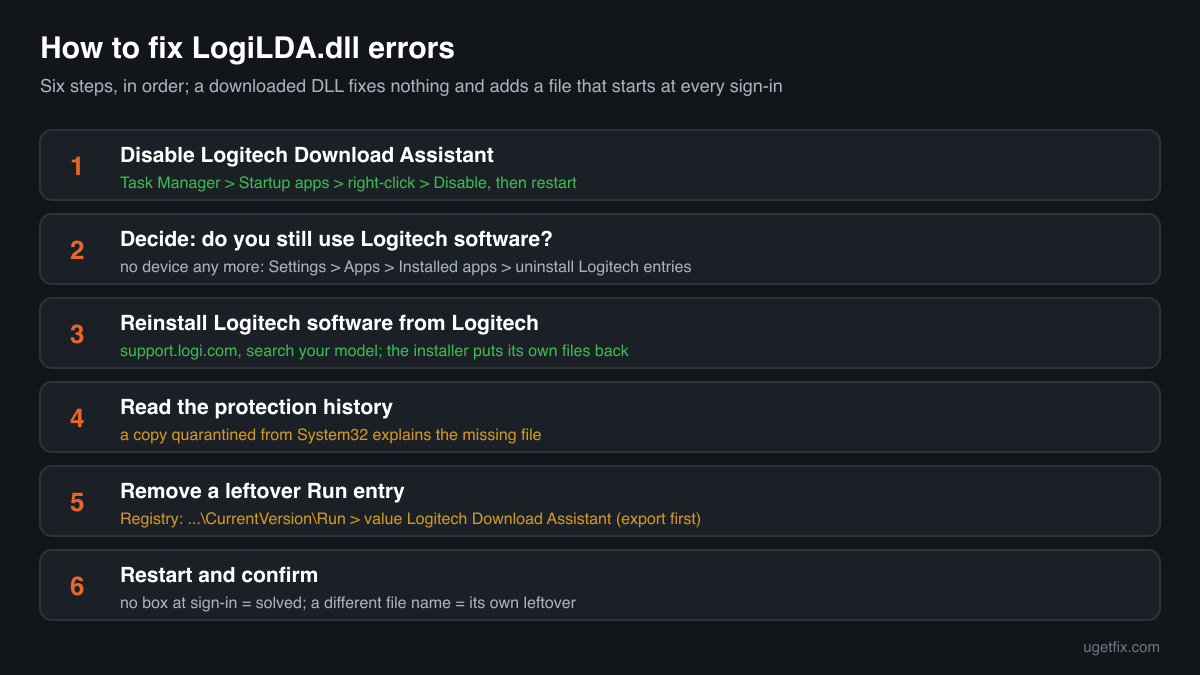
How to fix LogiLDA.dll errors
Open Task Manager (Ctrl+Shift+Esc), go to Startup apps, right-click Logitech Download Assistant and choose Disable, then restart the PC. The error box comes from that Startup entry: at every sign-in Windows tries to start LogiLDA.dll, and when the file is missing or cannot be loaded, it tells you so. The Download Assistant only looks for Logitech software updates, so your mouse, keyboard and their buttons keep working without it. If you want Logitech's software back in full, install the current version for your device from Logitech's support site, which puts its own files in place.
A LogiLDA.dll from a DLL download site is not the fix. Nothing on your PC needs the file except its own Startup entry, so a copy of unknown origin in System32 only adds a file that runs at every sign-in without anyone checking where it came from.
Where LogiLDA.dll comes from
The file is not part of Windows, and it is not shared by many programs the way a runtime is. It belongs to Logitech, Inc. and arrives with Logitech's device software, which registers it to start with Windows. These are the situations behind it.
| Source | Made by | What to know |
|---|---|---|
| Logitech mouse and keyboard software | Logitech, Inc. | Installs LogiLDA.dll in C:\Windows\System32 and adds a Startup entry named Logitech Download Assistant. The entry starts the file at sign-in so it can check for newer Logitech software. |
| The Logitech Download Assistant Startup entry | Logitech, Inc. | Not a program you see in the Start menu. It is the line in Task Manager, Startup apps, that starts the library. When it points to a file that is gone, the error box appears at every sign-in. |
| Windows updates and upgrades | Microsoft | Do not ship the file, but the error often shows up for the first time after one. A feature update or a cleanup can remove the file and leave the Startup entry behind, or replace older Logitech software and keep the old entry. |
| An old Logitech device you no longer use | Logitech, Inc. | Uninstalling a device or its software does not always take the Startup entry with it. The error then appears on a PC that has no Logitech hardware connected at all. |
| Copies outside System32 | Unknown | Logitech's file is meant for System32. A LogiLDA.dll in Downloads, Temp, AppData or a random program folder is not where the Startup entry looks, and it was not put there by Logitech's installer. |
Step by step
- Turn off the Logitech Download Assistant Startup entry. Press Ctrl+Shift+Esc to open Task Manager. On Windows 11 choose Startup apps on the left; on Windows 10 open the Startup tab. Right-click Logitech Download Assistant, choose Disable and restart the PC. For most people the error box is gone after this step, and nothing else changes: the entry only checks for Logitech software updates.
- Decide whether you still use Logitech software. If you have a Logitech mouse or keyboard and rely on its software for extra buttons, profiles or battery status, keep it and go on to the reinstall step. If you have no Logitech device any more, open Settings, Apps, Installed apps, look for Logitech entries and uninstall them. That removes the files that belong to the software you no longer need.
- Reinstall Logitech's software from Logitech. Download the current software for your exact device from Logitech's support site (support.logi.com), search by the model name printed under the mouse or keyboard, and install it. A fresh install puts its own files in place, in the version that software expects, and registers its own Startup entries. Restart once after the install.
- Look at your security software's protection history. In Windows Security open Virus and threat protection, Protection history; other security programs have a quarantine of their own. If LogiLDA.dll from C:\Windows\System32 is listed, that explains why it is missing. Check the details of the detection before you restore anything: a Logitech-signed file in System32 is the genuine one, a copy from any other folder is not.
- Remove a leftover entry that Task Manager does not show. If the box still appears after disabling the entry, the start-up line can also sit in the registry. Open Registry Editor, go to HKEY_LOCAL_MACHINE\SOFTWARE\Microsoft\Windows\CurrentVersion\Run and to the same path under HKEY_CURRENT_USER, and look for a value named Logitech Download Assistant that runs rundll32 with LogiLDA.dll. Right-click the Run key, Export, to keep a backup first, then delete only that one value.
- Restart and confirm. Restart the PC and sign in. If no box appears, the problem is solved. If the box now names a different file, that file has its own Startup entry left behind by other software, and the same approach applies: find which program it belongs to before you change anything.
What not to do
Do not download LogiLDA.dll from a DLL site.
You cannot tell who built such a file, which version it is or what else it does. Because it starts at every sign-in from System32, a file of unknown origin there gets a lot of trust for very little benefit: the only thing that needs it is a Startup entry you can simply turn off.
Do not copy LogiLDA.dll from another PC into System32.
Even a genuine Logitech copy from another computer may not match the Logitech software on yours, and it puts back a component that the installer did not register. Reinstalling Logitech's software does the same job properly.
Do not delete files in System32 to make the error go away.
The error is caused by a file that is already missing. Deleting other files with similar names, or cleaning System32 with a tool, can break Windows itself. Change the Startup entry instead.
Do not restore a quarantined LogiLDA.dll from an unusual folder.
If your security program removed a copy from Downloads, Temp or AppData, that copy was not Logitech's file in its usual place. Leave it in quarantine and read the security page linked below.
Do not turn off your security software to keep the file.
Logitech's software does not need protection switched off to install or run. An instruction to do so for a DLL belongs to a download you should not trust.
Check the copy on your PC
Choose the LogiLDA.dll from C:\Windows\System32 or wherever you found it. Its checksum is calculated in your browser and compared with 3 copies of the file collected from PCs.
The file stays on your computer. Nothing is uploaded: the checksum is computed locally.
Found a LogiLDA.dll outside C:\Windows\System32, without a Logitech signature, or on a PC that never had Logitech software? Then the question is whether it is Logitech's file at all, and that is a security question rather than a startup error. Is logilda.dll Logitech's file or a fake? On 2-Spyware
The error messages and what each one means
Almost every report of this file is the same box at sign-in. The title bar usually says RunDLL, because Windows starts the library through rundll32.exe, the Windows tool that runs code stored in a DLL. The wording after the file name tells you the cause.
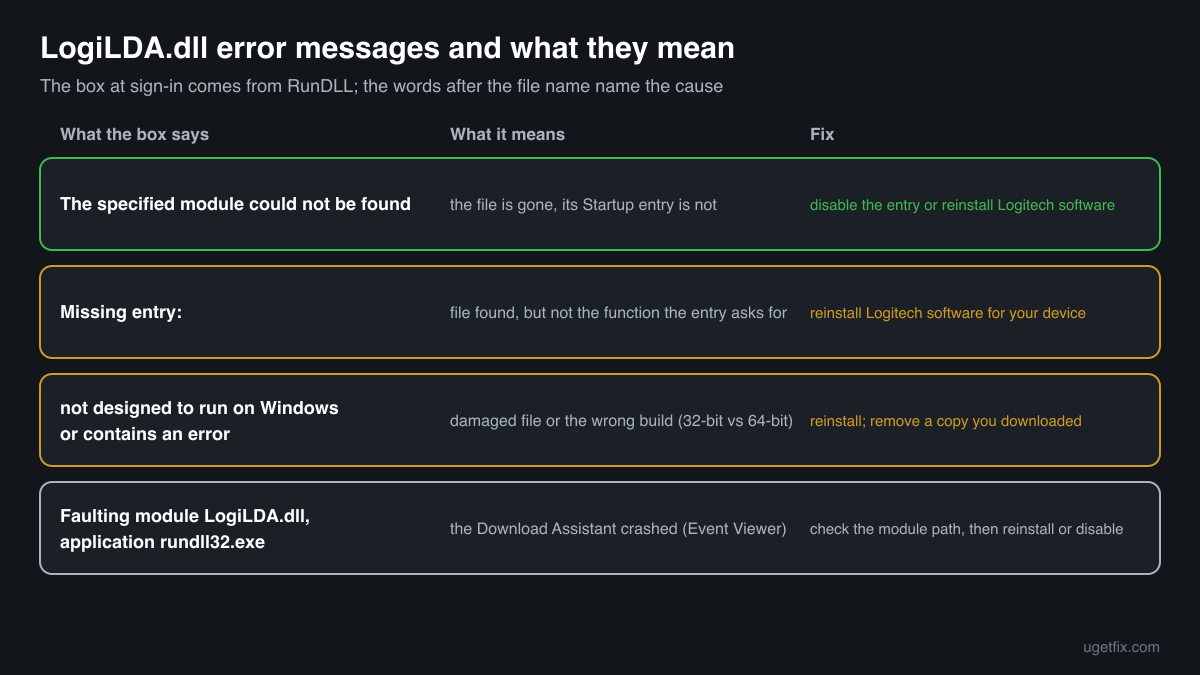
There was a problem starting C:\Windows\System32\LogiLDA.dll. The specified module could not be found.
The Startup entry is still there, the file is not. Typical after a Windows update, after Logitech software was removed or replaced, or after security software quarantined the file. Disable Logitech Download Assistant in Task Manager, Startup apps, or reinstall Logitech's software if you want it back.
There was a problem starting LogiLDA.dll. Missing entry:
RunDLL found the file but not the function the Startup entry asks for. The file is damaged, an older or newer copy than the entry expects, or not Logitech's at all. Reinstall Logitech's software for your device, or disable the Startup entry if you do not use it.
LogiLDA.dll is either not designed to run on Windows or it contains an error.
Windows found a file but it is damaged or not a valid library for this PC, for example a 32-bit copy where a 64-bit one is expected, or a file broken by a disk error. Reinstall Logitech's software. If you put a downloaded copy there yourself, remove it.
Faulting module name: LogiLDA.dll, faulting application rundll32.exe
A line from the Application log in Event Viewer. The Download Assistant crashed while it was running. Look at the module path in the same event: in C:\Windows\System32 it is Logitech's file, so reinstall or disable it; anywhere else, check the copy before you do anything with it.
File facts
LogiLDA.dll describes itself as Logitech Download Assistant from Logitech, Inc. It is not a driver and it does not make your mouse or keyboard work: the device works through Windows' own drivers and Logitech's device software. The Download Assistant is a helper that the Startup entry runs at sign-in through rundll32.exe, so it shows up in Task Manager's Startup list rather than as a program of its own. Turning it off only stops Logitech's automatic check for new software. What the catalogue copies of the file report:
- Description in the file
- Logitech Download Assistant
- Company in the file
- Logitech, Inc.
The genuine file sits in C:\Windows\System32, which is the path every error box names. On a 64-bit Windows that folder holds 64-bit files, and the Logitech copies in the catalogue below are 64-bit builds of about 3.8 MB that report Logitech, Inc. as the company and Logitech Download Assistant as the description. The catalogue also holds one 32-bit copy of about 1.4 MB under the same name with no company or description in its version resource, which cannot be confirmed as Logitech's. Right-click your file, Properties, Details and Digital Signatures, to see what it says about itself and who signed it.
Copies of LogiLDA.dll found on PCs
Public DLL catalogues have collected 3 copies of LogiLDA.dll uploaded from PCs, all reporting version 1.10.77.0. The 64-bit copies report Logitech, Inc. as the company and Logitech Download Assistant as the description. The table lists every copy with its checksums, so you can tell whether your file is one of them.
A matching checksum means your file is the same as a copy someone else had, not that it is the right one for your Logitech software. The 32-bit copy carries no company or description at all, so treat a match with it as unconfirmed. For a working Download Assistant, the copy that Logitech's installer puts in place is the one to use.
| Version | Build | Size | MD5 | SHA-1 |
|---|---|---|---|---|
1.10.77.0 | 64-bit | 3.8 MB | 1c1c3c5d7df9d6b19410168e7724f48e | 10d504c7d30bea0871a436e2d15c44c916769fba |
1.10.77.0 | 64-bit | 3.8 MB | 68defb1f0f056a9fc162ad38862b47be | f4aa40c3409795d4d0edba79e8fa2907c43e3685 |
1.10.77.0 | 32-bit | 1.4 MB | 1a7eb63f7300e93159021f635e3d33b6 | 299a17df606c1f8867ae802f5fa8f2649bcf778b |
Copies uploaded by users to a public DLL catalogue, read on 17 October 2026. We list their checksums so you can identify a file; we do not offer them for download and we did not verify each one against Logitech's signature.
Questions people ask
Is LogiLDA.dll a virus?
Logitech's LogiLDA.dll is the Logitech Download Assistant, a harmless helper that checks for Logitech software updates. A copy in C:\Windows\System32 with Logitech, Inc. in its details and a Logitech signature is the genuine one. A copy in another folder or without a signature needs checking; the security page linked above explains how.
Is it safe to disable Logitech Download Assistant?
Yes. It only checks for newer Logitech software at sign-in. Your mouse, keyboard, extra buttons and saved settings keep working with it turned off, and you can still update Logitech's software by hand from Logitech's support site. You can turn it back on in Task Manager at any time.
Why does the LogiLDA.dll error appear after a Windows update?
The update or the cleanup after it removed or replaced Logitech files but left the Startup entry that points to LogiLDA.dll. At the next sign-in Windows tries to start a file that is not there and shows the box. Disabling the entry, or reinstalling Logitech's software, fixes it.
I do not have a Logitech device. Why does my PC ask for LogiLDA.dll?
A Logitech device was used on the PC before, or its software came preinstalled, and its Startup entry stayed behind when the device or software was removed. Disable Logitech Download Assistant in Task Manager and uninstall any Logitech entries you find in Settings, Apps, Installed apps.
Can I download LogiLDA.dll and put it in System32?
You should not. Nothing but its own Startup entry needs the file, so a downloaded copy fixes a box you can simply switch off, and it adds a file of unknown origin that starts at every sign-in. If you want the Download Assistant, reinstall Logitech's software for your device from Logitech.
Will my Logitech mouse stop working if LogiLDA.dll is missing?
No. The mouse or keyboard works through Windows drivers and Logitech's device software, not through the Download Assistant. Without LogiLDA.dll you only lose Logitech's automatic check for software updates, and the error box at sign-in until you turn the Startup entry off.
Related guides
LogiLDA.dll error at startup: what the file is and how to fix it
Sources
- Dartmouth College Knowledge Base: There was a problem starting C:\Windows\System32\LogiLDA.dll
- Logitech Support: downloads and software for Logitech devices
- Microsoft Learn: rundll32
File data read on October 17, 2026.

The editors who write and check uGetFix guides and reference pages. File facts are read from Microsoft's own installers and documentation, and every page shows the date its data was read.
Questions and experiences
Ask about this page: members and our editors answer. Reading is open; writing needs a free account.
…