
msvbvm50.dll is missing or fails to load: what the file is and how to fix it
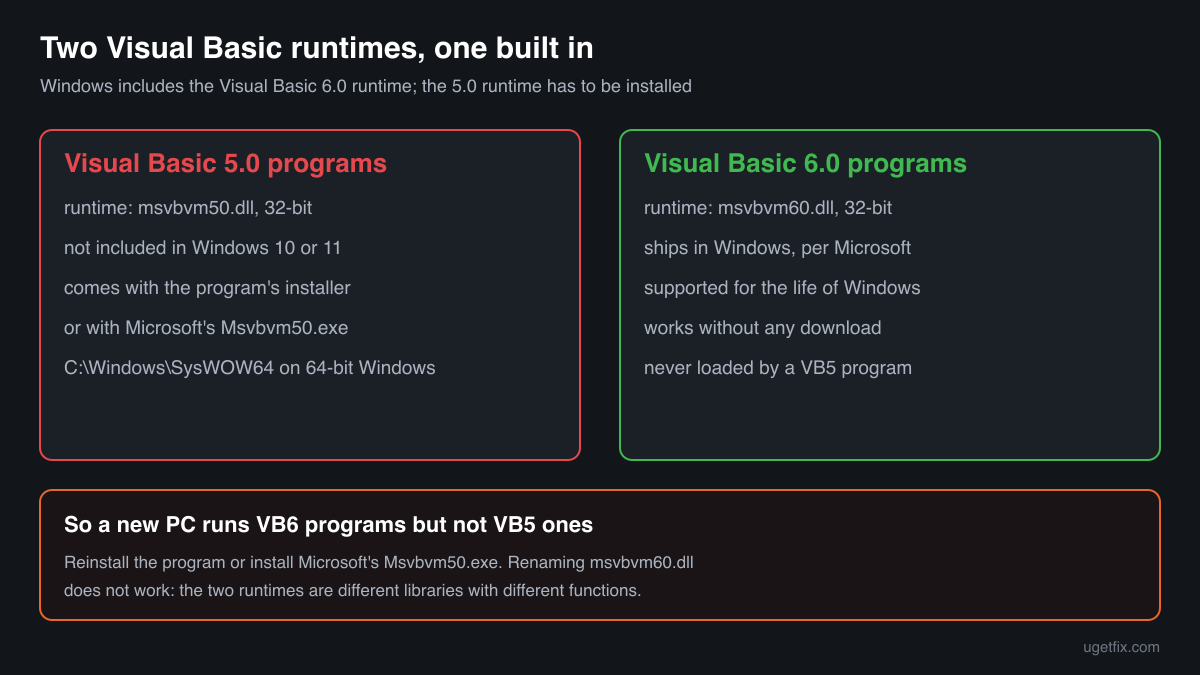
msvbvm50.dll is the Visual Basic Virtual Machine, the run-time library of Microsoft Visual Basic 5.0. Every program written in Visual Basic 5.0 needs it to start, from old shareware tools to business, engineering and school software. Windows 10 and Windows 11 include the runtime of Visual Basic 6.0 but not this older one, so the file comes either with the program's installer or with Microsoft's own Visual Basic 5.0 run-time package.

Prefer to fix it yourself? The manual steps follow.
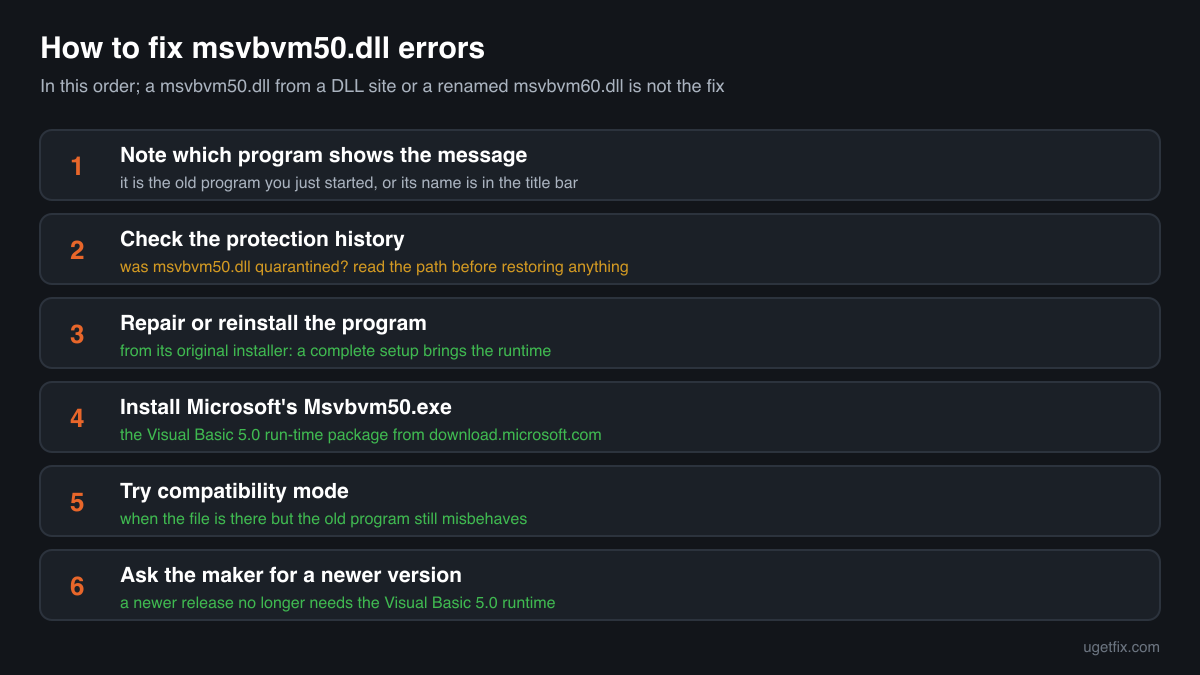
How to fix msvbvm50.dll errors
The message comes from an old program written in Visual Basic 5.0, and that program cannot start without the runtime. First repair or reinstall the program from its original installer: a complete installer brings msvbvm50.dll with it. If the program came without an installer, or the installer does not add the runtime, install Microsoft's Visual Basic 5.0 run-time package, Msvbvm50.exe, which Microsoft published on download.microsoft.com. It puts msvbvm50.dll and its companion files where Windows expects them and registers them. If the file disappears again after that, look at your security software's protection history before anything else.
A msvbvm50.dll from a DLL download site is not the fix, and neither is a renamed msvbvm60.dll. The Visual Basic 6.0 runtime that Windows ships is a different library with a different name, and a VB5 program does not load it. A loose file of unknown origin also skips the registration that Microsoft's package does.
Which programs ship msvbvm50.dll
Developers who built programs with it had to give their users the runtime as well. Some put it into their own installer, others told users to get Microsoft's package. Every msvbvm50.dll in our catalogue is 32-bit and reports Microsoft Corporation, because the runtime was only ever 32-bit. These are the cases you will meet.
| Program | Made by | What to know |
|---|---|---|
| Programs written in Visual Basic 5.0 | Microsoft Corporation (runtime), shipped by the program's maker | Old utilities, shareware, small business tools, engineering and design programs, school and lab software. Their setup copied msvbvm50.dll into the Windows system folder or next to the program. Reinstalling the program from its installer restores it. |
| Microsoft's Visual Basic 5.0 run-time package, Msvbvm50.exe | Microsoft Corporation | A self-extracting installer that Microsoft published on download.microsoft.com for users of VB5 programs. It installs msvbvm50.dll with the other run-time files. This is the clean source when the program's own installer is gone or never had the runtime. |
| Programs whose message names Msvbvm50.exe | The program's maker | Some programs and installers do not ship the file and ask you to download Msvbvm50.exe instead, often pointing to Microsoft's support site. Install Microsoft's package and start the program again. |
| Programs written in Visual Basic 6.0 | Their own makers, runtime by Microsoft | They use msvbvm60.dll, which Microsoft lists among the Visual Basic 6.0 runtime files shipping in Windows. They never load msvbvm50.dll, and having the VB6 runtime does not help a VB5 program. |
| Programs written in Visual Basic 4.0 and older | Their own makers | Older Visual Basic versions had runtimes with other file names. A program that asks for one of those does not need msvbvm50.dll, and msvbvm50.dll does not replace it. |
| Old games and multimedia CDs | Their publishers | Menus, launchers and setup screens on old CDs were often written in Visual Basic 5.0. The game itself may be fine; it is the launcher or setup screen that asks for the runtime. |
Step by step
- Note which program shows the message. The error appears when you start that one program, or its name is in the title bar of the error window. If it appears at Windows start-up with no window of its own, open Task Manager, Startup apps, and look for an old entry: the message comes from that program.
- Look at your security software's protection history. In Windows Security open Virus and threat protection, Protection history; other security programs have a quarantine or a history list of their own. If msvbvm50.dll is listed, read the detection name and the path before you restore anything.
- Repair or reinstall the program from its original installer. Open Settings, Apps, Installed apps, click the three dots next to the program and choose Modify or Uninstall. Many older installers show a Repair choice when you run them again. Otherwise uninstall, restart, and install the program again from its original disc or download. A complete installer puts msvbvm50.dll back.
- Install Microsoft's Visual Basic 5.0 run-time package. If the program came without an installer, or the reinstall did not help, get Msvbvm50.exe from Microsoft's download server and run it as an administrator. The download link is an old http address, so your browser may warn about it; make sure the address starts with download.microsoft.com. The package installs and registers the runtime for every program on the PC.
- Restore the file from quarantine only when it is Microsoft's. If the security program removed a msvbvm50.dll that came from the program's installer or Microsoft's package, the detection is likely false: restore it, add an exception for that one file, and report it to the maker of the security program. Do not restore a copy found in Downloads, Temp or AppData, or one that came with a cracked program.
- Run the program in compatibility mode if it still fails. Once the file is in place, a missing-file message stops. If the program now starts but misbehaves, right-click its .exe, open Properties, Compatibility, and try Run this program in compatibility mode for an older Windows version, or Run this program as an administrator. That fixes the program, not the runtime.
- Ask the program's maker for a newer version. Software that still needs msvbvm50.dll was built with a Visual Basic version that is decades old. If the maker offers a newer release, it no longer needs the Visual Basic 5.0 runtime, and that is the lasting fix.
What not to do
Do not download msvbvm50.dll from a DLL site.
You cannot know which build the file is or whether it is Microsoft's at all. Microsoft's own run-time package exists for exactly this file, so a copy of unknown origin brings nothing but risk. A file in the Windows system folder is loaded by every VB5 program you run.
Do not rename msvbvm60.dll to msvbvm50.dll.
msvbvm60.dll is the Visual Basic 6.0 runtime that Windows ships. It is a different library with its own set of functions. A renamed copy fails with an entry point error, or loads and then crashes the program at an unpredictable point.
Do not replace or delete msvbvm60.dll while you are at it.
Windows protects its own Visual Basic 6.0 runtime, and many programs need it. Nothing about a msvbvm50.dll error is fixed by touching that file.
Do not put a loose copy into System32 on 64-bit Windows.
On 64-bit Windows, System32 is the folder for 64-bit files, and msvbvm50.dll is a 32-bit library. A 32-bit program never loads it from there. Microsoft's package or the program's installer puts the file where 32-bit programs look, so let them do it.
Do not switch off your security software to install it.
A tool or a download that asks you to disable protection before it installs msvbvm50.dll is not offering the runtime. Microsoft's package installs without that step.
Check the copy on your PC
Choose the msvbvm50.dll from your Windows system folder or your program's folder. Its checksum is calculated in your browser and compared with 3 copies of the file collected from PCs.
The file stays on your computer. Nothing is uploaded: the checksum is computed locally.
Found a msvbvm50.dll in Downloads, Temp or AppData, next to an .exe with a random name, or one that names another company in its Details? Then the question is whether it is Microsoft's runtime at all, and that is a security question rather than a missing-file one. Is msvbvm50.dll Microsoft's runtime or a planted copy? On 2-Spyware
The error messages and what each one means
The wording points to the cause: a missing runtime, a wrong file under the right name, a damaged file, or a runtime that is present but not registered. Messages often write the name in capitals, MSVBVM50.DLL, but it is the same file.
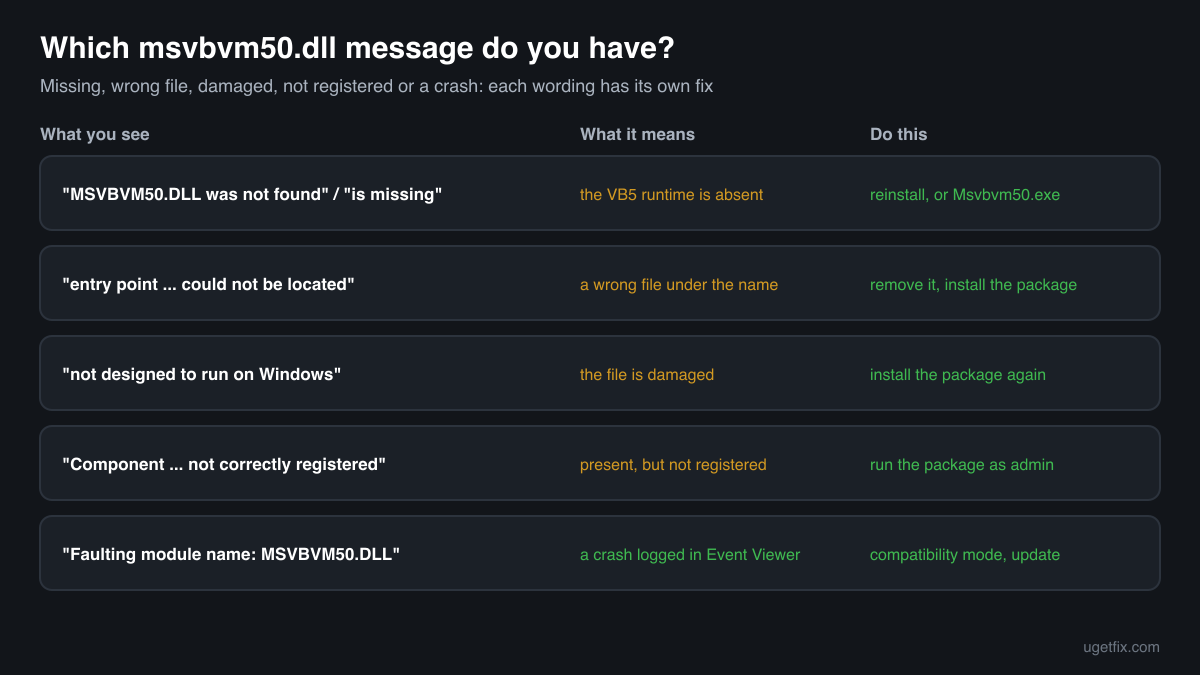
The code execution cannot proceed because MSVBVM50.DLL was not found. Reinstalling the program may fix this problem.
Windows 10 and Windows 11 wording. The Visual Basic 5.0 runtime is not on the PC, or the program's copy was removed. Reinstall the program, or install Microsoft's Msvbvm50.exe.
The program can't start because MSVBVM50.DLL is missing from your computer. Try reinstalling the program to fix this problem.
The same situation in the older Windows wording. Common on a new PC, which has the Visual Basic 6.0 runtime but not this one. Same fix.
The procedure entry point ... could not be located in the dynamic link library MSVBVM50.DLL.
A file named msvbvm50.dll was found, but it does not contain the function the program asked for. Typical after a renamed msvbvm60.dll or a download was put in its place. Remove that file and install Microsoft's package.
MSVBVM50.DLL is either not designed to run on Windows or it contains an error.
Windows found the file but it is damaged or not a valid library, often after a disk error or an interrupted copy. Install Microsoft's package again. If several programs show messages like it, check the drive.
Component 'MSVBVM50.DLL' or one of its dependencies not correctly registered: a file is missing or invalid
Shown by the Visual Basic program itself. The runtime or a file it needs is present but not registered. Run Microsoft's package as an administrator: it registers the files.
Please download and install Msvbvm50.exe
The program does not bring the runtime and tells you where to get it. Microsoft's package is what it asks for; install it and start the program again.
Faulting module name: MSVBVM50.DLL
A line from the Application log in Event Viewer after a crash. The runtime is where the crash surfaced, not usually its cause. Look at the Faulting application name of the same event, try compatibility mode and ask its maker for a newer version.
File facts
msvbvm50.dll is the run-time library of Visual Basic 5.0, which Microsoft calls the Visual Basic Virtual Machine. A program compiled with Visual Basic 5.0 hands much of its work to it: starting the program, drawing its forms and controls, handling strings, numbers and files, and reporting run-time errors. Visual Basic 6.0 programs use msvbvm60.dll instead, which Microsoft lists among the runtime files shipping in Windows and supports for the lifetime of supported Windows versions. Microsoft's statement covers Visual Basic 6.0 only, and states that the Visual Basic runtime files are 32-bit and run on 64-bit Windows in the WOW emulation environment. What the catalogue copies of the file report:
- Description in the file
- Visual Basic Virtual Machine
- Company in the file
- Microsoft Corporation
Installers of Visual Basic 5.0 programs and Microsoft's Msvbvm50.exe put the runtime into the Windows system folder, which on 64-bit Windows means C:\Windows\SysWOW64, the folder for 32-bit system files. Some programs also keep a copy next to their .exe, and Windows looks there first. The genuine file describes itself as Visual Basic Virtual Machine from Microsoft Corporation (Properties, Details), reports a file version that starts with 5.1 or 5.2, and is a 32-bit file of about 1.3 MB: 1,342,177 or 1,352,663 bytes in the copies listed below. A copy with another company, another description or a very different size is not Microsoft's runtime.
Copies of msvbvm50.dll found on PCs
Public DLL catalogues have collected 3 copies of msvbvm50.dll uploaded from PCs, from version 5.1.43.19 to 5.2.82.44. All of them report Microsoft Corporation and Visual Basic Virtual Machine, and all are 32-bit. The table lists them with their checksums, so you can tell whether your file is one of them.
Two of the copies share version 5.2.82.44 and the same size but have different checksums, so a version number alone does not identify a file. If your copy matches an entry, it is most likely a Microsoft build; if it matches none, the Details tab and the size above tell you more than the name does.
| Version | Build | Size | MD5 | SHA-1 |
|---|---|---|---|---|
5.2.82.44 | 32-bit | 1.3 MB | 157b3267a46a79dd900104f241da8c4c | 178271eaf8c48384e206cbaebcbbc12030980410 |
5.2.82.44 | 32-bit | 1.3 MB | d2296e9d90485d398d1ccce8990e1daa | 639a57977b307fc7397cfa5c896bb2162d8a5f2e |
5.1.43.19 | 32-bit | 1.3 MB | eac679185ad621eeace9b6b286372f27 | fba2529446d2955068d2268965a407d19ce3bf50 |
Copies uploaded by users to a public DLL catalogue, read on 17 October 2026. We list their checksums so you can identify a file; we do not offer them for download and we did not verify each one against Microsoft's signature.
Questions people ask
Is msvbvm50.dll a virus?
Microsoft's msvbvm50.dll is a harmless runtime library that old Visual Basic 5.0 programs need. A file under that name in a place where no program uses it, or with another company in its Details, is something else. The security page linked above has the checks for a copy of unknown origin.
Windows has msvbvm60.dll. Why does my program still need msvbvm50.dll?
Because it was written in Visual Basic 5.0, not 6.0. Each version has its own runtime with its own name, and a program loads only the one it was built with. Windows includes the Visual Basic 6.0 runtime, so VB6 programs work out of the box, but the older VB5 runtime has to be installed.
Where do I get msvbvm50.dll safely?
From the program's own installer, or from Microsoft's Visual Basic 5.0 run-time package, Msvbvm50.exe, on download.microsoft.com. Both install a genuine Microsoft file and register it. A loose file from a DLL site skips the registration and you cannot tell where it came from.
Does msvbvm50.dll work on Windows 11?
The runtime is a 32-bit library, and 64-bit Windows runs 32-bit programs, so installing it on Windows 10 or Windows 11 works. Whether the old program itself behaves on a new Windows is a separate question: try compatibility mode, and ask the maker about a newer release.
Does msvbvm50.dll go in System32 or SysWOW64?
On 64-bit Windows, 32-bit system files like this one belong in C:\Windows\SysWOW64, and that is where Microsoft's package puts it. On 32-bit Windows the same folder is called System32. Let the installer choose rather than copying the file by hand.
I installed Msvbvm50.exe and the program still fails. What now?
Read the new message: if it names another file, such as an .ocx control, that file belongs to the program and comes from its installer. If the program starts but crashes, try compatibility mode and running it as an administrator. A missing-file message about msvbvm50.dll should not come back after the package.
Can I delete msvbvm50.dll?
You can, but every Visual Basic 5.0 program on the PC stops starting. Windows itself does not use the file. If you no longer use any old program, leaving it in place costs nothing; if the copy sits somewhere unusual, read the security page before deciding.
Related guides
msvbvm50.dll is missing or fails to load: what the file is and how to fix it
Sources
- Microsoft Learn: Support Statement for Visual Basic 6.0 on Windows (msvbvm60.dll ships in Windows, runtime files are 32-bit)
- Microsoft Q&A: Is MSVBVM50.DLL still available? (Msvbvm50.exe on download.microsoft.com)
- Microsoft Q&A: msvbvm50.exe, Visual Basic 5 needed (a program asks for Msvbvm50.exe)
File data read on October 17, 2026.

The editors who write and check uGetFix guides and reference pages. File facts are read from Microsoft's own installers and documentation, and every page shows the date its data was read.
Questions and experiences
Ask about this page: members and our editors answer. Reading is open; writing needs a free account.
…