
msvcp120.dll not found: put back the Visual C++ 2013 C++ library the right way
msvcp120.dll is the C++ Standard Library of Microsoft Visual C++ 2013. Any program written in C++ with Visual Studio 2013 loads it at start, together with msvcr120.dll, which it needs in turn. Windows does not include it and newer Visual C++ packages do not provide it. Install or repair the Visual C++ 2013 Redistributable from Microsoft and both files come back at once.

Prefer to fix it yourself? The manual steps follow.
Download msvcp120.dll the official way
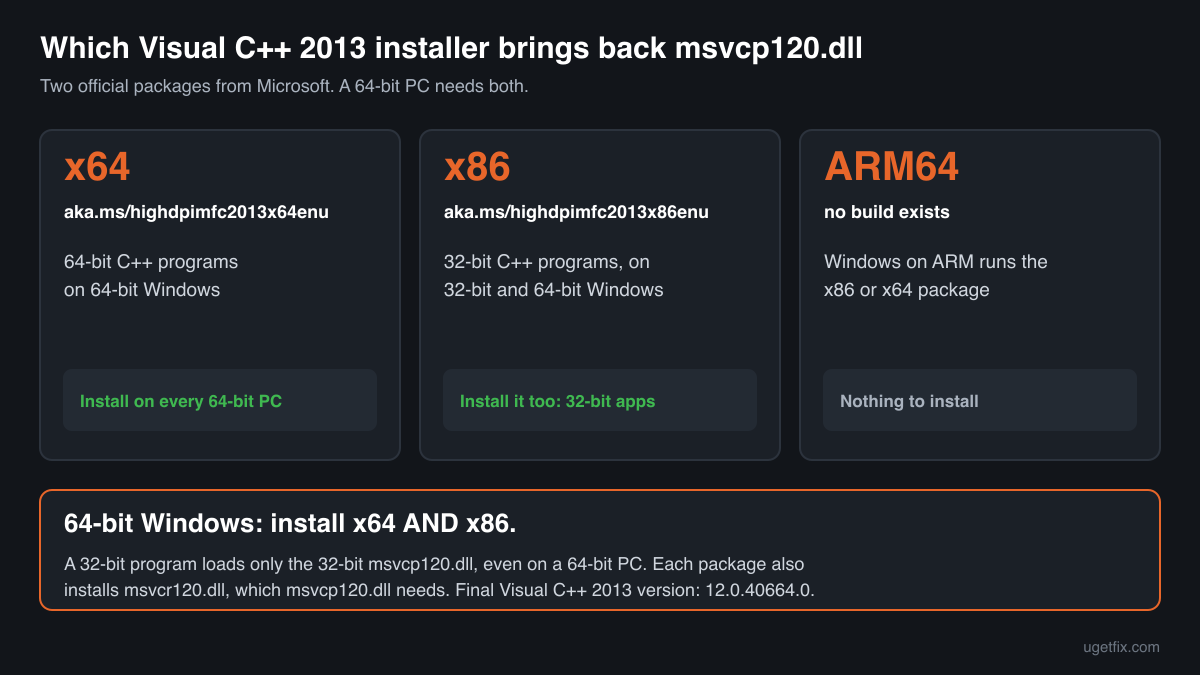
12.0.40664.0Get the Microsoft Visual C++ 2013 Redistributable, version 12.0.40664.0, the final 2013 build from Microsoft. The installer writes msvcp120.dll and the C runtime it relies on, msvcr120.dll, into the Windows folders and records them, so Windows can repair or update them later.
A 64-bit PC needs two packages: x64 and x86. Plenty of C++ programs and games from the Visual Studio 2013 era are 32-bit, and a 32-bit program looks only for the 32-bit msvcp120.dll. With the x64 package alone, those programs keep reporting the file as missing.
“DLL files only” is meant for one program that expects the files in its own folder, or for a PC where the installer refuses to run. The ZIP holds msvcp120.dll together with msvcr120.dll and the rest of the 2013 runtime, version 12.0.40664.0, taken out of Microsoft's installer without changes. Downloading needs a free uGetFix account. Sign in or make one in about a minute, and you return to this page.
We took these installers from Microsoft on October 14, 2026 and unpacked them ourselves. The size and SHA-256 checksum of each one is shown on its download page, so you can confirm the file you receive is the same. Both installers are served from Microsoft's aka.ms links, the ones Microsoft publishes for the Visual C++ 2013 runtime.
Step by step
- Check the list of installed runtimes. Open Settings, Apps, Installed apps and search for “2013”. A complete setup on 64-bit Windows shows two lines: Microsoft Visual C++ 2013 Redistributable (x64) and the same name with (x86). Entries for 2015-2022, 2012 or 2010 are separate runtimes and do not provide msvcp120.dll.
- One or both missing: install them. Download the x64 and x86 installers above and run each one. On 32-bit Windows you need only the x86 one. Restart the PC if the installer asks, then open the program that showed the error.
- Both present: update or repair. Compare the version in the list with 12.0.40664.0. If yours is lower, run the installers above; they upgrade the 2013 runtime without removing anything. If it matches, choose Modify on the entry and then Repair, once for x64 and once for x86. Repair writes fresh copies of msvcp120.dll and msvcr120.dll.
- The error came from a game: run its own runtime setup. Games often ship the Visual C++ 2013 installers in a subfolder such as _CommonRedist, Redist or Support. Run every vcredist file you find there for 2013. A game launcher with a verify or repair option for installed files does the same job.
- Only one program fails: check what is next to its .exe. Windows takes msvcp120.dll from the program's own folder before it looks in the Windows folders. A broken or wrong-architecture copy there blocks the program even when the redistributable is fine. Reinstall that program, or after installing the redistributable delete only that local copy.
- Now msvcr120.dll is reported instead: install the same package. msvcp120.dll cannot load without msvcr120.dll, so fixing one file by hand often just moves the error to the other. The Visual C++ 2013 Redistributable installs both, which ends the chain.
- Read the wording if it still fails. “Not found”, “not designed to run on Windows”, a missing entry point and the 0xc000007b code each have their own cause. The message list further down tells you which one you have.
What not to do
Skip the sites that offer msvcp120.dll on its own.
A single file from such a site comes with no proof of origin, may be the wrong build for your program and leaves msvcr120.dll out, so the next error is already waiting. If you need loose files for one program, take “DLL files only” from this page, which are Microsoft's unchanged files, and test any copy you already have with the checker.
Do not count on Visual C++ 2015-2022.
The newer package has msvcp140.dll, the version 14 C++ library. A program compiled with Visual Studio 2013 is linked to msvcp120.dll by name, so version 14 cannot stand in for it. Keep both packages installed; they do not conflict.
Do not paste the DLL into System32 or SysWOW64.
Windows' installer database does not know about a file you put there, so a later repair can skip it. The wrong build in the wrong folder, a 32-bit file in System32 for example, then breaks every program of the other architecture with 0xc000007b.
Do not try regsvr32.
msvcp120.dll is a plain function library with no self-registration entry, so regsvr32 has nothing to call and only reports a failure. Registration is not part of fixing this error.
Do not clean out private copies.
Many programs keep their own msvcp120.dll beside their .exe. Those copies are expected, and removing them makes those programs fail at start.
Check the copy on your PC
Select the msvcp120.dll on your PC. Your browser calculates its checksums and compares them with 21 builds we know: the final Visual C++ 2013 files from Microsoft, the copies found in Windows 10 images and the older versions people have on their PCs.
Your file never leaves your computer. The checksum is calculated locally and nothing is uploaded.
Is there a msvcp120.dll somewhere it should not be, such as Temp, Downloads, AppData, or beside a program you never installed? Then the question is whether it is safe, not how to restore it. Is msvcp120.dll genuine or malware? Read the check on 2-Spyware
The error messages and what each one means
Windows phrases the error differently depending on what went wrong. These are the texts as they appear, with the cause behind each.
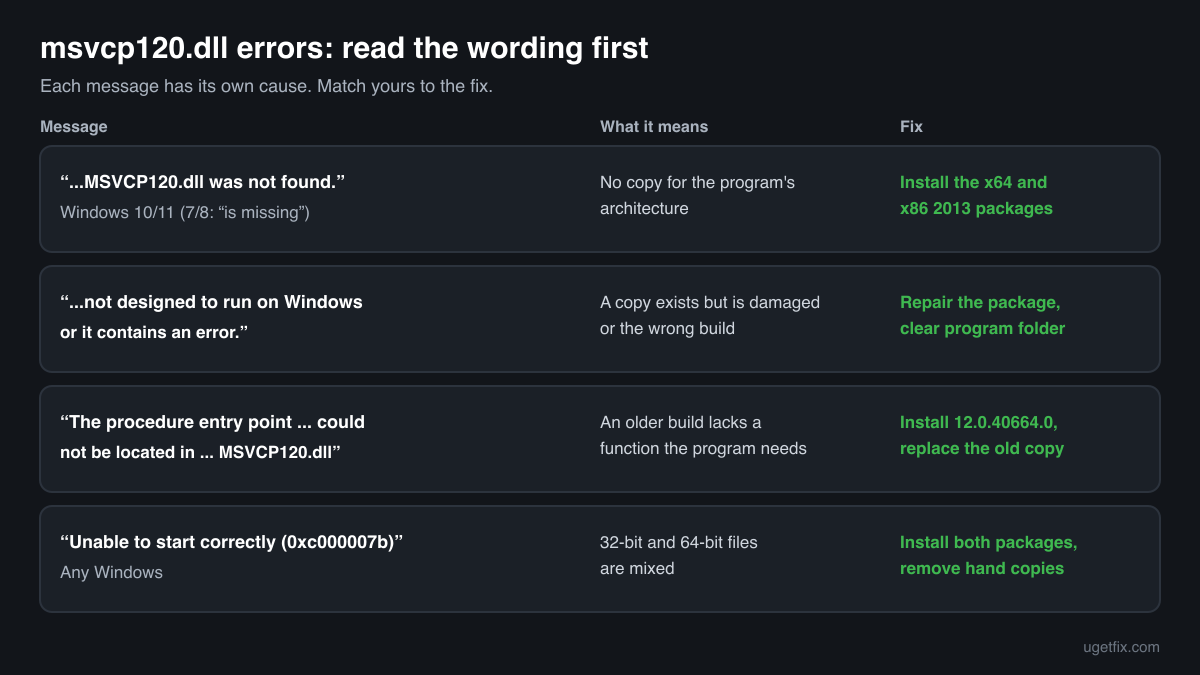
The code execution cannot proceed because MSVCP120.dll was not found. Reinstalling the program may fix this problem.
This is how Windows 10 and Windows 11 say it. There is no msvcp120.dll of the program's architecture anywhere Windows looked. Install the Visual C++ 2013 redistributable, the x64 and the x86 package.
The program can't start because MSVCP120.dll is missing from your computer. Try reinstalling the program to fix this problem.
The Windows 7 and Windows 8 text for the same case. The fix does not change: install both 2013 packages.
MSVCP120.dll is either not designed to run on Windows or it contains an error. Try installing the program again using the original installation media or contact your system administrator or the software vendor for support.
Windows found a copy but could not load it. The file is corrupted, cut short, or built for the other architecture, which is common after a manual copy. Repair the 2013 redistributable and remove any loose copy from the program's folder.
The procedure entry point could not be located in the dynamic link library MSVCP120.dll.
The file loaded, but it lacks a function the program asks for, so it is a different build from the one the program expects. Usually an old private copy sits in the program's folder or an early 2013 package is installed. Install 12.0.40664.0 and replace or remove the old local copy.
The application was unable to start correctly (0xc000007b). Click OK to close the application.
Architectures are mixed: a 64-bit program met a 32-bit msvcp120.dll or msvcr120.dll, or the other way round. Install both packages from Microsoft, then delete any copy you placed in System32, SysWOW64 or the program's folder by hand.
Faulting module name: MSVCP120.dll
Found in Event Viewer, Windows Logs, Application, after a program closed by itself. msvcp120.dll was loaded and the crash happened while the program was using it. Bring the 2013 runtime up to 12.0.40664.0; if crashes continue, update or reinstall the program, since the fault is then in its own code.
File facts for the last official version
Taken from msvcp120.dll inside Microsoft's Visual C++ 2013 installers, version 12.0.40664.0. Microsoft® C Runtime Library, Microsoft Corporation.
| Build | Version | Size | Exported functions | Signed by |
|---|---|---|---|---|
| x64 | 12.0.40664.0 | 659,624 bytes | 1,569 | Microsoft Corporation |
| x86 | 12.0.40664.0 | 454,976 bytes | 1,569 | Microsoft Corporation |
- SHA-256 · x64
3b92e964404e3f94531e7d7c4c7419561d9eca6accd98dc3979c9e3596db444c- SHA-256 · x86
0e535e147d253fc645ccb9406c888aee374ab1f3f9d99dc057a2b19cf401458b
The installer puts the x64 copy in C:\Windows\System32 and, on 64-bit Windows, the x86 copy in C:\Windows\SysWOW64. On 32-bit Windows the x86 copy goes into System32. Note that the file's own description reads “Microsoft® C Runtime Library”, the same text as msvcr120.dll, so tell the two apart by file name, not by Properties.
What msvcp120.dll itself depends on
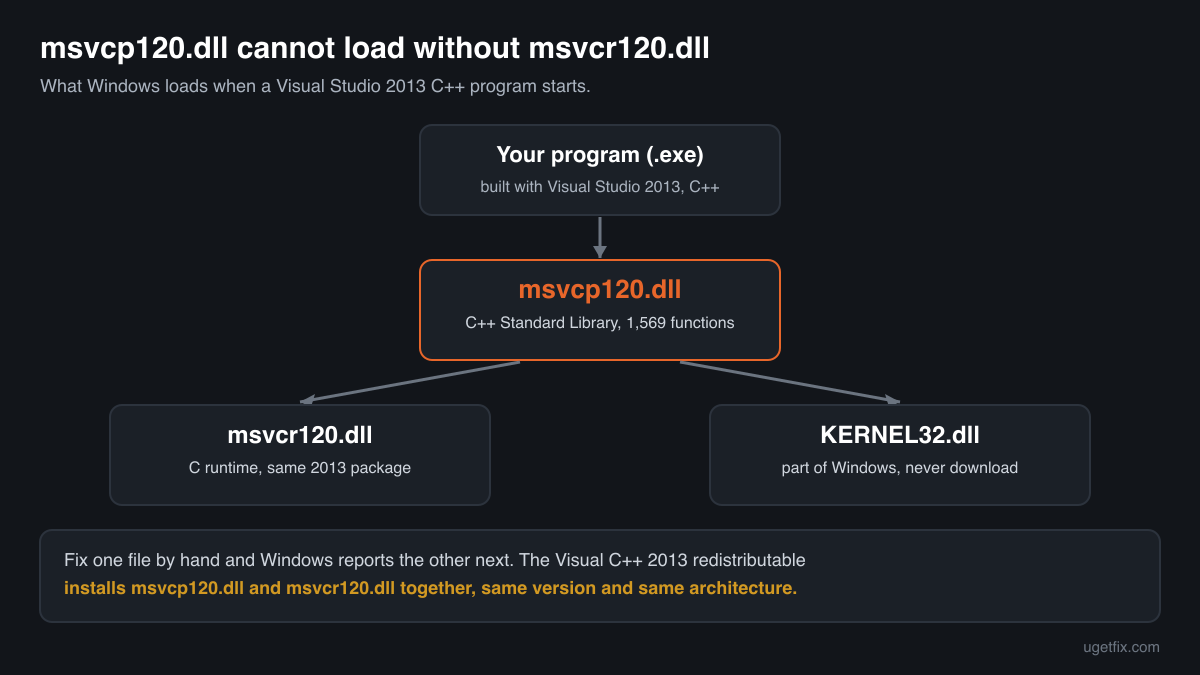
The import table of Microsoft's file names exactly two libraries: KERNEL32.dll, which every Windows installation has, and MSVCR120.dll, the C runtime from the same Visual C++ 2013 package. The C++ library is built on top of the C runtime: its string, stream, container and thread functions call into msvcr120.dll for memory, file access and the rest. If msvcr120.dll is absent, msvcp120.dll cannot load even when it is present and intact.
This is why errors for the 2013 runtime often come in pairs. You place msvcp120.dll, and the next start reports msvcr120.dll. Both must be the same architecture, and they should be the same version, because they are built and tested together. Installing the redistributable is the simple way to get a matching pair.
MSVCR120.dllKERNEL32.dllKERNEL32.dll is part of Windows and is updated only by Windows Update. Do not replace it, and do not download it from anywhere.
What the Visual C++ 2013 redistributable installs
These are the 5 runtime files in the x64 installer, version 12.0.40664.0. They arrive, update and get repaired as one set.
| File | Microsoft's description | Size |
|---|---|---|
msvcp120.dll | Microsoft® C Runtime Library | 644 KB |
msvcr120.dll | Microsoft® C Runtime Library | 941 KB |
vcamp120.dll | Microsoft® C++ AMP Runtime | 471 KB |
vccorlib120.dll | Microsoft ® VC WinRT core library | 348 KB |
vcomp120.dll | Microsoft® C/C++ OpenMP Runtime | 135 KB |
Older versions of msvcp120.dll found on PCs
Installers of programs and games leave their own msvcp120.dll behind, often for years. A public DLL catalogue lists 12 such copies, versions 12.0.21005.1 to 12.0.40664.0, and the table gives the checksums of each so you can match the file on your disk.
The current Microsoft build is 12.0.40664.0, the one the redistributable above installs. A file that the checker finds in this list is probably an earlier Microsoft build, but the list is not verified, so look at the signature as well. Then install the redistributable: programs without a private copy in their folder will load the up-to-date file from System32 or SysWOW64.
| Version | Build | Size | MD5 | SHA-1 |
|---|---|---|---|---|
12.0.40664.0 | 64-bit | 645 KB | c2028ba6c66363b36ea659ca8816265d | 5e2bda10ad417466290dc08fd6ee8bc5fcf0ebbd |
12.0.40664.0 | 32-bit | 440 KB | 854fb5751985d6d40fa12bc9c3e82be5 | e57cc61a59e88d2b6a373abca622af259c58be4e |
12.0.40660.0 | 64-bit | 645 KB | edef53778eaafe476ee523be5c2ab67f | 58c416508913045f99cdf559f31e71f88626f6de |
12.0.40660.0 | 32-bit | 440 KB | a883c95684eff25e71c3b644912c73a5 | 3f541023690680d002a22f64153ea4e000e5561b |
12.0.21005.1 | 64-bit | 635 KB | 39f3ccbefb9197b227ab253e25a85162 | 46121bde40e1aa7354648159e55e434152e22201 |
12.0.21005.1 | 64-bit | 645 KB | 46060c35f697281bc5e7337aee3722b1 | d0164c041707f297a73abb9ea854111953e99cf1 |
12.0.21005.1 | 64-bit | 645 KB | 72664fbad17678faecae97481e8e783c | 8edb9feb6d3a737a88dfd3213965d1ea4f64c3f6 |
12.0.21005.1 | 64-bit | 655 KB | eb09f32bb667e763158eab6aa6c21672 | 17dc2f21311643ee4c0c1b7bfa617818a1f20b9f |
12.0.21005.1 | 32-bit | 440 KB | 50260b0f19aaa7e37c4082fecef8ff41 | ce672489b29baa7119881497ed5044b21ad8fe30 |
12.0.21005.1 | 32-bit | 440 KB | 64295057c00f9d2cfca1b2e0503dccc8 | 5bccee32d62b1a069ff92362f75e0a757d870d73 |
12.0.21005.1 | 32-bit | 440 KB | b68c48d49efb74090635f32212add37e | 5f6c2f53f1785dbdcff1514477530139db3f63e9 |
12.0.21005.1 | 32-bit | 440 KB | fd5cabbe52272bd76007b68186ebaf00 | efd1e306c1092c17f6944cc6bf9a1bfad4d14613 |
User-submitted copies from a public DLL catalogue, read on 14 October 2026. The checksums are here to help you identify a file. We do not offer these copies for download and have not checked each against Microsoft's signature.
Questions people ask
I installed msvcp120.dll and now msvcr120.dll is missing. Why?
Because msvcp120.dll imports msvcr120.dll and cannot load without it. Adding one file solved the first lookup and exposed the second. Both come from the Visual C++ 2013 Redistributable, so install that package, x64 and x86, instead of collecting single files. It places a matching pair of the same version and architecture.
How is msvcp120.dll different from msvcp140.dll?
They are two generations of the same C++ library. msvcp120.dll is version 12, from Visual C++ 2013. msvcp140.dll is version 14, from the 2015-2022 redistributable. A program asks for the exact name it was built with, so neither replaces the other. A PC with programs from both eras needs both packages, and they install side by side.
Properties says “C Runtime Library”. Did I get the wrong file?
No. Microsoft's msvcp120.dll carries the description “Microsoft® C Runtime Library”, the same text as msvcr120.dll, even though it is the C++ library. Go by the file name, the version (12.0.40664.0 for the last build) and the Microsoft Corporation signature. The checker on this page confirms the exact build by its checksum.
Can I copy msvcp120.dll from another computer?
It can work if the other PC has the final Microsoft build and you copy the right architecture, but you also need msvcr120.dll and nothing will update or repair the copies later. Installing the redistributable takes about the same time and avoids all three problems. Use copied files only in a program's own folder, never in System32.
Is msvcp120.dll safe?
Microsoft's msvcp120.dll, signed by Microsoft Corporation, is a normal library. Where a copy sits tells you more than its name, and how attackers have used this file is covered on the security page linked above. To test the file you have, use the checker on this page.
Does Visual C++ 2013 work on Windows 11?
Yes. The final 12.0.40664.0 installers run on Windows 10 and Windows 11, and programs built with Visual Studio 2013 use them as before. Microsoft no longer issues fixes for the 2013 runtime but still links those installers for programs that depend on it. On Windows 11 on ARM, install the x64 or x86 package, since no ARM64 build exists.
Related guides
How to fix Bootstrapper.exe error in Windows?
Sources
- Microsoft: Latest supported Visual C++ Redistributable downloads
- Winbindex, the Windows binaries index (m417z)
File data read on October 14, 2026.

The editors who write and check uGetFix guides and reference pages. File facts are read from Microsoft's own installers and documentation, and every page shows the date its data was read.
Questions and experiences
Ask about this page: members and our editors answer. Reading is open; writing needs a free account.
…