
nvwgf2umx.dll crashes or is missing: what the file is and how to fix it
nvwgf2umx.dll is part of the NVIDIA graphics driver: the 64-bit user-mode driver that turns a game's Direct3D 10 and Direct3D 11 calls into work for an NVIDIA graphics card. No game ships it. You meet the name in two ways: as the faulting module when a DirectX 11 game crashes, or in a message that the file is missing after a driver install went wrong. Both are fixed through the NVIDIA driver.

Prefer to fix it yourself? The manual steps follow.
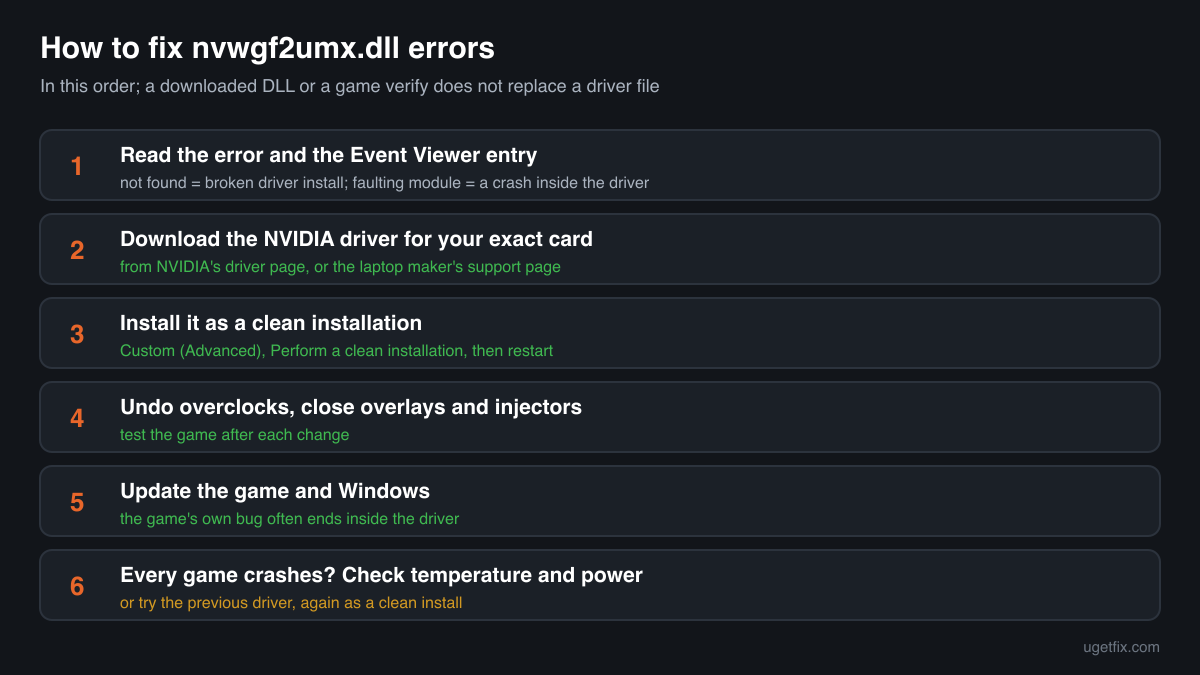
How to fix nvwgf2umx.dll errors
The file belongs to the NVIDIA graphics driver, not to the game that crashed and not to Windows. Download the current driver for your exact graphics card and Windows version from NVIDIA's driver page, or from your laptop maker's support page if you have a laptop with switchable graphics. Run the installer, choose Custom (Advanced), tick Perform a clean installation, and restart the PC when it finishes. A clean install replaces every driver file, nvwgf2umx.dll included, with the matching build and resets the driver's settings, which also removes broken profiles left by older versions. If a game still crashes in nvwgf2umx.dll after that, the cause is outside the file: an overclock, an overlay or injector, the game itself, or the hardware.
A nvwgf2umx.dll from a DLL download site, another PC or an old driver folder is not the fix. Windows loads the user-mode driver from the place the installed NVIDIA driver registered, and the file must be the same build as the kernel-mode driver it works with. A loose copy is either ignored or makes the mismatch worse.
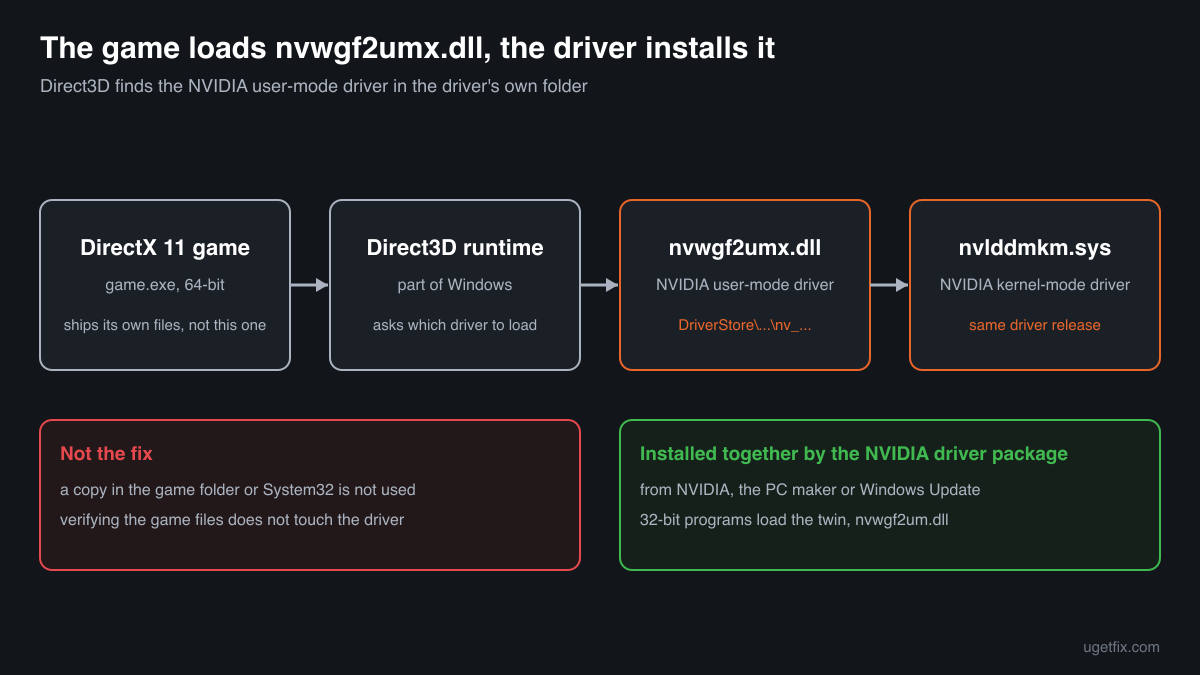
What installs nvwgf2umx.dll, and what only uses it
Under the Windows Display Driver Model a graphics card maker supplies two driver parts: a kernel-mode driver and a user-mode driver that runs inside each program using the card. nvwgf2umx.dll is NVIDIA's user-mode driver for Direct3D 10 and 11 on 64-bit Windows. So only an NVIDIA driver package puts it on a PC. These are the cases you will meet.
| Program | Made by | What to know |
|---|---|---|
| NVIDIA GeForce Game Ready and Studio drivers | NVIDIA Corporation | The usual source on a desktop PC. Every driver release brings its own nvwgf2umx.dll, built together with the rest of that release. Installing a driver from NVIDIA's driver page replaces it. |
| Laptop graphics drivers from the PC maker | NVIDIA Corporation, packaged by the laptop maker | Laptops that switch between the processor's graphics and an NVIDIA chip sometimes need the maker's tested package. If NVIDIA's installer refuses the system or the display goes wrong after it, use the driver from the laptop's support page. |
| NVIDIA drivers for professional cards | NVIDIA Corporation | Workstation drivers for NVIDIA's professional cards ship the same file name. The same fix applies: a clean install of the driver for that card. |
| NVIDIA drivers delivered by Windows Update | NVIDIA Corporation, distributed by Microsoft | Windows Update can install or replace an NVIDIA driver on its own. That is a frequent reason why a PC suddenly has an older or different nvwgf2umx.dll than the one you installed. |
| 32-bit games: nvwgf2um.dll | NVIDIA Corporation | The 32-bit twin, without the x at the end. A 32-bit DirectX 11 game loads nvwgf2um.dll, a 64-bit one loads nvwgf2umx.dll. The same driver package installs both; they cannot replace each other. |
| DirectX 10 and 11 games and programs | Their own developers | They load the file through Direct3D but never ship it. That is why the crash report names nvwgf2umx.dll even when the game's own code is at fault, and why verifying the game files does not touch it. |
Step by step
- Note what the error says and when it appears. A message that the file is missing points to a broken driver install. A crash with nvwgf2umx.dll as the faulting module points to the driver, a setting or the game. Open Event Viewer, Windows Logs, Application, and look at the Error entry from the time of the crash: it names the program, the module and its version.
- Download the right NVIDIA driver. On NVIDIA's driver page pick your card's series and model and your Windows version, or let the page detect them. On a laptop, check the maker's support page first. Save the installer; you need it after the next step if the screen drops to a basic resolution.
- Install it as a clean installation. Run the installer, accept the terms, choose Custom (Advanced) and tick Perform a clean installation. The installer removes the old driver files and settings and installs the new set, nvwgf2umx.dll and its 32-bit twin included. Restart the PC when it asks, even if the picture already looks fine.
- Undo overclocks and stop overlays and injectors. A GPU or memory overclock that passes a benchmark can still crash a game inside nvwgf2umx.dll. Set clocks back to default in the tool you used. Close or uninstall recording overlays, frame rate limiters and post-processing injectors one at a time, and test the game after each change.
- Update the game and Windows. Install the game's latest patch and the latest Windows updates. Games often fix crashes that show up in the NVIDIA driver, because the driver is where the game's bad request ends. Verifying the game files helps the game, not the driver file.
- Try the previous driver if the new one made it worse. When crashes started right after a driver update, install the release you had before, again as a clean installation, and wait for the next one. Stop Windows Update from replacing it only if it keeps doing so and the old driver is stable.
- Check the hardware if every game crashes. Crashes in many games, often with a message that the display driver stopped responding and recovered, can come from overheating, an unstable power supply or a failing card. Clean the dust from the card, watch its temperature in a game, and test with another card or PC if you can.
What not to do
Do not download nvwgf2umx.dll from a DLL site.
You cannot know which driver release the file came from or whether it is NVIDIA's at all. The driver loads into every program that uses the graphics card, so a file of unknown origin there runs inside all of them.
Do not copy the file into the game folder or System32.
Direct3D loads the user-mode driver that the installed NVIDIA driver registered, from that driver's own folder. A copy next to the game's .exe or in System32 is not used for the graphics card and only leaves an unknown file behind.
Do not mix files from two driver versions.
nvwgf2umx.dll works together with the kernel-mode driver and the other files of the same release. One file from another version, even a genuine NVIDIA one, gives crashes or a black screen instead of a fix.
Do not expect SFC or DISM to repair it.
System File Checker and DISM repair Windows files. nvwgf2umx.dll is a third-party driver file, so they neither check nor replace it. Reinstalling the driver is the repair.
Do not restore a quarantined nvwgf2umx.dll from an unusual folder.
Restore it only when the security program took it from the driver's own folder under C:\Windows\System32\DriverStore and the file is signed by NVIDIA. A copy in Downloads, Temp, AppData or a game folder is not used by the driver and has no reason to be there.
Check the copy on your PC
Choose the nvwgf2umx.dll from your NVIDIA driver folder. Its checksum is calculated in your browser and compared with the 1 copy of the file collected from PCs, which reports NVIDIA Corporation.
The file stays on your computer. Nothing is uploaded: the checksum is computed locally.
Found a nvwgf2umx.dll in Downloads, Temp, AppData or a game folder, outside the NVIDIA driver's folders, or one without NVIDIA's signature? Then the question is whether it is NVIDIA's file at all, and that is a security question rather than a driver one. Is nvwgf2umx.dll NVIDIA's driver or a planted copy? On 2-Spyware
The error messages and what each one means
The wording tells you whether the file is missing, whether the driver crashed inside a program, or whether the whole driver stopped. These are the texts Windows and games show, with the file name filled in.
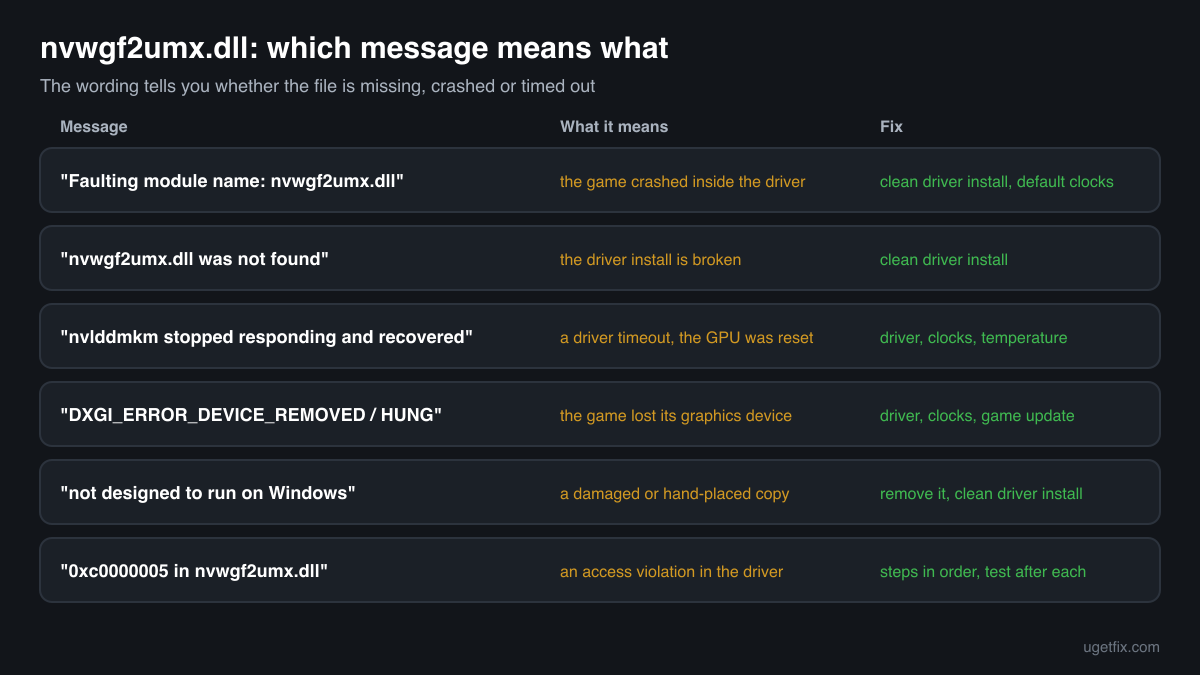
Faulting module name: nvwgf2umx.dll
The most common one, from the Application log in Event Viewer after a crash. The program crashed while the NVIDIA DirectX 11 driver was running its request. The driver is the place, not always the cause. Do the clean driver install, undo overclocks, close overlays and update the game.
The code execution cannot proceed because nvwgf2umx.dll was not found. Reinstalling the program may fix this problem.
The driver files are incomplete, usually after an interrupted driver install, a driver removed while a program was open, or a security program that quarantined the file. Reinstalling the game does not help. Install the NVIDIA driver again as a clean installation.
Display driver nvlddmkm stopped responding and has successfully recovered.
nvlddmkm is NVIDIA's kernel-mode driver. Windows reset the graphics card because it did not answer in time, and the game using nvwgf2umx.dll lost its device. The same fixes apply, and if it happens in every game, check temperature and power.
DXGI_ERROR_DEVICE_REMOVED / DXGI_ERROR_DEVICE_HUNG
Shown by the game or its engine, often with a D3D device lost message. The graphics device was reset under the game, usually after a driver timeout. Clean driver install, default clocks, then the game's update.
nvwgf2umx.dll is either not designed to run on Windows or it contains an error.
Windows found the file but it is damaged or not a valid 64-bit library. Typical after a disk error or a copy placed by hand. Remove any loose copy you added, then do a clean driver install so the driver's own folder gets an intact file.
Exception code 0xc0000005 in nvwgf2umx.dll
An access violation: the driver read or wrote memory it was not allowed to. Old drivers, overclocks, injectors that hook Direct3D, and bugs in the game all produce it. Work through the steps above in order and test after each one.
File facts
Microsoft's Windows Display Driver Model splits a graphics driver into a kernel-mode part and a user-mode part, and the graphics card maker supplies both. The Direct3D runtime in a program calls the user-mode driver, which prepares the commands for the card and hands them to the kernel-mode driver through the Windows graphics kernel. nvwgf2umx.dll is NVIDIA's user-mode driver for Direct3D 10 and 11 in 64-bit programs, and nvwgf2um.dll is the 32-bit one. Because it runs inside the game, a crash in it is reported under the game's name. What the catalogue copy of the file reports:
- Description in the file
- NVIDIA D3D10 Driver, Version 340.43
- Company in the file
- NVIDIA Corporation
NVIDIA driver packages that follow Microsoft's driver store model keep nvwgf2umx.dll in the driver's own folder under C:\Windows\System32\DriverStore\FileRepository, in a folder whose name starts with nv_, and Windows loads it from there. Older packages, such as the 340.43 release of the copy listed below, also placed it in C:\Windows\System32. A genuine copy describes itself as an NVIDIA D3D10 Driver with the driver release in the text, from NVIDIA Corporation (Properties, Details), is signed by NVIDIA and is large for a DLL: the catalogue copy is about 17.8 MB. The last five digits of its file version, 13.4043, read as 340.43, the driver release it belongs to.
Copies of nvwgf2umx.dll found on PCs
Public DLL catalogues hold 1 copy of nvwgf2umx.dll uploaded from a PC: version 9.18.13.4043, 64-bit, reporting NVIDIA Corporation and describing itself as the NVIDIA D3D10 Driver, Version 340.43. The table lists it with its checksums, so you can tell whether your file is that build.
Every NVIDIA driver release has its own nvwgf2umx.dll, so on most PCs the copy will not match this one, and that is expected. The right file for your PC is the one in the NVIDIA driver you install for your card; an old build like this one is not a replacement for a newer driver.
| Version | Build | Size | MD5 | SHA-1 |
|---|---|---|---|---|
9.18.13.4043 | 64-bit | 17.8 MB | 09b0b28d93734e04577aa370d887eff0 | 96d8136336efff2f5b5eaa77a02dece4a1353c1e |
Copies uploaded by users to a public DLL catalogue, read on 18 October 2026. We list their checksums so you can identify a file; we do not offer them for download and we did not verify them against NVIDIA's signature.
Questions people ask
Is nvwgf2umx.dll a virus?
No. NVIDIA's nvwgf2umx.dll is part of the graphics driver and loads into every 64-bit DirectX 10 or 11 program, which is why it appears in so many crash reports. A copy in the NVIDIA driver folder, signed by NVIDIA, is genuine. A copy anywhere else deserves a look: see the security page linked above.
Why do my games crash with nvwgf2umx.dll?
Because the crash happened while the NVIDIA driver was doing the game's drawing work. The cause can be the driver version, broken driver settings, an overclock, an overlay or injector, a bug in the game, or the hardware. A clean driver install removes the driver causes in one go; the other steps narrow down the rest.
Can I download nvwgf2umx.dll and put it in the game folder?
No. Direct3D does not load the graphics driver from a game folder, and the file must match the rest of the installed driver anyway. The right copy comes with the NVIDIA driver for your card, from NVIDIA's driver page or your PC maker.
Does verifying the game files fix nvwgf2umx.dll errors?
Not the file itself. Games do not ship nvwgf2umx.dll, so a verify neither checks nor replaces it. A verify helps when the game's own files are damaged and the crash only ends up in the driver, so it is a reasonable later step.
Should I install the newest NVIDIA driver or an older one?
Start with the newest driver for your card as a clean installation. If crashes began right after a driver update, a clean install of the release you had before is a fair test. Do not mix files of two releases.
What is the difference between nvwgf2um.dll and nvwgf2umx.dll?
nvwgf2um.dll is the 32-bit NVIDIA user-mode driver for Direct3D 10 and 11, used by 32-bit programs. nvwgf2umx.dll is the 64-bit one. The same driver package installs both, and each program loads the one that matches its own build.
I have an AMD or Intel graphics card. Why does something ask for nvwgf2umx.dll?
Usually because NVIDIA driver leftovers are still registered after you changed the card, or a laptop has both an NVIDIA chip and the processor's graphics. Remove the old NVIDIA driver through Settings, Apps, then install the driver for the card you have now.
Related guides
nvwgf2umx.dll crashes or is missing: what the file is and how to fix it
Sources
- NVIDIA: Driver Downloads
- Microsoft Learn: WDDM Architecture (user-mode and kernel-mode display drivers)
- Microsoft Learn: Timeout Detection and Recovery (TDR)
- Microsoft Learn: Driver Store
File data read on October 18, 2026.

The editors who write and check uGetFix guides and reference pages. File facts are read from Microsoft's own installers and documentation, and every page shows the date its data was read.
Questions and experiences
Ask about this page: members and our editors answer. Reading is open; writing needs a free account.
…