
openal32.dll is missing or fails to load: what the file is and how to fix it
OpenAL32.dll is the OpenAL audio library, a cross-platform 3D sound API that many games, older ones above all, use to play positional sound. On Windows it usually comes from the official OpenAL 1.1 Windows installer, oalinst.exe, which puts it into the Windows system folders. Some games ship that installer with them, and some keep a copy of the DLL in their own folder. When a game says the file is missing, the installer was skipped or the copy was removed, and the fix is to run the official installer again.

Prefer to fix it yourself? The manual steps follow.
How to fix openal32.dll errors
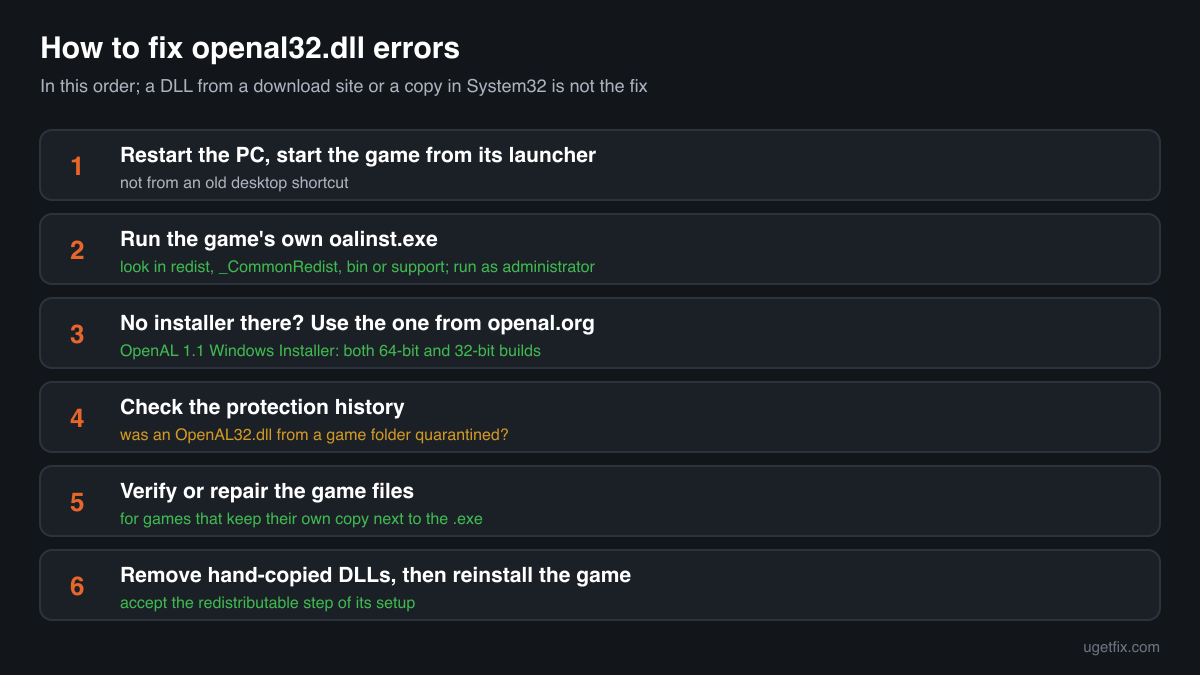
Run the OpenAL installer. Look in the game's folder first for a file named oalinst.exe, often in a redist, _CommonRedist, bin or support subfolder, and run it: that is the exact installer the game was made for. If the game has none, download the OpenAL 1.1 Windows Installer from the downloads page of openal.org, unpack the zip and run oalinst.exe. It installs OpenAL32.dll into the Windows folders, where any game can find it. Restart the game. If it still fails, verify or repair the game files in its launcher, because some games keep their own copy of the file next to the .exe.
An openal32.dll from a DLL download site is not the fix, and neither is a copy dropped into System32 by hand. The game's publisher support says the same: use the OpenAL installer instead of copying a random OpenAL32.dll into the Windows folder. A loose copy can be the wrong build, the wrong architecture or not OpenAL at all.
Where openal32.dll comes from
OpenAL is an audio API, not a program you start. Games call it to play sound, and the library that answers them can come from three places: the official installer that puts it into Windows, a copy of that installer bundled with a game, or a copy of the DLL that a game keeps for itself. These are the cases you will meet.
| Source | Made by | What to know |
|---|---|---|
| OpenAL 1.1 Windows Installer (oalinst.exe) | Creative Labs, published on openal.org | The official redistributable. It installs OpenAL32.dll into the Windows system folders, so every game on the PC can use it. Running it again repairs a missing or damaged copy. |
| Games that bundle oalinst.exe | The game's publisher, with Creative's installer | Many games carry the installer in their own folder and run it during setup. Neverwinter Nights keeps it in bin\win32, the Infinity Engine games from version 2.6 in the root of the install folder. If setup was skipped or interrupted, run that file yourself. |
| Games with their own OpenAL32.dll | The game's developer | Some games put the DLL next to their .exe instead of installing it. Windows loads that copy first. If it is missing or damaged, verify or repair the game in its launcher, or reinstall the game. |
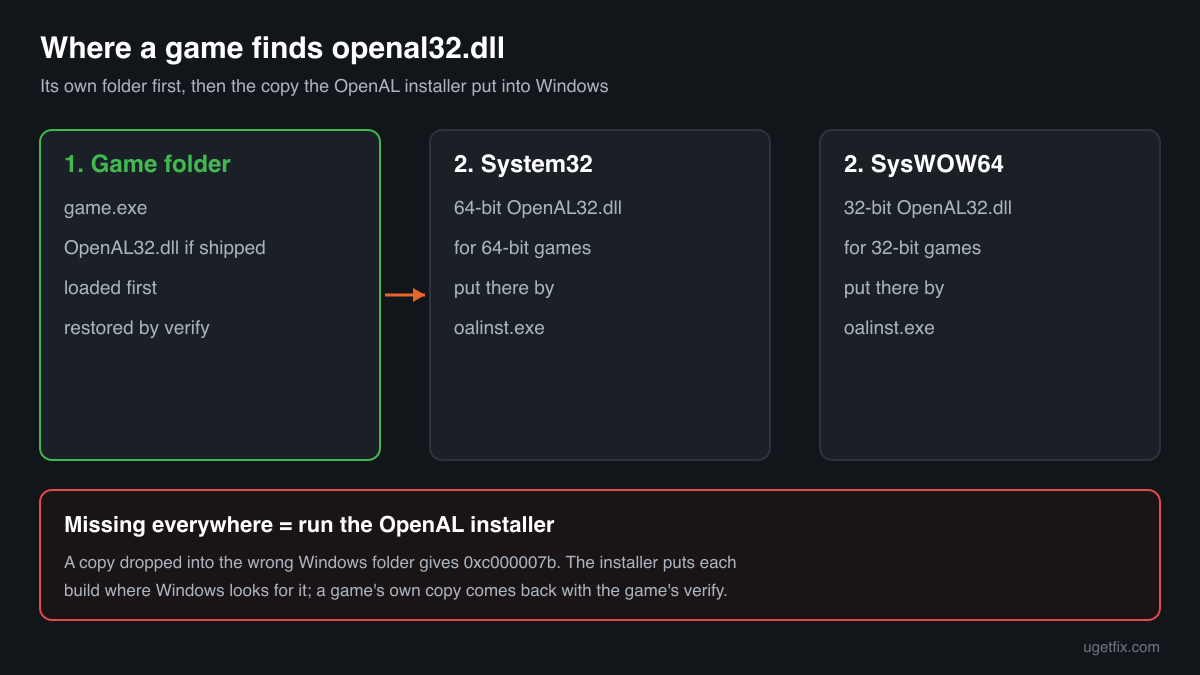
| 64-bit and 32-bit builds | Creative Labs | The installer puts the 64-bit OpenAL32.dll into System32 and the 32-bit one into SysWOW64 on 64-bit Windows. A game loads the build that matches its own .exe, so both folders can hold a copy with the same name. |
| Old games with an old OpenAL build | Creative Labs | Some older titles ship a pre-1.1 OpenAL32.dll that describes itself only as OpenAL32. The game was written for it, so keep it. Running the official installer as well does no harm: the system copy is only used when the game folder has none. |
| Other OpenAL implementations | Their own makers | OpenAL Soft is an open-source software implementation of the same API. A game that uses it can ship it under the name OpenAL32.dll, with another company or description in the file. It belongs to that game; verify the game to restore it. |
Step by step
- Restart the PC and start the game from its launcher. A pending Windows update or a half-finished game setup can leave a library unavailable until the next restart. Then start the game from Steam, GOG Galaxy, the EA app or wherever you installed it, not from an old desktop shortcut.
- Run the OpenAL installer that came with the game. Open the game's install folder and search it for oalinst.exe. It often sits in a redist, _CommonRedist, bin or support folder. Right-click it, choose Run as administrator and let it finish. It is the version of OpenAL the game was tested with.
- No installer in the game? Use the one from openal.org. Go to the downloads page of openal.org, download the OpenAL 1.1 Windows Installer zip, unpack it and run oalinst.exe as administrator. It installs both the 64-bit and the 32-bit library on 64-bit Windows. Restart the game afterwards.
- Look at your security software's protection history. In Windows Security open Virus and threat protection, Protection history; other security programs have a quarantine or history list of their own. If an OpenAL32.dll from a game folder is listed, you know why it is gone. Do not restore it yet: the next step brings back a clean copy from the game's store.
- Verify or repair the game files. If the game keeps its own copy next to the .exe, the system copy does not help when that one is broken. In Steam right-click the game, Properties, Installed Files, Verify integrity of game files. GOG Galaxy, the EA app, Epic and the Xbox app have a Verify or Repair option in the game's menu.
- Remove old copies you added by hand. If you once copied an OpenAL32.dll into the game folder or into System32 yourself, that copy may be the wrong build. Delete only the copy you placed there, then run the official installer again so Windows has the right one in the right folder.
- Reinstall the game. Uninstall it, delete the leftover install folder (move your own save files first if the game keeps them there) and install it again. Accept the redistributable step of the setup this time: on many older games that step is what installs OpenAL.
What not to do
Do not download openal32.dll from a DLL site.
You cannot tell which build it is, whether it is 32-bit or 64-bit, or whether it is OpenAL at all. The official installer is a small, free download from openal.org that installs the right builds for both architectures in one go.
Do not copy OpenAL32.dll into System32 by hand.
The game's publisher support warns against exactly this. On 64-bit Windows the 64-bit library belongs in System32 and the 32-bit one in SysWOW64, the reverse of what many people expect. A loose copy in the wrong one gives error 0xc000007b or the same missing-file message.
Do not rename another DLL to openal32.dll.
Renaming soft_oal.dll, wrap_oal.dll or any other file to OpenAL32.dll only works when the file was built for that purpose and the architecture matches. Done blindly, it gives an entry point error or a game without sound.
Do not reinstall the sound driver for a missing file.
The sound card driver does not install OpenAL32.dll and reinstalling it does not bring the file back. Update the driver only when the file is present and the game still has no sound or crashes in it.
Do not restore a quarantined copy from a repacked or cracked game.
Installers of such copies often bring files from unknown sources, and a detection there may be correct. Install OpenAL from openal.org instead and read the security page linked below about the copy that was removed.
Check the copy on your PC
Choose the openal32.dll from your game folder, System32 or SysWOW64. Its checksum is calculated in your browser and compared with 7 copies of the file collected from PCs, all reporting Creative Labs.
The file stays on your computer. Nothing is uploaded: the checksum is computed locally.
Found an openal32.dll in Downloads, Temp, AppData or a folder with no game in it, or one that came with a repacked game? Then the question is whether it is Creative's library at all, and that is a security question rather than a missing-file one. Is openal32.dll Creative's OpenAL or a planted copy? On 2-Spyware
The error messages and what each one means
The wording points to the cause: a library that was never installed, a copy of the wrong build or architecture, or a damaged file. These are the texts Windows and games show, with the file name filled in.
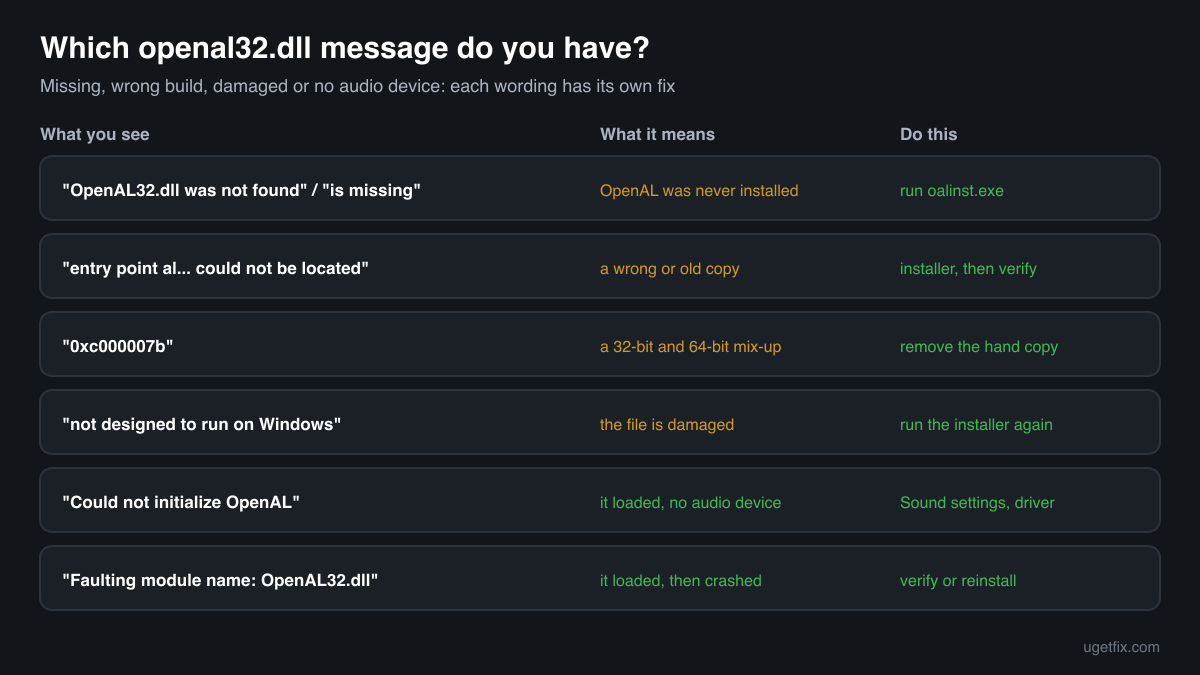
The code execution cannot proceed because OpenAL32.dll was not found. Reinstalling the program may fix this problem.
Windows 10 and Windows 11 wording. Neither the game folder nor the Windows folders have the library. Run oalinst.exe from the game's folder or from openal.org.
The program can't start because OpenAL32.dll is missing from your computer. Try reinstalling the program to fix this problem.
The same situation in the older Windows wording. The OpenAL step of the game's setup was skipped or failed. Run the OpenAL installer.
The procedure entry point al... could not be located in the dynamic link library OpenAL32.dll.
A copy was found but it lacks a function the game needs: an old build, another implementation under the same name, or a copy from a DLL site. Remove copies you added by hand, run the official installer and verify the game.
The application was unable to start correctly (0xc000007b).
Usually a 32-bit and 64-bit mix-up: a 32-bit OpenAL32.dll in System32 or a 64-bit one next to a 32-bit game. Remove the copy you placed there and run the installer, which puts each build where it belongs.
OpenAL32.dll is either not designed to run on Windows or it contains an error.
Windows found the file but it is damaged or not a valid library. Run the OpenAL installer again; if the copy is in the game folder, verify the game files.
Could not initialize OpenAL / Failed to create OpenAL context
Shown by the game, not Windows. The library loaded but found no usable audio device. Check that a playback device is enabled and set as default in Sound settings, plug in your headphones or speakers before starting the game, and update the sound driver.
Faulting module name: OpenAL32.dll
A line from the Application log in Event Viewer after a crash. Look at the Faulting module path of the same event: a copy in the game folder points to the game's own build, a copy in System32 or SysWOW64 to the installed one. Verify the game or run the installer again.
File facts
OpenAL32.dll is the library of OpenAL, the Open Audio Library, a cross-platform API for positional 3D sound used by games and other audio programs. The game describes where sounds and the listener are, and the library mixes and plays them on the PC's audio device. On Windows the common build is the one from the OpenAL 1.1 installer, which passes the game's calls on to the audio device it finds. What the catalogue copies of the file report:
- Description in the file
- Standard OpenAL(TM) Implementation
- Company in the file
- Creative Labs (OpenAL 1.1 Windows installer)
The official installer places OpenAL32.dll in C:\Windows\System32 (64-bit build) and C:\Windows\SysWOW64 (32-bit build) on 64-bit Windows, and the games that rely on it find it there. A game that ships its own copy keeps it next to its .exe, and Windows loads that one first. The Creative build describes itself as Standard OpenAL(TM) Implementation with Portions (C) Creative Labs Inc. and NVIDIA Corp. as the company (Properties, Details), and is about 100 KB to 125 KB across the copies listed below. An older build from Creative Labs describes itself only as OpenAL32. A copy with another description can be a different OpenAL implementation that belongs to one game.
Copies of openal32.dll found on PCs
Public DLL catalogues have collected 7 copies of openal32.dll uploaded from PCs, from version 0.9.5.1 to 6.14.357.25, in 32-bit and 64-bit builds. All of them report Creative Labs, alone or together with NVIDIA, as the company. The table lists them with their checksums, so you can tell whether your file is one of them.
The newest copy here, 6.14.357.25, is what the official installer provides, but a game folder may hold an older build on purpose. If your copy matches an entry, it is most likely a genuine Creative build; if it sits in the Windows folders and still fails, run the official installer again.
| Version | Build | Size | MD5 | SHA-1 |
|---|---|---|---|---|
6.14.357.25 | 64-bit | 123 KB | cba0e6c59d7defe8b6d423b778b5af6a | 68de6cee9974563b1586f3e9aea1a16108a1e8ab |
6.14.357.25 | 32-bit | 102 KB | 663a319d105e14548dba4c72201876b1 | 06e4ccca0f84b1f6a8f57e9aa2748fcf2a0c991e |
6.14.357.24 | 64-bit | 123 KB | 2ad7b4f3c8d2bb686d231edff404b7a4 | f29676b96d04bd2765925a3834d9babfdce6a0b3 |
6.14.357.24 | 32-bit | 102 KB | 235355a8dd26903e75d5e812ecf50e53 | 8316319341a0f9054e19e4a7b21df3dc49386fee |
6.14.357.24 | 32-bit | 102 KB | 628321a50ed9558513f8a5e37a5e1fba | 4b62b9ef4e681baa00964440d023c20b5442f5b5 |
6.14.357.22 | 32-bit | 113 KB | ce0cdc5459eaa1d574af781ddb8f2685 | 709f3ea879ee83ca8b61dba5a2e497919bb8a4da |
0.9.5.1 | 32-bit | 102 KB | 83de3a7d02a860083619837fd7305cc8 | af7dc057b7a4c6fbe536637640381161842e3261 |
Copies uploaded by users to a public DLL catalogue, read on 17 October 2026. We list their checksums so you can identify a file; we do not offer them for download and we did not verify each one against a signature.
Questions people ask
Is openal32.dll a virus?
No. The genuine OpenAL32.dll is Creative's audio library, installed by the official OpenAL installer or shipped by a game. Any name can be copied, though, so a file of that name in a folder no game uses deserves a check. Read the security page linked above for a copy of unknown origin.
Where do I download openal32.dll safely?
From openal.org, as the OpenAL 1.1 Windows Installer, not as a loose DLL. The installer puts the 64-bit and 32-bit builds into the right Windows folders in one step. If your game has oalinst.exe in its own folder, that copy is just as good and matches what the game was tested with.
Do I need OpenAL on Windows 10 or Windows 11?
Only if a game or program asks for it. Windows does not include OpenAL and does not need it for its own sound. Games that use it either install it during setup, ship their own copy, or show the missing-file error until you run the installer.
Why does the error come back after I copied the file?
A copied file is often the wrong architecture for the folder, or a different build than the game expects, so Windows skips it or the game rejects it. Delete the copy you placed and run the official installer, which puts each build where Windows looks for it.
Is it safe to install OpenAL from openal.org?
Yes. openal.org is the project's own site and the installer there is the one that game publishers point their players to. It adds the audio library to Windows and starts nothing on its own; the library only runs when a game loads it. You can remove it later under Settings, Apps if no game needs it.
The game starts but there is no sound. Is openal32.dll the cause?
If there is no error about the file, it loaded. No sound then usually means the game could not open your audio device: check the default playback device in Sound settings, connect headphones before starting the game, update the sound driver and, if the game keeps its own copy, verify its files.
Can I delete openal32.dll?
You can uninstall OpenAL under Settings, Apps, but every game that relies on it will stop with the missing-file error. Copies in game folders belong to those games. There is nothing to gain by deleting a genuine copy; remove only a copy you put somewhere yourself.
Related guides
openal32.dll is missing or fails to load: what the file is and how to fix it
Sources
- OpenAL: Downloads (OpenAL 1.1 Windows Installer)
- Aspyr Support: OpenAL and Windows
- OpenAL Soft on GitHub
File data read on October 17, 2026.

The editors who write and check uGetFix guides and reference pages. File facts are read from Microsoft's own installers and documentation, and every page shows the date its data was read.
Questions and experiences
Ask about this page: members and our editors answer. Reading is open; writing needs a free account.
…