
opengl32.dll is missing or OpenGL fails: what the file is and how to fix it
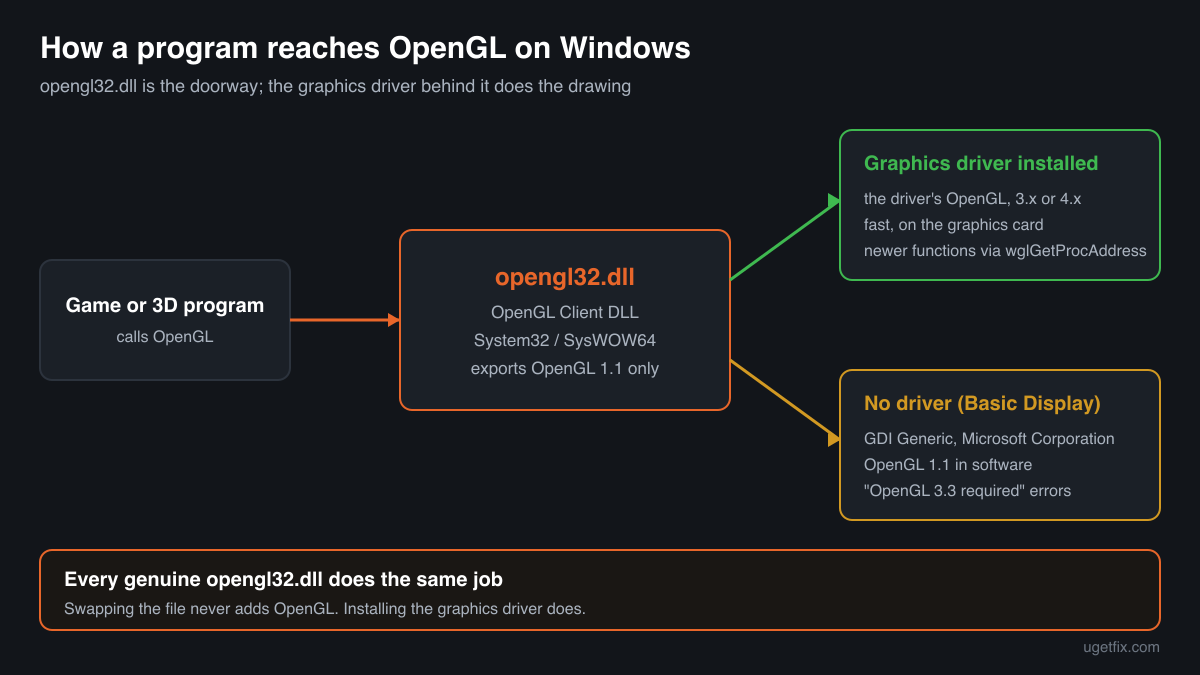
opengl32.dll is the OpenGL Client DLL, the Windows library every OpenGL program loads first. It is part of Windows itself, so there is nothing to install. On its own it offers only the old OpenGL 1.1 in software; the real OpenGL of your graphics card comes from the graphics driver, which opengl32.dll loads. That is why most opengl32.dll and OpenGL errors are fixed with the right graphics driver, not with a file.

Prefer to fix it yourself? The manual steps follow.
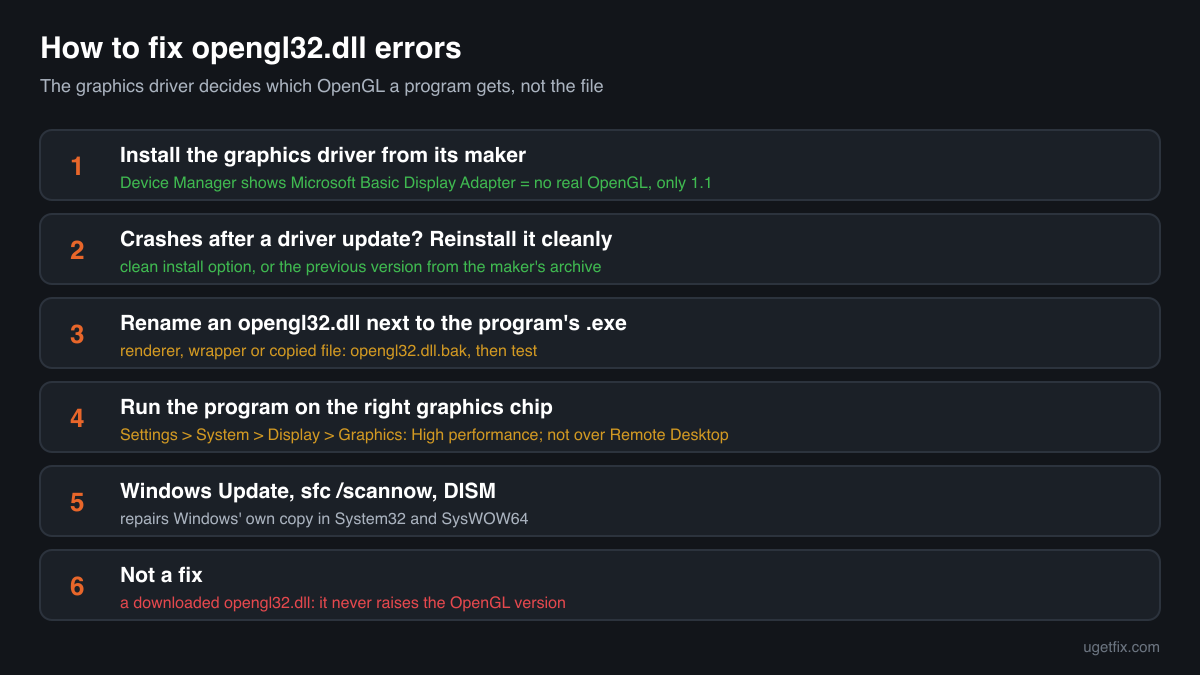
How to fix opengl32.dll errors
First install the graphics driver from the maker of your graphics chip, the card itself or, on a laptop, the laptop maker. If Device Manager lists Microsoft Basic Display Adapter under Display adapters, there is no real driver, and every OpenGL program gets only the software renderer Microsoft calls GDI Generic, which stops at OpenGL 1.1. Next, look in the folder of the program that fails, next to its .exe: an opengl32.dll there is not Windows' copy, so rename it to opengl32.dll.bak and test. If neither applies, repair Windows: install the pending updates, then run sfc /scannow and DISM.
A downloaded opengl32.dll never adds OpenGL support. Windows already has the file in System32 and SysWOW64, and every version of it hands the real work to your graphics driver. A copy from another PC or a download site cannot replace a missing driver.
Step by step
- Check which display driver Windows uses. Right-click Start, open Device Manager and expand Display adapters. You should see the name of your graphics chip from its maker. If you see Microsoft Basic Display Adapter, or a device with a yellow warning sign, no working graphics driver is installed. Windows then falls back to its own software OpenGL, which is enough for very old programs and nothing else.
- Install the graphics driver from its maker. Download the current driver for your exact graphics chip from the chip maker's site, or from the laptop maker's support page if the laptop uses its own driver package. Install it and restart. The driver adds the OpenGL implementation that opengl32.dll loads for every program, with the OpenGL version your hardware supports. This one step fixes most "OpenGL 2.0 required", "OpenGL 3.3 required" and "driver does not support OpenGL" messages.
- Started after a driver update? Reinstall it cleanly. If OpenGL programs began to fail or crash right after a graphics driver update, reinstall the driver: use the clean installation option of the maker's installer if it has one, or uninstall the display device in Device Manager, restart and install the driver again. If the new driver is the problem, install the previous version from the maker's archive and wait for the next release.
- Look in the program folder. Right-click the program's shortcut and choose Open file location. An opengl32.dll next to the .exe is not Windows' copy. It can be a software OpenGL renderer that someone added to run the program without a working graphics card, a graphics injector or wrapper for an old game, or a file copied there by a DLL fix guide. Windows loads that copy instead of its own. Rename it to opengl32.dll.bak, start the program, and keep the rename if it now works.
- Check that the program runs on the graphics card. On a PC with two graphics chips, a program can start on the weaker one. Open Settings, System, Display, Graphics, choose the program and set it to High performance, or set the same in the driver's own control panel. Over Remote Desktop or inside a virtual machine without 3D acceleration there may be no hardware OpenGL at all: start the program on the PC itself.
- Install Windows updates and restart. Open Settings, Windows Update, install everything that is offered and restart, even if Windows does not ask. Updates replace system files, opengl32.dll included, with the current build for your Windows release. Windows Update can also offer a driver for the graphics chip, though the maker's own driver is often newer.
- Run System File Checker. Type cmd in the Start menu, right-click Command Prompt and choose Run as administrator. Run sfc /scannow and wait until it reaches 100%. It compares protected Windows files with the stored originals and repairs a damaged or replaced opengl32.dll in System32 or SysWOW64. Restart afterwards.
- If System File Checker cannot repair everything, run DISM. In the same administrator window run DISM /Online /Cleanup-Image /RestoreHealth. It repairs the store that System File Checker copies its originals from, using Windows Update. When it finishes, run sfc /scannow once more, then restart.
- Still failing: repair Windows in place. On Windows 11, Settings, System, Recovery offers Fix problems using Windows Update, which reinstalls the current version of Windows and keeps your files, apps and settings. On Windows 10 the same result comes from running Microsoft's installation media and choosing to keep personal files and apps.
Download the genuine opengl32.dll for your Windows version
Each file below is Microsoft's own opengl32.dll for one Windows release, fetched from Microsoft's own server and checked against Winbindex, the index of the files in Windows images and updates. Pick your Windows version (Settings, System, About shows it) and the build: 64-bit for System32, 32-bit for SysWOW64. The repair steps above are still the better fix: the file does not contain your graphics card's OpenGL, and Windows protects these folders and keeps its copy updated. Use a file here to compare it with a copy you have, or when System File Checker and DISM cannot repair the file.
Older Windows releases
A free uGetFix account is needed to download. Sign in, or create one in a minute, and you come straight back here.
What not to do
Do not expect a downloaded opengl32.dll to raise the OpenGL version.
The OpenGL version a program sees comes from the graphics driver. Every genuine opengl32.dll offers the same OpenGL 1.1 on its own, so a file from a download site, another PC or a newer Windows changes nothing for a program that needs OpenGL 2.0, 3.3 or 4.x.
Do not download opengl32.dll from a DLL collection site.
You cannot tell which Windows release, build or architecture the file comes from, or whether it was changed. A copy that matches nothing Microsoft has published is how tampered files get onto a PC. Use the genuine files above, and the checker below for a file you already have.
Do not copy a file into System32 or SysWOW64 by hand.
These copies are protected Windows files owned by the system, and every OpenGL program on the PC goes through them. A hand-placed file of the wrong build or architecture can break all of them at once, and the next update or System File Checker run may replace it anyway. Repair with sfc /scannow instead.
Do not put a Windows copy into the program folder.
A Windows opengl32.dll next to the .exe adds nothing, because Windows already loads the one in System32 or SysWOW64. It stays behind, out of date, when Windows updates its own, and a 32-bit or 64-bit mismatch there causes error 0xc000007b.
Do not rely on a software renderer as a fix.
A software OpenGL renderer copied into a program folder as opengl32.dll can make a program start on a PC without a working graphics driver, but it draws everything on the processor and is far slower. Use it only when there is truly no graphics driver, such as in some virtual machines, and get it from its own project, not from a DLL site.
Check the copy on your PC
Choose the opengl32.dll you are unsure about, for example the one in a program folder. Its checksum is calculated in your browser and compared with 189 Microsoft builds of the file from Windows releases and updates.
The file stays on your computer. Nothing is uploaded: the checksum is computed locally.
Found an opengl32.dll you did not expect, in a folder you did not change, in Downloads, Temp or AppData? Programs load a file with this name from their own folder, so the name is also useful to injectors and to malware. That is a security question, not a missing-file one. Is opengl32.dll outside System32 safe? On 2-Spyware
The error messages and what each one means
The wording tells you which problem you have. The first four are the texts Windows shows, with the file name filled in; the others are the kind of message programs and the Windows event log show when OpenGL itself is the problem.
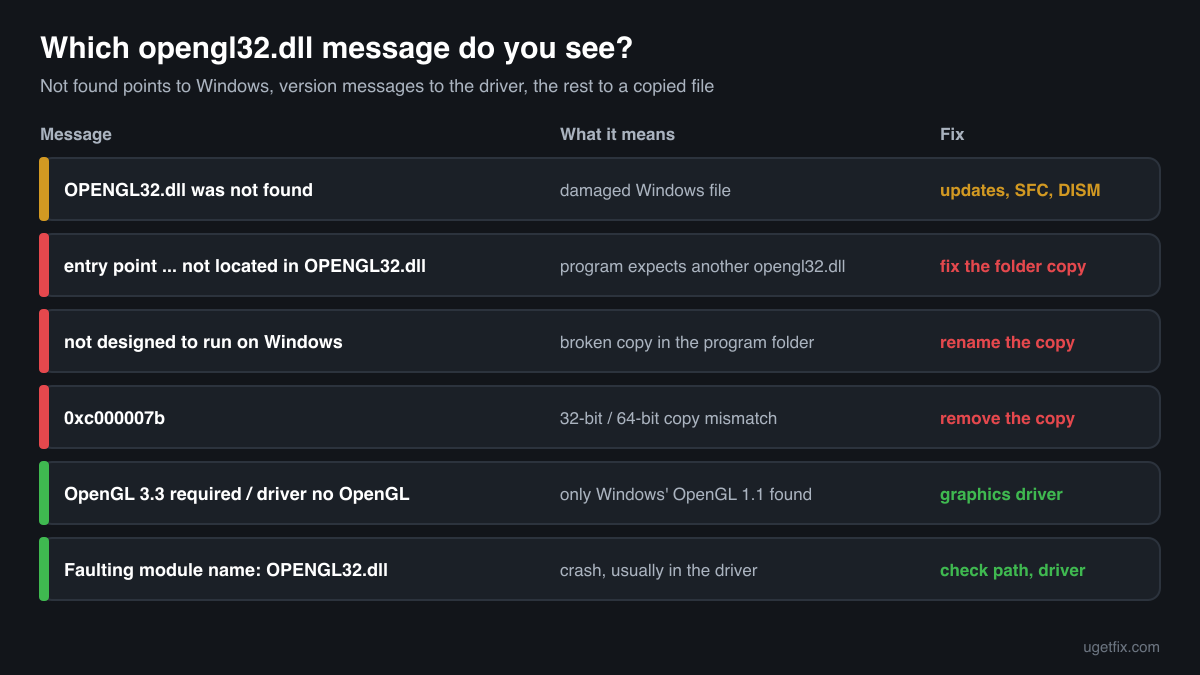
The code execution cannot proceed because OPENGL32.dll was not found. Reinstalling the program may fix this problem.
The wording of Windows 10 and Windows 11. Windows always includes opengl32.dll, so this points to a damaged or missing system file. Install updates, then run sfc /scannow and DISM.
The procedure entry point glBindFramebuffer could not be located in the dynamic link library OPENGL32.dll.
Windows names a function in this message. Windows' opengl32.dll exports only the OpenGL 1.1 functions; newer ones come from the graphics driver, and programs have to ask the driver for them. A program that expects such a function in opengl32.dll itself was built against a different opengl32.dll, usually a software renderer that belongs in its folder. Restore or update that copy, or get a build of the program made for Windows.
OPENGL32.dll is either not designed to run on Windows or it contains an error. Try installing the program again using the original installation media or contact your system administrator or the software vendor for support.
An opengl32.dll was found but could not be loaded. Almost always this is a copy in the program folder: a damaged download, a file of the wrong build, or a file blocked by security software. Rename the program folder copy and test again.
The application was unable to start correctly (0xc000007b). Click OK to close the application.
This one does not name a file, but after a DLL was copied by hand it often means a 32-bit opengl32.dll next to a 64-bit program, or the other way round. Remove the copy from the program folder.
OpenGL 3.3 or higher is required, or: WGL: The driver does not appear to support OpenGL.
Programs word this in their own way. It means the program found only Windows' own OpenGL 1.1, because no graphics driver with OpenGL support is active for it. Install the graphics driver from its maker, check that the program runs on the right graphics chip, and do not run it over Remote Desktop.
Faulting module name: OPENGL32.dll
A line from the Application log in Event Viewer after a crash. Look at the Faulting module path line of the same event. If the path is the program folder, the crash happened inside a copy that is not Windows': remove or update it. If it is System32 or SysWOW64, the crash usually started in the graphics driver that opengl32.dll called: reinstall or change the graphics driver, update the program, then run sfc /scannow.
File facts
opengl32.dll is the OpenGL Client DLL. OpenGL is a graphics interface for 2D and 3D drawing, used by many games, 3D and CAD software, emulators and creative tools. Microsoft documents its own implementation of OpenGL on Windows as version 1.1. Every program that uses OpenGL loads opengl32.dll, which then loads the OpenGL driver of the graphics card and passes the work to it; functions beyond 1.1 come straight from that driver. Without such a driver, opengl32.dll draws with its own slow software renderer, which programs report as GDI Generic from Microsoft Corporation. What Windows reports for the genuine file:
- Description in the file
- OpenGL Client DLL
- Where the genuine opengl32.dll belongs
C:\Windows\SysWOW64C:\Windows\System32
On 64-bit Windows, System32 holds the 64-bit file and SysWOW64 the 32-bit one; the folder names are historical. When a program starts, Windows looks for opengl32.dll in the program's own folder first, so a file with this name next to the .exe is loaded instead of the Windows copy. That is how software renderers and graphics wrappers work, and how a wrong copy breaks a program. The genuine file describes itself as OpenGL Client DLL (Properties, Details, File description) and is about one megabyte: in Windows 11 24H2 and 25H2 the 64-bit file is 983,040 bytes, in Windows 10 22H2 it is 1,076,224 bytes.
opengl32.dll versions by Windows release
Every Windows release has its own build of opengl32.dll, updated together with Windows. Winbindex lists 171 distinct Microsoft builds; the table shows the newest one indexed for each release and the update that delivered it. The OpenGL version your programs get does not depend on this build: it comes from the graphics driver.
| Windows release | File version | Delivered by | Size, 64-bit |
|---|---|---|---|
| Windows 11 26H1 | 10.0.28000.2336 | KB5101649, July 14, 2026 | 995,328 bytes |
| Windows 11 25H2 | 10.0.26100.9278 | KB5127648, October 13, 2026 | 983,040 bytes |
| Windows 11 24H2 | 10.0.26100.9278 | KB5127648, October 13, 2026 | 983,040 bytes |
| Windows 11 23H2 | 10.0.22621.5415 | KB5126653, October 13, 2026 | 933,888 bytes |
| Windows 11 22H2 | 10.0.22621.5415 | KB5126653, October 13, 2026 | 933,888 bytes |
| Windows 11 21H2 | 10.0.22000.2600 | KB5044280, October 8, 2024 | 937,984 bytes |
| Windows 10 22H2 | 10.0.19041.7725 | KB5129236, September 14, 2026 | 1,076,224 bytes |
| Windows 10 21H2 | 10.0.19041.7725 | KB5129236, September 14, 2026 | 1,076,224 bytes |
| Windows 10 21H1 | 10.0.19041.7725 | KB5129236, September 14, 2026 | 1,076,224 bytes |
| Windows 10 20H2 | 10.0.19041.7725 | KB5129236, September 14, 2026 | 1,076,224 bytes |
| Windows 10 2004 | 10.0.19041.7725 | KB5129236, September 14, 2026 | 1,076,224 bytes |
| Windows 10 1909 | 10.0.18362.1500 | KB5013945, May 10, 2022 | 1,263,616 bytes |
Older copies of opengl32.dll found on PCs
Public DLL catalogues have collected 18 copies of opengl32.dll uploaded from PCs, from version 5.1.2600.2180 to 10.0.17134.1. Many come from older Windows releases, back to Windows XP. The table lists each with its checksums, so you can tell which one you have.
None of these replaces the file your Windows ships, and none adds OpenGL support: the newest build indexed for Windows is 10.0.28000.2336, and each release keeps its own. If the check on this page finds your file in this list, it is most likely an older Microsoft build that was copied somewhere by hand. Confirm the Microsoft signature, remove the copy from the program folder, and let Windows use its own.
| Version | Build | Size | MD5 | SHA-1 |
|---|---|---|---|---|
10.0.17134.1 | 64-bit | 1014 KB | b8db21516b088afd9b0242741f435c71 | 1234ccb52557e2557dff59dccf49df670c793792 |
10.0.15063.0 | 64-bit | 1.0 MB | 5bb1fddad4ad903648d675895ce6b07b | 9cd0bcaa0aa6251f7cca507f79ecb92c740409b8 |
10.0.15063.0 | 32-bit | 758 KB | 5c46ce9d94a32b9b4ce0504e26063a96 | 7e2f6f11dfbe3715e17a386b3c28ebd73f7982b6 |
10.0.14393.0 | 64-bit | 1.0 MB | 9b58700477a62104e21266c23e67cc93 | ac12bc98316d056f6255ebb24f127461f64c2f80 |
10.0.14393.0 | 32-bit | 768 KB | 22331fd3ddd5ad8a9bf8ef609cf613ff | 35c4aa2c534c22232dbf633c0dede42f0bd8a53a |
10.0.10586.0 | 64-bit | 1.0 MB | 9b457c3aa23a0a6cbc8f7a42bf630a0f | a0d43a58ef97771f4ab9349d2e0929a678a0ad79 |
10.0.10586.0 | 32-bit | 768 KB | c826ad6e4c1052067ce557a11c5274b7 | f6e966331d774c3aee0fe7ab1964e5b6dcecc641 |
6.3.9600.17415 | 64-bit | 1.0 MB | 60158210f0b8a50631029374e3c05c19 | 5a86079d961bb4ba98127f91b8a505909284fa51 |
6.3.9600.17415 | 32-bit | 758 KB | 531f1651931a9aafa3211c30f2a4cd1c | 44fe8e7cb4470a4af26e64b83d05e79e4bc3782e |
6.3.9600.16384 | 64-bit | 1.0 MB | 7b7b7dc98921d6ea5dbf132a72c4e395 | 1a2ea561d23fcecb2c1951f49d1449b490790e3c |
6.3.9600.16384 | 32-bit | 717 KB | e5652cb0953b19f9bc2f93a74a60a3f9 | fa6f6dc207311b54efa5acb9567aa90f3e0890b3 |
6.2.9200.16384 | 32-bit | 788 KB | 5fc50e7bcb0d02a1174fd7e731a4b173 | 55863623cb3c010fff1fd4c07e1606652dbed580 |
6.1.7600.16385 | 32-bit | 768 KB | d1bbe227367ed791d5fcf08e132d2956 | f5f19d8f38b0a03cf47db41a71860249f465eabc |
6.0.6001.18000 | 64-bit | 1.1 MB | c7ee8f330c09be0f9ce4b4c3051b434e | b79b41f3be0a4eb8faaf2be27c688b9047e3f7bc |
6.0.6000.16386 | 32-bit | 686 KB | b55e77bb01e85d2ca2c4b8424e1df345 | 2c854f0c7e770f38ba2c6d7761cf73eba7157737 |
5.1.2600.5512 | 32-bit | 696 KB | 301c2364245db92f8ecfaf473c9a0bd8 | 418e69f850f2831e081b21b014e39ef9f031a686 |
5.1.2600.2180 | 32-bit | 696 KB | 896e0b586f52c459349fdfc0d7eae367 | 039c32ba5f78af44f1a84966417b95492d7877bd |
5.1.2600.2180 | 32-bit | 696 KB | f78a67e88f98d4cc871e6f3068343f00 | e621aa16a4dadb5de6ed1580db108d601a4cf942 |
Copies uploaded by users to a public DLL catalogue, read on 17 October 2026. We list their checksums so you can identify a file; we do not offer them for download and we did not verify each one against Microsoft's signature.
Questions people ask
Is opengl32.dll a virus?
The copies in System32 and SysWOW64 are genuine Windows files and are harmless. An opengl32.dll anywhere else is not Windows' copy: most often a software renderer or a graphics wrapper that someone put next to a program. Check the file with the tool on this page and read the security page linked above.
How do I update OpenGL on Windows?
By updating the graphics driver. OpenGL is not installed or updated on its own: the driver of your graphics chip brings the OpenGL implementation, and opengl32.dll loads it. Install the current driver from the chip maker or laptop maker, and the newest OpenGL version your hardware supports comes with it.
Why does a program say my OpenGL version is 1.1?
Because it found no OpenGL driver and fell back to Windows' own software renderer, GDI Generic, which offers OpenGL 1.1. The usual causes are a missing graphics driver (Microsoft Basic Display Adapter in Device Manager), a program running on the wrong graphics chip, Remote Desktop, or a virtual machine without 3D acceleration.
Can I delete opengl32.dll?
Not the copies in System32 or SysWOW64: every OpenGL program needs them, and Windows treats them as protected system files. An opengl32.dll in a program folder can be removed or renamed safely as far as Windows is concerned; the program then uses Windows' copy and your graphics driver.
Will System File Checker fix OpenGL errors?
Only when Windows' own opengl32.dll is damaged, which is rare. System File Checker does not install graphics drivers and does not look inside program folders, so it cannot fix an OpenGL version message or remove a copied file next to a program.
Should I use the 32-bit or the 64-bit file?
Windows needs both and already has both: the 64-bit file in System32 for 64-bit programs and the 32-bit file in SysWOW64 for 32-bit ones. A program uses the one that matches it. Copying either into a program folder causes error 0xc000007b when the build does not match the program.
Why do OpenGL games crash after a graphics driver update?
The crash usually happens inside the new driver, even when Event Viewer names OPENGL32.dll as the faulting module, because the program reaches the driver through that file. Reinstall the driver cleanly, try the previous version from the maker's archive, and update the game.
Related guides
opengl32.dll is missing or OpenGL fails: what the file is and how to fix it
Sources
- Winbindex, the Windows binaries index (m417z)
- Microsoft Learn: Use the System File Checker tool to repair missing or corrupted system files
File data read on October 17, 2026.

The editors who write and check uGetFix guides and reference pages. File facts are read from Microsoft's own installers and documentation, and every page shows the date its data was read.
Questions and experiences
Ask about this page: members and our editors answer. Reading is open; writing needs a free account.
…