
vulkan-1.dll is missing or a game crashes in it: what the file is and how to fix it
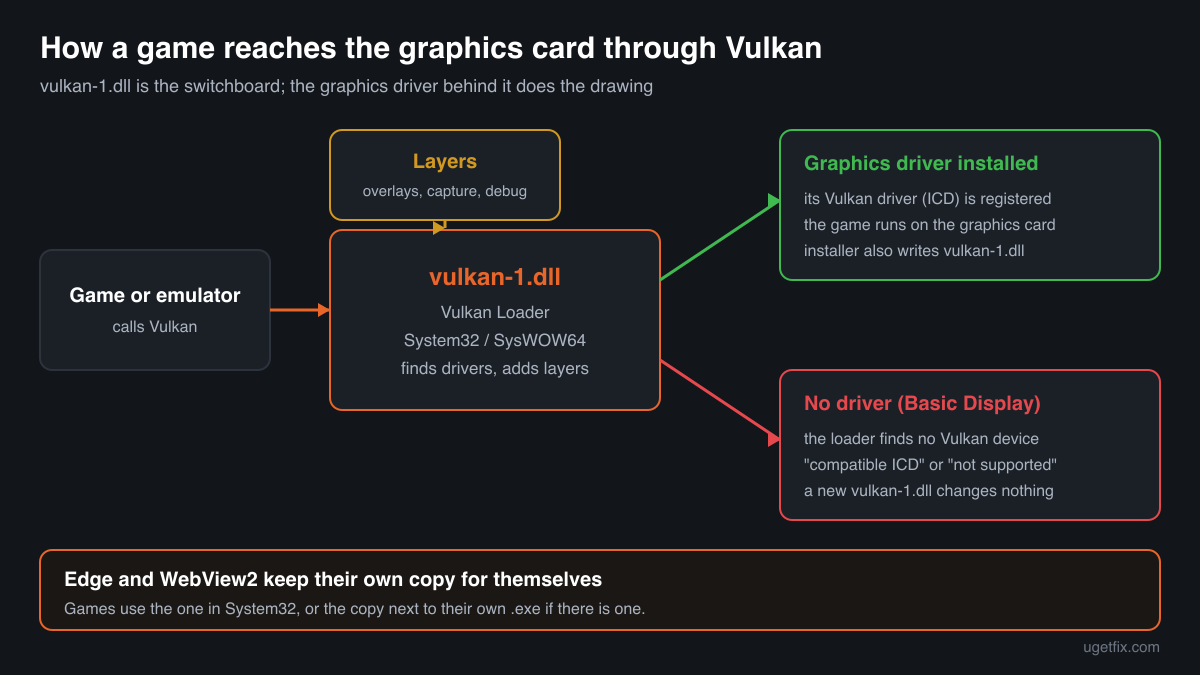
vulkan-1.dll is the Vulkan loader, the small library every Vulkan game, emulator or 3D program loads first. It finds your graphics driver and hands every Vulkan call to it. The graphics driver from NVIDIA, AMD or Intel installs it into Windows, and Windows 11 24H2 and later also include a Microsoft build. So when a program says it is missing, or crashes in it, the fix is almost always the graphics driver, not a downloaded file.

Prefer to fix it yourself? The manual steps follow.
How to fix vulkan-1.dll errors
Install the current graphics driver for your graphics chip from its maker: NVIDIA, AMD or Intel, or the laptop maker's support page for a laptop. The driver installs the Vulkan loader, vulkan-1.dll, into System32 and SysWOW64, together with the Vulkan driver it talks to. If Device Manager shows Microsoft Basic Display Adapter under Display adapters, no real driver is installed and no program can use Vulkan. If the driver is fine, look next to the program's .exe: an old vulkan-1.dll there wins over the one in System32, so rename it to vulkan-1.dll.bak and test. Only then repair Windows with Windows Update, sfc /scannow and DISM.
A downloaded vulkan-1.dll does not give a PC Vulkan support. The loader only connects programs to a Vulkan driver; without a graphics driver that supports Vulkan, every copy of the file fails the same way. The genuine files below are for comparing and for repairing Windows' own copy, not a replacement for the driver.
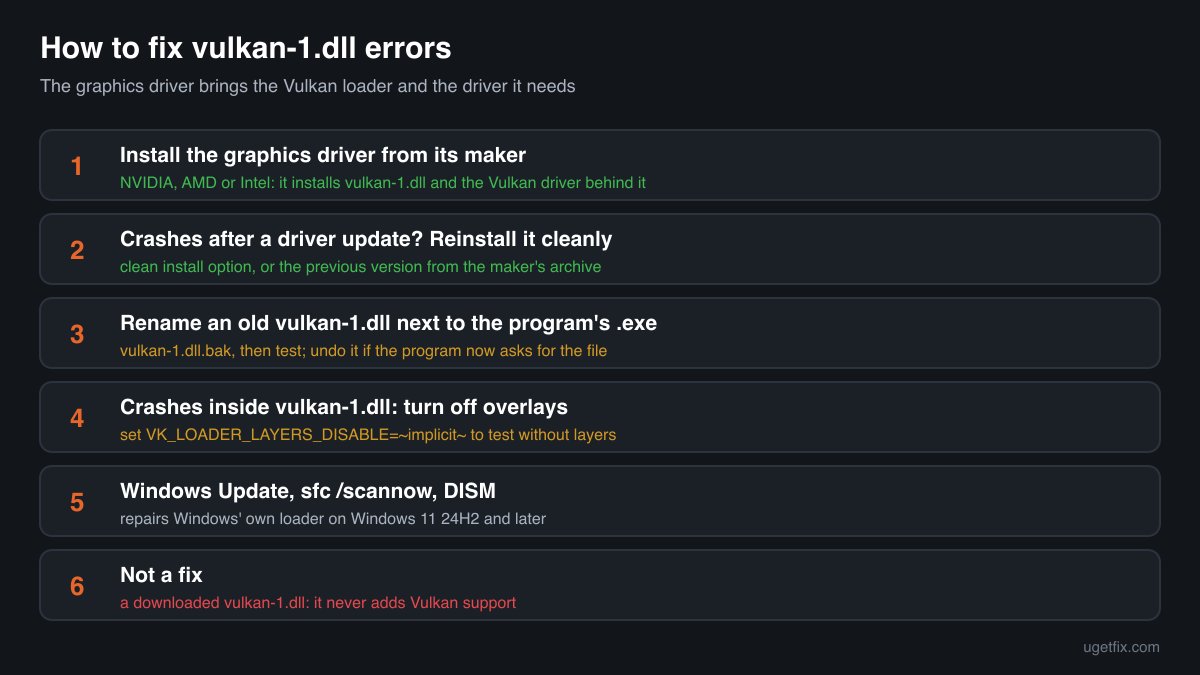
Step by step
- Check which display driver Windows uses. Right-click Start, open Device Manager and expand Display adapters. You should see your graphics chip by name, for example an NVIDIA GeForce, AMD Radeon or Intel graphics model. Microsoft Basic Display Adapter, or a device with a yellow warning sign, means no working graphics driver is installed. Windows can show a desktop without one, but Vulkan needs the maker's driver.
- Install the graphics driver from its maker. Download the current driver for your exact graphics chip from NVIDIA, AMD or Intel, or from the laptop maker's support page if your laptop uses its own driver package. Install it and restart. The installer puts vulkan-1.dll into C:\Windows\System32 (64-bit) and C:\Windows\SysWOW64 (32-bit) and registers its Vulkan driver, which is what the loader looks for. This one step fixes most "vulkan-1.dll was not found" and "Vulkan is not supported" messages.
- Laptop with two graphics chips: install both drivers. Many laptops have an Intel or AMD chip in the processor and a separate NVIDIA or AMD chip. Install the drivers for both, then open Settings, System, Display, Graphics, choose the game and set it to High performance, so it runs on the faster chip. A missing driver for either chip can make the loader report no Vulkan device.
- Started after a driver update? Reinstall it cleanly. If Vulkan games began to crash right after a graphics driver update, reinstall the driver: use the clean installation or factory reset option of the maker's installer if it offers one, or uninstall the display device in Device Manager, restart and install the driver again. If the new version is the problem, install the previous version from the maker's archive and wait for the next release.
- Look in the program folder. Right-click the program's shortcut and choose Open file location, or in a game launcher use the option to browse local files. A vulkan-1.dll next to the .exe is a private copy. Some games and emulators ship one, and DLL fix guides tell people to copy one there. Windows loads that copy before the one in System32, and an old one lacks the functions newer games need. Rename it to vulkan-1.dll.bak and test. If the program then complains that the file is missing, the program needs its own copy and the cause is elsewhere: undo the rename.
- Crashes in vulkan-1.dll: turn off overlays. The loader also loads layers, add-ons that hook into every Vulkan program. Overlays of game launchers, chat apps, screen recorders, frame rate counters and tuning tools register themselves this way. A broken or outdated layer crashes the game inside vulkan-1.dll. Turn off the overlays you use, one at a time, or test once with all of them off: open Command Prompt, run set VK_LOADER_LAYERS_DISABLE=~implicit~ and start the game's .exe from that same window.
- Install Windows updates, then run System File Checker. Open Settings, Windows Update, install everything offered and restart. On Windows 11 24H2 and later, Windows has its own build of the loader, and updates replace it. Then type cmd in the Start menu, right-click Command Prompt, choose Run as administrator and run sfc /scannow. If it reports files it could not repair, run DISM /Online /Cleanup-Image /RestoreHealth in the same window, then sfc /scannow again, and restart.
- Still failing: read the crash event. Open Event Viewer, Windows Logs, Application, and find the Application Error event of the crash. The Faulting module path tells you which vulkan-1.dll crashed, and the lines around it often name the driver file or the overlay DLL that was really at fault. Update or remove that program.
Download the genuine vulkan-1.dll for your Windows version
Each file below is Microsoft's own vulkan-1.dll for one Windows 11 release, fetched from Microsoft's own server and checked against Winbindex, the index of the files in Windows images and updates. The builds with a version such as 1.3.300.0 are the loader Windows 11 24H2 and later keep in System32 (64-bit) and SysWOW64 (32-bit). The 22H2 and 23H2 entries are the copies Microsoft Edge and WebView2 carry for themselves. The graphics driver is still the better fix, because it installs the loader together with the Vulkan driver it needs. Use a file here to compare it with a copy you have, or when Windows' own copy is damaged and System File Checker cannot repair it.
A free uGetFix account is needed to download. Sign in, or create one in a minute, and you come straight back here.
What not to do
Do not expect a DLL file to add Vulkan support.
Vulkan comes from the graphics driver. The loader without a driver behind it finds no device, and the program stops with a Vulkan error instead of a missing file error. Very old graphics chips have no Vulkan driver at all; on those, choose DirectX or OpenGL in the game's settings if it offers them.
Do not download vulkan-1.dll from a DLL collection site.
You cannot tell which loader version or build you get, or whether someone changed it. An old 1.0 or 1.1 loader in a game folder is exactly what causes the entry point errors described below. Use the driver, the genuine files above, and the checker below for a file you already have.
Do not copy a file into System32 or SysWOW64 by hand.
A hand-placed loader can be older than the one your driver installed, or of the wrong build for the folder: 64-bit belongs in System32, 32-bit in SysWOW64. Every Vulkan program on the PC then uses that file. Reinstall the graphics driver instead, which writes the matching files for you.
Do not uninstall the Vulkan runtime on its own.
Some driver packages listed the Vulkan loader as a separate entry under installed apps. Removing it breaks every Vulkan program until the graphics driver is installed again. If you want to start over, uninstall and reinstall the whole graphics driver.
Do not leave a file renamed if the error changes.
If renaming a folder copy produces a new error, the program brought that copy on purpose. Put the original name back and continue with the driver and overlay steps instead.
Check the copy on your PC
Choose the vulkan-1.dll you are unsure about, for example one in a game folder. Its checksum is calculated in your browser and compared with 59 Microsoft builds from Windows and Edge, and with older copies from a public catalogue.
The file stays on your computer. Nothing is uploaded: the checksum is computed locally.
Found a vulkan-1.dll you did not expect, in Downloads, Temp, AppData or a folder with no game or program in it? Genuine copies live in System32, SysWOW64, Edge's folders and the folders of programs that ship one. That is a security question, not a missing-file one. Is the vulkan-1.dll on your PC genuine? On 2-Spyware
The error messages and what each one means
The wording tells you which problem you have. These are the texts Windows and Vulkan programs show, with the file name filled in.
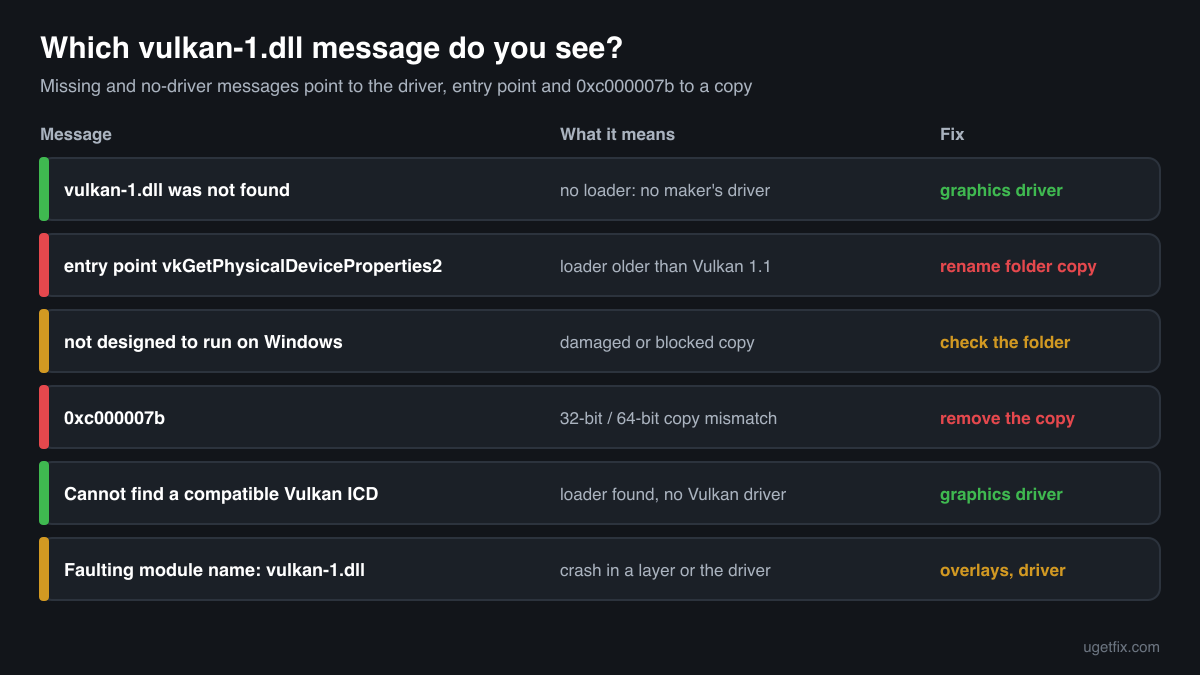
The code execution cannot proceed because vulkan-1.dll was not found. Reinstalling the program may fix this problem.
The wording of Windows 10 and Windows 11. No loader was found in the program's folder or in System32. On most PCs that means no graphics driver from the chip maker is installed, or its installation failed. Install the current graphics driver and restart.
The program can't start because vulkan-1.dll is missing from your computer. Try reinstalling the program to fix this problem.
The same situation in the older wording of Windows 7 and 8. Same fix: the graphics driver for your chip.
The procedure entry point vkGetPhysicalDeviceProperties2 could not be located in the dynamic link library vulkan-1.dll.
The program needs a newer Vulkan than the loader it found. vkGetPhysicalDeviceProperties2 and vkEnumerateInstanceVersion belong to Vulkan 1.1, so a 1.0 loader fails here. Almost always this is an old copy in the program folder or an outdated graphics driver: rename the folder copy, then update the driver.
vulkan-1.dll is either not designed to run on Windows or it contains an error. Try installing the program again using the original installation media or contact your system administrator or the software vendor for support.
A vulkan-1.dll was found but could not be loaded: a damaged download, a truncated copy or a file blocked by security software. Check where it is. In a program folder, rename it; in System32 or SysWOW64, reinstall the graphics driver and run sfc /scannow.
The application was unable to start correctly (0xc000007b). Click OK to close the application.
This one names no file, but after copying a vulkan-1.dll by hand it often means a 32-bit file where a 64-bit one belongs, or the other way round. Remove the copy you added and reinstall the graphics driver.
Cannot find a compatible Vulkan installable client driver (ICD).
The text of the loader itself, shown by many games and emulators as "Vulkan is not supported" or "failed to create Vulkan instance". vulkan-1.dll is present but finds no Vulkan driver. Install the maker's graphics driver; on a laptop with two chips, run the program on the dedicated one.
Faulting module name: vulkan-1.dll
A line from the Application log in Event Viewer after a crash. The loader passes every call to the driver and to layers, so a crash shown here is usually caused by one of them. Turn off overlays, reinstall the graphics driver cleanly, and check the Faulting module path: a program folder path points to that program's own copy.
File facts
vulkan-1.dll is the Vulkan loader, built from the Khronos Group's open source Vulkan-Loader project. Vulkan is a graphics and compute interface, like DirectX 12, used by many games, emulators and 3D programs. The loader itself draws nothing: it looks for the Vulkan drivers installed on the PC, adds any layers that are registered, such as overlays and debugging tools, and passes each call to the right driver. What the genuine file reports:
- Description in the file
- Vulkan Loader
- Where the genuine vulkan-1.dll belongs
C:\Windows\SysWOW64C:\Windows\System32
On 64-bit Windows the 64-bit loader is C:\Windows\System32\vulkan-1.dll and the 32-bit one is C:\Windows\SysWOW64\vulkan-1.dll. The graphics driver installer writes them, and on Windows 11 24H2 and later Windows has its own build there too: Winbindex lists version 1.3.300.0, 1,416,664 bytes for 64-bit and 1,266,136 bytes for 32-bit in the newest updates. Microsoft Edge and WebView2 keep a separate copy in each of their version folders, listed above; Edge uses those only for itself, and they are smaller, roughly 0.8 to 1 MB. A copy next to a game's .exe belongs to that game or was copied there by hand.
vulkan-1.dll versions by Windows release
Winbindex lists 47 distinct Microsoft builds of vulkan-1.dll, from Windows itself and from Microsoft Edge and WebView2. The table shows the newest one indexed for each Windows 11 release and the update that delivered it. A version that reads only Vulkan is an Edge or WebView2 copy, which gives no numbered loader version. Your graphics driver installs its own loader version, which can be newer or older than these.
| Windows release | File version | Delivered by | Size, 64-bit |
|---|---|---|---|
| Windows 11 26H1 | 1.3.300.0 | KB5127646, October 13, 2026 | 1,416,664 bytes |
| Windows 11 25H2 | 1.3.300.0 | original release | 1,384,944 bytes |
| Windows 11 24H2 | 1.3.300.0 | KB5127648, October 13, 2026 | 1,416,664 bytes |
Older copies of vulkan-1.dll found on PCs
Public DLL catalogues have collected 12 copies of vulkan-1.dll uploaded from PCs, from version 1.0.21.1 to 1.1.126.0. These are old Vulkan loaders of the kind that graphics drivers and games installed some years ago. The table lists each with its checksums, so you can tell which one you have.
None of these is current: the newest loader indexed for Windows is 1.3.300.0, and your graphics driver installs a recent one too. If the check on this page finds your file in this list, and it sits in a program folder, it is an old private copy. Rename it and test, so the program uses the loader in System32.
| Version | Build | Size | MD5 | SHA-1 |
|---|---|---|---|---|
1.1.126.0 | 64-bit | 1.0 MB | 6651b57da6b6740436a021419900fc00 | 231284eb8ae32a6804c1bf8e0b47dd5edfb7b849 |
1.1.126.0 | 64-bit | 1.0 MB | dd77ed1733723e46d8b4ad541c086c6d | 53fcdb573d14b8f2397ca3586941bdda3448c540 |
1.1.114.0 | 64-bit | 1.0 MB | 8f760fcd6456ef063b93c29fdf350bec | 5c99d25e6655de27a0531dd7119de6b49f7c7980 |
1.1.108.0 | 64-bit | 1.1 MB | a811cf40446c6209a08f29ad1b081324 | 85e2cc75d6d07518883ce5d377d3425b74636667 |
1.1.97.0 | 64-bit | 973 KB | 53f3a82d350f373133e1c4f24ca3d9c4 | 6f5409c8e0268c5e06f51e62090322de4ec1369e |
1.1.97.0 | 32-bit | 850 KB | 9a72f742017dc5a2869e7c9ff5441ebe | d2b67165e794bd3e5d64ba59d0bd53a349df9a55 |
1.1.82.1 | 64-bit | 942 KB | 264389fe2d13e56cf28c2d9497099a12 | f769b3d8ac1b7a3c15a29915d12922e74f76cb0b |
1.1.82.0 | 64-bit | 952 KB | 86f7f9e1bf74ead2faec57a625ba84c5 | 5992a74df4398d771ba4bccda4d35eae39e6759a |
1.1.77.0 | 64-bit | 942 KB | ac97f59aaf23e9f6baf6d29d6241adf3 | 35cc5d35df1ab59c696ca8f2e702190dc2b89cdf |
1.1.77.0 | 32-bit | 819 KB | 3140c410c9d67f9bdf19c82a65acd7df | d5768b65f3a9d82389e6038cb578626e5f19b78d |
1.0.42.1 | 64-bit | 522 KB | 6632ec0848e7c2745695c9fc25416789 | ad169d839000209689f74bb68e73d11cd33c19e6 |
1.0.21.1 | 32-bit | 502 KB | 6d18c63f17d406bdcdf5b1644d516fce | ec66e0c42fa11a9b83b97a9db232d09a53f2f4c7 |
Copies uploaded by users to a public DLL catalogue, read on 17 October 2026. We list their checksums so you can identify a file; we do not offer them for download and we did not verify each one against a publisher's signature.
Questions people ask
Is vulkan-1.dll a virus?
No. It is the Vulkan loader, installed by your graphics driver, by Windows 11 24H2 and later, and by Microsoft Edge. Copies in System32, SysWOW64, Edge's folders or a game's folder are normal. A copy in Downloads, Temp or AppData is not; the security page linked above explains how to check it.
Where do I download vulkan-1.dll?
From your graphics chip maker, as part of the graphics driver: NVIDIA, AMD or Intel, or your laptop maker. The driver installs the loader and the Vulkan driver it needs in one step. A single file from a download site gives you neither the driver nor a known version.
Do I need the Vulkan SDK?
No. The SDK is for developers who write Vulkan programs. To run games and programs you need only the graphics driver, which includes the runtime loader. Installing the SDK does not fix a missing driver.
My graphics card does not support Vulkan. What can I do?
Install the newest driver the maker offers for it first, because Vulkan support often arrives with a driver. If the chip is too old for Vulkan, no file can add it: choose DirectX or OpenGL in the game's graphics settings if the game offers them, or check its minimum requirements.
Can I delete vulkan-1.dll?
Not the copies in System32 or SysWOW64: every Vulkan program needs them, and Edge uses its own. A copy in a program folder can be renamed to test, but put it back if the program then stops starting, because that program brought it on purpose.
Why does vulkan-1.dll crash only in one game?
Because the crash usually comes from a layer or the driver, not from the loader. Overlays and capture tools load into each game differently. Turn the overlays off for that game, reinstall the graphics driver cleanly, and update the game. The Faulting module path in Event Viewer shows which copy of the loader was used.
Will System File Checker fix vulkan-1.dll?
Only Windows' own copy on Windows 11 24H2 and later. On older Windows releases the loader in System32 comes from the graphics driver, and System File Checker does not install or repair it. Reinstalling the graphics driver repairs that copy.
Related guides
vulkan-1.dll is missing or a game crashes in it: what the file is and how to fix it
Sources
- Winbindex, the Windows binaries index (m417z)
- Microsoft Learn: Use the System File Checker tool to repair missing or corrupted system files
File data read on October 17, 2026.

The editors who write and check uGetFix guides and reference pages. File facts are read from Microsoft's own installers and documentation, and every page shows the date its data was read.
Questions and experiences
Ask about this page: members and our editors answer. Reading is open; writing needs a free account.
…