
vuser32.dll is missing or fails to load: what the file is and how to fix it
vuser32.dll is not part of Windows. Windows has user32.dll; the extra v marks a stand-in library that comes with unofficial packages which make Windows Vista programs, such as InkBall, run on Windows XP. The program from such a package asks for vuser32.dll instead of user32.dll, so the error means a file of that package is missing, quarantined or does not fit your Windows.

Prefer to fix it yourself? The manual steps follow.
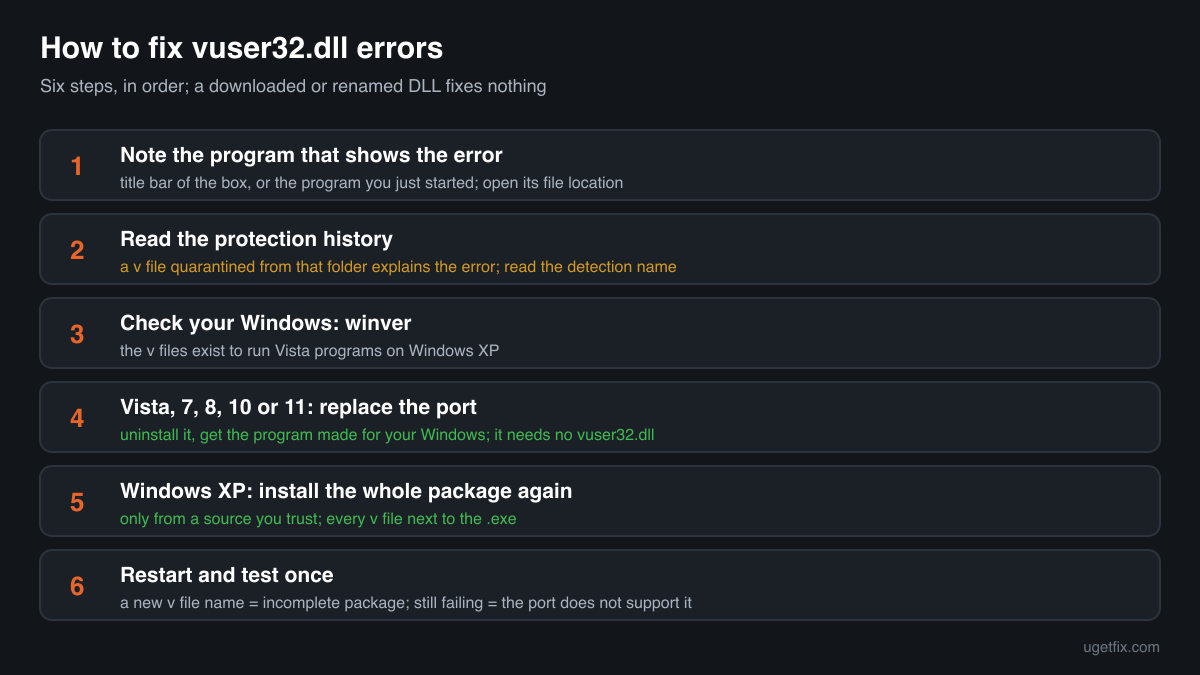
How to fix vuser32.dll errors
Find the program that shows the error: the message box names it in its title bar, or you know it because you just started it. That program is almost always a Windows Vista program moved to Windows XP by an unofficial package, and vuser32.dll is one of the files the package puts next to it, together with vkernel32.dll, vadvapi32.dll and others with the same v in front. Look at your security software's protection history first, because a file without a publisher, version or description is an easy target for a detection. Then decide: if you want that program and you are on Windows Vista or later, use the version that comes with your Windows or from its maker, which needs no vuser32.dll. If you are on Windows XP and you trust the package, install it again in full so all its v files land in the program's folder together.
A vuser32.dll from a DLL download site is not the fix. Nobody publishes this file, so a downloaded one has no known origin, and the program expects the exact copy its own package was built with. Copying or renaming user32.dll from Windows to vuser32.dll does not work either and can leave the program crashing at start.
Where vuser32.dll comes from
No Windows release, Microsoft redistributable or driver installs vuser32.dll. The file appears in sets with other libraries that copy the names of core Windows libraries and add a v in front, in the folder of a program that was patched to load them. These are the cases you will meet.
| Program | Made by | What to know |
|---|---|---|
| Unofficial ports of Windows Vista programs to Windows XP | Unknown authors, not Microsoft | A Microsoft Q&A thread from 2015 shows a user adding vuser32.dll, vkernel32.dll, vadvapi32.dll, vmsvcrt.dll, vntdll.dll, vshell32.dll and vslc.dll to run the Vista version of InkBall on Windows XP. The patched program loads these files from its own folder instead of the Windows libraries. |
| The other v files of the same set | Unknown authors | If vuser32.dll is missing, check its companions too. In the DLL catalogue, vkernel32.dll, vadvapi32.dll and vmsvcrt.dll report no company, no description and version 0.0.0.0, like vuser32.dll. vntdll.dll and vshell32.dll copy Windows descriptions with version 1.1.0.0, which is not a Windows version number. |
| Windows itself: user32.dll | Microsoft Corporation | The real Windows library for windows, menus, the keyboard and the mouse, in C:\Windows\System32. Every Windows program uses it. It is a different file, and Windows never looks for vuser32.dll on its own. |
| Microsoft's own copies of the programs | Microsoft Corporation | InkBall and the other programs people port came with Windows editions of their time and loaded the Windows libraries directly. Microsoft's copy on the Windows it was made for asks for no vuser32.dll. |
| Windows 10 and Windows 11 | Microsoft Corporation | Winbindex, the public index of Windows 10 and Windows 11 system files, lists user32.dll and has no entry for vuser32.dll. On these systems the error always comes from a program you added, never from Windows. |
| A file that only borrows the name | Unknown | A vuser32.dll in Temp, AppData, ProgramData or Downloads, with no ported program next to it, belongs to no package above. Do not try to fix it: find out where it came from and read the security page linked below. |
Step by step
- Note the program that shows the error. The title bar of the message box carries the name of the .exe, or the error appears right after you start a program. Right-click its shortcut, choose Open file location, and look at its folder: a ported program has vuser32.dll and its v companions right there, or should have.
- Look at your security software's protection history. In Windows Security open Virus and threat protection, Protection history; other security programs have their own quarantine list. If vuser32.dll or another v file from that folder is listed, that is why it is gone. Read the detection name before you think about restoring it: a file with no publisher can be flagged for good reason.
- Check which Windows you have. Press Windows key + R, type winver and press Enter. The v files exist to make a Vista program run on Windows XP. On Windows Vista, 7, 8, 10 or 11 the port is the wrong tool, and the next step is the fix.
- On Windows Vista or later, use the program made for your Windows. Uninstall the ported copy in Settings, Apps, Installed apps, or delete its folder if it came without an uninstaller. Then get the program from Windows itself, from Microsoft Store or from its maker's site. A version made for your Windows loads user32.dll from Windows and never asks for vuser32.dll.
- On Windows XP, install the whole package again. Only if you trust where it came from. Delete the program's folder, unpack or install the package again, and check that every v file it lists is in the same folder as the .exe. These files work only as a set: one missing companion gives the same kind of error for its own name.
- Restore from quarantine only a copy you can vouch for. If the package came from a source you trust and the scan named a generic detection, restore the files from the protection history and add an exclusion for that one folder. If the detection names a trojan or another specific threat, leave it in quarantine and remove the program.
- Restart and test once. Restart the PC and start the program again. A different v file name in the next error means the package is incomplete; no error and a working program means you are done. If it still fails on a newer Windows, the port does not support it and there is nothing left to repair.
What not to do
Do not download vuser32.dll from a DLL site.
The file has no publisher, no version and no description, so no site can say where its copy came from or that it is the one your program was built with. A library of unknown origin in a program folder runs with your rights every time you start the program.
Do not rename user32.dll to vuser32.dll.
A copy of Windows' own user32.dll under another name is not what the ported program expects, and on a newer Windows it does not belong in a program folder at all. The usual result is a crash at start or an entry point error instead of the missing file message.
Do not put vuser32.dll into System32 or SysWOW64.
Windows never loads it, so a copy there fixes nothing for Windows, and it stays behind as an unknown file in a folder that security tools watch closely. A ported program looks for it in its own folder first.
Do not turn off protection to make the port work.
Packages that patch Microsoft programs come from forums and download sites, not from Microsoft. If a package asks you to switch off your security software before you run it, treat that as the warning, not as a step of the install.
Do not mix v files from different packages.
Each package ships its own set, built to match its patched program. A vkernel32.dll or vuser32.dll from another set can load and then fail with an entry point error, or crash the program in the middle of use.
Check the copy on your PC
Choose the vuser32.dll from your program folder. Its checksum is calculated in your browser and compared with 1 copy of the file collected from a PC, with no company or description.
The file stays on your computer. Nothing is uploaded: the checksum is computed locally.
Found a vuser32.dll in Temp, AppData, ProgramData or Downloads, with no ported program next to it, or on a PC where you never installed such a package? Then the question is what the file is doing there, and that is a security question rather than a missing-file one. Is vuser32.dll part of a port or something else? On 2-Spyware
The error messages and what each one means
The wording tells you whether the file is gone, wrong or damaged. These are the texts Windows shows, with the file name filled in. The Windows XP wording matters here, because that is the system these packages target.
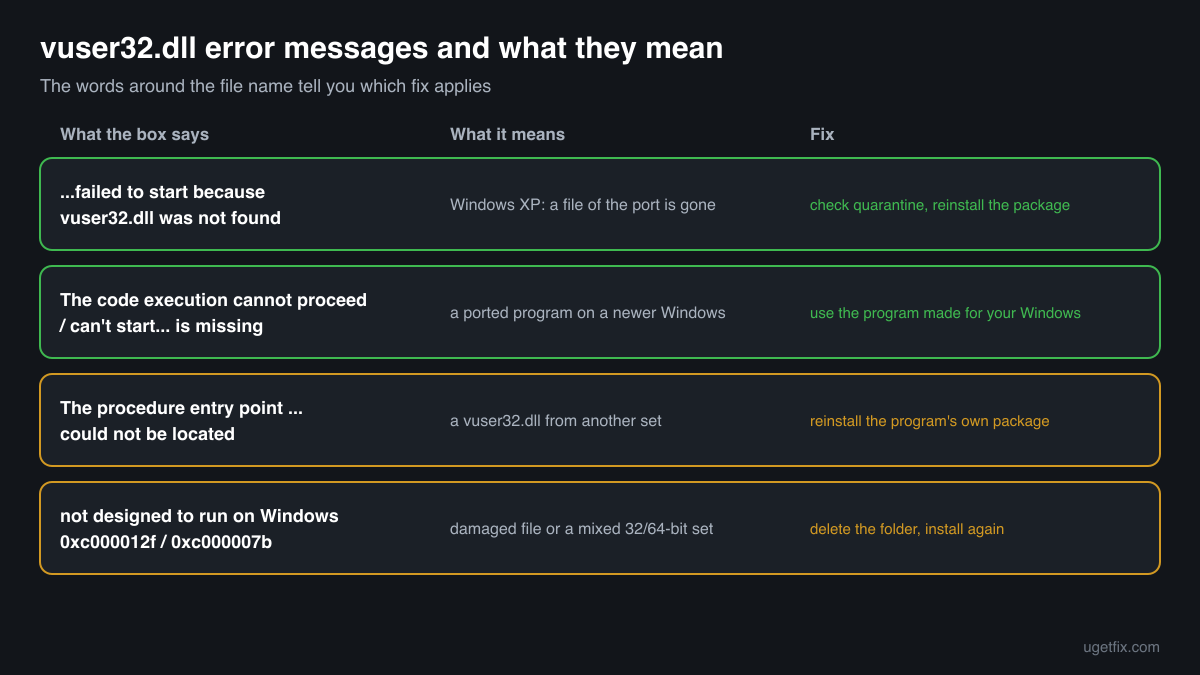
This application has failed to start because vuser32.dll was not found. Re-installing the application may fix this problem.
The Windows XP wording. The ported program's own copy is not in its folder: it was deleted, quarantined, or the package was unpacked without it. Check the protection history, then install the whole package again.
The code execution cannot proceed because vuser32.dll was not found. Reinstalling the program may fix this problem.
The Windows 10 and Windows 11 wording. A program built for the port is running on a newer Windows. Remove that copy and use the version of the program made for your Windows.
The program can't start because vuser32.dll is missing from your computer. Try reinstalling the program to fix this problem.
The Windows 7 and Windows 8 wording of the same situation. Same fix: the version made for your Windows, not the port.
The procedure entry point ... could not be located in the dynamic link library vuser32.dll.
A vuser32.dll was found, but not the build this program was patched for: the function named in the message is not in it. Typical after mixing files from two packages or using a downloaded copy. Reinstall the package that came with the program.
vuser32.dll is either not designed to run on Windows or it contains an error. Error status 0xc000012f.
Windows found the file but cannot load it: it is damaged, empty, or a file of the wrong type under this name. Delete the program's folder and install it again from the package.
The application was unable to start correctly (0xc000007b).
One of the files the program loads, often a v file, is built for the other architecture. vuser32.dll copies in the catalogue are 32-bit, so this points to a mixed set. Reinstall the whole package.
Faulting module name: vuser32.dll
A line from the Application log in Event Viewer after a crash. The port was loaded and failed while running, which happens when it does not support your Windows. Look at the Faulting application name: that is the program to remove or replace.
File facts
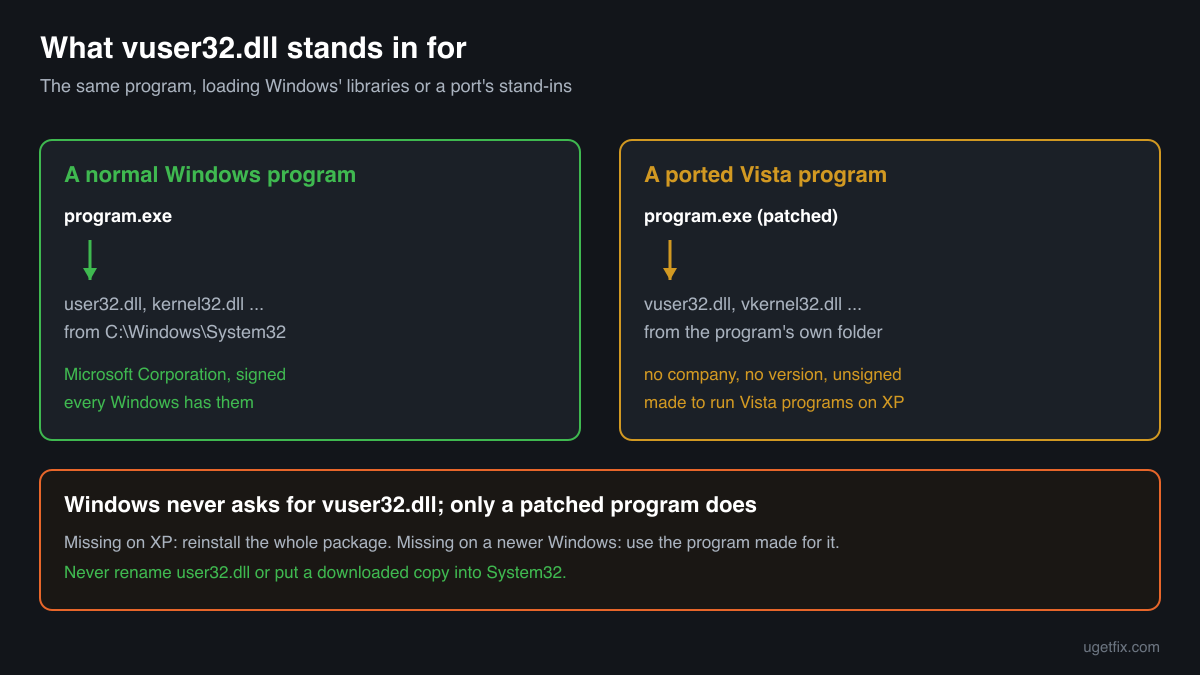
vuser32.dll is a stand-in library. A program patched for an unofficial port has its list of Windows libraries rewritten so it loads vuser32.dll from its own folder instead of user32.dll from Windows. The stand-in then answers the program and passes what it can on to Windows. That is how a program written for Windows Vista can start on Windows XP, which lacks some of the functions Vista added. Without the port's files the patched program cannot start on any Windows. What the catalogue copy of the file reports:
- Description in the file
- -
- Company in the file
- Unknown: an unofficial porting package, not Microsoft
The file belongs in the folder of the ported program, next to its .exe and its companions vkernel32.dll, vadvapi32.dll, vmsvcrt.dll, vntdll.dll, vshell32.dll and vslc.dll. It never belongs in C:\Windows, System32 or SysWOW64. The only copy in the public DLL catalogue is 32-bit, carries no company and no description, and reports version 0.0.0.0, which means it has no version information at all. Microsoft's own libraries always carry Microsoft Corporation as the company and a Windows version number, and they are digitally signed, so none of the usual identity checks can confirm a vuser32.dll. Only the package it came with can.
Copies of vuser32.dll found on PCs
Public DLL catalogues have collected 1 copy of vuser32.dll uploaded from a PC, version 0.0.0.0, with no company and no description. It came from the folder of some ported program. The table lists it with its checksums, so you can tell whether your file is the same one.
A match tells you only that someone else had the same file, not who made it or that it fits your program. A different checksum is just as possible for a working copy, because each package builds its own set. The file to trust is the one from the package you chose to install.
| Version | Build | Size | MD5 | SHA-1 |
|---|---|---|---|---|
0.0.0.0 | 32-bit | e1501e07945e805c9ffef36966f3e8d0 | d6f55d9fff28d1ab780b3cb469e9de65e78e1c6e |
Copies uploaded by users to a public DLL catalogue, read on 17 October 2026. We list their checksums so you can identify a file; we do not offer them for download, and nobody publishes this file, so no signature exists to verify it against.
Questions people ask
Is vuser32.dll a Windows file?
No. Windows has user32.dll, which every Windows program uses for windows, menus, the keyboard and the mouse. vuser32.dll is a separate library that comes with unofficial packages porting Windows Vista programs to Windows XP. Windows never asks for it; only a program patched by such a package does.
Is vuser32.dll a virus?
The file has no publisher and no version information, so there is nothing to vouch for it, and it comes from packages passed around outside any store. A copy next to a ported program you installed on purpose is part of that port. A copy anywhere else needs checking: read the security page linked above.
Can I download vuser32.dll to fix the error?
You should not. Nobody publishes this file, so a downloaded copy has no known origin, and the patched program needs the build from its own package. On Windows Vista or later, the fix is the version of the program made for your Windows; on Windows XP, the whole package installed again.
Why does the error appear on Windows 10 or Windows 11?
Because a program built for the port is running on a Windows it was not made for. The patched program still asks for vuser32.dll instead of the Windows library. Remove that copy and use the program made for your Windows. Windows 10 and Windows 11 themselves never need vuser32.dll.
Can I just copy user32.dll and rename it?
No. The ported program was patched to use the functions the stand-in library offers, not a renamed copy of the Windows file. A renamed user32.dll usually ends in a crash or an entry point error, and it leaves an unknown copy of a core Windows file in a program folder.
Do I need vuser32.dll on my PC?
Only if you use a ported program that came with it, on Windows XP. Nothing in Windows, no driver and no Microsoft runtime uses it. If you no longer use that program, remove the program's folder, and vuser32.dll and its v companions go with it.
Why is Windows XP part of this?
The v files exist to bring programs from Windows Vista to Windows XP, which is missing some functions Vista added. Microsoft ended support for Windows XP on 8 April 2014, so it gets no security updates. A PC that still runs XP and patched programs from unknown sources is best kept offline.
Related guides
vuser32.dll is missing or fails to load: what the file is and how to fix it
Sources
- Microsoft Q&A: InkBall not working on Windows XP (vuser32.dll and the other v files)
- Winbindex: Windows 10 and 11 system files index (no vuser32.dll; user32.dll listed)
- Microsoft Learn: Windows XP lifecycle (end of support)
File data read on October 17, 2026.

The editors who write and check uGetFix guides and reference pages. File facts are read from Microsoft's own installers and documentation, and every page shows the date its data was read.
Questions and experiences
Ask about this page: members and our editors answer. Reading is open; writing needs a free account.
…