How to recover
Decrypt files encrypted by Gandcrab
from Windows
Recover your files encrypted by Gandcrab on Windows 10 and 11 effortlessly. Follow our expert-tested solutions for swift file decryption! Fixed in minutes.

What leads to How to decrypt files encrypted by Gandcrab?
- Malicious spam email attachments
- Unpatched systems
- Lack of anti-virus software
- Exploitation of software vulnerabilities
- Downloaded via backdoor malware
Repairs Windows system files, removes malware, and restores a clean OS state — without reinstalling.
Hello, I think I got infected with some malware, and now I can't open any of my photos or other files. A text note is present on my desktop, and the wallpaper is changed to a black background with a message saying "ENCRYPTED BY GANDCRAB." According to the memo, I need to pay digital currency for these people to restore my files. Is it the only way? Can you please help me? I am not a huge PC expert, so more detailed instructions on what to do would be appreciated...
GandCrab ransomware originated in early 2018, and, within a little over a year of its lifespan, managed to release a few dozens of versions that lock up users' files with the help of Salsa20, AES and RSA-2048 encryption algorithms[ref en-5] and demands a ransom for the decryption key. However, you should not contact cybercriminals and rely on alternative methods that can help you decrypt files encrypted by Gandcrab.
While initial malware released appended .CRAB, .KRAB, and similar file extensions, Gandcrab v5 switched to a different, improved model of the virus. The latest variants use a random combination of characters as an extension, complicating GandCrab decryption procedure even further. Additionally, Gandcrab saw a collaboration with other malicious threats like Vidar[ref en-2] or Emotet.[ref en-4]
Throughout its reign, GandCrab ransomware used a variety of distribution techniques, such as:
- Rig, Magnitude, GradSoft and Fallout[ref en-3] exploits;
- Task Scheduler ALPC and Adobe Flash vulnerabilities;
- Malspam campaigns, such as “Love You”;
- Downloaded via backdoor malware, etc.

As evident, it is best not to get infected with GandCrab in the first place. Unfortunately, users are not that careful when it comes to cybersecurity: they open malicious spam email attachments, do not patch their systems, avoid anti-virus software, and similar. Therefore, make sure you use security measures to prevent ransomware infections in the future. Additionally, you can use GandCrab vaccine that would prevent the execution of the malicious script and, consequently, the file encryption.
The question that interests users the most is "Can I decrypt files encrypted by Gandcrab?." The answer to this question is not that simple, as, it depends on the version of the malware, whether or not backups were prepared if malware failed to delete Shadow Volume Copies, etc.
If you had backups prepared before GandCrab ransomware attacked your computer, you should be able to copy and paste all your data without any problems. However, make sure you remove GandCrab virus before you proceed with file recovery, otherwise, all the backups will be locked as well.
If you do not have backups, several other options are available to decrypt files encrypted by Gandcrab. There are official decryptors available, as well as third-party tools. Please explore all the possible options below.
Before you proceed: remove GandCrab ransomware
As we already mentioned, you should remove GandCrab ransomware before you attempt to recover your files. First, you need to download and install security software that can detect the threat. There are plenty of applications available, so make sure you choose the one that suits you the best.
Once you install an AV engine, you will have to enter Safe Mode with Networking to perform a full system scan. More details on how to remove Gandcrab ransomware can be found in this video.
Option 1. Use GandCrab decryptor from BitDefender
Security researchers at Bitdefender released an official GandCrab decryptor that can be used for free.[ref en-1] Please follow these steps to download it (note: the app requires an internet connection to perform decryption process):
- Download the Official GandCrab decryptor.
- Run the application.
- Agree to terms and conditions.
- Pick Scan Entire System or select a specific folder you want the tool to decrypt files from.
The latest variant of the decryptor will work versions 1, 4, 5.0.1 through 5.1. 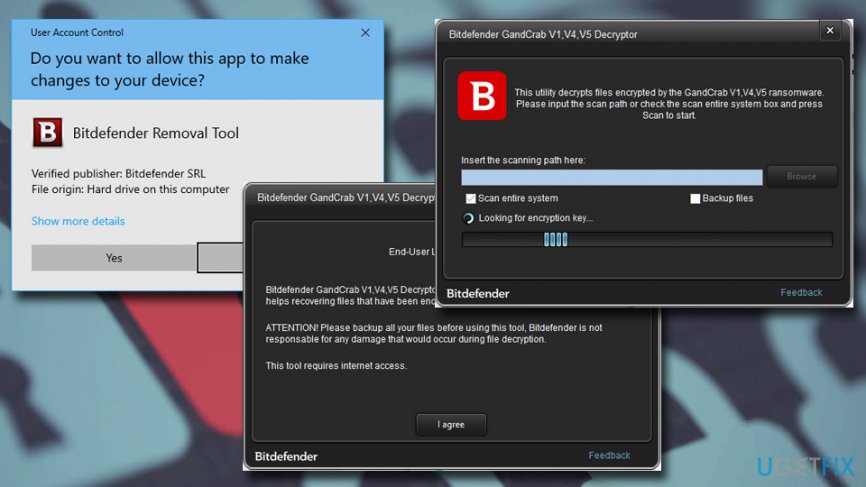
Option 2. Use alternative GandCrab decryptor
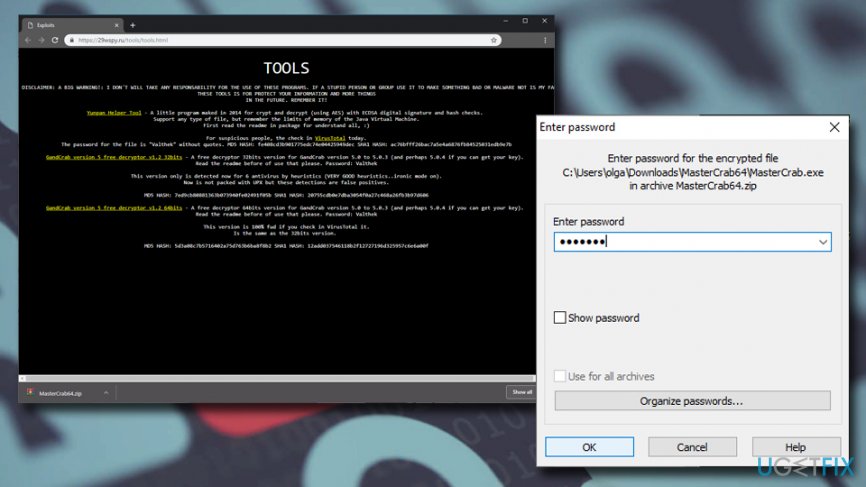
Independent security researchers are continually working on new methods to decrypt Gandcrab ransomware. Therefore, if the official tool from Bitdefender does not work for you and you are affected by GandCrab version 5.0 to 5.0.3, you can download an alternative decryptor here.
- Once you download the tool for your version of Windows (32bits or 64bits), extract the zip file.
- You will be asked to enter the password - type in Valthek and click OK.
- Once MasterCrab.exe opens, type in Y and hit Enter.
- The software will decrypt your files.
Note that you can find more detailed instructions in the README.txt file.
Option 3. Use Data Recovery Pro to restore files encrypted by GandCrab
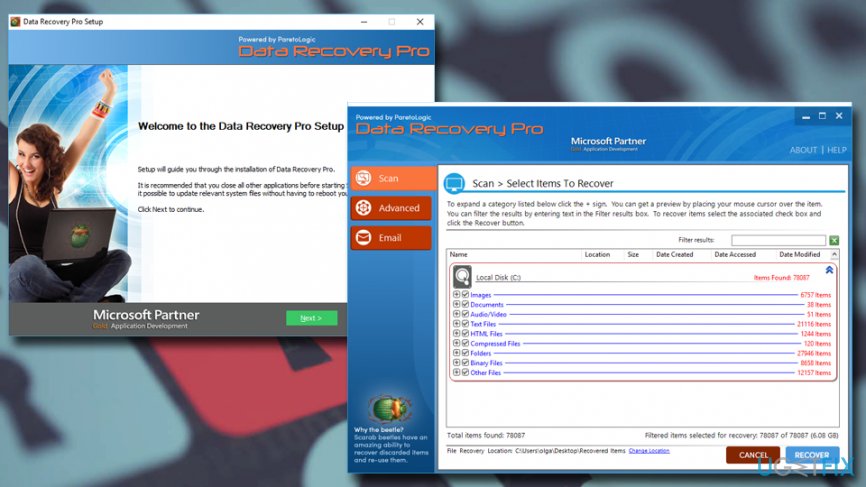
In case official decryptors do not work, or you are infected with a version that is not decryptable (v5.04+), you should try third-party data recovery applications. You should try to decrypt your files encrypted by Gandcrab with the help of Data Recovery Pro:
- Download [rev id=”Data Recovery Pro”] software and then install it by following on-screen instructions.
- Once installed, open the program and start a scan - pick Full Scan option and seclect Start Scan.
- You can also look for specific files - just enter a keyword.
- Once the scan is complete, choose all the files you can to return and click Recover.
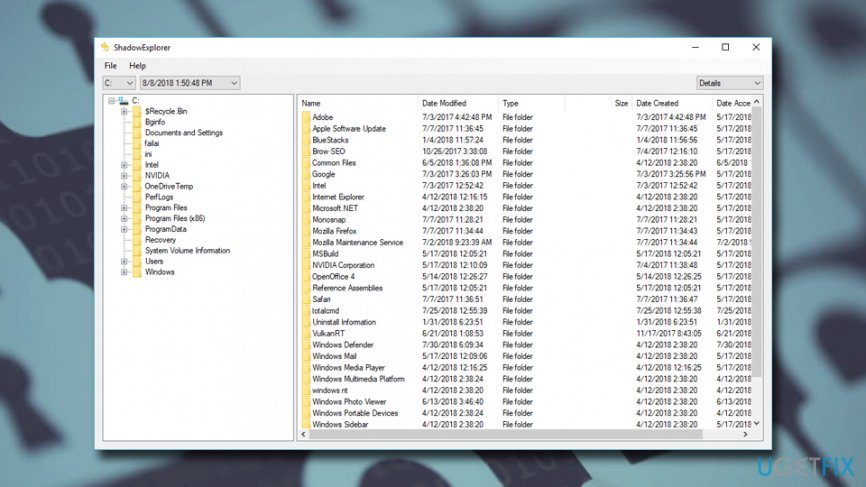
Option 4. Make use of ShadowExplorer when trying to recover files encrypted by GandCrab
Volume Snapshot Service (VSS) is an automated backup system in Windows and would provide data recovery without too much trouble. For that reason, most ransomware viruses are programmed to delete these automated copies. However, GandCrab, just as all the other similar viruses, might fail to perform this procedure, leaving Shadow Volume Copies behind. In such a case, tools like ShadowExplorer can get all of your data back:
- Download ShadowExplorer and install it by using on-screen instructions.
- Open the application and choose the drive you want to recover data from.
- Click Export (you may also specify where to export files).
Bonus: use GandCrab vaccine to avoid future infections
Independent security researcher Valthek[ref en-6] has been creating software dedicated specifically to GandCrab ransomware file encryption prevention:
- Go to the vaccine hosting site and download the appropriate tool.
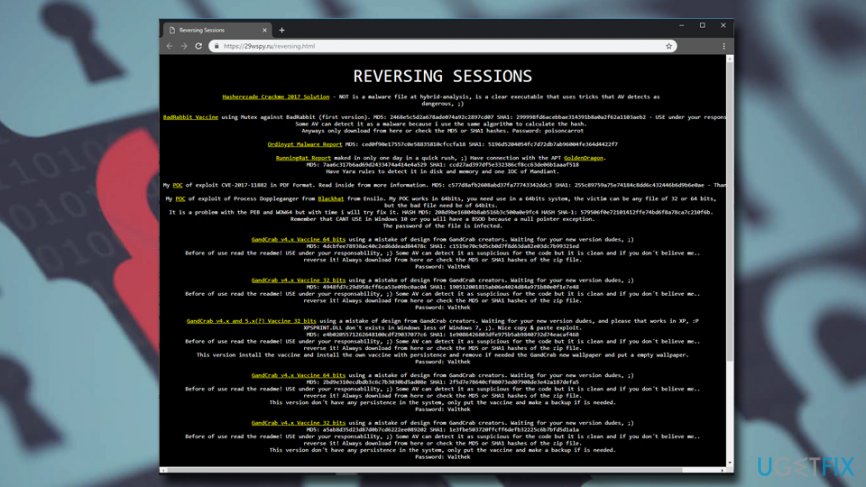
Decrypt files encrypted by gandcrab use vaccine - To extract the application, use Valthek as a password.
- When UAC pops up, click Yes.
- Double-click on the GandCrabSucksVaccine.exe
- The vaccine will be running in the background and you will be protected from GandCrab file infection.
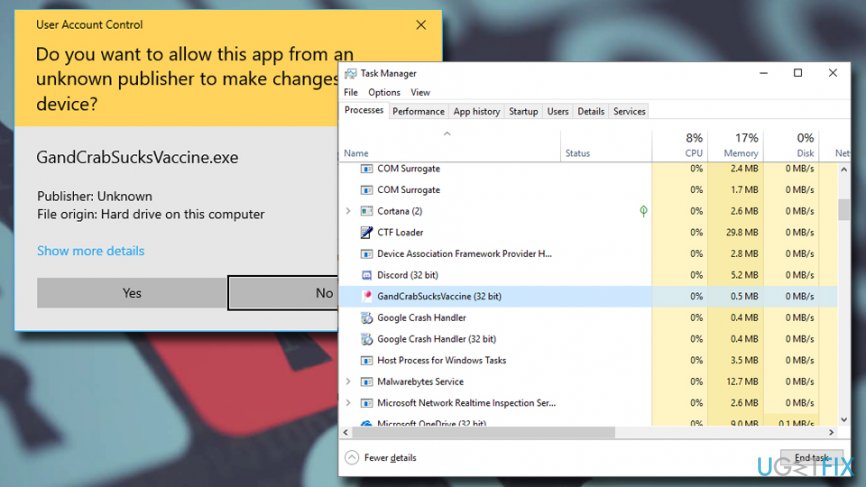
Decrypt files encrypted by gandcrab vaccine runs in the background
Finally, after you remove GandCrab virus from your computer, scan it with [d1], as it can can clean Windows Registry and recover from other virus damage.
Bottom line
To decrypt files encrypted by Gandcrab, users should avoid contacting cybercriminals and explore alternative methods. Implementing security measures such as using a GandCrab vaccine and being cautious with email attachments can help prevent infections. If these solutions do not work, consider seeking professional help or using data recovery services.
Frequently asked questions
Look for files with extensions like .GDCB or .GDCB-Ransom. Additionally, check for ransom notes that may have been created in your folders.
Yes, the No More Ransom project offers a free decryption tool specifically for Gandcrab, which you can download and run on Windows 10 or Windows 11.
If decryption fails, consider restoring from backups or using file recovery software compatible with Windows 10 or Windows 11 to recover lost data.




Report an issue
What's wrong with this guide? We review every report and update or remove content.
Report received — thank you. We'll review and fix it.
You need a free account to submit a report.
Be the first to comment