How to recover
Fix a hacked Facebook account
from Windows
Recover your hacked Facebook account seamlessly on Windows 10 or 11 with our expert-tested solutions. Regain control quickly and securely!

What leads to How to fix a hacked Facebook account?
- Phishing links received via Messenger
- Malicious applications installed on Facebook accounts
- Independent malware that can steal account information
- Spam from hacked accounts to friends
- Malware-laden links sent to users
Repairs Windows system files, removes malware, and restores a clean OS state — without reinstalling.
I need help. I cannot enter my Facebook account as it says "wrong password," even though I checked it several times. I suspect that it might be hacked. Do you have any solutions for that?
Since its release back in February 2004, Facebook became the most popular social media platform globally, hosting as many as 2.7 billion active users.[ref en-3] The application can be accessed via a desktop computer, iPhone/Android phone, or tablet, as long as it is connected to the internet.
Naturally, it was only a matter of time when Facebook would be targeted by felons, and there are several different ways of how the platform can be abused to fulfill their malicious goals. For example, hacked Facebook accounts are among the main ways for threat actors to monetize by spamming malicious links to victims' friends. By far, the most devastating issue is when users are sent malware-laden links, as they then get infected with a type of Facebook virus.
Facebook account comprises of a lot of information about you, including your email, phone number, work you have done in the past, your birth date, relationship status, friend list, and much more. Such information is typically hidden from users who are not Facebook friends. Indeed, there are many malicious parties that would find suchlike personal information extremely valuable.
There are several ways how your Facebook account could get hacked. One of the most common reasons is the phishing links that users receive via the Messenger. Millions of users took the bait after opening the video with their name and profile picture on it - a phishing campaign is commonly known as the "Is that you" virus, and remains most the most prominent ways of getting infected with malware.
Users might install add-ons on their Facebook accounts. These malicious applications are created in large quantities, so it does not help that Facebook removes such apps from the platform as soon as they are reported enough times. This might be one of the reasons why users have to deal with a hacked Facebook account.
Finally, there is independent malware that can steal all types of information from your computer, including your login credentials. Koobface, Dridex, AZORult, Vidar, and many others possess such functionality. Therefore, as a first step to recover hacked Facebook account, you should perform a full system scan with security software. Also, you should remediate your computer with a repair software such as [d1], which would replace malware-damaged system files with brand new ones and ensure that the computer is operating at its best.
An now, lets find out how to fix and secure your hacked Facebook account.
Step 1. Scan your computer for malware
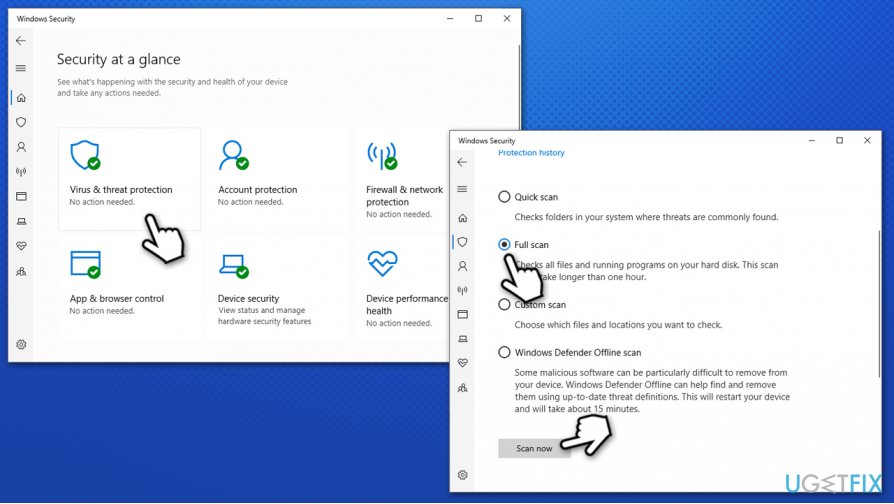
Anti-malware software is extremely important for any computer.[ref en-1] It is the only way to protect yourself from the most dangerous viruses out there. There are several security applications available that you could download for free - although experts recommend investing in an advanced third-party solution to ensure the best security. Nonetheless, if you are using Windows OS, you can quickly scan it with Windows Defender:
- Type in Security into Windows search and click Windows Security
- Select Virus & Threat protection
- Choose Scan options
- Select Full scan and then click Scan now.
How to fix hacked facebook account scan computer for malware
If you are using a Mac, you should employ a third-party application such as [rev id="Intego"], and perform a full system scan with it.
Step 2. Change your Facebook password
Even though hacked Facebook account would send malicious links or friend requests, it does not mean that the attackers took their time to change your password. Therefore, if you are able to access your account after you noticed suspicious activity on it, you should change your password immediately.
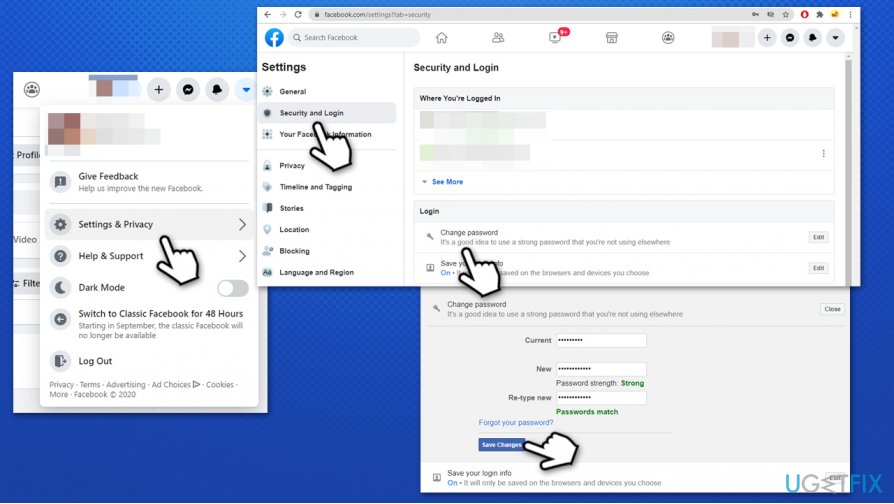
- On your Facebook page, press the arrow (Account) button at the top-right corner
- Select Settings & Privacy and then pick Settings
- Go to Security and Login
- Under Login, select Change password
- Type in the Current password and then a new one
- Select Save Changes.
How to fix hacked facebook account change password
Important: if you used your Facebook password for other accounts, it is crucial to change password there as well. In case you don't, hackers can use this data to access your other accounts, steal money, and perform other malicious actions.
Step 3. Recover hacked Facebook account using Facebook Help Center
If you are unable to access your hacked Facebook account, you should rely on Facebook Help Center.
- Go to Facebook's Compromised Account page
- Click Your account has been compromised and type the required information
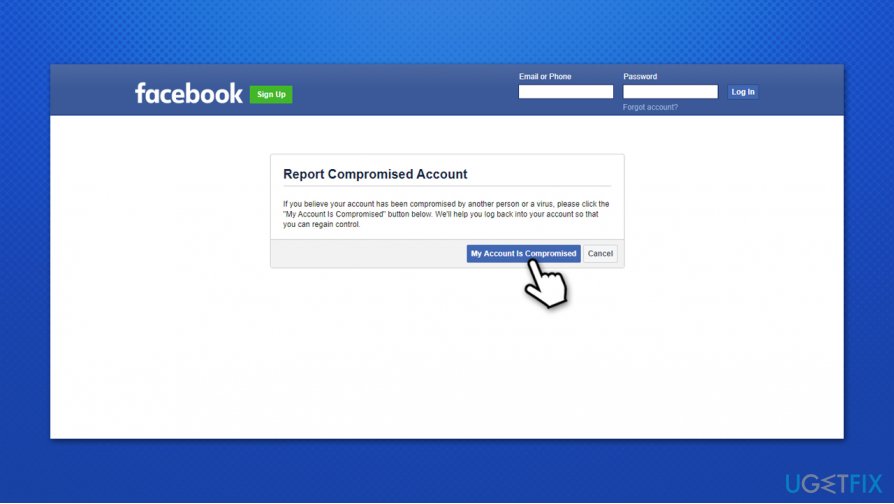
How to fix hacked facebook account report compromised account - You might be presented with several suggested accounts. Pick the right one
- Enter the old password and implement the reset instructions
- The email address is likely to be different than yours so click No longer have access to these? button
- Type your email address and the account recovery procedure will start. You should be able to access your lost account within 24 hours.
Step 4. Log out of all active sessions
This step is extremely important, as active session would allow malicious actor to access your account. Here's how to do it:
- Go to Settings & Privacy > Settings once again
- Select Security and login
- Under Where You're Logged In section click See More
- Press Log Out Of All Sessions at the bottom-right.
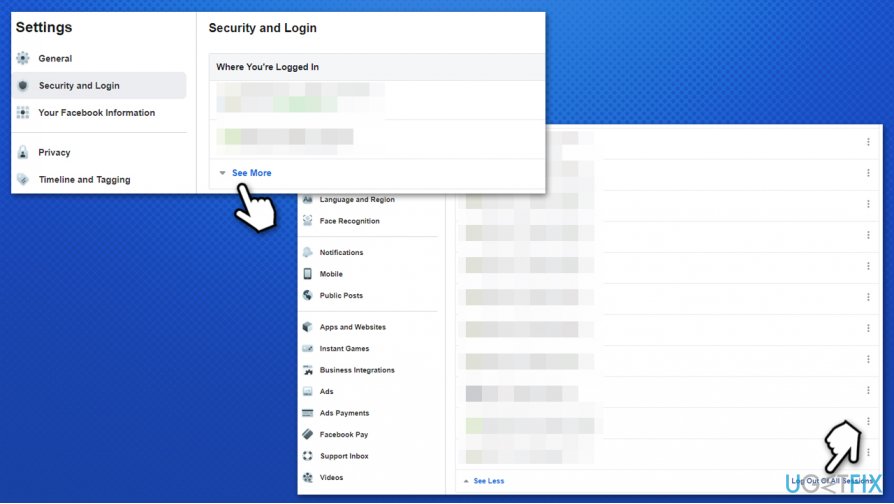
How to fix hacked facebook account logout of all active sessions
Step 5. Uninstall useless Facebook apps
Some apps can access your data. You should check the Apps and Websites section of your Facebook account and get rid of everything suspicious:
- Go to Settings & Privacy > Settings once again
- On the left, select Apps and Websites
- On the right, you will see a list of active apps that are using your data (you can view each of them individually)
- Tick a checkbox near the app your want to get rid of
- Click Remove at the top.
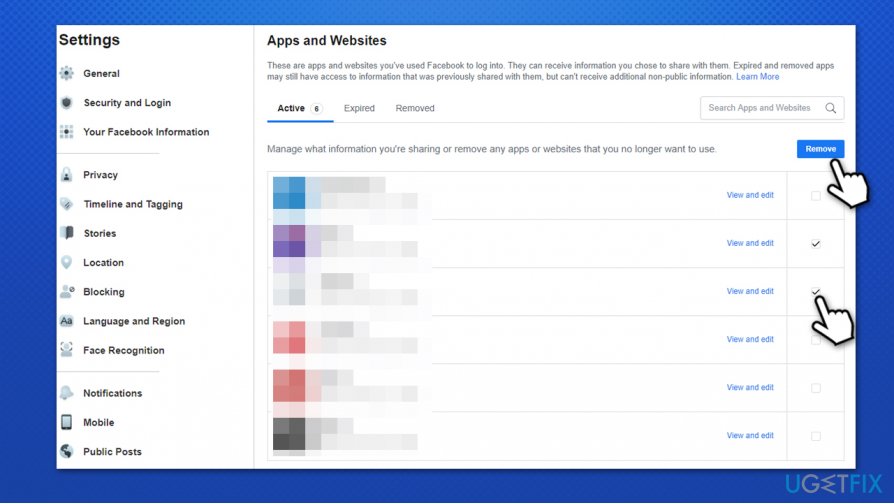
How to fix hacked facebook account remove useless apps
Step 6. Enable two-factor authentication
Finally, enabling two-factor authentication[ref en-2] on your Facebook account is highly likely to prevent you being hacked again in the future.
- Go to Settings & Privacy > Settings > Security & Login
- Scroll down until you find Two-Factor Authentication section
- Click on Use two-factor authentication
- Select Text Message (SMS) or Authentication App
- Pick an existing number or select Add Phone Number option and select Continue
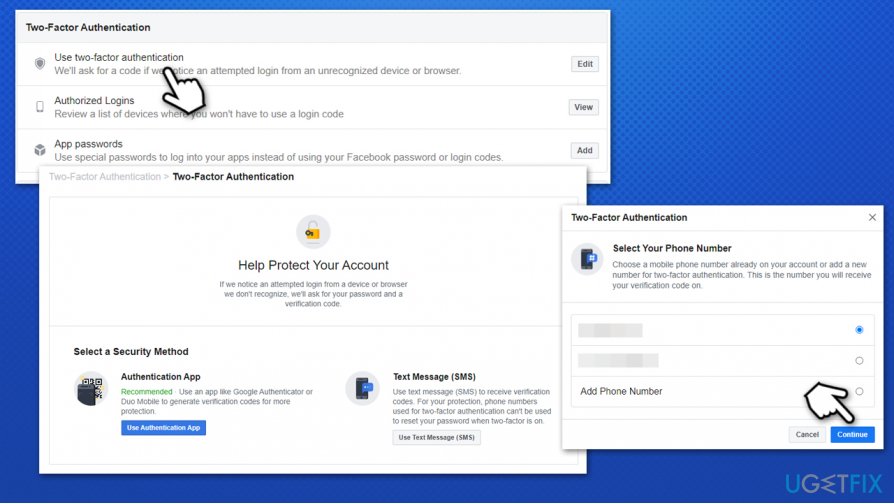
How to fix hacked facebook account add two factor authentication - You will receive a notification that the two-factor authentication is on.
Additional security tips
Ensure you change your password at least once every few months or more often if you regard it necessary. Make a phrase comprised of characters and numbers. Add your telephone number and additional security questions to recover the hacked accounts faster in a hijack. Finally, never reuse your passwords! Instead, rely on a password-managing application to ensure the best security (you will also not have to rely on your memory to access your accounts).
Bottom line
To fix a hacked Facebook account, you should change your password immediately, enable two-factor authentication, and report the issue to Facebook. If these steps do not resolve the problem, consider seeking further assistance from Facebook's help center.
Frequently asked questions
First, try to regain access to your Facebook account using the recovery options provided by Facebook. Once your account is secure, run a full antivirus scan on your Windows device to ensure it is free from malware.
Make sure to update your Windows security settings and enable two-factor authentication on your Facebook account. Additionally, consider changing your Windows account passwords and reviewing your security settings.
If your files were deleted or altered due to the hack, you can use Windows File History or third-party recovery software to restore them. Always maintain regular backups to prevent data loss in such scenarios.




Report an issue
What's wrong with this guide? We review every report and update or remove content.
Report received — thank you. We'll review and fix it.
You need a free account to submit a report.
Be the first to comment