How to recover
Hijacked or stolen Steam account
from Windows
Regain access to your hijacked Steam account easily on Windows 10 or 11. Follow our expert-tested methods for quick recovery and peace of mind.

What leads to How to recover hijacked or stolen Steam account?
- Entering credentials into a spoofed or hacked site
- Downloading and installing malware
- Giving out account or payment information to unauthorized individuals
- Fake screenshot links
- Phishing scams
- Chatroom scams
Repairs Windows system files, removes malware, and restores a clean OS state — without reinstalling.
Hello, I think my Steam account has been hacked. I had money there, and now it's gone, although I did not purchase any games recently. What am I suppose to do to recover my stolen Steam account? Help would be much appreciated!
Steam, which was launched back in 2003, is probably one of the most recognized gaming platforms around the world, as it hosts around 30,000 games as of January 2019.[ref en-1] The huge library consists of games of all genres, DLCs,[ref en-2] videos, and similar. While countless games go on sale every day, and some of them are even given for free, there is a lot of money involved in the business of gaming, as a newly-released game costs around $50-$60.
Due to such immense popularity, it is not surprising that hackers are willing to dig in into the newly-blooming gaming industry, Steam platform included. Therefore, they try to steal users' credentials to gain access to the platform and harvest available funds or even infect other users with malware. So, how to recover hijacked or stolen Steam account? Do not worry - we will provide detailed instructions on what to do next.
Obviously, the best solution would be not to get your Steam account hacked in the first place. While some account hacks might happen completely unexpectedly or even without any triggers, most people recognize that the account compromise occurred due to them entering their credentials into a spoofed or hacked site, or after downloading and installing malware on the device.
Additionally, there are several methods crooks can try to obtain your account credentials. NEVER give out your account, payment or similar sensitive information to anybody, because a real Steam employee would never ask for such information. Other infection types include:
- Fake screenshot links
- Fake TeamSpeak error
- Phishing scams
- Fake steam sites
- Man-in-the-middle[ref en-4] attacks
- Chatroom scams, etc.
To avoid Steam account compromise in the future, you should use such measures as a password manager or, as the best option - Steam Guard authenticator.[ref en-3] All you have to do is download an app for iOS or Android device and set up your account. To compromise your account, hackers would have to acquire access to your phone - which is highly unlikely.
To recover your hijacked or stolen Steam account, please check the guide below. We first go into detail of what to do if you are able to log in, and later we will discuss how to recover Steam account when not being able to log in.
Step 1. Scan your device for malware
The most probable cause of your Steam account compromise is malware. Crooks often urge users to click on links which redirect users to a malicious payload. Additionally, such tools like cheats or bots are known to be infected with malware. Thus, never try to download such applications, as you will be asking for trouble.
Various malware can be populated with the help of phishing messages of phishing sites, but most prominent ones are data-stealers. These threats can record a large amount of information, and send it out to a remote server that is only accessible to hackers. Thus, credentials of your Steam account become leaked, and hackers can log in.
Therefore, the first step to recover your Steam account should be computer scan using security software. We suggest using [d1] which is based on Avira's engine, although there are plenty of other tools to choose from.
Step 2. Change the password of your email and Steam
Once you are sure that your computer is malware-free, you should change the password of both your email and Steam account. Remember, using strong passwords is the key. Additionally, never reuse them on any other websites.
To change your Steam password, do the following:
- Go to the official site (link)
- In here you will be asked to enter either your account name, email address or phone number
- Enter the detail and proceed with on-screen instructions to change your password
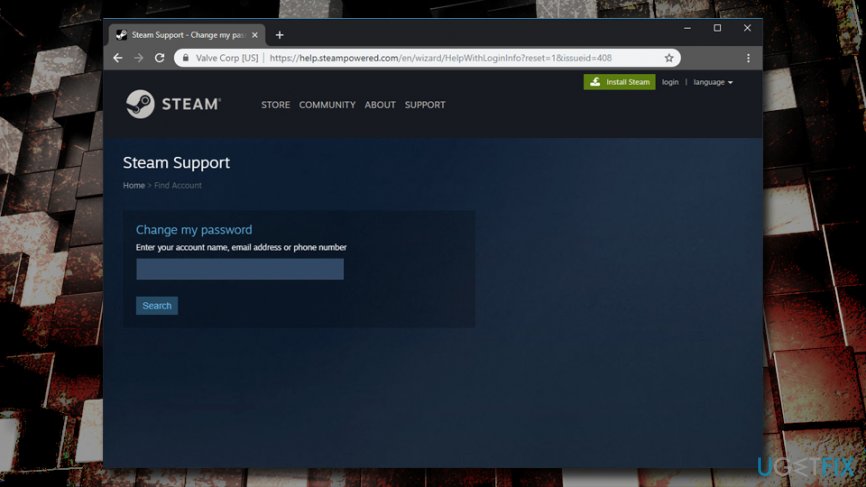
How to recover hijacked or stolen steam account change password
Step 3. Perform checks on your Steam account
If hackers managed to log in to your account, it is possible that they changed certain parameters, like associated email address.
- Open Steam app
- Click on your username at the top-right and select Account details
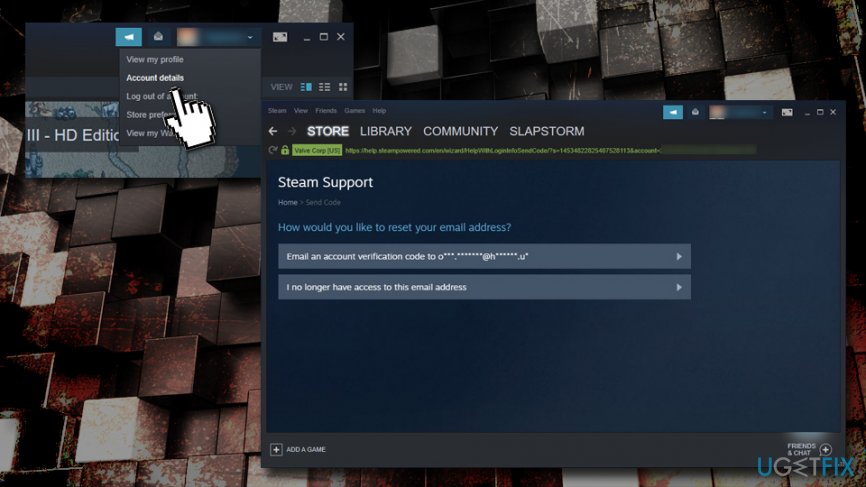
How to recover hijacked or stolen steam account reset email - Check your email address under Contact Info section
- In case it is changed, click on Change my email address
- Proceed with on-screen instructions
Now, you should check if hackers did not make any purchases using your account:
- Go to Account details again
- Under Store & Purchase history, click on View purchase history - check if any unsolicited changes were made
- Go back and now check View licenses and product key activations - check if any unsolicited changes were made
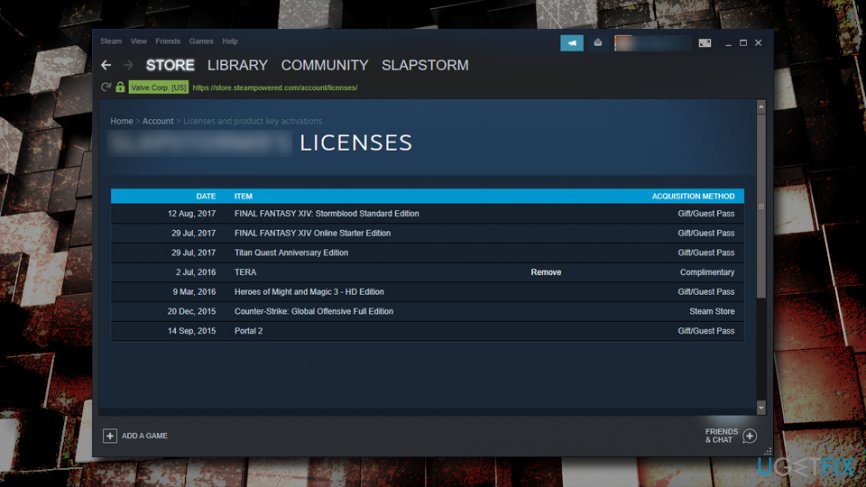
How to recover hijacked or stolen steam account check your licenses andpurchase history
In case any changes were made, make sure you contact Steam customer support, they will be glad to help you.
Recover hijacked or stolen Steam account when you can't log in
If you can't log in to your account, and the self-recovery did not work for you, you will have to contact Steam customer support. Beware that you will need to provide the proof of ownership. 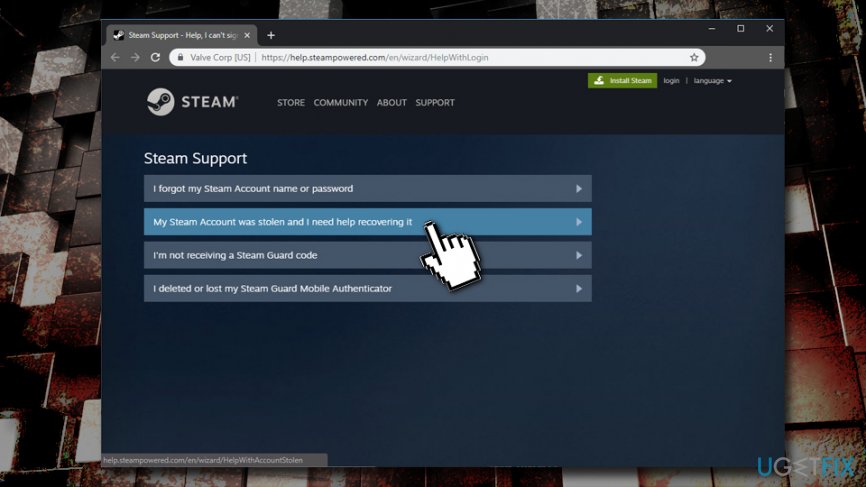
There should be a lot of information that hackers do not know about your account. For example, you can prove the ownership of the account using the following:
- Bank transfers
- Credit cards
- Retail activation keys
- Steam account login names
- Email addresses associated with the account
Once you have this information ready, feel free to contact the support via the official website. Hopefully, we helped you to recover your hijacked or stolen Steam account, and you can enjoy all the games again!
And remember, use adequate protection measures in order to protect your Steam account in the future.
Bottom line
To recover your hijacked or stolen Steam account, you should use a password manager and enable Steam Guard authenticator for added security. If these measures do not resolve the issue, consider reaching out to Steam support for further assistance.
Frequently asked questions
Immediately try to reset your password using the Steam account recovery options. Ensure that your email account associated with Steam is secure as well.
Yes, you can use the Steam support page to submit a ticket and provide proof of account ownership, such as purchase receipts.
Make sure to change passwords for all other accounts, enable two-factor authentication on Steam, and run a full antivirus scan to check for malware.




Report an issue
What's wrong with this guide? We review every report and update or remove content.
Report received — thank you. We'll review and fix it.
You need a free account to submit a report.
Be the first to comment