How to recover
Reset the forgotten password
from Windows
Forgot your Windows 10 or Windows 11 password? Discover effective methods to regain access to your system quickly and securely. Expert-tested solutions.

What leads to How to reset the forgotten password on Mac?
- Forgotten password
- Security measures by Apple
- Disabled password hint in Login options
- KeyChain password not recoverable
- Need for FileVault encryption
Repairs Windows system files, removes malware, and restores a clean OS state — without reinstalling.
Hi! I have found my old MacBook, but unfortunately, I forgot the password. Is there any chance to reset Mac password without the help of IT professional? Thanks for your help.
Mac password is crucial when trying to make changes on your device. It includes deleting important files, installing software or simply logging in to your computer. Unfortunately, Apple[ref en-1] has taken care of their customers' security and resetting Mac password might be challenging.
Likewise, we have prepared multiple methods which should help you quickly reset the password and log in once again. We strongly advise you to not only carefully follow the instructions but also try all the provided techniques since some of them might not work for you.
Additionally, it is important to understand that malevolent people may also try to hack into your computer using similar methods. Therefore, you should definitely protect your computer by turning on FileVault encryption[ref en-2]. This way, the crook won't be able to access your data unless he/she has a recovery key and password.
Keep in mind that you receive one after you turn on FileVault. We advise you to print it and put it somewhere safe. Be aware that if you forget or lose it, all your data will be lost permanently. Thus, understand the risks and take care of your computer's and files' security.
Recover forgotten password on Mac
Below you will find ways how to recover your Mac password. Make sure that you try them all to successfully reset the password. Unfortunately, these methods do not recover the password for KeyChain[ref en-3] and similar applications. Likewise, you should create a new KeyChain account for the future use.
Method 1. Get a password hind to remember it
- Navigate to the top-left corner of your desktop and click on the Apple icon;
- Select System Preferences and click on Users & Groups.
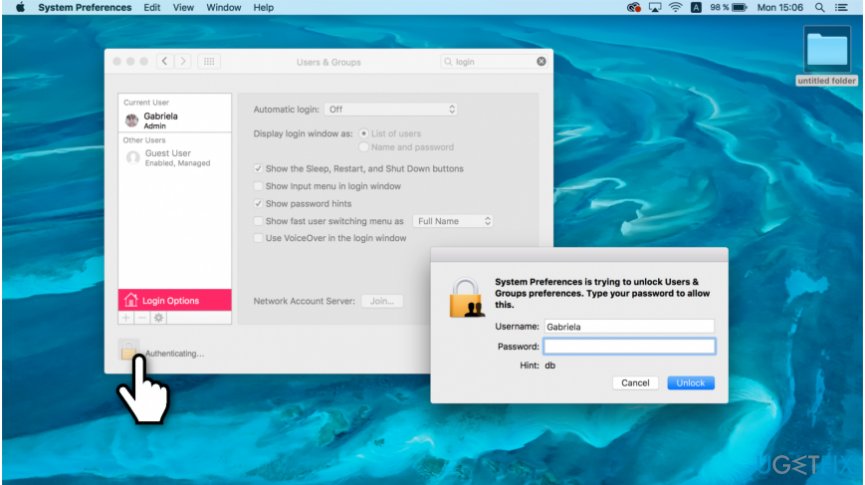
Use password hint on mac - At the bottom-left corner of the window click the Lock icon;
- Press Return key three times until the hind appears below.
NOTE: If it doesn't show up, it means that it was not enabled in Login options.
Method 2. Use another account to change the password on Mac
- On the top-left corner of your desktop, click on the Apple icon and select Log Out option.
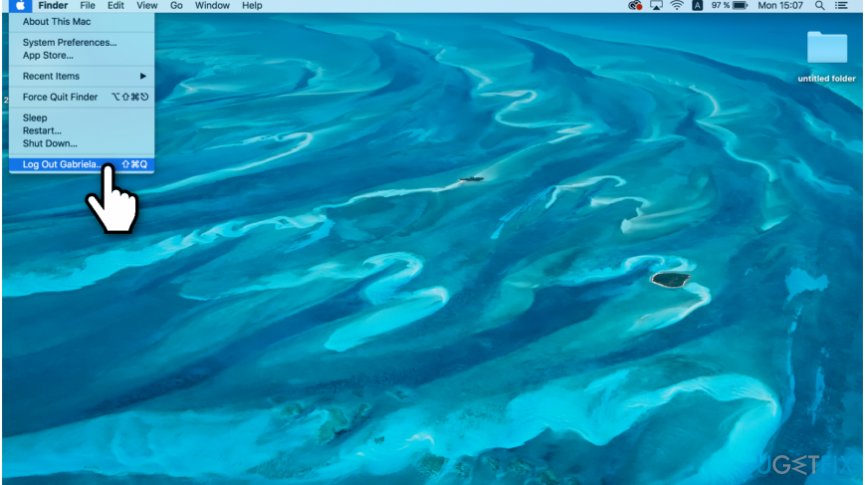
Reset password from another account on mac - Pick the account you remember the password to and log in;
- Open System Preferences and go to Users & Groups;
- Click on the Lock icon and enter the password;
- On the left sidebar select the account whose password you want to reset.
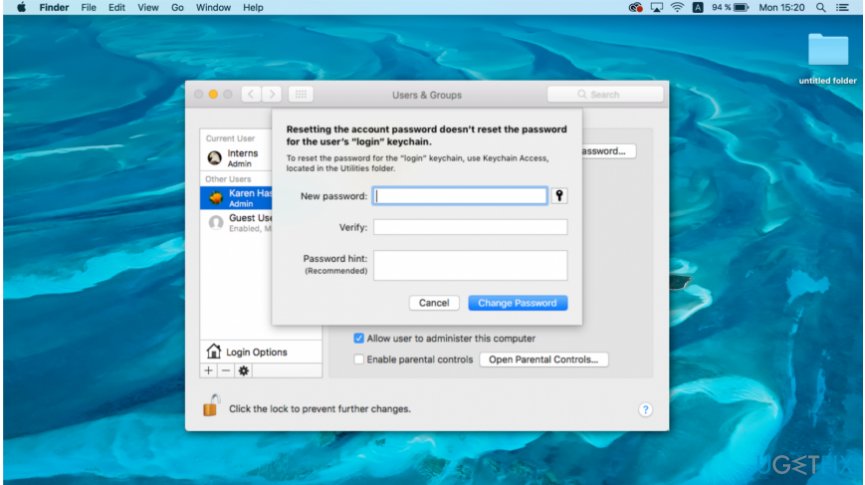
Change password on mac - Click on Reset Password button and create a new password.
NOTE: If the account whose password you remember doesn't have admin rights you will not be able to reset the password.
Method 3. Try recovery mode to reset your password
- Click on the Apple icon and select Shut Down option;
- Press Command + R + Power buttons all together until the load bar appears;
- Once it loads, select Disk Utilities and pick Terminal;
- Type resetpassword and press return button;
- Choose the volume which contains your account and click on Select the User Account;
- Submit the new password and press Save;
- Shut down your computer and turn it on normally.
Bottom line
To reset a forgotten Mac password, you can try using the password hint feature or create a new KeyChain account. If these methods do not work, consider seeking professional help or further assistance from Apple support.
Frequently asked questions
No, Windows 10 cannot directly reset a password on a Mac; you will need to use macOS recovery options instead.
While Windows 11 itself doesn't provide tools for Mac password recovery, third-party software like Disk Drill can be used to recover files from Mac drives connected to a Windows PC.
You cannot access a Mac's data directly from Windows 10 without the password, but you can connect the Mac hard drive to a Windows machine to attempt data recovery.




Report an issue
What's wrong with this guide? We review every report and update or remove content.
Report received — thank you. We'll review and fix it.
You need a free account to submit a report.
Be the first to comment