How to remove
Delete Your Reddit Account
from Windows
Easily delete your Reddit account on Windows 10 or Windows 11 with our simple guide. Complete removal, zero traces left, expert-tested for your convenie…

How does How to Delete Your Reddit Account end up on your PC?
- Cannot remember the password of the Reddit account
- Disapproval of Reddit's design
- Discontent with the Karma system
- Lack of understanding of Reddit's features
- Desire to remove account due to personal preference
Repairs Windows system files, removes malware, and restores a clean OS state — without reinstalling.
So I‘ve been on Reddit for more than a year, but I did not understand its peculiarities fully. I agree that those Karma things and other stuff is awesome, but it‘s actually not for me. The thing is that I cannot figure out how to remove my Reddit account. Could you please provide a tutorial on how to remove it?
Reddit gets into the list of the most popular social news and discussion website. It has been found in 2005 by Steve Huffman and Alexis Ohanian[ref en-1] who were roommates studying in the Universiy of Virginia. The name of the website is a play-on-words with the phrase „Read it.“
Although the beggining of the site was not that successful, currently it‘s ranked number 4 most visited site in USA and number 9 in the worlds (US, the British, Canadians, Australians and Germans visit it the most). In the beginning of 2017, Reddit had 542 million monthly visitors and 234 million unique users.[ref en-2]
Reddit has a distinctive classification of news‘ categories, i.e. reddit and subreddit. The users whose links or posts are transfered to subreddit section are called redditors. People can upvote or downvote the news, links, and post by giving them some Karma or taking it away.
Not to mention, “Ask Me Anything” or AMA[ref en-3] is a trendy term used on Reddit and the Internet society in general to refer to interviews occuring between the discussion pioneer and his/her followers. Reddit AMAs feature allows asking questions to public figures and which is why it‘s extremely popular.
In a nutshell, Reddit is one of the strongest and most visitied news and discussion site in the world, which has a smart and strong community. Nevertheless, many people disapprove off its design[ref en-4] and the whole system of communication (Karma, Meta, Upvoting, Downvoting, AMAs, etc.).
If you are no longer a fan of Reddit and want to remove Reddit account, follow the steps given down below.
NOTE: if you can‘t remember the password of you Reddit account, you won‘t be able to remove your Reddit account. The Reddit support team will not be able to help you either.
Instructions on how to remove Reddit account
1. Open the web browser (any) and open Reddit website.
2. Log in to your account by entering your username and password.
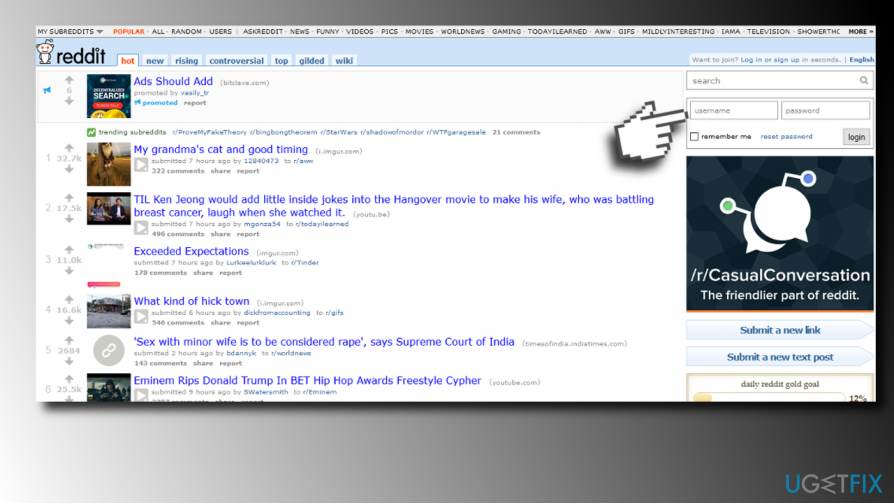
3. Access Reddit preferences by clicking on Preferences button at the top-right corner of the screen.
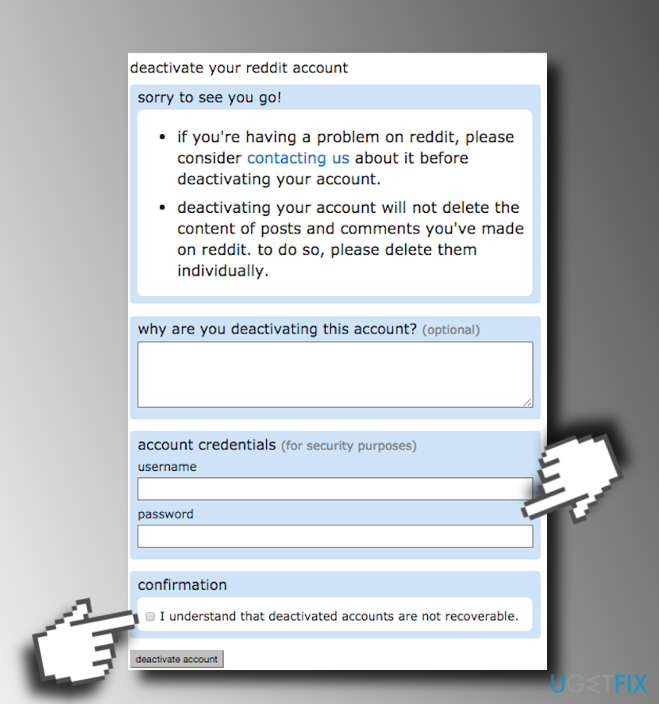
4. Now open Deactivate tab, which is located near the top of the screen.
5. Type in your username and password to confirm that you‘re the account‘s owner.
6. Check the box next to the "I understand that deactivated accounts are not recoverable" box.
7. Finally, click Deactivate account button if you are sure that you really want to deactivate your Reddit account.
IMPORTANT: after Reddit account removal, you will not be able to use the same username for creating the new Reddit account. Reddit usernames cannot be recycled and the accounts cannot be recovered.
Bottom line
To delete your Reddit account, ensure you remember your password and follow the provided steps. If you encounter issues, consider reaching out to the Reddit support team for assistance.
Frequently asked questions
Yes, you can delete your Reddit account using a web browser on Windows 10 or Windows 11 by logging into your account and following the account deletion steps in the settings.
Yes, deleting your Reddit account will remove your posts and comments, but it may take some time for them to disappear from the site.
While it is not necessary to uninstall the Reddit app, doing so can help free up space on your Windows device if you no longer plan to use it.




Report an issue
What's wrong with this guide? We review every report and update or remove content.
Report received — thank you. We'll review and fix it.
You need a free account to submit a report.
Be the first to comment