How to remove
The “Error Hard Drive Safety Delete” Pop-Up
from Windows
Eliminate the "Error Hard Drive Safety Delete" pop-up on Windows 10 and 11 efficiently. Follow our expert-tested guide for quick fixes, zero traces left.

How does How to Remove the “Error Hard Drive Safety Delete” Pop-Up end up on your PC?
- Adware installation via third-party software package
- Malicious third-party extension
- Web browser settings being altered
- Potential Trojan horse infection
Repairs Windows system files, removes malware, and restores a clean OS state — without reinstalling.
Hello. Can someone please tell me what should I do to fix the "Error hard drive safety delete" error. I receive this message regularly within my web browser (currently using Chrome by default). I was not allowed to close my web browser, so I did that using Task Manager. Although my hard drive does not seem to be affected in any way, this message makes me worries. Could you please help me to fix that?
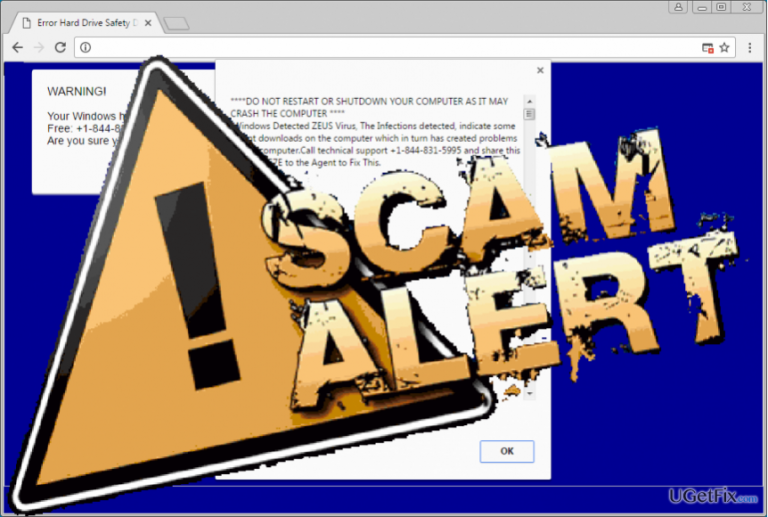
The "Error Hard Drive Safety Delete" is a web browser based pop-up alert. It has been recorded hitting Chrome and Mozilla web browsers in the begging of 2016, but apparently, its dissemination hasn’t been suspended entirely. A couple of months ago, people started reporting the "Error Hard Drive Safety Delete," which usually locks Google Chrome and scares its users into thinking that their computers are about to crash unless they call for professional IT technicians. It is stated, that the target PC might have been affected by a Trojan horse, which may steal personal information, including credit card details, logins, browsing activity, etc. will be stolen shortly. Although that sounds intimidating, the "Error Hard Drive Safety Delete" pop-up is yet another Tech-Support -Scam, which seeks to promote a rogue Customer Service owned by hackers. To fix "Error Hard Drive Safety Delete," people supposedly have to call for the +1-844-831-5995 number. The web browser gets stuck with this pop-up and no other solutions, except a phone call, are provided. That’s a catch many people fall for. However, "Error Hard Drive Safety Delete" scam only seeks people to call for hackers who may either try to extort personal information out of you or foist useless services.

Luckily, "Error Hard Drive Safety Delete" error is not malicious and can be disabled with no difficulties. It is triggered by an adware that you probably installed accidentally via third-party software package. However, adware removal won't be enough to disable "Error Hard Drive Safety Delete" pop-up. For this purpose, you will also have to reset your web browser to disable the malicious third-party extension and other leftovers.
Step 1. Remove adware
"Error Hard Drive Safety Delete" scam is triggered by an adware infection. Thus, to stop it from appearing on your web browser's screen, you will have to delete the adware completely. If you can't close your web browser because of the pop-up that freezes it completely, press Ctrl + Shift + ESC, locate your web browser's process on the Processes tab, right-click it, and select Disable. After that, perform the following steps:
- Navigate to Start > Control Panel > Programs and Features > Add/Remove Programs (Windows 7, XP).
OR Right-click on Win key > select Control Panel > Uninstall a Program (Windows 8, 10). - Check what programs have been recently installed and delete those you are not familiar with or that look suspicious to you. Select unknown programs and click Uninstall.
- To confirm the removal, click OK/Uninstall.
Step 2. Reset your web browser
NOTE: please do not restore the last browsing session. Otherwise, you will restore the "Error Hard Drive Safety Delete" alert and will have to terminate web browser via Task Manager again.
- Open Google Chrome and then look for a Menu button (three bars located in the top right corner). Click it, select Tools on a drop-down menu and click Extensions.
- Locate suspicious browser extensions and click on the trash icon placed next to them. Confirm the removal by clicking Remove.
- Click Menu button again and select Settings.
- Scroll down and find Show advanced settings option.
- Open Advanced Settings and find Reset settings button. Read all information provided in the notification and, if you agree with all conditions, click Reset.
Bottom line
To fix the 'Error Hard Drive Safety Delete' pop-up, you should first remove any adware and reset your web browser to disable the malicious extension. If these solutions do not work, consider seeking professional IT assistance.
Frequently asked questions
This pop-up usually appears when a program is trying to access a removable drive that is not properly ejected or when there's an issue with the drive itself. To resolve this, ensure all programs using the drive are closed before safely ejecting it.
You can stop the pop-up by uninstalling or disabling the program that is attempting to access the removable drive. Check your startup programs and background processes for any applications that might be causing this issue.
To prevent this message, make sure to safely eject your external drives and check for any background applications that may be accessing the drive. Additionally, keep your Windows 10 or Windows 11 system updated to minimize compatibility issues.




Report an issue
What's wrong with this guide? We review every report and update or remove content.
Report received — thank you. We'll review and fix it.
You need a free account to submit a report.
Be the first to comment