How to remove
“Unknown Security Breach” Pop-Up
from Windows
Eliminate the “Unknown Security Breach” pop-up on your Windows 10 or 11 device quickly and easily. Expert-tested solutions with screenshots await!

How does How to Remove “Unknown Security Breach” Pop-Up end up on your PC?
- Downloaded adware on the system
- Landed on a compromised website
- Installed bundled freeware from a doubtful download source
- Inexperienced PC users easily intimidated by tech support scams
Repairs Windows system files, removes malware, and restores a clean OS state — without reinstalling.
Chrome regularly redirects me to the site, which says “Internet Service Provider: unknown Security Breach.” The pop-up indicates the error code 0xa297sa, HARDDISK_ROOTKIT_TROJAN_HIJACK.EXE Hard Disk Failure, and many other technical information that I do not understand. I can’t and actually fear of closing the browser. Need your help!
If your web browser got stuck with the “Internet Service Provider: unknown Security Breach” pop-up all of a sudden, it can only mean two things – you have either downloaded adware on the system or landed on a compromised website. Anyway, a quick solution would be to close your web browser forcefully using Task Manager and then scan the system with a professional anti-malware utility.
What the “Unknown Security Breach” pop-up actually is?
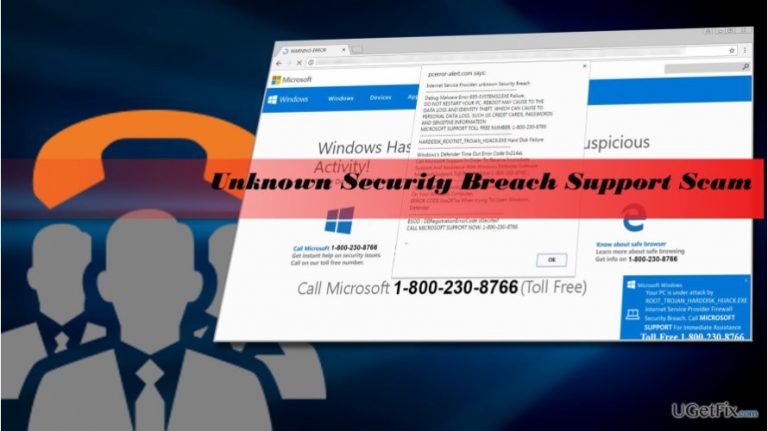
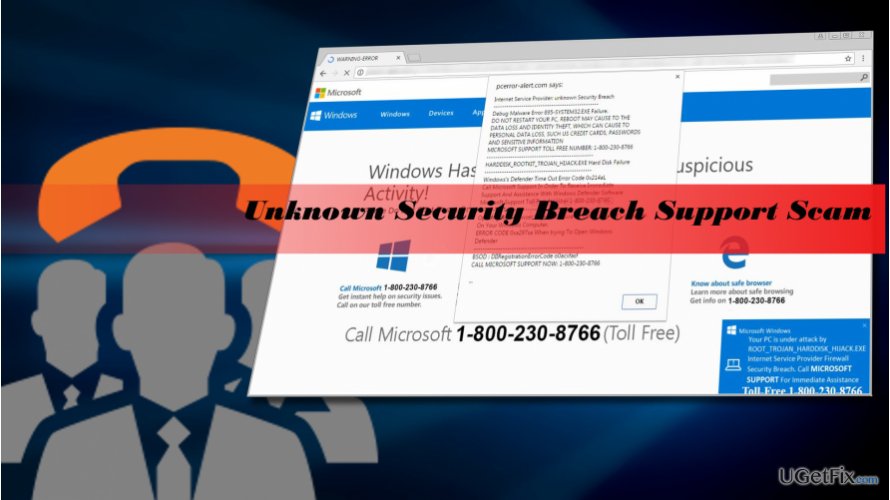
The “Unknown Security Breach” is a Tech-Support-Scam alert. It has been invented by scammers and disseminated through compromised websites or software bundles. In most of the cases, the pop-up starts emerging when the PC owner installs a bundled freeware from a doubtful download source without knowing that. When the “Unknown Security Breach” adware settles down on a default web browser, it starts generating the following message in a regular basis:
Internet Service Provider: unknown Security Breach
Debug Malware Error 895-SYSTEM32.EXE Failure.
DO NOT RESTART YOUR PC, REBOOT MAY CAUSE TO THE
DATA LOSS AND IDENTITY THEFT, WHICH CAN CAUSE TO
PERSONAL DATA LOSS, SUCH US CREDIT CARDS, PASSWORDS
AND SENSITIVE INFORMATION
MICROSOFT SUPPORT TOLL FREE NUMBER: 1-800-230-8766
HARDDISK_ROOTKIT_TROJAN_HIJACK.EXE Hard Disk Failure
Windows's Defender Time Out Error Code 0x214aL
Call Microsoft Support In Order To Receive Immediate
Support And Assistance With Windows Defender Software
Microsoft Support Toll Free Number 1-800-230-8766
Opening New Browser Page Will Cause To Data Loss And Corruption
On Your Windows Computer.
ERROR CODE 0xa297sa When trying To Open Windows Defender
BSOD : DIIRegistrationErrorCode o0acxfasf
CALL MICROSOFT SUPPORT NOW: 1-800-230-8766
Inexperienced PC users who have never fall victims to tech support scam may easily get intimidated by the “Unknown Security Breach.” As you can see, the alert contains a long list of technical information about BSOD, dll errors, various error codes, etc. and warn about possible data leakage and system crash. To strengthen the feeling of urgency, scammers programmed the “Unknown Security Breach” pop-up to freeze the browser and the tactics seems to be working because many people have already fallen to call for the supposed Microsoft Support team.
Dialing the given number is a big mistake because the scammers on the other side of the handset may trick you into purchasing useless products or services. Even worse, you may be tricked into revealing information allowing criminals to access your PC remotely. In a nutshell, “Unknown Security Breach” virus is a nasty piece of infection, which has to be removed immediately.
Removing “Unknown Security Breach” pop-up
- First of all, close the “Unknown Security Breach” scam alert by forcefully closing the entire web browser. For this purpose, press Ctrl + Shift + ESC and find the process of your web browser, click it, and select End Task.
- Right after that, run a scan with a professional anti-malware utility, such as [d1].
- OR uninstall potentially unwanted program that triggers the scam manually. Open Control Panel -> Programs and Features.
- Fing unknown or suspicious applications and uninstall them one-by-one. To do so, click on the app and select Uninstall.
- Finally, reset your web browser's default settings.
- To save the changes reboot the system.
IMPORTANT: if your web browser asks you if you want to restore the last web browsing session, DO NOT accept that because the “Unknown Security Breach” pop-up will be reopened.
Bottom line
To resolve the 'Unknown Security Breach' pop-up, you should forcefully close your web browser using Task Manager and then scan your system with a professional anti-malware utility. If these steps do not resolve the issue, consider seeking further assistance from a tech support professional.
Frequently asked questions
You should first run a full system scan using Windows Defender or another reputable antivirus program to detect and remove any potential threats.
Yes, go to Settings > Apps > Apps & features, find the suspicious program, and click 'Uninstall' to remove it from your system.
Keep your Windows 10 or Windows 11 system updated and ensure that you have a reliable antivirus installed to help block malicious software.




Report an issue
What's wrong with this guide? We review every report and update or remove content.
Report received — thank you. We'll review and fix it.
You need a free account to submit a report.
Be the first to comment