How to remove
Stop Command Prompt pop up
from Windows
Discover effective ways to stop Command Prompt pop-ups on Windows 10 and 11. Quick fixes that are expert-tested and ensure zero traces left.

How does How to stop Command Prompt pop up end up on your PC?
- Adware program installation
- Bundled software with free applications
- Pre-selected additional software during installation
- Legitimate software like Microsoft Office installer
- Modification attempts by adware
Repairs Windows system files, removes malware, and restores a clean OS state — without reinstalling.
Hello, I have recently noticed that Command Prompt keeps popping up each half an hour or so. Even though it might seem like not a big deal, I'm a passionate gamer and it annoys me. Do you have any tips how to stop cmd.exe popup? Thank you!
Recently, a vast of users report that Command Prompt[ref en-1] pops up and then closes after a few seconds. This issue might be annoying since it disrupts people while browsing, gaming, or performing other tasks on the computer. However, if you have encountered such random cmd pop up on Windows, it might indicate that your computer is infected.
Usually, Command Prompt popup might be triggered by the adware program. This cyber threat is classified as a potentially unwanted program[ref en-2] which might be installed together with free third-party applications. Likewise, users are advised to carefully follow each step of the installation process if they want to avoid the infiltration of the adware.
Additionally, experts recommend choosing Advanced or Custom settings of the installer since they fully disclose the information about additional software which might be bundled with freeware. Note that Recommended or Quick parameters are usually selected at the setup. However, you should never pick them.
Furthermore, during the procedure, you should search for any pre-selected additional software installation. It might appear as "Get XXX now" or similar boxes. Likewise, ALWAYS de-select them and use a professional security software to double-check your system for potentially unwanted programs.
Moreover, in some cases, cmd pop up might be triggered by a legitimate software, like Microsoft Office installer. However, you should still employ a malware removal tool to scan your system for potentially unwanted programs. Note that typically this issue appears due to the attempt to modify your computer settings by the adware[ref en-3].
Learn how to stop Command Prompt pop up
If you don't know how to stop Command Prompt pop up, use [rev id="Perfect Uninstaller"] to help you remove adware program which causes such issues. However, there is a possibility to get rid of the potentially unwanted program manually as well.
Since there is a possibility that this random cmd popup is caused by a legitimate MS Office software, we have prepared two ways how to fix Command Prompt problem. You can find them below.
Method 1. Remove adware program from Windows which might cause Command Prompt pop up
- Navigate to the bottom-left corner and press Start button.
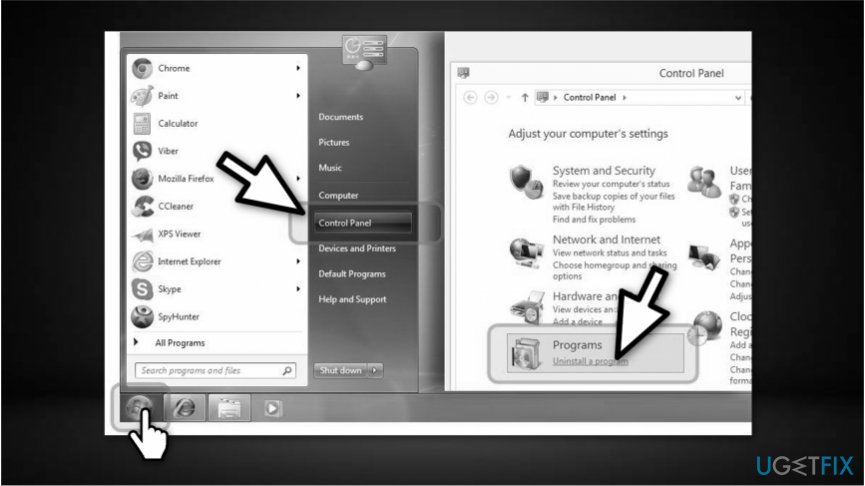
Open control panel on windows - Select Control Panel and click on Programs and Features or Add/Remove programs depending on your Windows version;
- Search for any recently installed programs which might related to the adware.
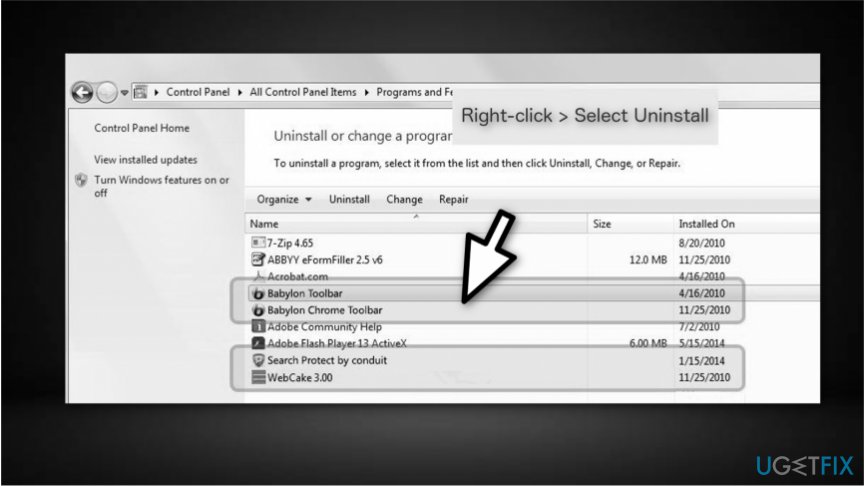
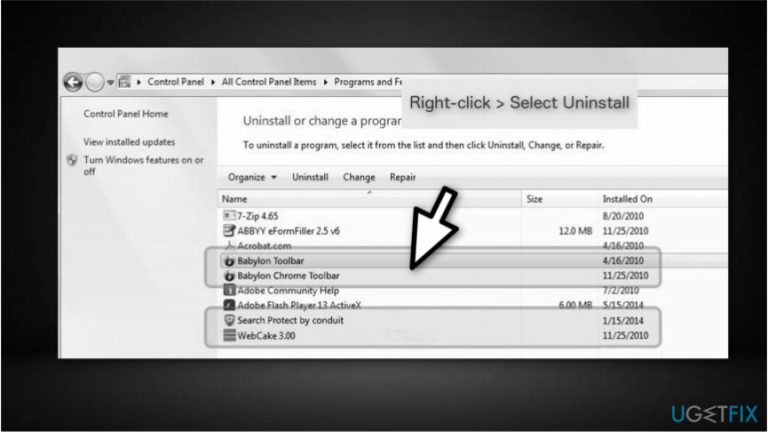
How to uninstall adware on windows - Right-click on them and select Uninstall;
- Save the changes by clicking OK button.
Method 2. Disable MS Office to stop cmd pop up
- Click on the Start button at the bottom-left corner of the desktop;
- Type Task Scheduler in the search box and open the program;
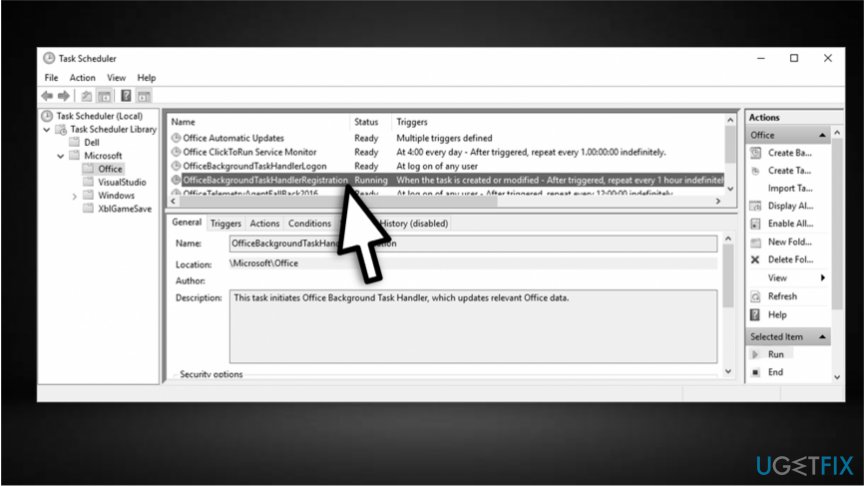
Disable ms office task to stop cmd popup - Select Task Scheduler Library, then Microsoft and finally click on Office;
- Search for OfficeBackgroundTaskHandlerRegistration task and disable it;
NOTE: If the command prompt keeps popping up, you might need to repeat the procedure and additionally disable OfficeBackgroundTaskHandlerLogon task as well.
Bottom line
To stop the Command Prompt pop up, you can use a professional uninstaller to remove the adware causing the issue or manually uninstall the potentially unwanted program. Always choose Advanced or Custom settings during installation to avoid such problems. If these solutions do not work, consider using a malware removal tool to scan your system.
Frequently asked questions
The Command Prompt may pop up due to scheduled tasks, startup programs, or malware. It's important to identify the source to prevent it from recurring.
You can disable it by checking the Task Manager's Startup tab or using the Task Scheduler to find and disable any tasks that trigger the Command Prompt.
Yes, if you identify a specific program responsible for the Command Prompt pop-ups, uninstalling it can be safe, but ensure it's not a critical system utility.




Report an issue
What's wrong with this guide? We review every report and update or remove content.
Report received — thank you. We'll review and fix it.
You need a free account to submit a report.
Be the first to comment