How to remove
Turn off Safari suggestions
from Windows
Discover effective methods to disable Safari suggestions across your Apple devices while enjoying seamless Windows 10 and 11 support. Expert-tested solu…

How does How to turn off Safari suggestions on Mac, iPad, and iPhone end up on your PC?
- Irritating offers appearing on Safari browser
- Suggestions related to previous search queries
- Collection of browsing information by Safari Suggestions
- Background processes affecting browsing speed
- Pop-ups from various sources like news and weather
Repairs Windows system files, removes malware, and restores a clean OS state — without reinstalling.
Hello! I have started getting really irritated with these offers that come on my Safari browser while I perform tasks on the web. I often receive suggestions to download particular apps from the App Store or just be loaded with weather forecasts and news articles. Additionally, I have spotted that my browsing became slower than ever before. Is this related? Is there any way to stop this activity on my Safari web browser? I am using an iPhone. Thanks in advance.
The Safari web browser is a browsing platform that is supported by Apple machines and devices. This browser app includes a feature that is named Safari Suggestions and is responsible for pushing various content to the user's computer during browsing sessions.
If you have been using Safari's Smart Search section, you should not be surprised to have received various pop-ups from news sources,[ref en-2] weather forecasting, Wikipedia texts,[ref en-3] advertisements of iTunes and other applications from the App Store, nearby located places.
The pop-ups you start experiencing from Safari Suggestions can relate to your previously search words[ref en-1] or can be not linked to your search queries at all. However, for example, if you have searched for a diet-related app, you might be loaded with various health app offers later on.
Additionally, if the Safari Suggestions feature is enabled on your Apple device or machine, note that some type of your browsing information might get collected and transferred straightly to Apple. If you perform a search request via Smart Search section, such type of data might get recorded:
- Search requests you perform.
- The location of your device/machine.
- Types of subscription services used.
- Types of Safari Suggestions that you have clicked on.
Frequent offers that come from Safari Suggestions might influence your browsing quality, i.e. especially the speed. If a lot of background processes are performed at the same type, it might result in hard browser session maintenance.
Gladly, if this feature has been bothering you lately, there is a way to turn off Safari suggestions on Mac, iPad, and iPhone devices. Follow the below-provided guiding lines if you want to succeed in this process.
How to turn off Safari suggestions on Mac, iPad, and iPhone?
STEP 1. Turn off Safari Suggestions on your Mac computer
If Safari Suggestions have been bothering you on your Mac machine, you should deselect the Safari & Spotlight Suggestions box to get rid of unwanted deals on your Safari web browser. You can do that with the help of these steps:
- Boot your Mac computer and turn on System Preferences.
- Continue by clicking on the Security & Privacy section.
- Unlock the preference section and type in your administrative password.
- Click the Unlock button.
- Furthermore, go to the Privacy tab and find Location Services.
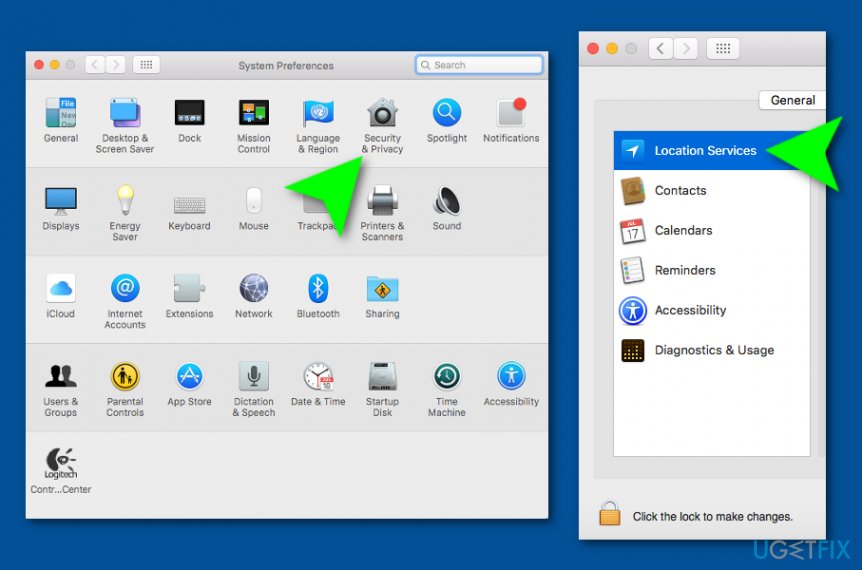
Turn off safari suggetions for your mac - Choose Details on your left that is planted next to System Services.
- Uncheck the Safari & Spotlight Suggestions box.
STEP 2. Disable Safari Suggestions on your iPhone/iPad devices
Safari & Spotlight Suggestion feature is also available on Apple devices such as iPhones and iPads. If you want to disable this function on your iPad/iPhone, complete the following steps:
- Take your device and continue with Settings > Privacy > Location Services.
- Tap on the System Services option
- Afterward, turn off Safari & Spotlight Suggestions.
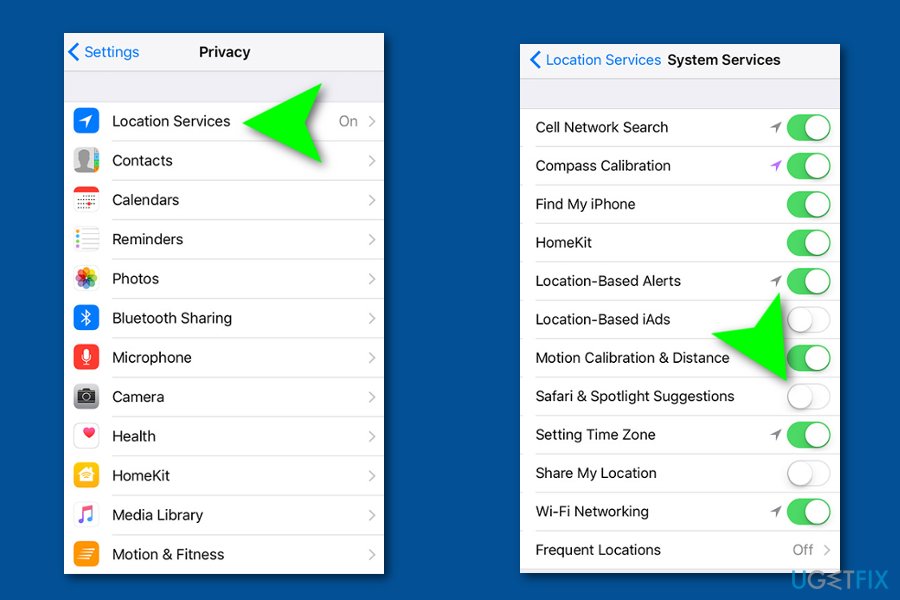
Turn off safari suggestions on iphones and ipads - Close the window to enable the changes.
Bottom line
To turn off Safari suggestions on your Mac, iPad, or iPhone, follow the provided guiding lines to disable the feature. If the issue persists after disabling suggestions, consider checking for other potential causes or resetting your browser settings.
Frequently asked questions
Safari is not available on Windows, but you can disable suggestions in other browsers like Chrome or Edge by adjusting their settings.
Safari is no longer supported on Windows, so it cannot be uninstalled directly; however, you can remove remnants through the Control Panel.
Since Safari is not designed for Windows, ensure that you are not using a browser that mimics Safari or check for any installed applications related to it.




Report an issue
What's wrong with this guide? We review every report and update or remove content.
Report received — thank you. We'll review and fix it.
You need a free account to submit a report.
Be the first to comment