How to remove
Uninstall AVG Web TuneUp
from Windows
Uninstall AVG Web TuneUp easily from Windows 10 or 11. Follow our expert-tested guide for a hassle-free removal experience, with screenshots included.

How does How to uninstall AVG Web TuneUp end up on your PC?
- Difficulty uninstalling due to additional changes on the system
- Program alters browser settings, homepage, or new tab preferences
- AVG Web TuneUp operates as security software
- Potential vulnerabilities that expose users' browsing data
- Installation via deceptive methods
Repairs Windows system files, removes malware, and restores a clean OS state — without reinstalling.
Hello. For some reason, I cannot uninstall AVG Web Tuneup completely from the device. I tried to do that via Programs and Features on my computer, but even after clicking the "Uninstall" multiple times, I still see the symbol of this extension on the browser. Do you have any suggestions?
AVG Web TuneUp is the program that users[ref en-1] have difficulty to uninstall normally and it is due to additional changes on the system and even related programs. This is a program that can even alter browser settings, homepage or new tab preferences on the browser, so uninstalling the app via control panel cannot work that easily.
AVG Web Tuneup operates as security software that is designed to guard computer users against virtual threats. Malware creators are picking up their speed in developing more destructive threats, IT experts are also trying to keep up with the latest counterattack technologies. The application focuses on securing netizens during the browsing sessions. It emphasizes the features which are able to protect from covert malware lurking on the websites.
However, there are also disadvantages to this program which might want you to uninstall the program. Previously Google security officially warned the AVG software creators to fix critical flaws in the software which, on the contrary, exposes users‘ browsing data online.[ref en-2] Crooks might have exploited such vulnerabilities for easily hijacking browsers.[ref en-3] The company attempted to fix the deficiency.
How to uninstall AVG Web TuneUp
This browser add-on can affect various web browsing tools and the Windows system in general. There are a few files that can help with the general uninstallation of AVG products. But unins000.exe or AVG Remover.exe works for more advanced computer users because it involves knowledge of the processes.
Additionally, ordinary users report getting certain difficulties while uninstalling the app this way. [d1] helps you to remove it. Since this program injects AVG Web Tuneup extension and it is delivered via deceptive methods, here are the manual guides:
Remove it from Firefox
- Open Mozilla Firefox browser. Click on the menu icon (top right corner) and choose Add-ons and then Extensions.
- Select AVG Web TuneUp and other questionable plugins. Click Remove to delete these entries.
- Afterward, it would be better to reset Mozilla Firefox.
- Enter Firefox menu and click on the question mark in the top left corner. Choose Troubleshooting Information.
- Choose to reset Firefox to its default state and then click Reset Firefox.
Delete the extension from Internet Explorer
- Launch Internet Explorer. Click on the gear icon on the top right corner and select Manage Add-ons.
- In the new window, locate AVG Web Tuneup and click Disable.
- In order to revert to the previous search engine, click on the gear icon (menu) on the top right corner of the browser and select Internet Options. Stay in General tab.
- Delete unwanted URL and enter preferable web page URL name. Click Apply to save changes.
- Click on the gear icon (menu) again and select Internet options. Enter Advanced tab and choose Reset. In the new window, check Delete personal settings and choose Reset again to complete AVG Web Tuneup elimination.
Remove AVG Web Tuneup from Google Chrome
- Click three dots on the right-top corner of the browser.
- Then go to More Tools and Extensions
- Find AVG Web Tuneup and choose Remove. Confirm by choosing Remove on the pop-up.
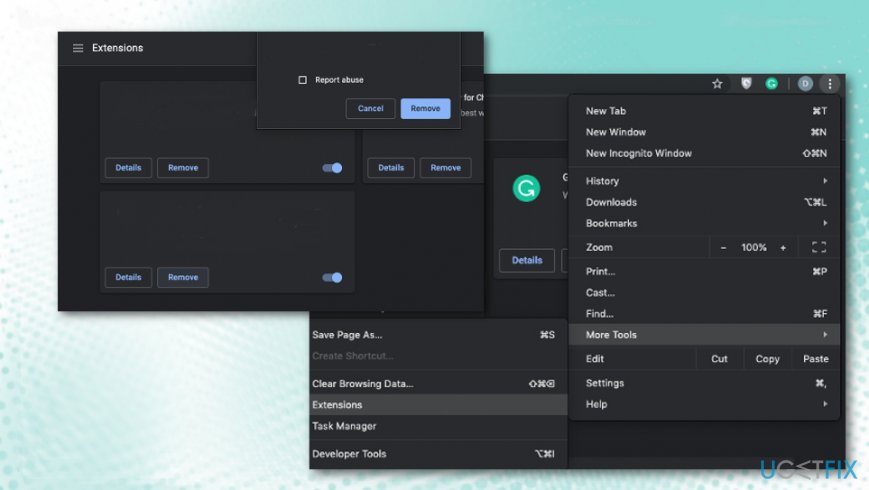
How to uninstall avg web tuneup extensions - You may also benefit from resetting the browser to default and eliminating all those unwanted changes automatically.
- Go to Advanced Settings and choose Reset Settings at the bottom.
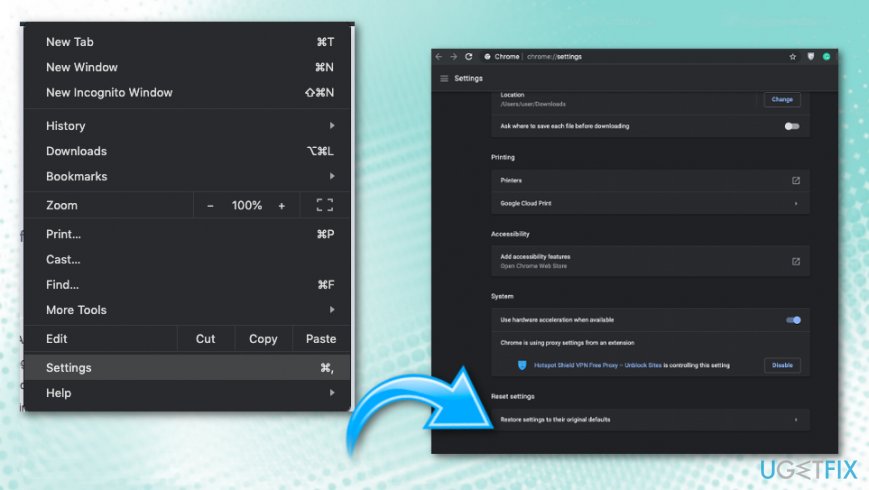
How to uninstall avg web tuneup default reset
Get rid of AVG Web Tuneup registry entries
- Click Start and type regedit to open Windows Registry Editor
- Navigate to: HKEY_CURRENT_USER -> Software -> AVG Web TuneUp
- Right-click the folder and Delete it.
- Reboot the machine.
Use AVG Remover
- Download AVG Remover/ AVG Clear
- Run the AVG Remover.exe and launch the program.
- Complete the process and reboot the machine.
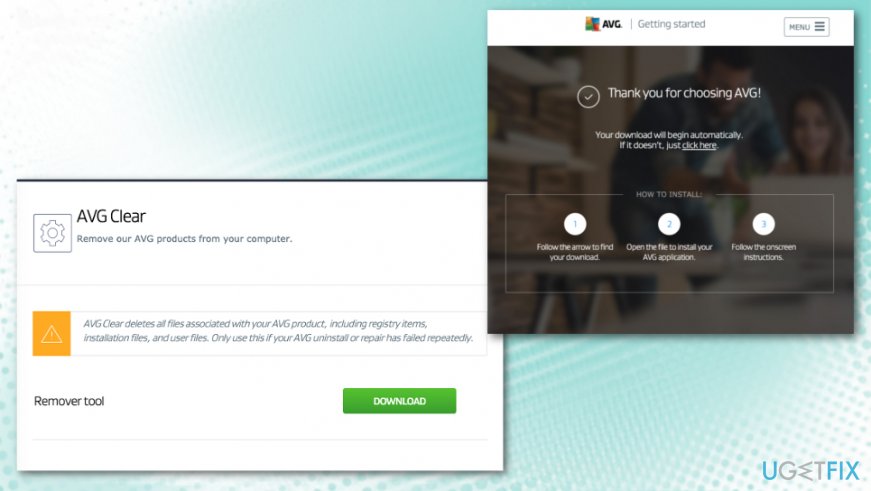
How to uninstall avg web tuneup remover tool
Bottom line
To uninstall AVG Web TuneUp, users can try removing it from the browser's extensions or using unins000.exe or AVG Remover.exe for a more advanced uninstallation. If these methods do not work, consider seeking further assistance or using specialized removal tools.
Frequently asked questions
To uninstall AVG Web TuneUp from Windows 10, go to Settings > Apps, find AVG Web TuneUp in the list, and click 'Uninstall'. Follow the prompts to complete the removal process.
Yes, on Windows 11, you can remove AVG Web TuneUp by right-clicking the Start button, selecting 'Apps & Features', locating AVG Web TuneUp, and clicking 'Uninstall'.
If AVG Web TuneUp does not appear in the programs list, try using the AVG removal tool or check your browser's extensions, as it may be installed as an extension instead.




Report an issue
What's wrong with this guide? We review every report and update or remove content.
Report received — thank you. We'll review and fix it.
You need a free account to submit a report.
Be the first to comment