How to remove
Uninstall Crashplan
from Windows
Discover quick methods to uninstall unwanted programs on Windows 10 and Windows 11. Expert-tested solutions ensure smooth removal with zero traces left.

How does How to uninstall Crashplan on Mac OS X end up on your PC?
- Difficulty in removing programs on Mac
- Leaving leftovers after dragging to Trash
- Corrupted files causing crashes or freezes
- Infected applications affecting performance
- Misunderstanding the difference between removal and uninstalling
Repairs Windows system files, removes malware, and restores a clean OS state — without reinstalling.
Hey. Maybe it will seem a bit funny, but I really cannot find out how to remove CrashPlan from Mac OS X. I'm a fairly new Mac user, so I haven't yet sorted out how to uninstall software correctly. Could you please help me to remove CrashPlan from my Mac? It is useless. Many thanks!
Many computer users were looking for a way how to uninstall Crashplan on Mac OS X. Therefore, this time we are going to speak about this tool specifically. CrashPlan is the tool that supposedly helps small businesses and organizations with automatic backups.
It's obvious that you are facing difficulties in getting rid of programs on your Mac because it is not that easy.[ref en-1] Fortunately, you are in the right place! Our team has prepared an explanation on how to 'remove' and 'uninstall' programs on Macs and a comprehensive uninstalling guide.
As we have just noted, two terms 'removal' and 'uninstalling' have to be understood correctly to get rid of unnecessary programs like CrashPlan from your machine. People keep thinking that it's enough to drag a program to Trash and that's it. If you are one of those users who think so, then don't be surprised if the performance of your Mac will diminish.
That's because by 'removing' programs, you leave tens of leftovers and cash the system gradually. In contrast, you should apply 'uninstalling,' which means that you have to delete CrashPlan and every single file that is related to it what is not that easy.

Also, there is a possibility of corrupted or infected files.[ref en-2] Sometimes programs will crash or freeze due to the corrupted file or infected application. Because of these intruders, programs cannot work appropriately. For this instance, you need a system scan to determine what is the problem.
CrashPlan uninstalling
All this can be done manually. Nevertheless, manual CrashPlan uninstalling requires a lot of time because you need to find all related pieces. Therefore, those who want to do that quickly and ultimately, it's recommended to use [rev id=”Reimage”] or another tool dedicated to fixing system issues or even clean Mac OS from Mac malware.[ref en-3] Besides, we will give you short tips on how to uninstall CrashPlan on Mac OS manually at home.
Ways to uninstall CrashPlan on Mac
Most probably you are advanced in 'removing' applications. Nevertheless, we will remind you what steps should be taken to get rid of Crashplan from Mac. Such steps need to be taken:
- You should Quit CrashPlan application if it is running.
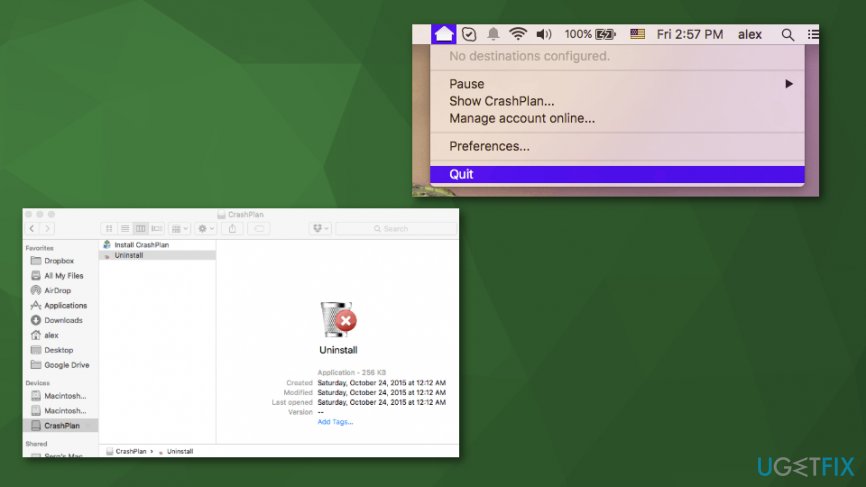
How to uninstall crashplan on mac os uninstall application - Then delete the following files from the system:
Users > [current user=””][/current] > ~Library > Saved Application State > com.backup42.desktop.savedStatesers > [current user=””][/current] > ~Library > Caches > com.backup42.desktop
Users > [current user=””][/current] > ~Library > Saved Application State > com.backup42.desktop
Users > [current user=””][/current] > ~Library > Preferences > com.backup42.desktop.plist
Users > [current user=””][/current] > ~Library > Logs > Crashplan - Do not forget to delete the program from Applications folder:
- Open Applications folder;
- Click on the CrashPlan icon and hold it until it can be moved;
- Drag the application to Trash;
- Click Ctrl+Trash at once and then select Empty Trash.
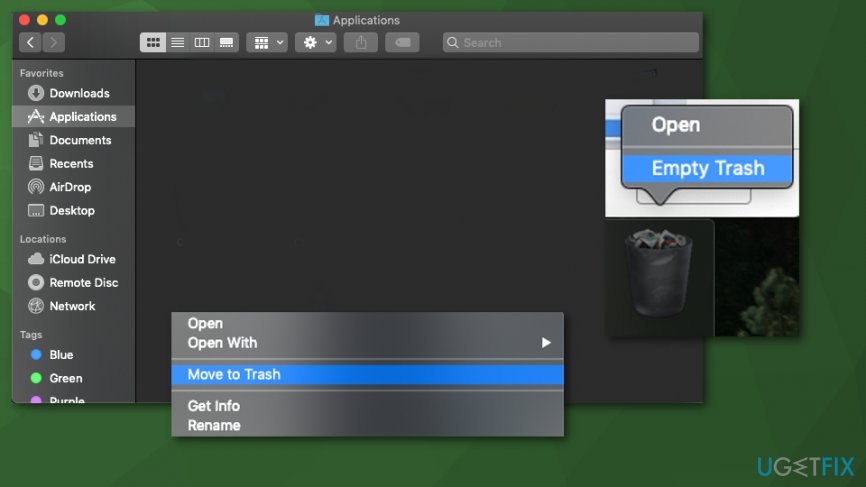
How to uninstall crashplan on mac os trash
CrashPlan Home edition uninstall
There is more to the CrashPlan uninstalling process. You need to find the proper uninstaller:
- Open Finder.
- Press Command + Shift + G to open the dialogue window.
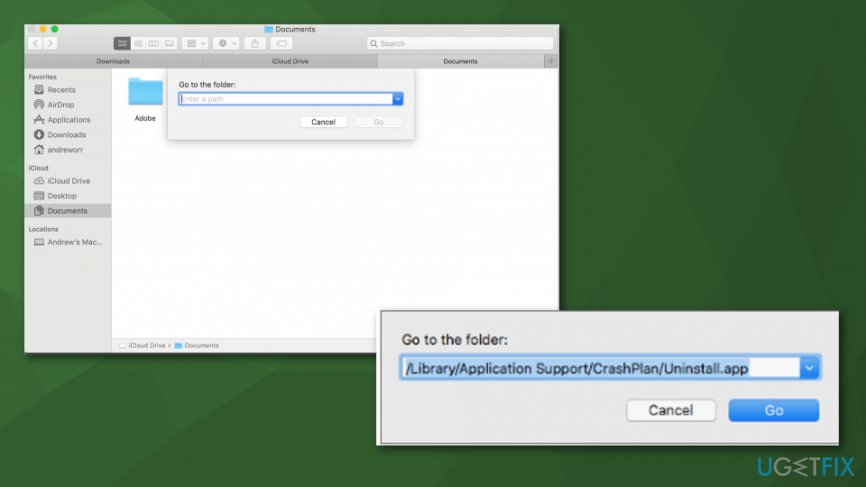
How to uninstall crashplan on mac os finder - Copy and paste the following in the box:
When CrashPlan is installed for everyone using the device: /Library/Application Support/CrashPlan/Uninstall.app.
When CrashPlan is installed for the specific user: ~/Library/Application Support/CrashPlan/Uninstall.app. - Click Go after the step.
- Double-click the Uninstall app in Finder and follow the suggested steps.
Using automatic uninstaller software
There is another method - special tools. PC repair tools or specific software for application cleaning might help with unwanted and persistent programs or apps. This method also helps to clean the remains of already deleted apps and avoid problems in the future.
Bottom line
To uninstall CrashPlan, it's important to not just drag it to Trash but to ensure all related files are deleted. Manual uninstallation can be time-consuming, so using a dedicated tool like Reimage is recommended for a quicker solution. If these methods do not work, consider performing a system scan to identify any underlying issues.
Frequently asked questions
Yes, you can uninstall applications in Windows 10 or Windows 11 by going to Settings > Apps, selecting the program, and clicking 'Uninstall.'
If Crashplan doesn't uninstall correctly, try using the built-in Windows troubleshooter for apps or a third-party uninstaller to remove leftover files.
Yes, after uninstalling, you can manually check the Program Files and AppData folders for any remaining Crashplan files and delete them.




Report an issue
What's wrong with this guide? We review every report and update or remove content.
Report received — thank you. We'll review and fix it.
You need a free account to submit a report.
Be the first to comment