How to remove
Uninstall Star Citizen and delete RSI Launcher
from Windows
Easily uninstall Star Citizen and remove the RSI Launcher from your Windows 10 or 11 PC. Follow our expert-tested guide for a hassle-free experience.


How does How to uninstall Star Citizen and delete RSI Launcher end up on your PC?
- Uninstalling RSI Launcher does not remove Star Citizen
- Residual files left on the system after uninstallation
- Improper uninstallation process causing registry issues
- Frequent lag and crashes due to incomplete removal
- Potential error messages from leftover files
Repairs Windows system files, removes malware, and restores a clean OS state — without reinstalling.
Hi, yesterday I installed Star Citizen since it was free over the weekend. I did not like the game in particular, so I'd like to get rid of it. The problem is I don't know how to uninstall Star Citizen and RSI Launcher that comes with it. Any advice?
Star Citizen is a multiplayer first-person shooter and combat simulation game that was first announced in 2012, and up to this day, remain in the "in-development" status, which means that there is no official release date provided to this day. However, this does not mean that players can't play the game, even without it being finished.
Instead of releasing the game, the developers allow gamers to play the game in the Alpha (otherwise known as early access)[ref en-3] stage - everyone who is willing to spend $45USD is allowed in. Besides, the Star Citizen also offers "modules" that could be purchased via an application known as RSI Launcher - it comes along with the game.
Without a doubt, the project's crowdfunding approach was not received well overall and questioned whether charging users for an unfinished game for years is ethical. Nonetheless, the game is very active, and over 2.6 million accounts were created over the years.[ref en-1]
Whether it is this reason why you want to uninstall Star Citizen or not, you came to the right place. Games are not so straight-forward anymore when it comes to their installation and uninstallation in some cases. Once downloaded, users are required to install any additional application to manage and launch the game.
In some cases, players think that deleting RSI Launcher would uninstall Star Citizen, but it is not the case. There are plenty of residue files that could be scattered around in a Windows operating system, so it creates plenty of confusion among users. Do you uninstall RSI Launcher or Star Citizen first? How do you get rid of the residue files and where to find them?
If you do not remove Star Citizen correctly, it might cause you issues with the registry or cause error messages. If you have already experienced frequent lag, crashes, BSODs,[ref en-2], or other errors, we recommend scanning your device with [d1], as there could be underlying issues on the PC that could be causing these problems.
Step 1. Save the custom game files
If you are planning to come back to the game later, it is advisable you first save all the relevant files, such as keybind settings, user configuration, profiles, etc. If you want to completely delete RSI Launcher along with the game and its settings, you can skip this step.
- Press Win + E to open File Explorer
- Go to the following location:
C:\\Program Files\\Roberts Space Industries\\StarCitizen\\LIVE\\USER\\Controls\\Mappings
- Copy the relevant files to another location of your choice
- Now go to the following location:
C:\\Program Files\\Roberts Space Industries\\StarCitizen\\LIVE\\
- Save the custom user.cfg file.
Step 2. Uninstall Game Launcher
You can uninstall the Launcher via Control Panel:
- Type in Control Panel in Windows search and press Enter
- Go to Programs > Uninstall a program
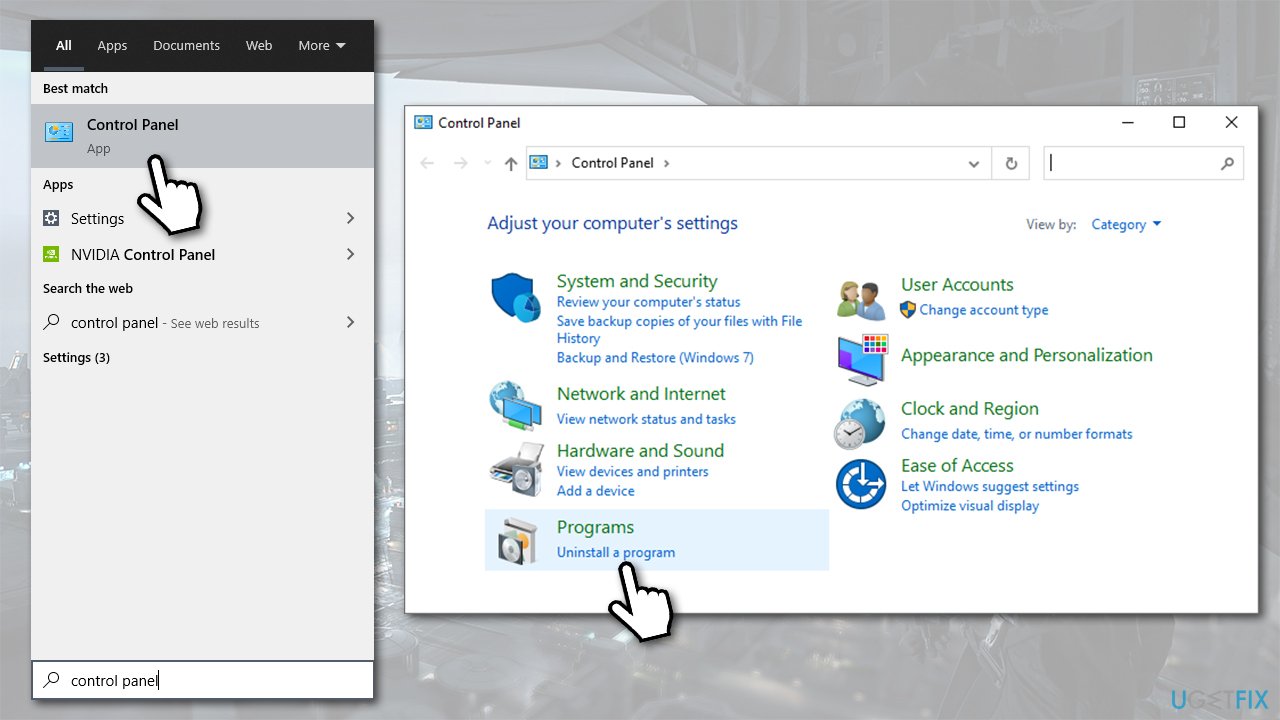
How to uninstall star citizen and delete rsi launcher go to control panel - Find RSI Launcher on the list, right-click it and press Uninstall
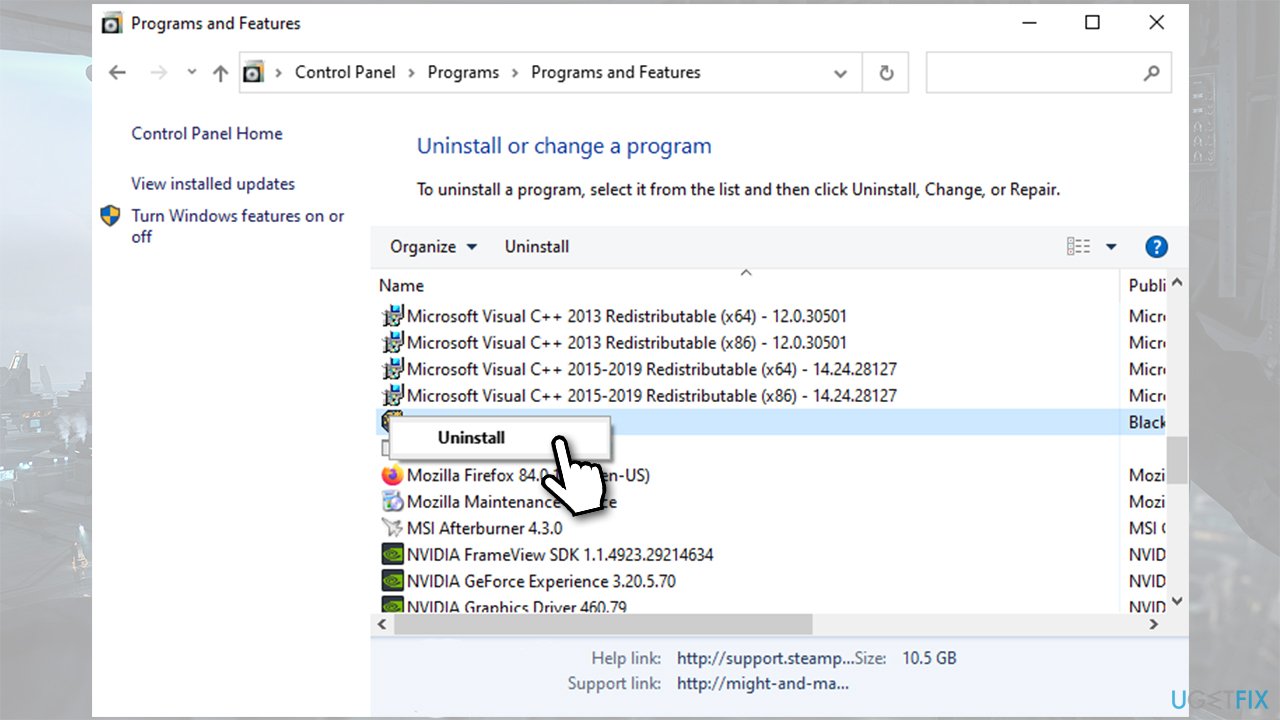
How to uninstall star citizen and delete rsi launcher uninstall game launcher via control panel - Follow on-screen instructions.
Step 3. Delete RSILauncher and Start Citizen files (User account)
Some players believe that uninstalling RSILauncher would also delete the game. However, this is not true, as you need to also eliminate files scattered around your PC. Here's how to do it:
- Type in %AppData% in Windows search and press Enter
- Right-click on rsilauncher folder and pick Delete
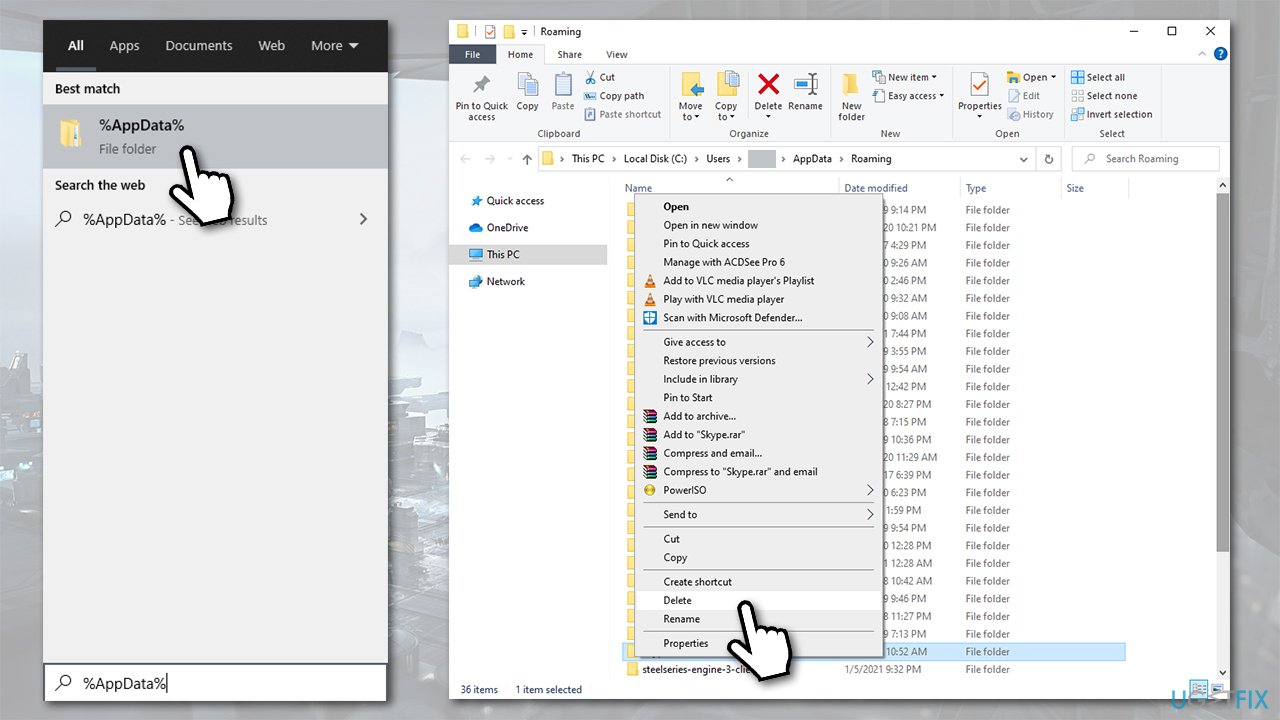
How to uninstall star citizen and delete rsi launcher delete appdata - Type in %LocalAppData% in Windows search and press Enter
- Delete StarCitizen folder
- Type in %ProgramFiles% in Windows search and press Enter
- Delete Roberts Space Industries folder.
- Right-click on Recycle Bin and press Empty Recycle Bin.
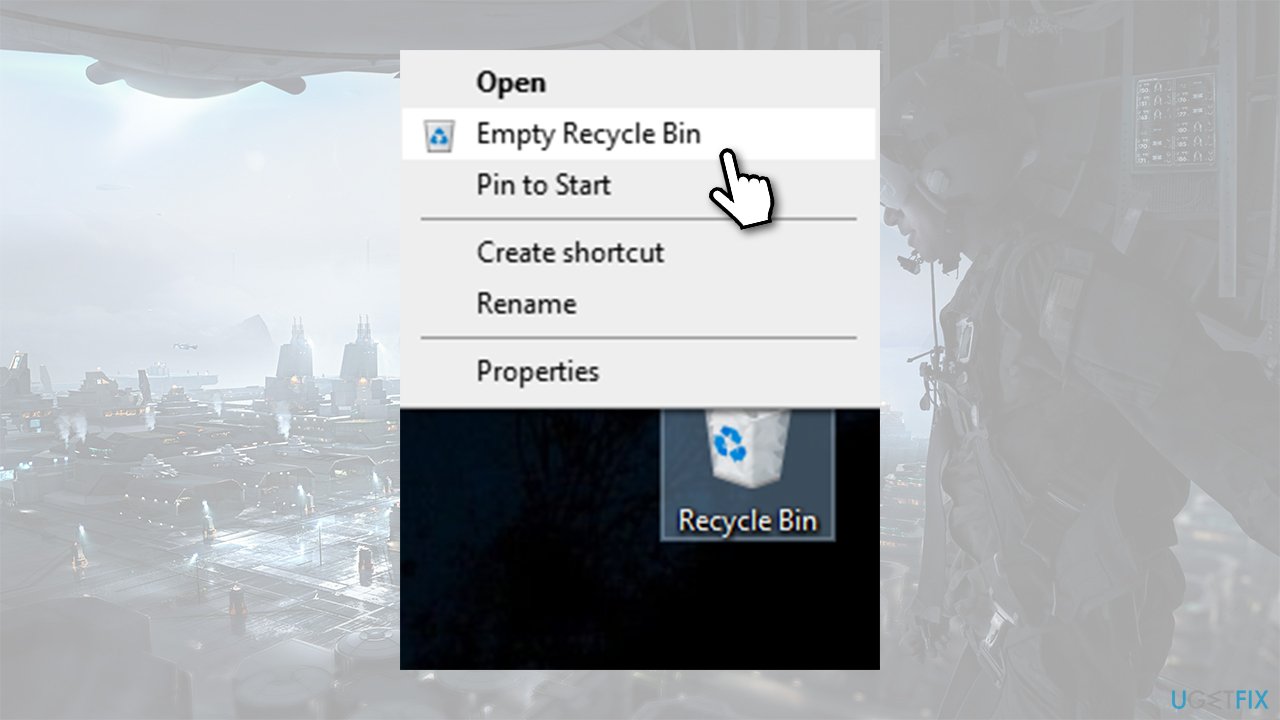
How to uninstall star citizen and delete rsi launcher empty recycle bin
Tip: If you can't see the folders mentioned above, you need to enable hidden files. To do that, open File Explorer, go to View tab and tick the Hidden Files box.
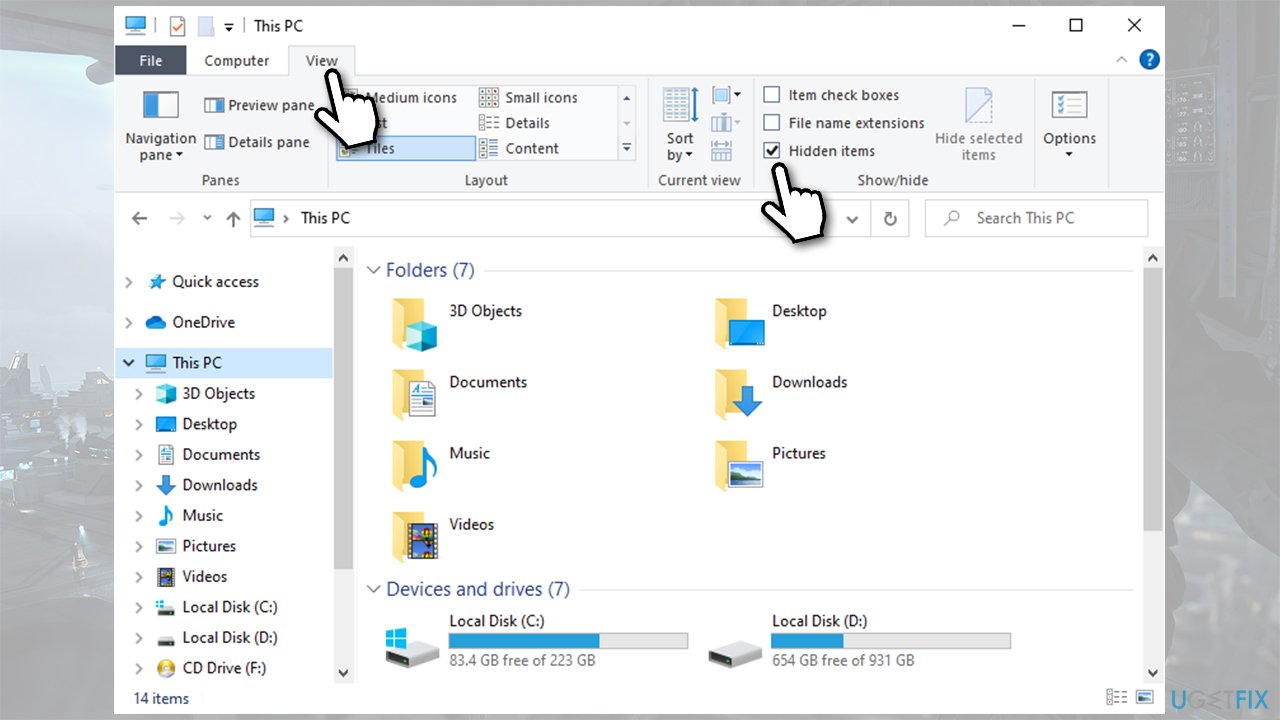
Step 4. Delete RSILauncher and Start Citizen files (Admin account)
If you are using Administrator's account as your default account, you will not find RSILauncher and StarCitizen files. Instead, you need to find these files under the admin account. To do that, go to the following location:
C:\\Users\\administrator\\AppData
Note that "administrator" can be named as something else, if you changed it before.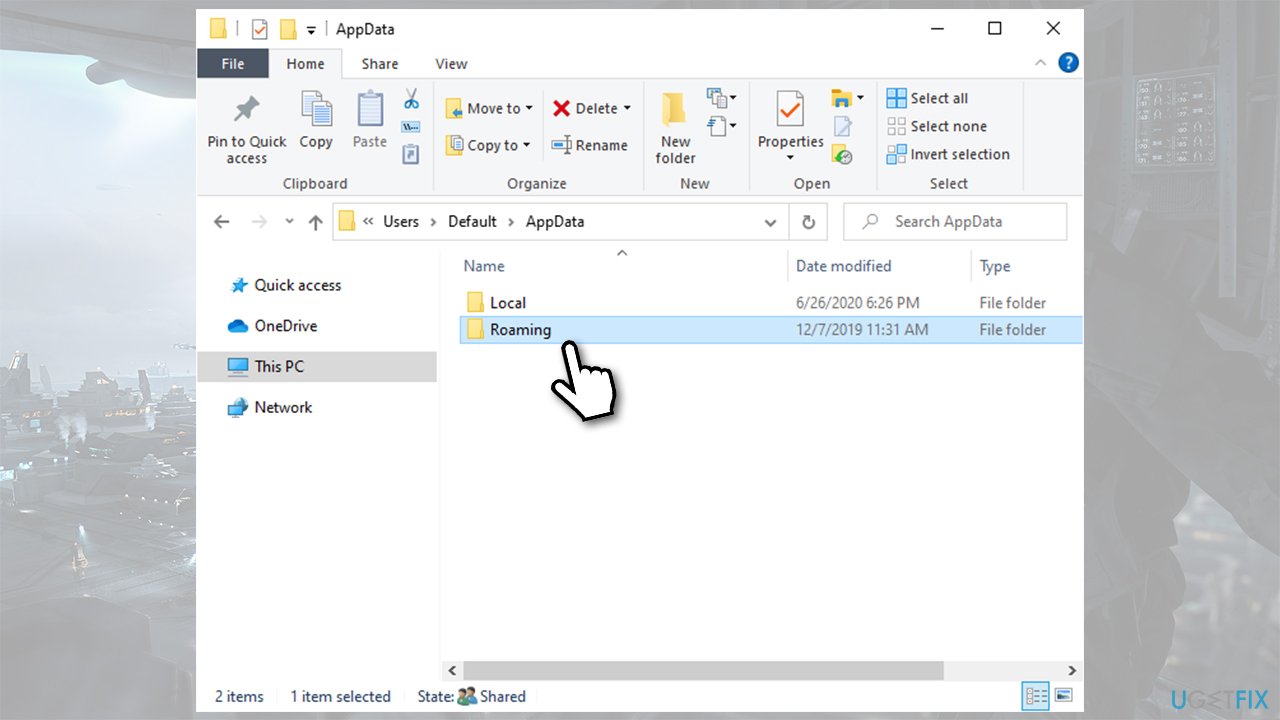
Final thoughts
While Star Citizen might be a great game, there are plenty of reasons to remove it. Unfortunately, it is not easy to do, as the game does not have a simply uninstaller, just like most other games or programs do. Hopefully, you were able to uninstall Star Citizen and delete RSILauncher on Windows 10 after following this guide.
Bottom line
To properly uninstall Star Citizen and RSI Launcher, ensure you remove both applications and clean up any residual files. If you encounter issues, check for leftover files in the system and remove them manually. If none of these steps resolve the problem, consider seeking further technical support.
Frequently asked questions
To completely uninstall Star Citizen from Windows 10, go to 'Settings' > 'Apps', find Star Citizen in the list, and click 'Uninstall'. Make sure to also delete any remaining files in the installation directory to free up space.
To remove the RSI Launcher on Windows 11, open 'Settings', navigate to 'Apps', find the RSI Launcher, and select 'Uninstall'. Additionally, check your Program Files folder to ensure no leftover files remain.
Yes, after uninstalling both Star Citizen and the RSI Launcher, use a third-party uninstaller tool or manually search for and delete any leftover folders in the installation directory on Windows 10 or Windows 11.




Report an issue
What's wrong with this guide? We review every report and update or remove content.
Report received — thank you. We'll review and fix it.
You need a free account to submit a report.
Be the first to comment