How to fix
Facebook attachment unavailable error
on Windows
Resolve the Facebook attachment unavailable error on Windows 10 and 11 effortlessly. Get expert-tested solutions that fix the issue in minutes!

What causes How to fix Facebook attachment unavailable error?
- Privacy settings of the shared image are set to private
- The person who shared the image may not have permission to share it
- The image may have been removed from the original source
- Incorrect configuration of sharing settings
- Programming bugs or general errors
Repairs Windows system files, removes malware, and restores a clean OS state — without reinstalling.
Hello. When I post a picture to my group on Facebook, people complained that they could not see it, as it shows "Attachment Unavailable." Is there any way to fix this issue? Thanks
Facebook is one of the most successful social network platforms in the world, and its popularity, despite multiple privacy scandals, is growing. The website, which was first released to the public back in 2004, currently has over 2.3 billion users worldwide.[ref en-1] Additionally, the application is always improved, and new features added, improving the user experience for many.
However, not everything always goes smoothly, and some features fail, whether it is due to incorrect configuration, programming bugs,[ref en-2] or general errors. One of such errors is Facebook "Attachment Unavailable," which prevents users from viewing images that were hosted in a group.
"Attachment Unavailable" error reads as follows:
Attachment Unavailable. This attachment may have been removed or the person who shared it may not have permission to share it with you.
The reason for "Attachment Unavailable" Facebook error is relatively simple: when you share an image, its privacy settings might be altered. For example, if you are trying to share a picture posted on Twitter, but its security settings are set to private.
For that reason, only your friends can see posts where hosted images have incorrect privacy settings. It is an unfortunate situation indeed since group members are not always included in the friend list. Fortunately, several things can be done in order to fix Facebook attachment unavailable error. Please follow all the instructions below.
Note: before you proceed, we recommend you scan your device with [d1] - it can fix various problems that can arise due to multiple factors like corrupted or missing files.[ref en-3]
Fix 1. Set Public sharing setting
This method helps users fix "Attachment Unavailable" Facebook error in most cases. Before you share the image, you should make sure that the privacy is set to Public:
- Go to your wall on Facebook
- Click on three horizontal dots to open the drop-down menu
- Pick from News Feed or Your Story options
- On the right side, click on the drop-down menu and pick Public
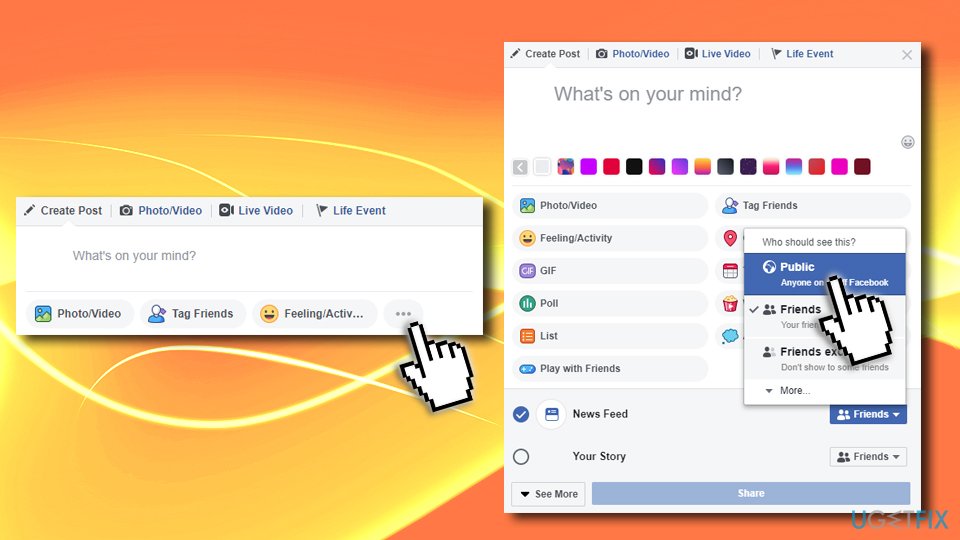
Fix facebook attachment unavailable error set to public
Fix 2. Upload to the specific group directly instead of sharing the link
Instead of sharing the picture, you can simply upload it to the group directly. Here's how to do it:
- To enter the group of interest, go to Facebook's main page, and click on Groups on the left side
- Select the group you want to post the picture in
- Click on Add Photo/Video (and again, make sure the privacy is set to Public)
- Select Upload Photos/Videos and pick the file to upload it
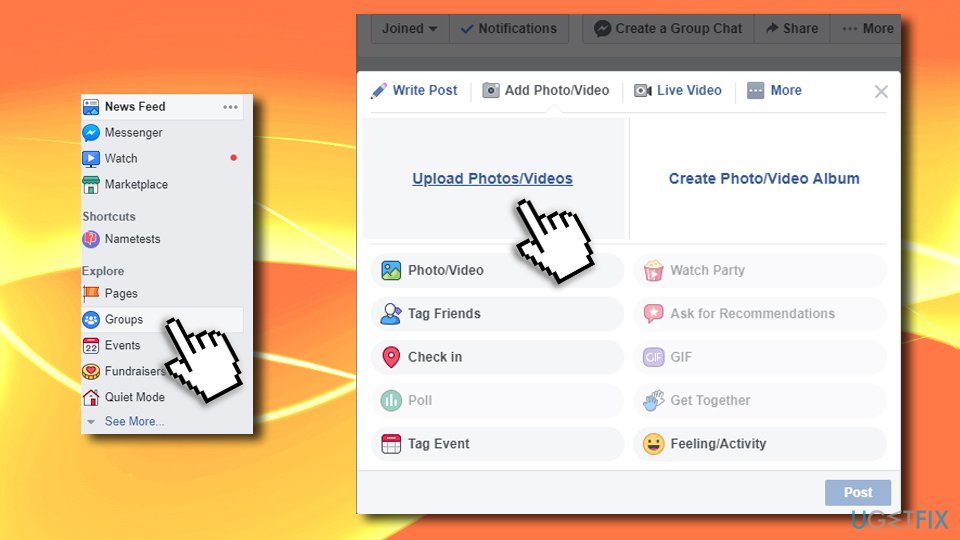
Fix facebook attachment unavailable post directly on group wall
Fix 3. Modify security settings of the image before posting
Some pictures might have preset options that might not let others view it after sharing. Therefore, perform the following actions:
- Download the picture to your computer
- Right-click on it, and select Properties
- In the bottom of the window, locate Security section
- Tick Unblock, then click on Apply and OK
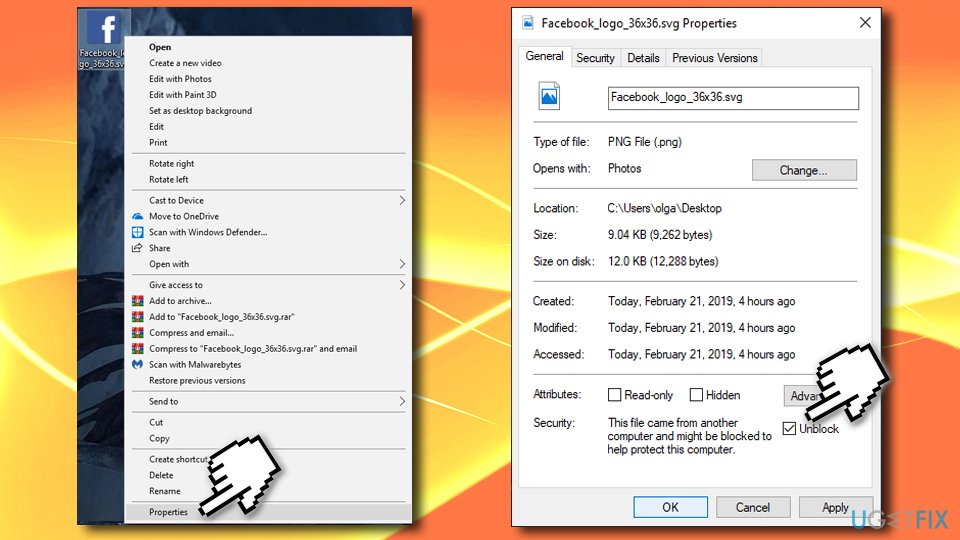
Fix facebook attachment unavailable unblock via file properties
Fix 4. Set Privacy settings to Public
Setting your Privacy on Facebook to Public will fix Facebook attachment unavailable error quickly. However, this will allow everybody on Facebook to see your posts. Follow these steps:
- Click on the arrow in the menu bar on the top-right of Facebook page
- Select Settings
- Next, go to Privacy
- Under Your Activity > Who can see your future posts, click on Edit
- Set the setting to Public
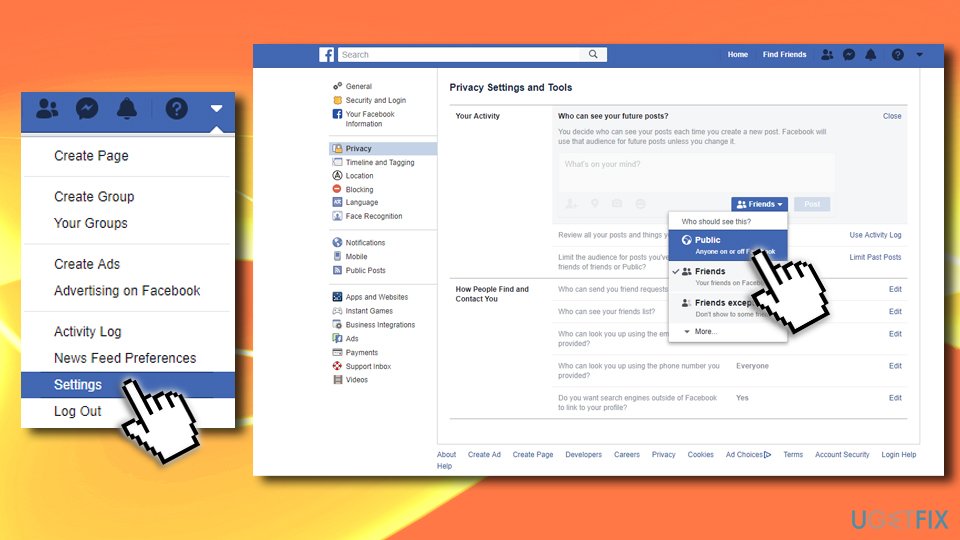
Fix facebook attachment unavailable set global public setting
Note: in some cases, Facebook malfunctions can be attributed to malware infection. Facebook Messenger is commonly used to deliver malicious attachments or phishing links. Therefore, if you were recently exposed to social media's strange behavior, you should scan your device with reputable anti-malware to rule out this possibility.
Bottom line
To fix the Facebook 'Attachment Unavailable' error, ensure that the privacy settings of the image are set to Public before sharing. If the issue persists, consider checking the permissions of the person who shared the image or scanning your device for potential problems.
Frequently asked questions
First, clear your browser cache and cookies, then restart your browser. If the issue persists, try accessing Facebook in a different browser or reset your network settings.
You can try disabling any VPN or proxy settings that might be interfering with your connection. Additionally, ensure that your Windows 11 is updated to the latest version for optimal performance.
Yes, you can visit websites like DownDetector to see if other users are experiencing similar issues with Facebook. If the service is down, you may need to wait until it is resolved on their end.




Report an issue
What's wrong with this guide? We review every report and update or remove content.
Report received — thank you. We'll review and fix it.
You need a free account to submit a report.
Be the first to comment