How to fix
ERR_SSL_BAD_RECORD_MAC_ALERT error
on Windows
Resolve the ERR_SSL_BAD_RECORD_MAC_ALERT error on Windows 10 or 11 effortlessly. Quick solutions await to get you back online—expert-tested!


What causes How to fix ERR_SSL_BAD_RECORD_MAC_ALERT error?
- Third-party anti-malware software scanning encrypted connections
- Outdated Google Chrome web browser
- Issues with SSL certificates
- Windows not updated
- Network configuration problems
Repairs Windows system files, removes malware, and restores a clean OS state — without reinstalling.
I recently updated my Windows 10 PC, and now I cannot access many sites, including https://support.microsoft.com/en-us. I use Google Chrome web browser, and it shows an error message instead of loading the site - ERR_SSL_BAD_RECORD_MAC_ALERT. Is there a way to fix this? Many thanks.
ERR_SSL_BAD_RECORD_MAC_ALERT is an SSL certificate error that is specific to Google Chrome browser - while MS Edge users would encounter an equivalent - INET_E_DOWNLOAD_FAILURE error. SSL certificates are crafted for your own safety - they use a cryptographic key to digitally sign the owner of the site and bind a domain name and the organization together. If some problems arise with the certificate, users might start receiving various SLL errors, including ERR_SSL_BAD_RECORD_MAC_ALERT.
While no particular sites are connected to ERR_SSL_BAD_RECORD_MAC_ALERT error, users cannot access legitimate and trusted sites, such as Microsoft support or Google support domains. Therefore, there is no doubt that these sites have a valid certificate, and the problem lies somewhere else.
One of the most likely culprits and ERR_SSL_BAD_RECORD_MAC_ALERT error causes is third-party anti-malware software that is set to scan all the encrypted connections. Nevertheless, other reasons, like the outdated Google Chrome web browser, can also be the cause of the problem.
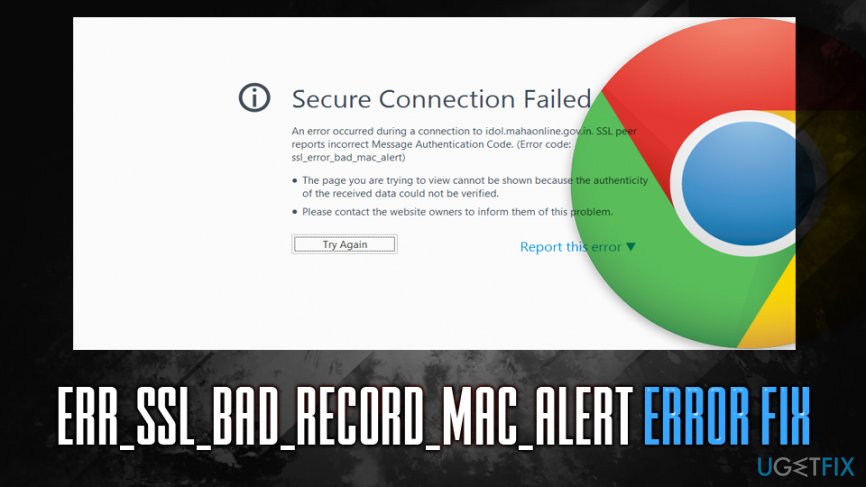
However, to fix ERR_SSL_BAD_RECORD_MAC_ALERT error, you will have to apply various solutions that we provide below. Before you do that, however, we would recommend you to scan your computer with [d1], it can fix various errors and repair damage done by malware when trying to recover from the infection.
For the record, you should not enter financial or personal information into sites that do not provide a safe connection (HTTPS)[ref en-4] that includes a valid SSL certificate, as the data can be intercepted and stolen not necessarily by website authors but hackers. Consequently, you might face money loss or even identity theft.
Fix 1. Update Google Chrome and Windows
Regardless of what type of computer problem you are facing, updating the software should be your first troubleshooting option. In this particular instance, you should make sure that Windows are updated, as well as Google Chrome. The latter should update automatically as long as you turn off the browser and enable it again. To update Windows, follow these steps:
- Right-click on Start button and select Settings
- Go to Update & Security
- On the right-side, click on Check for updates
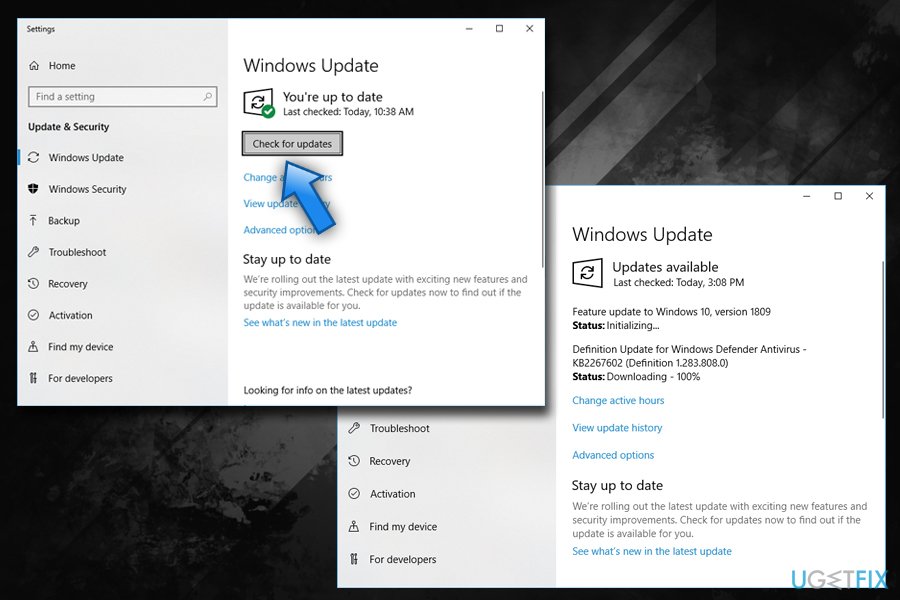
Err ssl bad record mac alert error fix check for windows updates - Windows should automatically download and install the latest updates
- Reboot your computer
Fix 2. Add problematic sites to Trusted sites list
This ERR_SSL_BAD_RECORD_MAC_ALERT error fix helped many users, so you should try this method if you are having problems with just a few particular sites and the issue is not universal:
- Type in Control Panel into Cortana's search box and hit Enter
- Go to Network and Internet > Internet Options
- Select Security tab and click on Trusted sites
- Click on Sites
- Type in the problematic site address and click Add
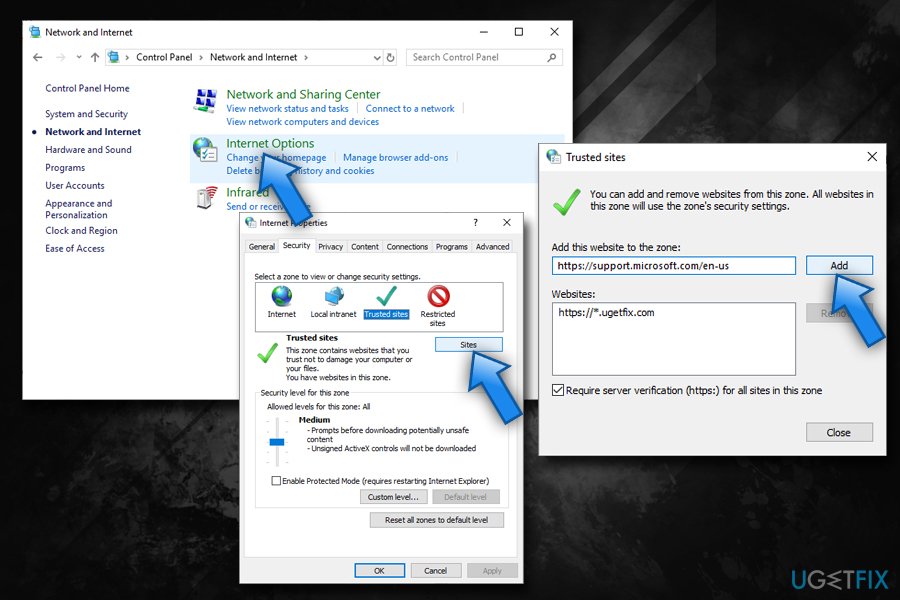
Err ssl bad record mac alert add to trusted sites - Try entering the website
Fix 3. Stop the anti-virus scanning the encrypted connections
ERR_SSL_BAD_RECORD_MAC_ALERT was mostly present in computers of users who used such anti-malware tools like Bitdefender.[ref en-1] It is important to keep your system protected, so you should not uninstall security software completely. However, you can disable the excessive HTTPS scanning (note that these instructions apply to BitDefender and can differ depending on security application you are using):
- Go to Features and select Web Protection
- Select Settings
- Under Scan SSL option toggle the switch to the left to turn the feature off
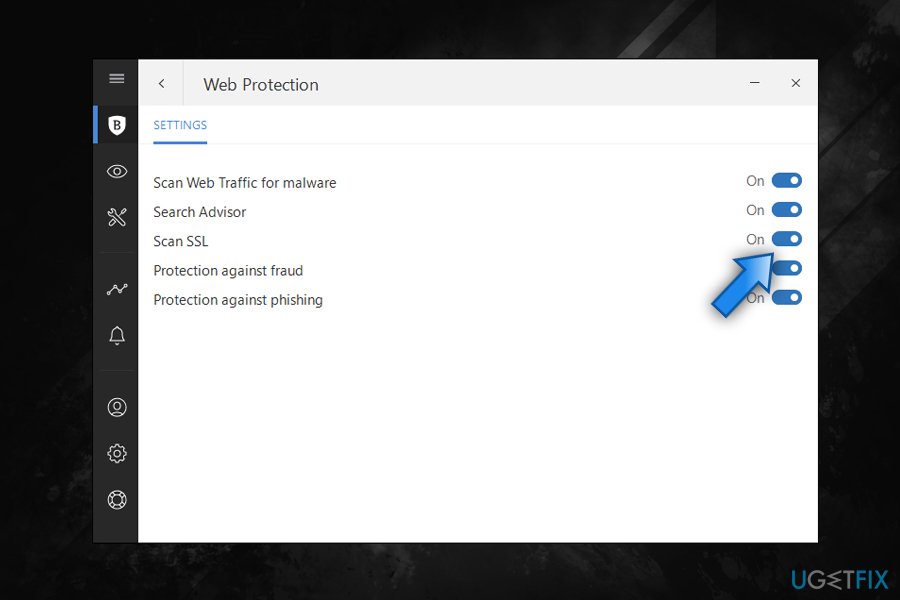
Err ssl bad record mac alert disable ssl scanning
Fix 4. Set Windows Time service to automatic
Many SSL errors are connected to incorrect time settings. To permanently fix ERR_SSL_BAD_RECORD_MAC_ALERT or similar SSL errors, you should set the startup time of Windows Time service to automatic:
- Press Win + R on your keyboard
- Type in services.msc and hit Enter or click OK
- Scroll down and locate Windows Time service
- Double-click on it and to open its Properties
- Under Startup type, pick Automatic from the drop-down menu
- Click Apply and then select Start
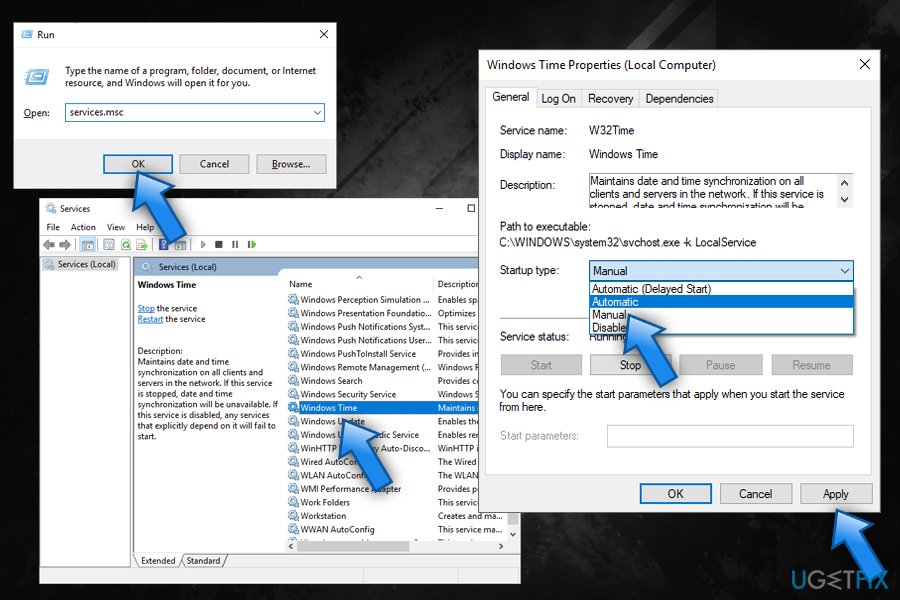
Err ssl bad record mac alert edit windows time service - Reboot your computer
Fix 5. Change the settings of your router
Another way to fix ERR_SSL_BAD_RECORD_MAC_ALERT error by changing the MTU[ref en-2] (Maximum transmission unit) rate to 1400. For that, you will have to log in to your router environment via the browser (you need to know admin credentials which you obtained when setting up the account with the ISP).[ref en-3] You should try using a default IP address to enter the account, such as 192.168.0.1, 192.168.1.1, 192.168.2.1, or 192.168.1.100.
Once inside, look for such option like Advanced, Setup or WAN settings where you would be able to change the value of MTU. Set the size to 1400 and press OK.
Bottom line
To fix the ERR_SSL_BAD_RECORD_MAC_ALERT error, you should start by updating both Google Chrome and Windows. If the issue persists, consider checking your anti-malware settings and ensuring your network configuration is correct. If none of these solutions work, further investigation into your system settings may be necessary.
Frequently asked questions
This error typically occurs due to issues with the SSL connection, such as outdated browser settings or incorrect system time. Ensuring that your Windows 10 system date and time are correct can help resolve this issue.
To fix this error on Windows 11, try clearing your browser's cache and cookies, as well as resetting your network settings. Additionally, checking for any pending Windows updates can also help.
Yes, temporarily disabling your antivirus or firewall software on Windows can help identify if they are causing the ERR_SSL_BAD_RECORD_MAC_ALERT error. Be sure to re-enable them after testing.




Report an issue
What's wrong with this guide? We review every report and update or remove content.
Report received — thank you. We'll review and fix it.
You need a free account to submit a report.
Be the first to comment