How to fix
“Windows sockets registry entries required for network connectivity are missing”
on Windows
Resolve the "Windows sockets registry entries required for network connectivity are missing" error on Windows 10 and 11 quickly and efficiently. Expert-…

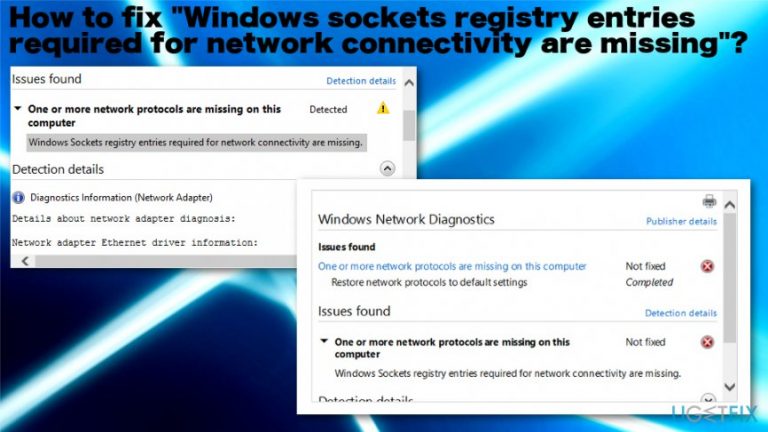
What causes How to fix “Windows sockets registry entries required for network connectivity are missing”?
- Registry entries are corrupted or missing
- One or more network protocols are missing
- The issue may occur after a Windows OS update
- Windows troubleshooter cannot automatically fix the problem
- Users have reported this issue after upgrading Windows 10
Repairs Windows system files, removes malware, and restores a clean OS state — without reinstalling.
Hello. I have encountered "Windows sockets registry entries required for network connectivity are missing" error message on my Windows 10 device. I cannot properly connect to the Internet due to this issue. This is related to the registry? I am afraid to change things there and damage anything else. Can I do something myself?
"Windows sockets registry entries required for network connectivity are missing" error seems to be one of many Windows Update issues because users[ref en-1] started complaining about the message that occurs once they upgrade Windows 10 devices.[ref en-2] Windows sockets is a programming interface that manages incoming and outgoing network requests on devices that run Windows operating systems.
Windows sockets,[ref en-3] also known as Winsock creates the error "Windows sockets registry entries required for network connectivity are missing" when the needed registry entries get corrupted or missing. If requests are not processed by Winsock, an internet connection will not work entirely. Users thought that some updates of Windows 10 could resolve network issues, but they are still occurring to this day.
Even though Troubleshooting issues can indicate "Windows sockets registry entries required for network connectivity are missing" error, there are no chances that Windows troubleshooter automatically could fix these problems for you. However, you can determine what triggers the issue and try to go from there.
It possible that one or more network protocols are missing on the computer, so this issue occurs. Also, the reason for "Windows sockets registry entries required for network connectivity are missing" can possibly be the upper-mentioned registry keys. Since the error may appear only after the Windows OS update, you can try to upgrade again and fix the error. Also, we have full silt of methods for you. 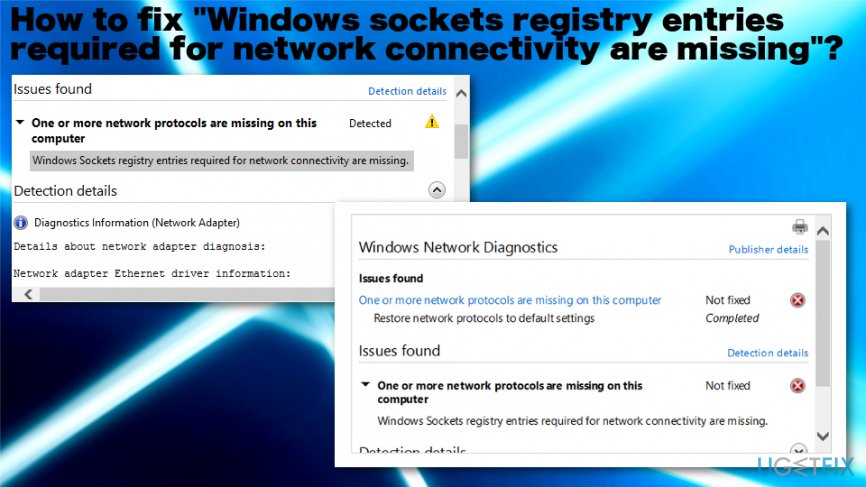
How to fix "Windows sockets registry entries required for network connectivity are missing"
The good news for the ones that want to fix "Windows sockets registry entries required for network connectivity are missing" error is that this is not an essential issue that cannot be repaired eventually. You may need to repair corrupted entries and modify different parts to get the issue solved. You can automatically fix such file corruption issues with [d1] that manages to find and repair various Windows system files. You may need some serious troubleshooting sessions and modify different things, but make sure to go through suggestions below and try at least a few methods before giving up.
Run the Network Diagnostic Troubleshooter
- In the system tray, right-click the network connection icon.
- Choose Troubleshoot problems and follow the instructions.
Reset Windows Sockets to fix "Windows sockets registry entries required for network connectivity are missing" error
- Open Command prompt with administrator rights
- Then in the window type
- netsh winsock reset
netsh int ip reset
ipconfig /release
ipconfig /renew
ipconfig /flushdns - and press Enter to launch each of the commands.
Remove and reinstall TCP/IP Protocol
- Click Start button and type Run to open the window.
- Type in regedit snd press Enter.
- Locate key HKEY_LOCAL_MACHINE\\System\\CurrentControlSet\\Services and right-click, delete the entire Winsock key, and the Winsock2.
- Login as Admin and find Network and Sharing Center in the control panel.
- Right-click Local Area Connection and click Properties.
- Click Install under the “This Component Uses the Following Items” dialog box.
- Click protocol and Add.
- Click Have Disk.
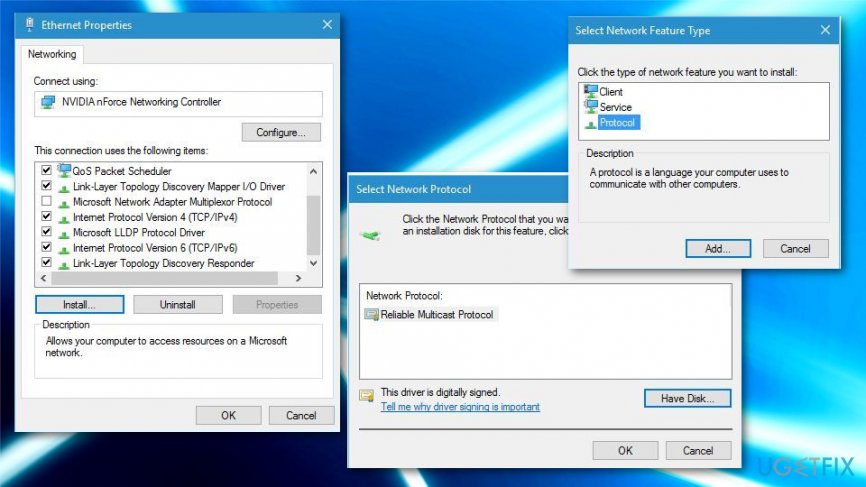
How to fix windows sockets registry entries requiredf or network connectivity are missing interte protocol - In the Copy Manufacture's files from box, type C:\\windows\\inf and then click OK.
- Click Internet Protocol (TCP/IP) and then OK.
- Reboot your computer.
Update adapter drivers to fix "Windows sockets registry entries required for network connectivity are missing"
- Open Device Manager.
- Scroll to Network adapters and expand the menu.
- The first ethernet adapter is the one that needs to be reinstalled.
- Right-click and choose Properties.
- Then Uninstall and confirm.
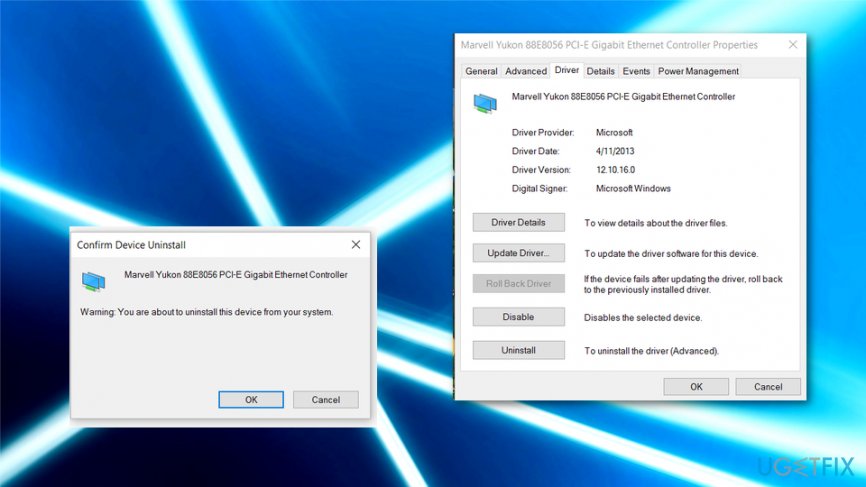
How to fix windows sockets registry entries requiredf or network connectivity are missing uninstall - Reboot the system then and try to connect.
Disable Proxy
- Go to Internet Options and navigate to the Connections tab.
- Click LAN settings there and check the Proxy server section.
- Makes rue Use a proxy server for your LAN is not checked.
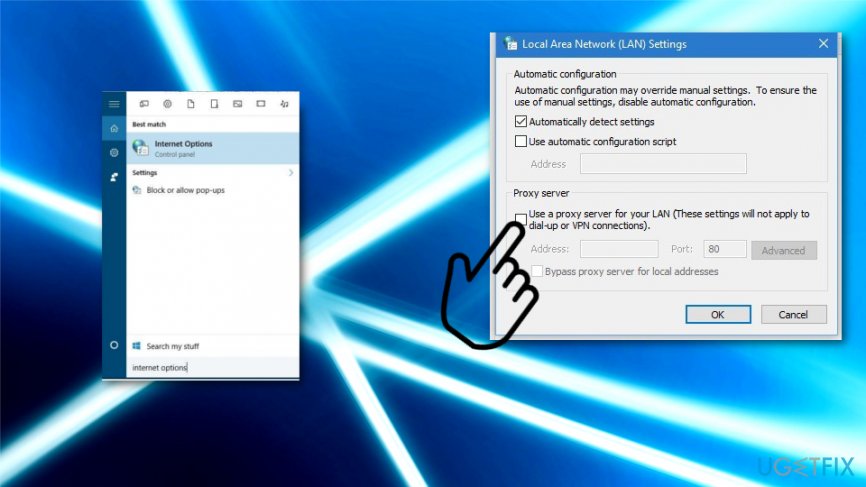
How to fix windows sockets registry entries requiredf or network connectivity are missing lanl - OK to save.
Bottom line
To fix the 'Windows sockets registry entries required for network connectivity are missing' error, you can repair corrupted entries and modify various settings. If the issue persists after trying these methods, consider upgrading Windows again or seeking further assistance.
Frequently asked questions
This error typically occurs due to corrupted or missing Windows Sockets registry entries, often caused by improper uninstallation of networking software or malware. It can prevent your computer from connecting to the internet.
You can use the Command Prompt to reset the Winsock catalog by typing 'netsh winsock reset' and then restarting your computer. This action usually restores the necessary registry entries for network connectivity.
Yes, Windows 10 includes a Network Troubleshooter that can automatically detect and fix some network problems, which may help resolve the missing sockets registry entries issue.




Report an issue
What's wrong with this guide? We review every report and update or remove content.
Report received — thank you. We'll review and fix it.
You need a free account to submit a report.
Be the first to comment