How to fix
Your computer or network may be sending automated queries – how to fix
on Windows
Resolve the "Your computer or network may be sending automated queries" error on Windows 10 or 11 quickly and easily. Expert-tested solutions await!


What causes Your computer or network may be sending automated queries – how to fix?
- Suspicious automated search queries
- Malware
- Spyware
- Potentially Unwanted Programs (PUPs)
- Traffic spikes on Google
Repairs Windows system files, removes malware, and restores a clean OS state — without reinstalling.
Hello. There is an issue on my computer or maybe the router. I cannot access some of the websites due to "Your computer or network may be sending automated queries. To protect our users, we can't process your request right now. For more details visit our help page." error. Can you suggest a solution for this?
Your computer or network may be sending automated queries - might be one of the common issues that users[ref en-1] complain about online. It gets triggered on particular sites[ref en-2] or randomly on only some of them. This Google Sorry message and "we are sorry" alerts can frustrate significantly when you have no idea where it all comes from.
This alert stops people from searching online and keeps trip accessing particular sites, using the computer as normal. People state that their Google search gets labeled as an automated search, IP is banned and captcha forms appear a couple of times. Unfortunately, there is a question of multiple answering sessions until the Google search can be restored back. However, temporarily.
These messages are errors and warnings stating the same issue but in different sentences. Google claims that this happens because of the suspicious automated search queries that can be associated with malware,[ref en-3] spyware, PUPs, and other intruders.
The version of the message:
Your computer or network may be sending automated queries. To protect our users, we can't process your request right now. For more details visit our help page.
Your computer or network may be sending automated queries fix might be associated with anti-malware tools and running the antivirus program that can find any suspicious program can be the solution. Also, deleting cookies and searching for some system or software bugs.

How to fix "Your computer or network may be sending automated queries"
The message may appear when Google detects the automated queries from the IP address and ban the particular address, so the traffic spike on google.com triggers errors. There is a way to remove the IP address ban and restore these Google search results. You can go through some settings, change them, or other preferences and fix "Your computer or network may be sending automated queries" pop-up. First of all, it might be useful to run [d1] and clear possible PUPs or fx system issues automatically.
Delete Cookies
- Go to Menu.
- Then find Settings and choose Advanced.
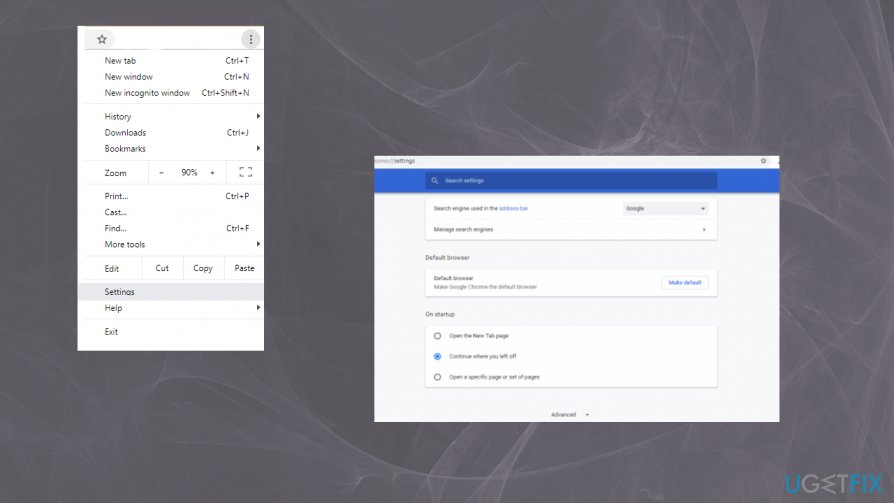
Your computer or network may be sending automated queries how to fix menu browser - Then navigate to Clear Browsing Data.
- Make sure to choose Cookies and other site data.
- Then confirm with Clear data button.
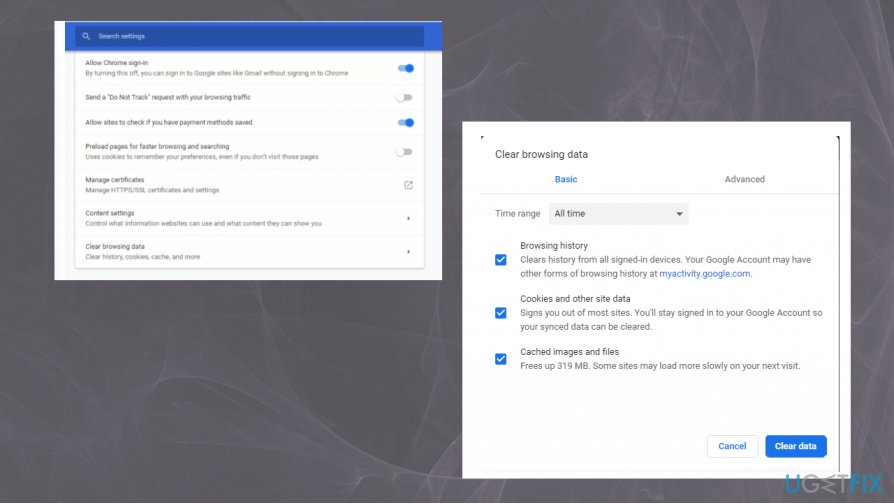
Your computer or network may be sending automated queries how to fix clearing data
Scan the system with anti-malware tool to fix Your computer or network may be sending automated queries
If the automated search queries issue is actually related to malware or spyware, you need to run a proper anti-malware tool, so rely on a trustworthy program that keeps the malware database updated and can provide the best results for you.
Solve the ReCaptcha
Google should show you the reCAPTCHA. Solving that and showing that you are not a robot can help bypass the issue and you will get back to using Google normally again.
Bottom line
To fix the issue of automated queries, you can run an antivirus program to detect and remove any suspicious software, delete cookies, and check for system or software bugs. If these solutions do not resolve the problem, consider adjusting your network settings or consulting additional resources for further assistance.
Frequently asked questions
This error indicates that your computer is being flagged for sending too many requests to a server, which may be due to malware or misconfigured network settings. To resolve it, you should run a virus scan and check your network configuration.
You can clear your browser cache and cookies, disable any unnecessary extensions, and check your proxy settings to ensure they are correctly configured. Additionally, resetting your network settings might help eliminate the issue.
Yes, you should review your network adapter settings, disable any VPNs or proxies that may interfere, and ensure your firewall is not blocking legitimate connections. Keeping your Windows updated can also help prevent such issues.




Report an issue
What's wrong with this guide? We review every report and update or remove content.
Report received — thank you. We'll review and fix it.
You need a free account to submit a report.
Be the first to comment